


 Video Converter Ultimate
 Screen Recorder
 Reparație video
3 moduri eficiente de a transforma M4V în MKV pe Mac/Windows/Linux fără pierderi de calitate
Trebuie să transform videoclipurile M4V pe care le-am descărcat pe iTunes. Aveți idee cum să convertesc M4V în MKV pe Mac și să îl utilizați ulterior pe televizorul meu?
Această problemă este larg răspândită, mai ales la videoclipurile M4V descărcate de pe iTunes, deoarece acest format intră sub incidența politicii FairPlay a Apple și este protejat. Prin urmare, nu poți reda direct fișierele .m4v pe alte dispozitive fără să le convertești. Acest articol îți va prezenta informații despre convertoarele pe care le poți folosi și cu ajutorul cărora vei reuși să convertești formatul M4V. Fără alte întârzieri, hai să învățăm metoda eficientă de a schimba M4V în MKV pe Mac sau Windows.

Partea 1. Convertiți iTunes M4V în MKV pe Mac și Windows [Cel mai ales]
Există multe convertoare M4V în MKV gratuite pe piață pe care le poți descărca, iar unul dintre ele este FVC Video Converter Ultimate. Însă acest instrument avansat oferă o conversie mai eficientă decât alte convertoare datorită vitezei fulgerătoare de conversie, încărcării nelimitate de fișiere de convertit și interfeței intuitive. Ești uimit de convertoarele „ultimate”? Sau vrei să afli mai multe despre acest convertor? În acest caz, mai jos sunt principalele funcții pe care le vei vedea dacă alegi acest convertor.

FVC Video Converter Ultimate
2.999.368+ Descărcări- Poate converti mai multe iTunes M4V în MKV sau în peste 200 de formate media, cum ar fi MOV, AVI, MP4 etc.
- Cu conversia ultra-rapidă, procesul dvs. de a vă converti M4V într-un mod instantaneu
- Sunt disponibile funcții de editare avansate pentru a vă îmbunătăți și mai bine videoclipul.
- Setați funcții uimitoare pentru a comprima, a redimensiona, a crea GIF-uri etc., sub Caseta de instrumente.
Descărcare gratuită pentru Windows 7 sau o versiune ulterioară Descărcare securizată
Descărcare gratuită pentru MacOS 10.7 sau o versiune ulterioară Descărcare securizată
Nu este uimitor cum toate aceste caracteristici pot fi într-un singur instrument? Să nu mai pierdem timpul și să stabilim cum acest instrument transformă eficient iTunes M4V în MKV, urmând pașii de mai jos.
Pasul 1. Mai întâi, descarcă convertorul „ultimate” pe disc făcând clic pe butonul de descărcare de mai jos. Alege platforma pe care o folosești în prezent, urmează procesul de instalare, apasă Start Now pentru a continua. Ține minte, trebuie să te familiarizezi mai bine cu interfața instrumentului pentru a evita dificultățile.
Descărcare gratuită pentru Windows 7 sau o versiune ulterioară Descărcare securizată
Descărcare gratuită pentru MacOS 10.7 sau o versiune ulterioară Descărcare securizată
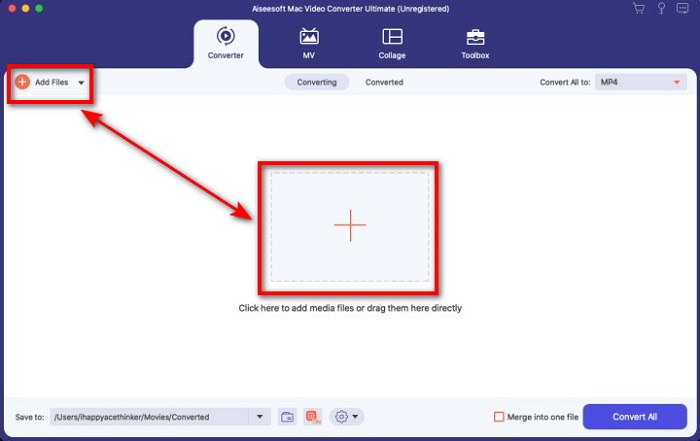
Pasul 2. Încarcă fișierul M4V în interfață făcând clic pe butonul Add Files sau pe butonul +. După aceea, se va deschide un folder pe ecran, caută fișierul .m4v și apasă Open.
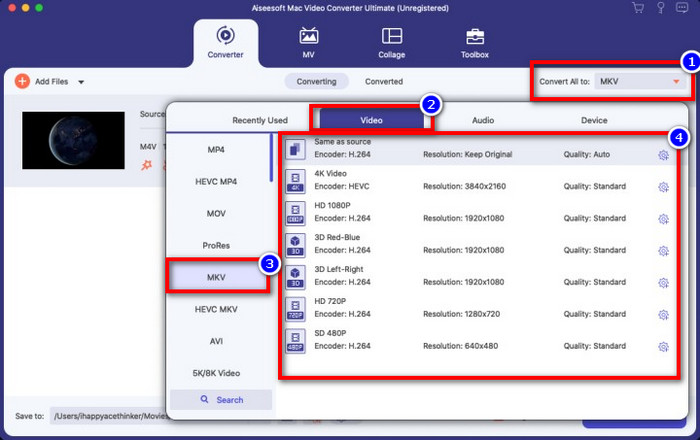
Pasul 3. Selectează formatul MKV din meniul Convert All to și fă clic pe el.
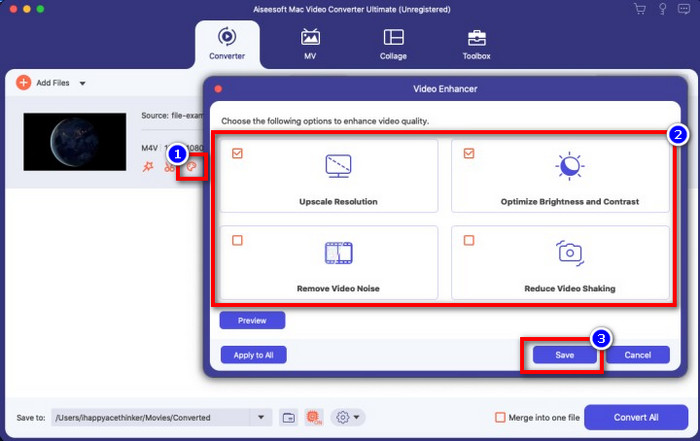
Opțional. Eficiența acestui instrument este, fără îndoială, foarte bună până acum. Dar știai că acest instrument oferă și funcții de îmbunătățire video? Dacă dai clic pe opțiunea enhance video, se va afișa o casetă de dialog; bifează caseta pentru opțiunile pe care vrei să le îmbunătățești în videoclipul tău, iar pentru a le aplica fă clic pe Save.
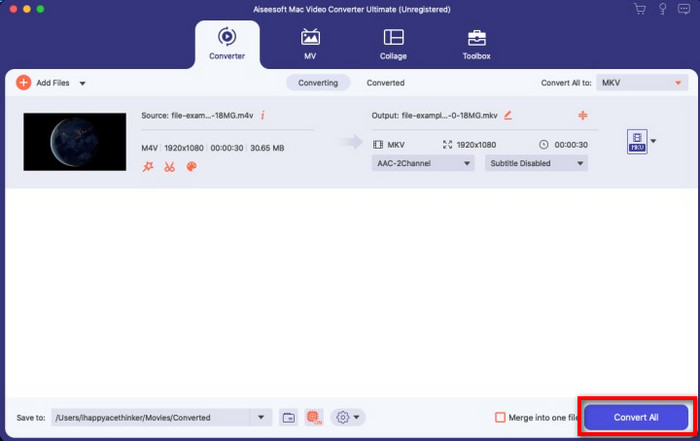
Pasul 4. Fă clic pe butonul Convert All, iar conversia va începe și se va finaliza într-un timp scurt. Gata; de acum, extensia fișierului video este .mkv.
Partea 2. Convertiți M4V în MKV online
Nu vrei să plătești pentru a converti fișiere M4V și preferi să convertești M4V în MKV online? Dacă este așa, FVC Free Video Converter Online este un convertor online care îți garantează eficiența procesului de conversie chiar și pe web. Convertorul poate finaliza treaba fără să fie nevoie să îl cumperi sau să îl descarci. De asemenea, nu există reclame și nici nu este necesară înregistrarea pentru a-l folosi. Chiar dacă acest convertor este gratuit, funcțiile prezentate aici se concentrează doar pe conversie. Spre deosebire de instrumentul „ultimate”, acesta nu oferă o gamă largă de funcții avansate. Mai mult, dacă ai nevoie să convertești fișierele tale M4V online, folosește acest convertor și urmează pașii de mai jos.
Pasul 1. Te rugăm să dai clic pe acest link pentru a deschide FVC Free Video Converter Online.
Pasul 2. Apasă pe opțiunea Add Files to Convert pentru a porni și încărca fișierul M4V pe care trebuie să îl convertești.
Descărcați versiunea pentru desktop pentru a converti fișiere în lot.
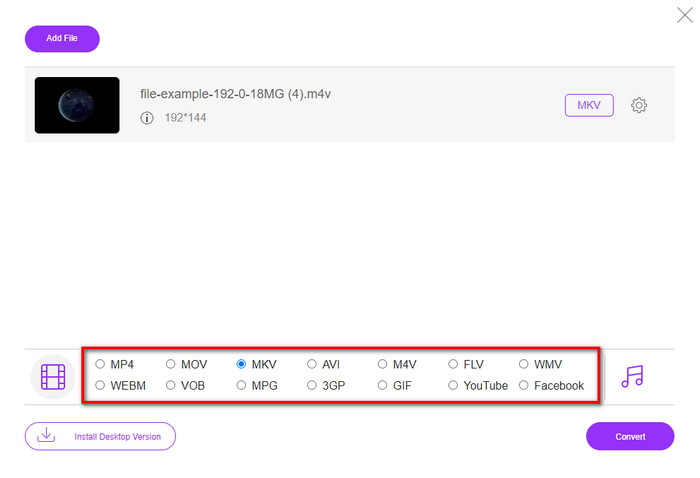
Pasul 3. Selectează formatul MKV de mai jos sau un alt format pe care vrei să îl obții.
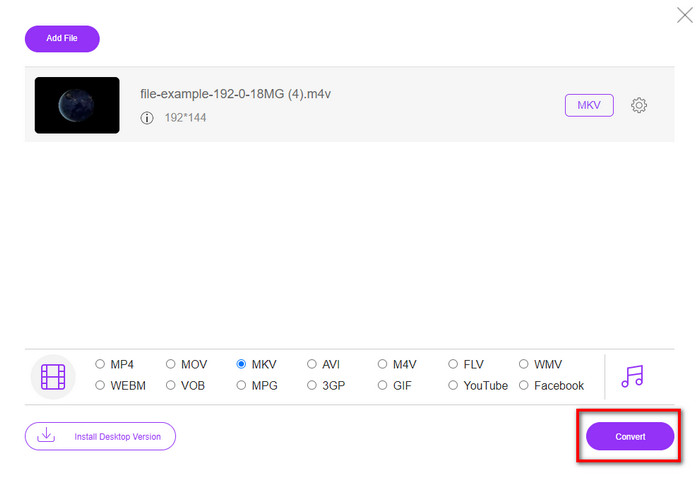
Pasul 4. Apasă pe Convert pentru a începe procesul.
Partea 3. Convertiți M4V în MKV gratuit
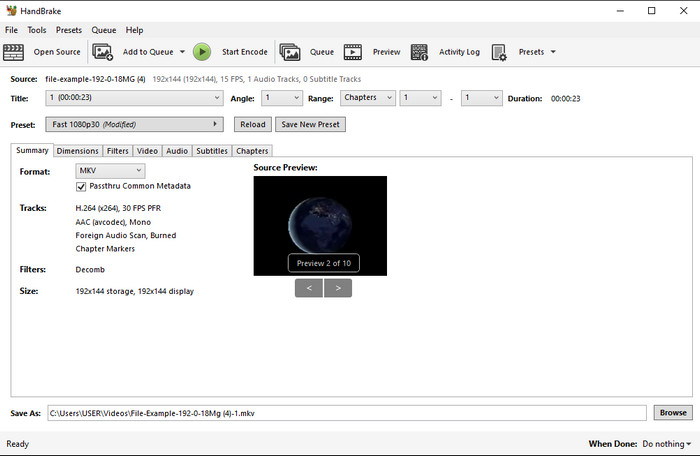
Handbrake oferă un proces de conversie rapid și eficient, la fel ca și celelalte convertoare prezentate aici. Totuși, formatele acceptate de acest instrument sunt limitate, ceea ce înseamnă că ai mai puține opțiuni din care să alegi formatul dorit. Dar dacă vrei să folosești și să convertești M4V în MKV în Handbrake, urmează pașii de mai jos.
Pasul 1. Descarcă Handbrake pe desktop. Încarcă fișierul .m4v prin drag and drop în interfață. Poți, de asemenea, să faci clic pe File, să localizezi fișierul în folderul de pe computer și să apeși Open.
Pasul 2. Fă clic pe Format și alege MKV.
Pasul 3. Fă clic pe Start Encode pentru a începe procesul de conversie.
Partea 4. Care sunt asemănările și diferențele dintre M4V și MKV
Înainte de a compara M4V și MKV, să ne dăm seama care sunt asemănările dintre aceste două formate. M4V și MKV sunt ambele containere pentru conținut și elemente media. De asemenea, aceste două formate sunt cunoscute pentru a stoca una dintre cele mai bune calitate video, cum ar fi videoclipuri HD sau 4k. Și sunt, de asemenea, mari pentru a conține elemente precum metadate. Mai mult, detaliile de mai jos sunt diferența dintre cele două formate.
M4V este foarte asemănător cu formatul MP4; cu toate acestea, acest format este protejat de copiere DRM, ceea ce înseamnă că nu îl puteți utiliza liber. Dar nu toate fișierele M4V au protecție Apple, deoarece unele dintre fișierele M4V descărcabile au o licență neautorizată, așa că asigurați-vă că descărcați fișierul .m4v pe iTunes pentru a evita virusul rău intenționat care vă va infecta sistemul. Deși formatul are o limitare, puteți utiliza în continuare acest format pe mai multe playere media pentru a viziona videoclipul pe care îl descărcați pe iTunes. Mai mult, dacă aveți nevoie de un design protejat pe Mac, acest format este cea mai bună alegere.
Dimpotrivă, MKV este specific pentru a conține mai multe conținut media și elemente într-un singur fișier. Această capacitate este disponibilă numai pe MKV, deoarece acest format este gratuit și este mai flexibil decât M4V. Mai mult, există multe motive pentru a schimba M4V în MKV pe Mac sau Windows, iar unul dintre ele este să faceți fișierul video nerestricționat.
M4V vs. MKV
M4V este dezvoltat de Apple, care folosește și MPEG 4. Fișierele M4V sunt adesea folosite pentru a stoca acele videoclipuri descărcate din magazinul Apple iTunes, cum ar fi videoclipuri muzicale, episoade TV etc. Este posibil să găsiți unele fișiere M4V protejate la copiere, deoarece utilizează Protecția prin drepturi de autor FairPlay DRM de la Apple.
Formatul container multimedia Matroska, lansat în 2002, este un format open-source care poate include o serie de piese video, audio, imagini și subtitrare. Deci, îl puteți folosi pentru a stoca cu ușurință clipuri video scurte, emisiuni TV și filme. Este destul de popular pentru fan-subbing anime.
Partea 5. Întrebări frecvente despre conversia M4V în MKV
Care este mai bun pentru editare, M4V sau MOV?
Cele două formate menționate sunt unele dintre formatele Apple, astfel că vei observa că nu există o diferență majoră între M4V și MOV. Totuși, MOV este mult mai bun pentru editare, deoarece acest format conține adesea o succesiune de redări video, fiind cea mai bună alegere pentru editare profesională. Poate te gândești că ar trebui să transformi fișierul M4V în MOV în scop de editare. Dacă da, fă clic pe acest link pentru a afla mai multe despre convertirea M4V în MOV, cu o prezentare detaliată.
M4V și MP4 sunt la fel?
M4V și MP4 sunt foarte identice în ceea ce privește structura și calitatea video. Dar datorită protecției Apple Plays, M4V are o gamă redusă de suporturi și nu puteți doar să redați un videoclip sau să editați în extensia .m4v.
Care sunt playerele media care acceptă M4V?
Nu mulți playere media acceptă acest tip de format din cauza protecției DRM. Așadar, dacă ești în căutarea unui player pentru MKV, vei petrece mult timp testându-le, ceea ce consumă foarte mult timp. Însă, dacă citești acest articol, poți descărca sau utiliza top 5 playere media MKV disponibile pe toate platformele.
Concluzie
Cele trei instrumente prezentate în acest articol îți vor oferi cu siguranță conversia eficientă pe care ți-o dorești, dacă urmezi pașii. Deși convertoarele au multe în comun, ele au și multe diferențe. Dacă ai citit detaliile prezentate mai sus, vei afla multe despre aceste trei instrumente. Dacă vrei să obții o conversie excelentă dintr-o singură încercare și totodată să menții eficiența procesului, îți recomandăm FVC Video Converter Ultimate. Ți se pare incredibil? Chiar este, așa că descarcă-l pe desktop pentru a-l încerca singur.
-
 Convertor M4V în MP3 - 4 cele mai bune metode pentru a extrage MP3 din fișiere M4V
 Când doriți să extrageți cu ușurință audio MP3 din videoclipurile M4V, puteți afla mai multe despre cele mai bune 4 convertoare M4V în MP3 pentru a obține fișierele audio dorite din articol.
-
 [Ghid] Cum să convertiți videoclipuri M4V în GIF-uri animate pe Windows/Mac
 Dacă doriți să creați fișiere GIF animate din videoclipurile M4V preferate, puteți afla despre 2 moduri ușoare și eficiente de a converti videoclipurile M4V în GIF-uri cu setări personalizate.
-
 3 Program Video Converter folosit pentru a converti iTunes M4V în AVI pe Mac
 Nu aveți idee cum să convertiți MKV într-un format AVI? Pe măsură ce continuăm să citim acest articol, vom cunoaște cele 3 instrumente care vă pot ajuta să convertiți acest format de fișier.

