


 Video Converter Ultimate
 Screen Recorder
 Reparație video
Descărcați cele mai bune 5 instrumente disponibile pentru a realiza videoclipuri de 2 ori mai rapid în câteva clicuri
Există momente în care va trebui să accelerezi un videoclip, de exemplu să îl mărești la viteză de 2x video. Pentru că sunt unele părți pe care vrei să le omiți sau poate vrei ca videoclipul să fie redat mai repede pentru a-i scurta durata. Așadar, dacă vrei să înveți cum să îți mărești viteza videoclipului, continuă să citești acest articol. Pentru a avea o idee și cunoștințe suficiente despre cum să faci asta și de ce ar trebui folosită viteza 2x.

Partea 1. Ce este un videoclip 2x?
Vizionarea rapidă este acțiunea de a viziona un videoclip accelerat la viteza sa naturală de redare. Doar prin ajustarea vitezei videoclipului pe care îl vizionam; ne poate ajuta în diferite moduri. Deci, dacă doriți să știți care sunt beneficiile aducerii video cu viteza naturală la viteza video de 2x. Apoi citiți detaliile de mai jos pentru a afla mai multe.
Beneficiile vizionării videoclipurilor accelerate.
◆Dacă redați un videoclip cu o viteză de 2x, puteți determina cu ușurință dacă videoclipul merită vizionat sau nu. Acest lucru se poate aplica videoclipurilor cu durată lungă și de cele mai multe ori se plictisește să le vizioneze pe toate la o viteză normală.
◆Ne permite să economisim mult timp decât viteza normală de redare. În acest caz, dacă trebuie să vizionați 2 sau mai multe videoclipuri cu o durată de 15 minute, este mai bine să le vizionați de 2 ori mai repede. Pentru a absorbi detaliile mai repede decât vizionarea la viteză normală. Deci, în loc să vizionați 1 videoclip în 15 minute, puteți viziona 2 în acel interval de timp.
◆Majoritatea oamenilor cărora le place să vizioneze videoclipuri redate la redare rapidă sunt cei cărora le place să memoreze totul într-un minut. Acest lucru funcționează cel mai bine pentru persoanele ocupate sau cei care se grăbesc.
◆Vă va îmbunătăți și vă va antrena mai bine concentrarea și abilitățile de ascultare dacă redați videoclipul la viteza de 2x, mai degrabă decât la viteza normală. Așadar, acum aveți o idee despre care sunt avantajele grăbirii unui videoclip. Acum este momentul potrivit pentru a trece la instrumentele care vă vor ajuta să vă accelerați videoclipul. Următoarea parte va vorbi despre diferitele instrumente pe care va trebui să le utilizați.
Partea 2. Cum să faci un videoclip 2x
Dacă vrei să faci un videoclip de 2x mai rapid, încearcă să folosești editorul video fenomenal, Video Converter Ultimate. Acest instrument a ajutat deja mulți dintre clienții săi cu diverse probleme, în special conversia, realizarea de GIF-uri, îmbunătățirea materialelor și altele. Așadar, mărirea vitezei de redare a videoclipului poate fi făcută cu ușurință cu ajutorul acestui instrument. De asemenea, în timp ce mărești viteza videoclipului, poți avea și o previzualizare la viteză 2x mai jos. Pentru a determina dacă acea viteză a videoclipului ți se potrivește. Așadar, hai să trecem acum la modul de schimbare a vitezei de redare a videoclipului, urmând pașii de mai jos.
Pași despre cum să accelerezi videoclipul până la viteza de 2X
Pasul 1. Descarcă instrumentul pe desktop, apoi instalează-l după ce se termină procesul de descărcare.
Descărcare gratuită pentru Windows 7 sau o versiune ulterioară Descărcare securizată
Descărcare gratuită pentru MacOS 10.7 sau o versiune ulterioară Descărcare securizată
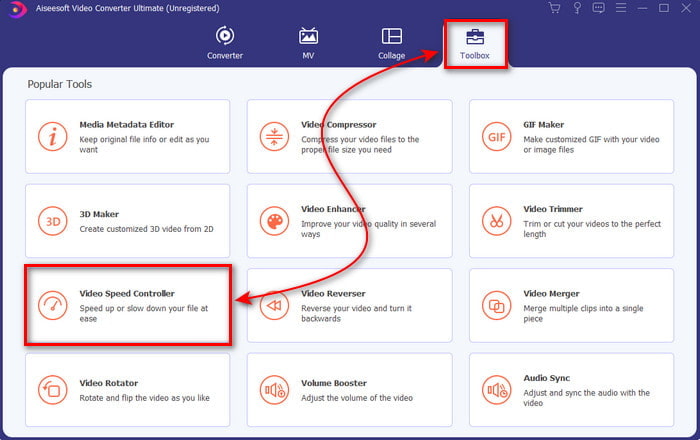
Pasul 2. Apoi mergi la Toolbox și caută Video Speed Controller.
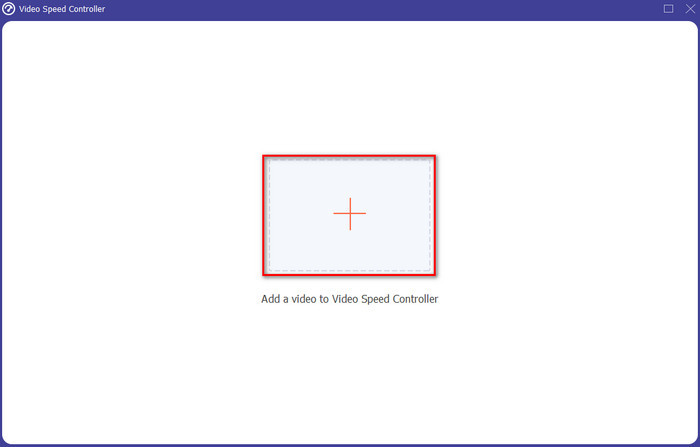
Pasul 3. Apasă butonul + pentru a introduce fișierul pe care vrei să îl urmărești la viteză video 2x și apasă Open pentru a continua.
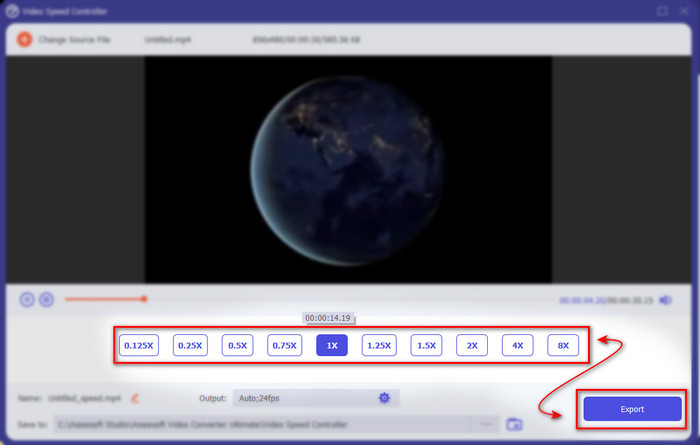
Pasul 4. După ce ai introdus fișierul, alege 2x din lista de viteze video disponibile. Apoi, pentru a salva viteza videoclipului, apasă butonul Export.
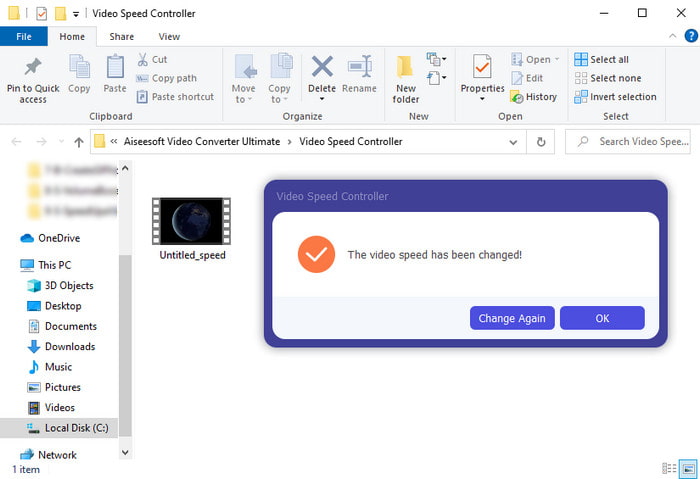
Pasul 5. După ce fișierul este exportat, pe ecran va apărea un folder; apasă pe fișier pentru a urmări versiunea accelerată a videoclipului.
Partea 3. Cum să redați videoclipuri cu viteza de 2x
1. VLC Media Player
Cel mai renumit player media pe care îl poți descărca pe PC sau Mac este VLC Media Player. Acest instrument pentru desktop este folosit de utilizatorii care adoră să urmărească clipuri video. De asemenea, acest instrument are acces la aproape toate formatele cunoscute pe web. Totuși, unele videoclipuri cu codecuri complicate nu pot fi redate aici, cum ar fi AVI sau MKV. Așadar, dacă vrei să știi cum să faci un videoclip cu viteză 2x cu VLC Media Player, urmează pașii de mai jos.
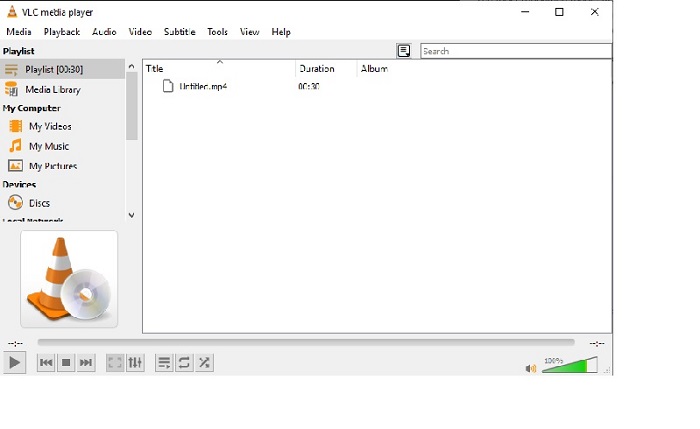
Pasul 1. Descarcă VLC pe desktop, apoi deschide-l.
Pasul 2. Trage și plasează fișierul în interfață, apoi apasă pe fișierul video pe care l-ai introdus aici.
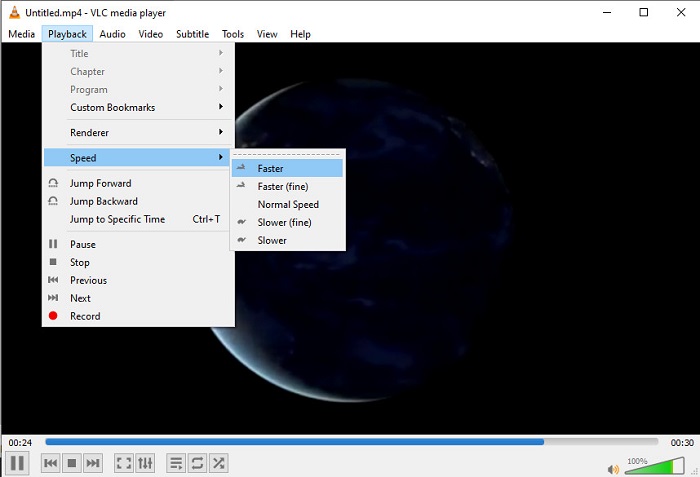
Apoi mergi la Playback și apasă pe Speed pentru a schimba viteza normală a videoclipului.
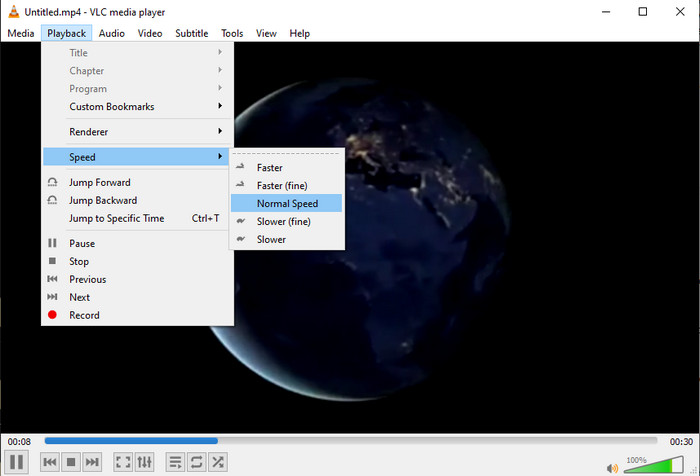
Pasul 3. Iar dacă vrei să readuci viteza la normal, mergi la Playback și apasă pe Speed, apoi alege viteza normal.
2. QuickTime Player
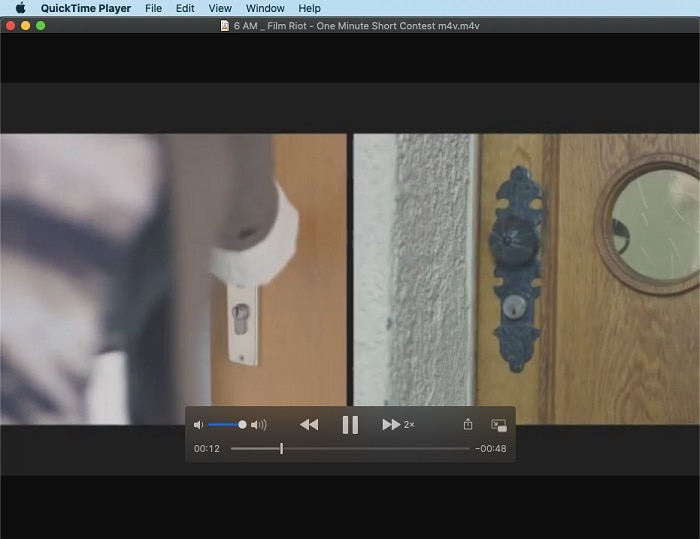
Playerul media nativ de pe Mac te poate ajuta să redai la viteză de redare video 2x. QuickTime Player este playerul media preinstalat pe care îl vei vedea pe Mac. Spre deosebire de VLC, acest instrument nu trebuie descărcat pe desktop. Din păcate, dacă ești utilizator de Windows, nu poți folosi acest instrument deoarece nu suportă PC-urile cu Windows. Deși instrumentul poate fi accesat pe Mac, există în continuare multe funcții pe care nu le suportă, cum ar fi anumite formate. Pentru că majoritatea formatelor dezvoltate de Windows nu pot fi redate aici. Așadar, dacă ai un Mac, încearcă să urmezi pașii de mai jos.
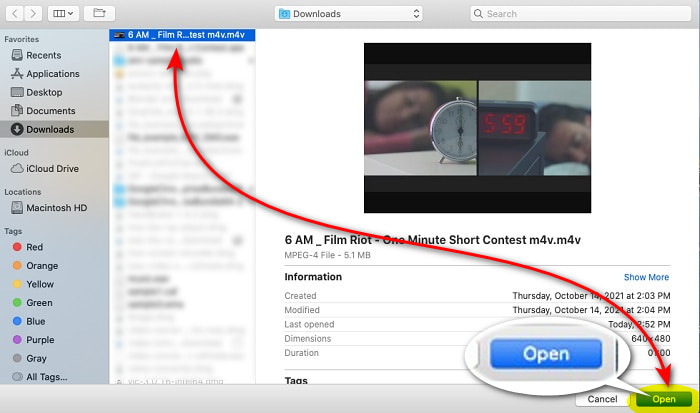
Pasul 1. Caută QuickTime în Finder, apoi lansează instrumentul. Apasă pe File și Open File pentru a localiza videoclipul și a-l deschide.
Pasul 2. În timp ce videoclipul rulează, apasă pe butonul de fast-forward pentru a-l accelera.
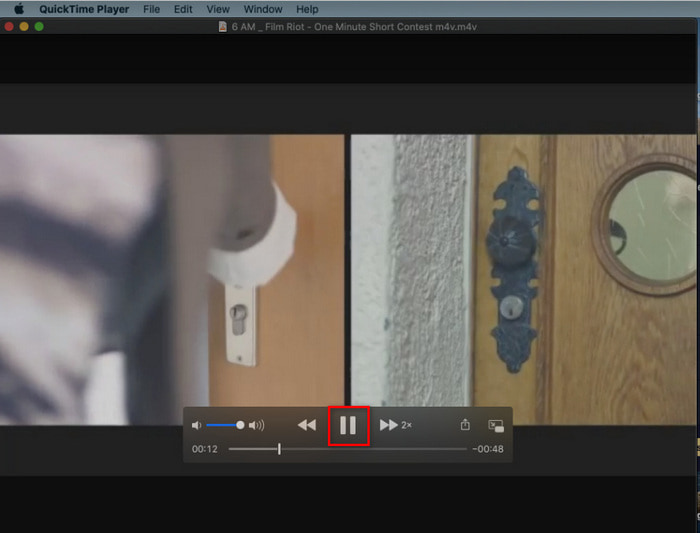
Pasul 3. Iar dacă vrei să oprești accelerarea, apasă pe butonul de pause/play.
3. Windows Media Player
Dacă Mac are propriul său player media preinstalat, atunci și Windows are propriul player media unic, Windows Media Player. La fel ca QuickTime, acest instrument este deja preinstalat pe Windows și este gata de utilizat pentru a urmări și a face videoclipul de 2x mai rapid decât viteza lui obișnuită. Totuși, considerăm că accelerarea oferită de acest instrument este cea mai slabă, deoarece elimină imaginea și sare de la o secundă la alta în loc să redea mai rapid. Dar dacă acest lucru este în regulă pentru tine, urmează pașii de mai jos pentru a vedea cum să îl accelerezi.
Pasul 1. Lansează instrumentul pe desktopul cu Windows.
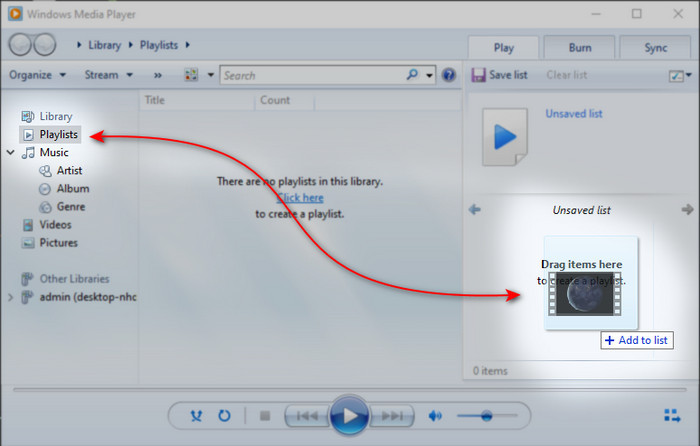
Pasul 2. Apasă pe Playlist, apoi drag and drop fișierul video în căsuța mică din partea dreaptă.
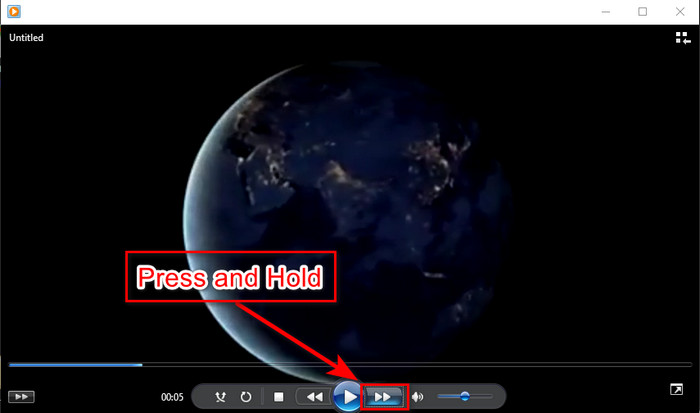
Pasul 3. Videoclipul va porni automat; pentru a-l accelera, apasă și ține apăsat butonul de fast-forward și eliberează-l pentru a opri.
Partea 4. Întrebări frecvente despre 2x Video
Care este mai bine: încetinitorul sau accelerarea?
De fapt, depinde de situația în care se presupune că îl vei folosi. Deși ambele ajustări pe care le vei face te vor ajuta. Deci, dacă urmăriți un tutorial sau doriți să dezvăluiți trucul magicianului, atunci folosiți încetinitorul. Cu toate acestea, dacă vă grăbiți și aveți nevoie să vizionați multe clipuri video, atunci este obligatoriu să le vizionați pentru a accelera redarea.
Pot să înregistrez într-o redare super-rapidă?
Da, puteți folosi un interval de timp pentru a face un videoclip de o oră într-un minut sau o secundă. Dar, spre deosebire de accelerare, intervalul de timp este mult mai rapid decât viteza obișnuită de 2x, 4x, 8x.
Care este dezavantajul vizionarii video cu viteza de 2x?
Deși vizionarea videoclipurilor la acest tip de viteză vă poate ajuta foarte mult, există o mulțime de dezavantaje la care vi se poate întâmpla dacă vizionați această viteză. De exemplu, dacă redarea unui videoclip în acest mod devine obișnuința dvs., atunci viteza normală a videoclipului va deveni mai mică.
Concluzie
Acum că știi diferitele instrumente pe care le poți folosi pentru a urmări videoclipuri la viteză 2x, este momentul potrivit să alegi ce preferi. Sperăm că acest articol te-a ajutat să alegi ce este mai bun. Fie că vei folosi un player media pentru a ajusta viteza, fie că vei folosi un editor precum Video Converter Ultimate. Indiferent ce soluție alegi, toate funcționează excelent pentru a fi folosite de tine, ca utilizator.
-
 Top 4 cei mai buni jucători VOB pentru telefoane mobile Android pentru utilizări diferite
 Când descărcați videoclipuri VOB și doriți să le vizionați pe Android, îl puteți alege pe cel mai potrivit dintre următorii 4 jucători VOB din acest articol.
-
 Top 5 cele mai bune alternative pentru Windows Media Player pentru telefoane mobile Android
 Deoarece nu puteți descărca Windows Media Player pentru Android, ar trebui să citiți acest articol și să aflați despre cele mai bune 5 alternative la Windows Media Player.
-
 Top 5 cele mai bune playere video pentru iPhone pe care nu ar trebui să le ratezi în 2025
 Pentru a reda videoclipuri în toate formatele și pentru a avea o experiență de vizionare mai bună pe iPhone, ar trebui să citiți acest articol și să aflați cele mai bune 5 playere video pentru iPhone 12/11 / X / 8/7/6.
