


 Video Converter Ultimate
 Screen Recorder
 Reparație video
 Descărcare sigură
2 moduri eficiente de a combina videoclipuri pentru Instagram
„Cum pot combina videoclipuri pentru Instagram? Am avut o petrecere de ziua de neuitat și am făcut multe videoclipuri în timpul ei. Acum vreau să combin clipurile video într-unul complet și să le postez pe Instagram. Vă rog să mă învățați cum să o fac ... ”Sunt multe ocazii în care multe videoclipuri așteaptă să fie îmbinate într-unul singur. Pentru a răspunde unei astfel de nevoi, acest articol va vorbi despre 2 metode eficiente de a alătura videoclipuri pentru Instagram.

Partea 1: Combinați videoclipuri pentru Instagram fără deteriorarea calității
Pentru început, ai nevoie de o aplicație pentru a îmbina videoclipurile pentru Instagram. Nu ai nevoie de un program complicat de montaj video, precum Adobe Premiere Pro sau Final Cut Pro, pentru o sarcină atât de simplă. Video Converter Ultimate este mai mult decât suficient pentru tine.
Vă poate ajuta să îmbinați cu ușurință mai multe videoclipuri pentru Instagram. Viteza de procesare și calitatea imaginii sunt ambele perfecte. Indiferent de format, puteți utiliza această aplicație pentru a vă alătura videoclipurilor pentru Instagram fără nicio limitare.
Funcții principale:
- • Combinați videoclipuri pentru Instagram, indiferent de format și rezoluție
- • Tehnologia de accelerare hardware asigură o viteză de proces de 70 de ori mai mare
- • Editați și alăturați videoclipuri pentru Instagram fără a lăsa filigran
- • Crop și îmbinați videoclipurile cu rezoluții diferite pentru a le face perfecte
- • Alăturați-vă videoclipurilor cu funcția de tăiere pentru a șterge segmentele nedorite
- • Interfață de utilizare ușoară și intuitivă atât pentru începători, cât și pentru profesioniști
Descărcare gratuită pentru Windows 7 sau o versiune ulterioară Descărcare securizată
Descărcare gratuită pentru MacOS 10.7 sau o versiune ulterioară Descărcare securizată
Pași pentru a îmbina videoclipuri pentru Instagram fără pierdere de calitate
Pasul 1. Descarcă gratuit, instalează și pornește Video Converter Ultimate. Fă clic pe butonul Add Files pentru a adăuga videoclipurile pe care vrei să le îmbini pentru Instagram.

Pasul 2. În interfața principală, poți trage videoclipurile importate pentru a le schimba liber ordinea. Bifează căsuța Merge into one file astfel încât videoclipurile să nu fie convertite separat.
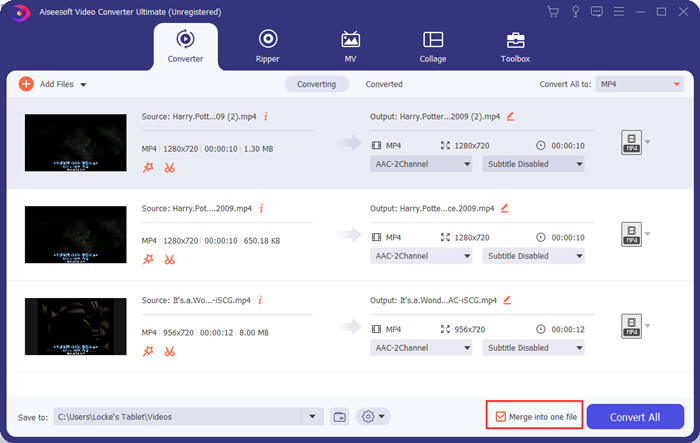
Pasul 3. Fă clic pe cadrul Convert All to pentru meniul de profil. Apoi poți selecta formatul, rezoluția și encoderul dorite. Pentru a îmbina videoclipuri pentru Instagram, formatul MP4 este potrivit. De asemenea, poți face clic pe unul dintre butoanele Custom Profile pentru a personaliza setările.
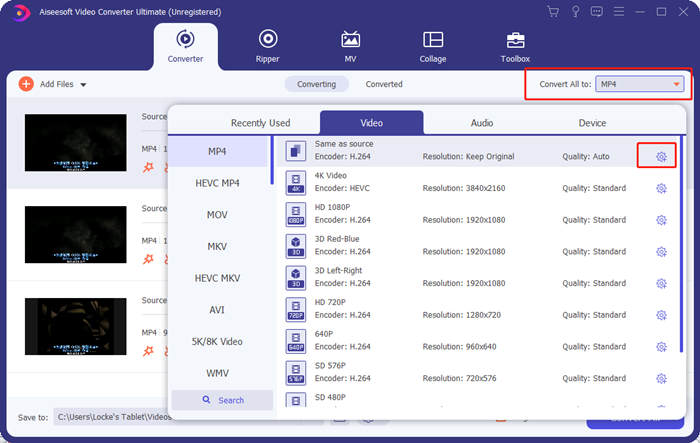
În fereastra Edit Profile, poți personaliza encoderul, rezoluția, rata de cadre, bitrate-ul și anumiți parametri audio.

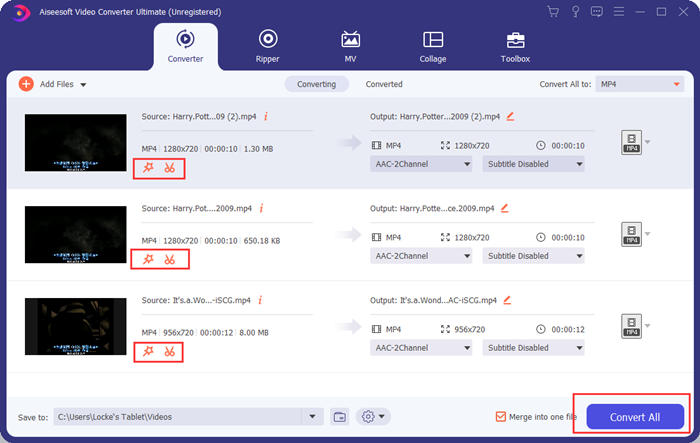
Pasul 4. Înapoi în interfața principală, poți face clic pe butonul Convert All pentru a începe îmbinarea videoclipurilor pentru Instagram. Înainte de asta, poți folosi și butoanele Cut și Edit pentru a decupa, tăia, roti și pentru alte funcții care pot face videoclipul tău să arate mai bine.
Video Converter Ultimate este convenabil și puternic, dar nimănui nu îi place să aștepte descărcarea unui program uriaș. Nici noi. Deci, este posibil să îmbinați videoclipuri pentru Instagram fără a descărca un program? Da, vă rugăm să citiți mai departe!
Partea 2: Îmbinați videoclipuri pentru Instagram online și gratuit
Iată un alt instrument la îndemână, FVC Free Online Video Merger, un instrument web excelent pentru a uni videoclipuri pentru Instagram. Poți încărca acest instrument într-o secundă, apoi să încarci videoclipurile în următoarea secundă. Pur și simplu ajustezi setările și lași programul să se ocupe de restul. Cel mai important este că acest instrument este complet gratuit de utilizat.
Pași pentru a îmbina videoclipuri pentru Instagram online și gratuit
Pasul 1. Fă clic pe FVC Free Online Video Merger pentru a-l deschide. În mijlocul paginii web a instrumentului, dă clic pe butonul Upload Videos to Merge. Apoi ar trebui să apară fereastra de explorare a fișierelor, în care trebuie să selectezi videoclipurile și să le încarci.

Pasul 2. Când videoclipurile sunt importate, poți ajusta ordinea lor. Pentru a face acest lucru, poți elimina un videoclip importat plasat greșit și să îl inserezi din nou în poziția corectă.

Pasul 3. Acest instrument online de îmbinare video îți permite să stabilești Resolution și Format pentru videoclipul îmbinat pentru Instagram. Poți selecta Auto pentru a păstra rezoluția originală sau poți alege oricare dintre celelalte cinci opțiuni de rezoluție.
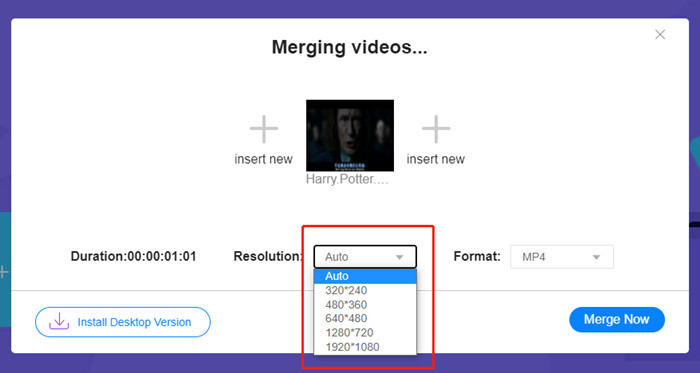
Fuziunea video online oferă în prezent nouă formate de ieșire din care puteți alege. MP4 ar putea fi cel mai bun pentru postarea dvs. pe Instagram.
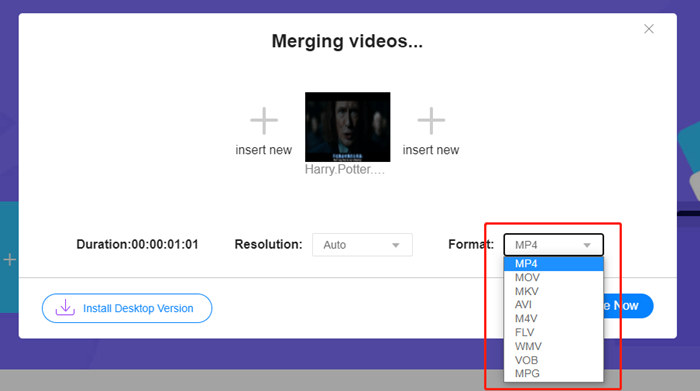
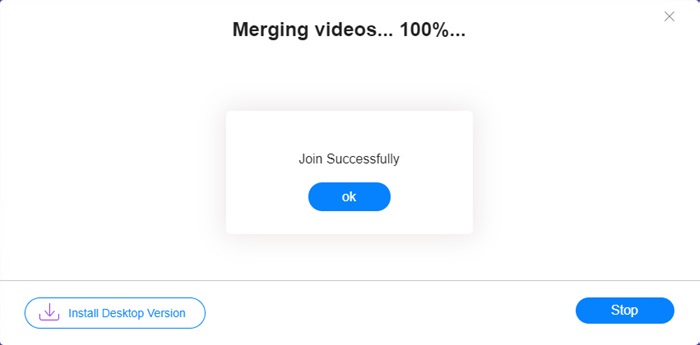
Pasul 4. Fă clic pe butonul Merge Now și așteaptă notificarea Join Successfully.
Deși este convenabil, acest instrument online nu este la fel de perfect ca Video Converter Ultimate. În instrumentul online, nu puteți regla convenabil ordinea videoclipurilor, nu puteți modifica codificatorul sau rata de cadre sau nu puteți edita videoclipurile. În plus, Video Converter Ultimate vă oferă mai multe opțiuni în rezoluție și formate și procesează videoclipurile mult mai repede.
Partea 3: Întrebări frecvente despre combinarea videoclipurilor pentru Instagram
Ce specificații sunt bune pentru videoclipurile Instagram?
Raportul de aspect de la 9:16 ar fi perfect. Mai exact, folosiți doar 1080 * 1920 dacă este posibil. Cel mai bun format video este MP4, deși sunt acceptate și alte formate populare.
Ce trebuie să fac dacă videoclipul meu combinat este prea mare pentru Instagram?
În partea de sus a interfeței principale a Video Converter Ultimate există o Toolbox în care poți găsi un Video Compressor. Îl poți folosi pentru a-ți comprima videoclipul la dimensiunea dorită. Pentru Instagram, asigură-te că nu este mai mare de 4 GB.
Cât de lung poate fi videoclipul meu îmbinat pentru Instagram?
Depinde de locul în care postezi videoclipul. Limita pentru videoclipurile Feed este de 3s la 1min, iar pentru Povestiri este mai mică de 15s. Videoclipurile IGTV pot dura 60 de minute, ceea ce este cel mai probabil să vă răspundă nevoilor.
Concluzie
Acest articol a prezentat două moduri eficiente de a combina videoclipuri pentru Instagram. Poți folosi Video Converter Ultimate pentru a combina videoclipuri pentru Instagram fără a pierde din calitatea imaginii și pentru a face anumite ajustări și editări ale videoclipurilor. Celălalt instrument, FVC Free Online Video Merger, este cea mai rapidă soluție, dar îți oferă mai puține opțiuni când vine vorba de rezoluții și formate. De asemenea, nu poate schimba deloc encoderul sau rata de cadre. În final, dacă întâmpini vreo dificultate în îmbinarea videoclipurilor pentru Instagram, lasă-ne un comentariu ca să știm.
-
 Cum se îmbină videoclipurile pe iPhone cu sau fără iMovie
 Citiți și obțineți 4 modalități ușoare de a îmbina videoclipurile pe iPhone. Toate modelele iPhone și versiunile iOS sunt acceptate. Puteți combina rapid 2 și mai multe videoclipuri pe iPhone într-un videoclip nou.
-
 Cele mai bune 2 moduri de a vă alătura fișierelor MKV pentru a viziona necontenit filmul
 Când descărcați filmul preferat cu fișiere MKV separate și doriți să alăturați fișiere MKV împreună pentru a-l viziona fără încetare, puteți afla 2 modalități eficiente de a alătura fișiere MKV din acest articol.
-
 Top 6 cele mai bune aplicații video MP4 pentru a combina videoclipuri MP4 gratuit
 Există multe dispozitive de asamblare MP4 disponibile pentru conectarea diferitelor clipuri MP4. În acest articol, am ales câteva elemente de asamblare MP4 gratuite pentru Windows 10/8/7 și Mac.
