


 Video Converter Ultimate
 Screen Recorder
 Reparație video
Cel mai bun editor de metadate MKV pentru adăugarea/modificarea/eliminarea metadatelor pe MKV
Nu există o gamă largă de editori de metadate MKV pe piață, deoarece formatul MKV nu este foarte bine susținut. Dar asta nu înseamnă că nu putem edita etichetele fișierelor noastre MKV, așa că nu fi abătut. Pentru a afla care este cel mai bun editor de metadate ce acceptă MKV, poți citi integral acest articol, în care analizăm diferite instrumente. Ce mai aștepți? Ține ritmul, pentru că nu îți va lua mai mult de 7 minute să găsești un editor de tag‑uri.

Partea 1. Cel mai bun editor de etichete MKV recomandat pentru Windows și Mac: FVC Video Converter Ultimate
FVC Video Converter Ultimate este cel mai popular editor de metadate MKV pentru Windows și Mac. Acest instrument își respectă pe deplin numele și așteptările, așa că descărcarea programului pentru a edita metadatele este cea mai bună alegere pe care o poți face. Funcțiile și caracteristicile sale puternice vor gestiona cu ușurință sarcina, de parcă ar fi ceva foarte simplu. În plus, acest instrument acceptă și alte formate pentru încărcare, precum MP4, AVI, MOV, FLV, WMV și peste 1000 de formate media, fără a re‑coda fișierul, pentru o experiență mai puțin anevoioasă.
Ce e mai mult? Să presupunem că descărcați instrumentul. Veți avea cel mai rapid instrument pentru adăugarea metadatelor pe MKV și cea mai frumoasă GUI a editorului de metadate pe care celălalt instrument nu îl poate oferi. Dacă sunteți interesat să utilizați editorul, continuați să citiți partea 2, deoarece vă explicăm cum să editați datele fișierelor MKV.
Partea 2. Cum să editați metadatele MKV cu Editorul de metadate MKV recomandat
Urmați pașii în consecință, începând de la descărcarea instrumentului și așa mai departe. Deci, să începem să folosim cel mai bun editor de metadate MKV pe care îl puteți descărca pe Windows sau macOS.
Pasul 1. Apasă butonul de descărcare pe care îl prezentăm mai jos și selectează sistemul de operare pe care îl folosești în prezent. Instalează imediat după ce ai descărcat fișierul, urmează procesul de instalare și îți promitem că nu vei greși, apoi deschide programul pentru a continua. Înainte de a începe, trebuie să te familiarizezi cu instrumentul pentru a avea un proces fluid de lucru cu editorul de etichete MKV.
Descărcare gratuită pentru Windows 7 sau o versiune ulterioară Descărcare securizată
Descărcare gratuită pentru MacOS 10.7 sau o versiune ulterioară Descărcare securizată
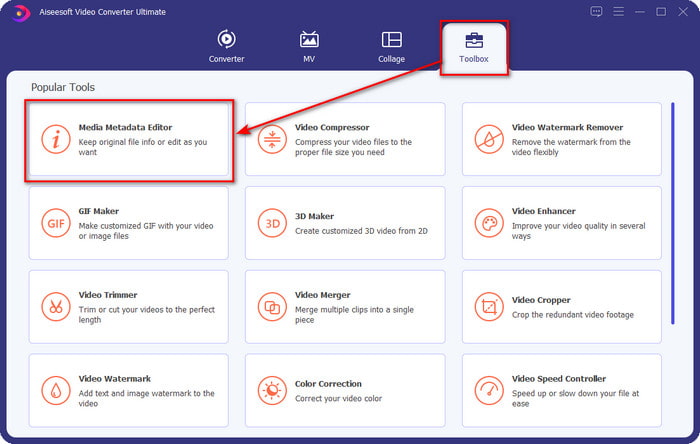
Pasul 2. Deschide Toolbox, caută Media Metadata Editor și apasă pe el pentru a‑l deschide.
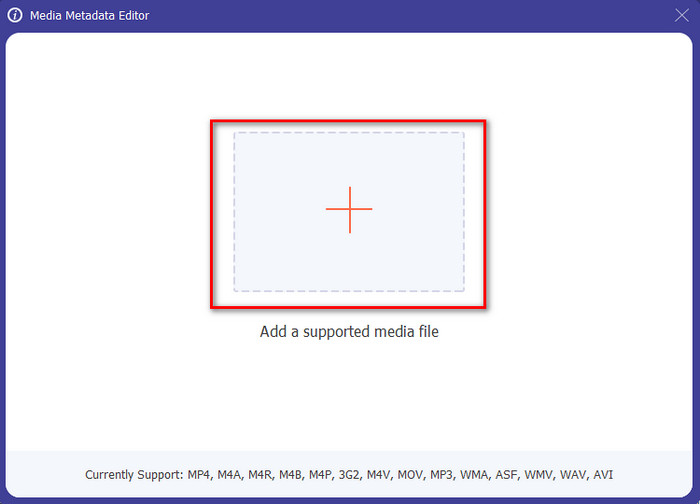
Pasul 3. Încarcă fișierul MKV făcând clic pe pictograma +; se va deschide o fereastră de selectare a fișierelor, alege fișierul MKV și apasă Open.
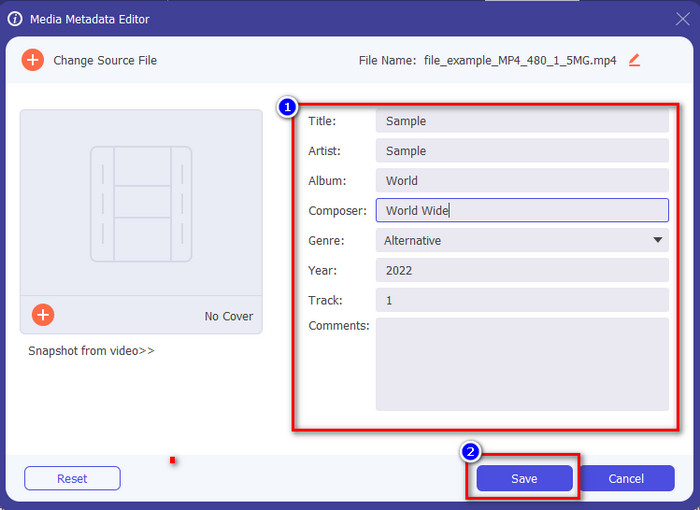
Pasul 4. Editează metadatele în caseta de text; poți fie să le completezi, fie să le ștergi – fă ce dorești cu metadatele. După toate acestea, apasă Save pentru a aplica modificările făcute mai devreme. Astfel, ai editat acum etichetele MKV.
Partea 3. 3 editori de etichete MKV gratuite pe care ar trebui să le cunoașteți, disponibile pe Windows, Mac și online
GROUPDOCS.Metadata [Gratuit pe web]
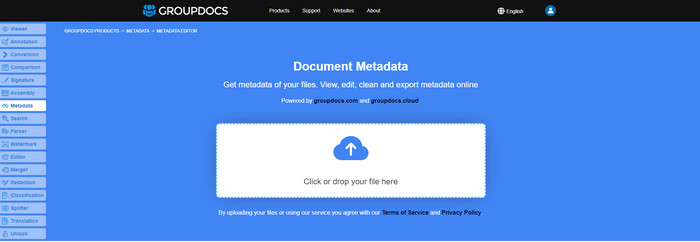
Dacă vrei să folosești gratuit pe web un editor de metadate MKV, îți recomandăm cu tărie să încerci GROUPDOCS.Metadata. Este cea mai bună alegere pentru a vizualiza și edita metadatele fișierelor MKV, deoarece funcționează pe toate platformele, ceea ce înseamnă că este flexibil și ușor de adaptat în orice situație. Mai mult, poate manipula cu ușurință căutarea și actualizarea etichetelor în funcție de proprietățile de care ai nevoie, iar dacă acestea trebuie eliminate, o va face automat. Totuși, instrumentul poate fi dificil de utilizat pentru anumite sarcini, cum ar fi actualizarea etichetelor fișierului. Pentru a te obișnui cu această unealtă online, va trebui să o folosești mai des, pentru a‑ți îmbunătăți cunoștințele despre funcțiile site‑ului și pentru a o manevra mai ușor.
Proprietăți pe Windows [Editor încorporat pe Windows]
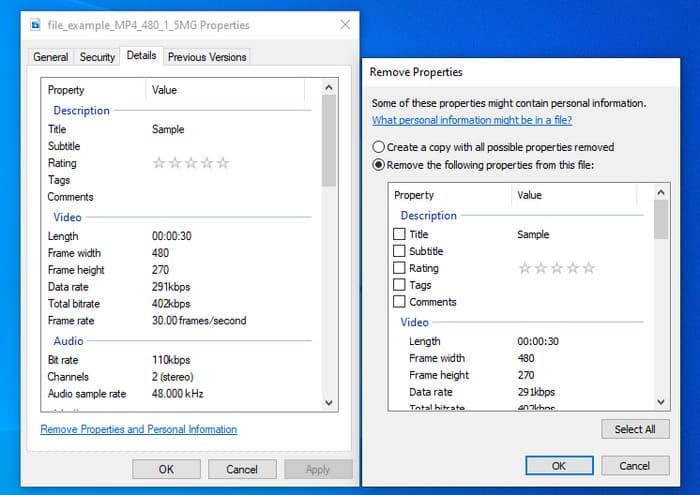
Nu doriți să descărcați un instrument pentru a schimba metadatele MKV și doriți să utilizați funcția încorporată pe Windows pentru a edita metadatele? Atunci cel mai bine ar fi să utilizați Proprietățile pe Windows. Această funcție este disponibilă pe toate computerele Windows și nu va trebui să descărcați niciun instrument sau internet pentru ao utiliza. Puteți vizualiza rapid metadatele și le puteți edita cu succes cu această funcție gratuită. Cu toate acestea, există unele rapoarte despre etichetele lipsă după ce au încercat să folosească această funcție. Conform utilizatorilor, poate elimina automat etichetele din fișierul dvs. În loc să folosească această funcție, ei intenționează să descarce instrumentul potrivit pentru a pierde efortul pe etichetele pe care le includ în fișierul MKV sau media. Dar dacă doriți să vedeți unde este această caracteristică, trebuie doar să faceți clic dreapta pe fișier, în principal în partea de jos.
iFlicks [Pentru Mac]
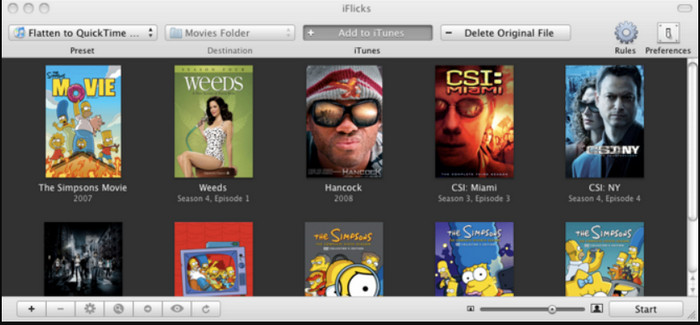
iFlicks vă poate ajuta să convertiți MKV într-un format redabil sau să vă învețe cum să editați metadatele MKV pe Mac. Acest instrument interacționează bine cu iTunes, deoarece oferă metadate detaliate pentru fiecare fișier media. Cu acest software, puteți adăuga diferite informații despre fișierul dvs., cum ar fi slogan, gen, dată. evaluările, rezoluțiile și altele sunt preluate în bazele de date online. În plus, acest software compilă metadate de unde le puteți descărca și le puteți aplica automat fișierelor. Cu toate acestea, încercările gratuite pot dura doar șapte zile, așa că, dacă doriți să utilizați din nou instrumentul, va trebui să plătiți taxa de abonament.
Partea 4. Întrebări frecvente despre Editorul de metadate MKV
MKV poate fi redat pe Mac?
Fișierele MKV pot fi redate pe Mac dacă folosești un instrument terț, cum ar fi Blu‑ray Player. Dar dacă încerci să redai video‑ul intenționat în QuickTime, nu va funcționa, deoarece nu este acceptat. Așadar, dacă vrei să urmărești fișiere MKV pe Mac, îți recomandăm cu tărie să folosești un Blu‑ray Player de la terți sau poți să convertești formatul MKV în MOV cu ajutorul FVC Video Converter Ultimate.
Trebuie să convertesc MKV înainte de a edita metadatele?
Dacă instrumentul pe care doriți să îl utilizați nu acceptă încărcarea formatului MKV, vă sfătuim să convertiți mai întâi formatul într-un format compatibil. Dar, având în vedere taxa pe care am menționat-o mai sus, nu ar fi nevoie să convertiți fișierul într-un format acceptat. Cu toate acestea, nu există multe opțiuni sau instrumente pentru a edita etichetele MKV, deoarece formatul este necunoscut. Deși este greu de căutat, am făcut tot posibilul să căutăm în toate editorii pe care îi puteți folosi pentru a actualiza sau modifica metadatele care acceptă formatul MKV.
De ce fișierele MKV au dimensiuni prea mari?
Principalul motiv pentru care fișierele MKV sunt mari este acela că pot conține mai multe tipuri de conținut video, audio și subtitrări, cu codecuri și elemente diferite. Iar dacă ai adăugat și metadate în acel fișier, dimensiunea va deveni și mai mare. Așadar, cel mai bun mod de a economisi spațiu păstrând totuși un fișier MKV pe unitatea ta este să îl comprimi fără a strica calitatea sau a pierde informații din fișier. Fă clic pe acest link pentru a afla mai multe despre comprimarea fișierelor video.
Concluzie
Chiar dacă există puține editoare de metadate MKV pe piață, încă există instrumente puternice, de încredere, disponibile pe platforme diferite. Pe măsură ce am analizat diverse programe pe care le poți folosi, alegerea rămâne întotdeauna în mâinile tale: pe care îl preferi pentru a schimba metadatele fișierului tău MKV? Într‑adevăr, este o decizie dificilă, deoarece toate instrumentele sunt excelente de folosit. Dacă nu te‑ai hotărât încă ce preferi, îți sugerăm să folosești FVC Video Converter Ultimate, deoarece este cel mai flexibil software și are funcții mai avansate pe care oricine le poate utiliza. Apăsând butonul de descărcare, vei obține cel mai bun editor de etichete pe care îl poți avea pe Windows și Mac!
-
 Cele mai simple 5 moduri de a elimina metadatele din orice fișier media
 Cum să eliminați metadatele? Este greu să o faci? Trebuie să cumpăr sau să folosesc un instrument gratuit pentru a elimina etichetele? Toate aceste întrebări au răspunsuri în acest articol.
-
 5 editoare de metadate MP4 de top [Actualizat 2022]
 Cum îmi pot schimba metadatele MP4? Cel mai bun mod de a schimba metadatele MP4-ului este să utilizați un editor de etichete care acceptă formatul MP4, cum ar fi exemplul pe care îl enumeram mai jos.
-
 Top 5 editoare de etichete video AVI alese de utilizatori pentru 2022
 Care este cel mai bun editor de etichete AVI pe care îl pot folosi? Piața editorilor de etichete pentru fișiere AVI este prea largă. Așa că astăzi vom prezenta cei mai aleși cinci editori în anul 2022.
