


 Video Converter Ultimate
 Screen Recorder
 Reparație video
Cum să accelerezi videoclipurile TikTok pe Tiktok sau să folosești alt software alternativ
Una dintre aplicațiile de divertisment video cu cea mai rapidă creștere, pe care o poți folosi pe telefonul mobil, este TikTok. Deși TikTok a fost lansat în 2016, a devenit imediat foarte popular la doar câteva luni după data lansării. De asemenea, unul dintre cele mai folosite tipuri de editare de aici este accelerarea videoclipului pentru a crea un efect vizual. Așadar, dacă ești unul dintre acei utilizatori și vrei să știi cum se face, ești în locul potrivit. Vom prezenta diferite instrumente care te vor ajuta să înveți cum să accelerezi un videoclip pe TikTok.

Partea 1. Cum să accelerezi un videoclip pe TikTok
După cum am menționat mai devreme, TikTok a devenit una dintre cele mai cunoscute platforme de clipuri video scurte, astfel că editarea unui videoclip aici se poate face ușor. Reține că poți accelera videoclipul chiar în timpul filmării, nu doar după ce videoclipul este terminat. De asemenea, dacă încerci să accelerezi un videoclip pe TikTok, va trebui să estimezi viteza totală fără să știi sigur dacă aceasta este viteza pe care vrei să o obții. Totuși, dacă nu vrei să descarci un instrument terț pentru a accelera un videoclip, atunci TikTok își va face treaba. Așadar, urmează pașii de mai jos pentru a accelera un videoclip pe TikTok.
Pași pentru a filma un videoclip accelerat pe TikTok:
Pasul 1. Mai întâi descarcă aplicația TikTok pe telefonul tău mobil și deschide-o după ce procesul de descărcare s-a încheiat.
Pasul 2. Atinge semnul + pentru a începe filmarea. Apoi apasă pe „add sound” pentru a adăuga muzică de fundal și filtre, dacă dorești. Acum, pentru a accelera videoclipul, apasă pe Speed și alege una dintre opțiunile de sub acesta. Pentru a începe înregistrarea, apasă pe butonul rotund, iar pentru a opri înregistrarea, apasă din nou pe el.
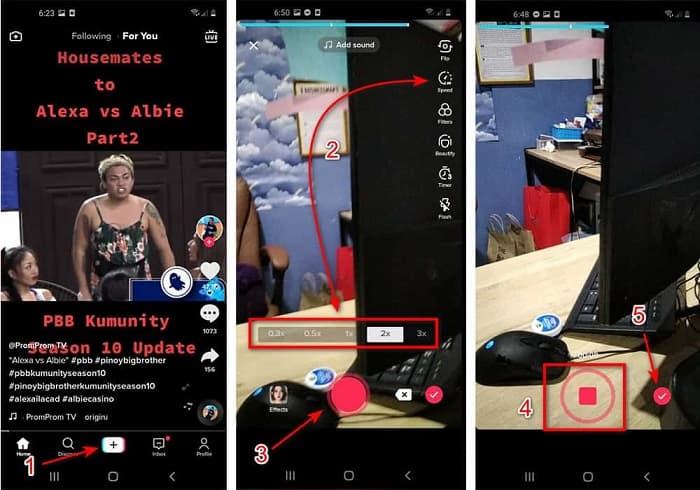
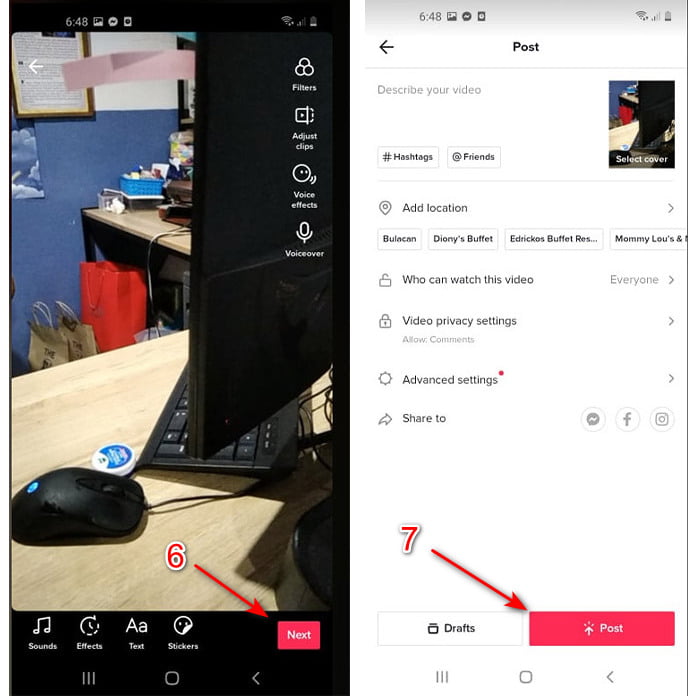
Pasul 3. Pentru a verifica videoclipul, apasă pe butonul check și apoi pe Next. Apoi apasă pe Post pentru a-l încărca pe TikTok.
Partea 2. Cum să accelerezi orice videoclipuri TikTok pe Video Converter Ultimate
Spre deosebire de funcția de editare integrată pe care o oferă TikTok, Video Converter Ultimate îți permite să accelerezi manual videoclipul, însă într-un mod mai simplu. De asemenea, în timp ce ajustezi viteza, vei avea un preview, pentru a vedea dacă viteza videoclipului corespunde preferințelor tale. Mai mult, acest software remarcabil le permite deja utilizatorilor să experimenteze un nivel avansat, de tip profesionist, de funcții de editare, dar cu pași simpli. Din cauza funcțiilor avansate pe care ți le oferă acest instrument, va trebui să plătești câțiva dolari. Însă nu trebuie să îți faci griji, pentru că nu va costa nici pe departe mii sau chiar sute. Dacă vrei să știi ce beneficii sau funcții-cheie vei avea dacă folosești acest instrument, aruncă o privire pe listă.
Cele mai bune funcții-cheie pe care le vei găsi în Video Converter Ultimate:
◆ Acesta este un software independent de platformă, ceea ce înseamnă că îl puteți descărca pe PC, Mac sau Linux.
◆ Toate editările avansate, convertizorul, generatorul GIF și multe altele sunt disponibile în acest instrument.
◆ Utilizabilitatea instrumentului este foarte la îndemână pentru oricine, chiar și pentru profesioniști sau începători în editare.
◆ Permite utilizatorilor să-și exprime latura creativă prin diverse funcții de editare disponibile aici.
◆ Deși instrumentul este încă plătit, este mai puțin costisitor și foarte accesibil pentru oricine ar dori să îl încerce.
Așadar, dacă vrei să știi cum să accelerezi videoclipuri TikTok cu ajutorul acestui editor alternativ excepțional, citește și urmează instrucțiunile de mai jos pentru a obține un succes deplin.
Pași pentru a accelera videoclipuri TikTok cu Video Converter Ultimate:
Pasul 1. Pentru a folosi software-ul, mai întâi trebuie să îl descarci pe PC sau Mac. Apoi instalează-l, fă setarea inițială simplă și apasă pe „Finish” pentru a continua.
Descărcare gratuită pentru Windows 7 sau o versiune ulterioară Descărcare securizată
Descărcare gratuită pentru MacOS 10.7 sau o versiune ulterioară Descărcare securizată
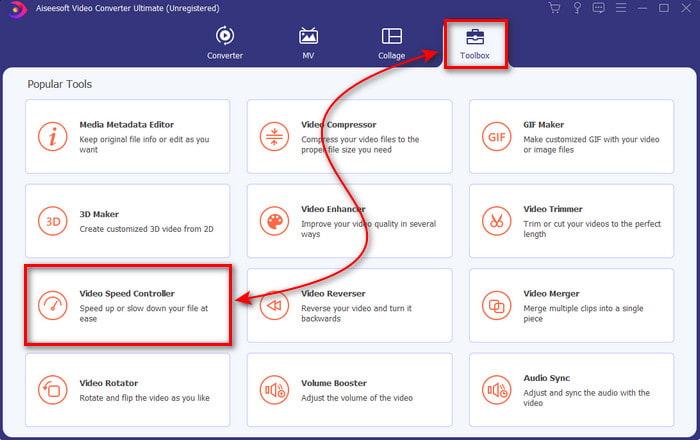
Pasul 2. Apasă pe Toolbox și selectează Video Speed Controller din listă.
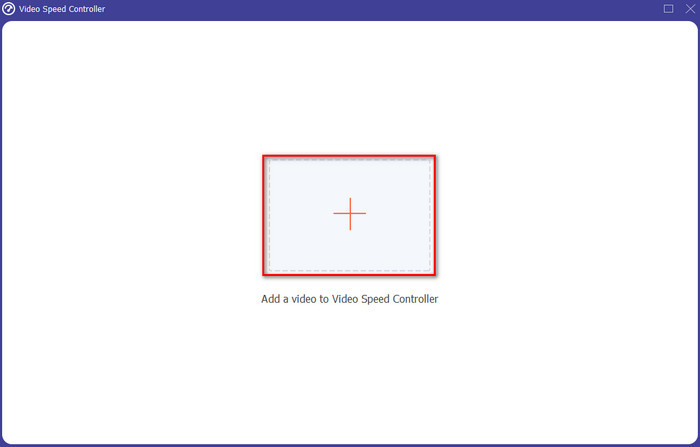
Pasul 3. Pentru a adăuga fișierul pe care vrei să îl accelerezi, apasă butonul +. Apoi alege fișierul din folderul care apare și apasă pe Open pentru a continua.
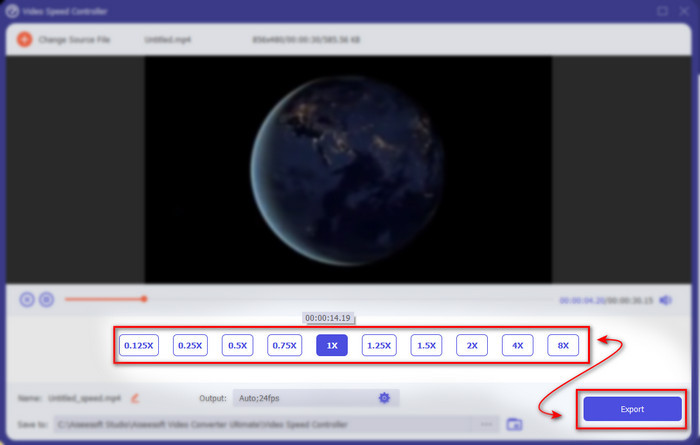
Pasul 4. Pentru a ajusta viteza videoclipului, alege opțiunea de viteză de mai jos. Iar pentru a descărca fișierul, apasă pe Export pentru a începe procesul de salvare.
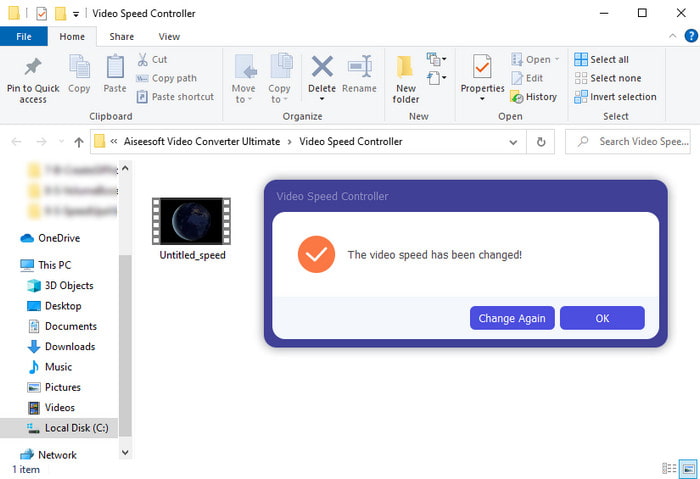
Pasul 5. Nu este nevoie să aștepți un minut, deoarece fișierul va fi gata după câteva secunde. Dacă pe ecran îți apare un folder, înseamnă că fișierul a fost deja exportat. Apasă pe fișier pentru a viziona videoclipul pe care l-ai accelerat.
Articole similare:
Cum să încetinești fișiere MP4
Partea 3. Întrebări frecvente despre accelerarea unui videoclip pe Tiktok
Cum să accelerezi un videoclip TikTok care nu este al tău?
Dacă vrei să accelerezi un videoclip care nu îți aparține, atunci mai întâi trebuie să descarci videoclipul de pe TikTok. Apasă butonul + și Upload, apoi alege videoclipul din galerie. Selectează opțiunea de viteză și apasă pe Next pentru a-l încărca. Sau folosește Video Converter Ultimate pentru a-l accelera, urmând pașii prezentați mai sus.
Pot să înregistrez un videoclip de 3 minute pe Tiktok?
Absolut Da, puteți dacă sunt înregistrate separat, dar nu puteți înregistra un videoclip direct de 3 minute. Deoarece durata înregistrării cu acest suport pentru aplicație este de 15 până la 60 de secunde complete. Deci, dacă durata videoclipului pe care doriți să o înregistrați este mai mare de un minut, atunci este mai bine să-l înregistrați separat. Cu toate acestea, dacă ești unul dintre utilizatorii care au fost selectați de Tiktok pentru a încerca înregistrarea de 3 minute, atunci ești norocos, deoarece aceasta a fost testată doar pentru un grup mic de oameni.
Pot adăuga MP3 la videoclipurile mele de pe Tiktok?
Când TikTok a fost lansat pentru prima dată, utilizatorilor li s-a permis să adauge muzică la videoclipul lor, dar acum au eliminat această caracteristică. Din cauza problemei de drepturi de autor care a fost depusă la TikTok. Deci, pentru a evita problema, o elimină și adaugă un eșantion de muzică disponibilă sau poți folosi o altă aplicație pentru a face acest lucru în locul tău.
Tiktok are o restricție de vârstă?
Conform termenilor și condițiilor TikTok, vârsta de 13 ani sau peste trebuie să fie vârsta utilizatorului care va folosi această aplicație. De asemenea, Tiktok nu are verificarea vârstei atunci când vă înregistrați, așa că așteptați-vă să apară conținut de peste 16 ani în feedul dvs.
Concluzie
Acum că știi cum să accelerezi un videoclip pe TikTok, este momentul să te bucuri de această funcție. În plus, alege soluția care ți se potrivește cel mai bine. Dacă consideri că funcțiile integrate de accelerare din TikTok sunt suficiente, atunci folosește-le. Dar dacă vrei să experimentezi o accelerare mai avansată, cu previzualizare, folosește Video Converter Ultimate. Indiferent de opțiunea pe care o alegi, te poți aștepta la un rezultat foarte bun datorită funcțiilor și performanței lor generale.
-
 7 pași simpli despre cum să remediați problemele de întârziere audio OBS [Rezolvați]
 Vă dificultăți să vizionați videoclipul după înregistrare din cauza întârzierii audio când utilizați OBS Studio? Citiți articolul de mai jos pentru a afla cum să remediați eficient sunetul nesincronizat.
-
 Cai excelente posibile | Cum se remediază întârzierea audio VLC [2021]
 Vă este greu să vizionați filmul preferat pe VLC media player din cauza incertitudinii audio? Continuați să citiți acest articol pentru a afla toate modalitățile posibile de a remedia întârzierea audio VLC.
-
 Cele mai bune modalități de a crește volumul MP4 online și offline
 Te chinui să auzi sunetele videoclipului tău? Citiți articolul de mai jos pentru a afla cum să creșteți volumul mp4 în diferite moduri.
