


 Видео конвертер Ultimate
 Устройство записи экрана
 Видео ремонт
Узнайте о программном конвертере, который вы можете использовать для преобразования MPEG в FLV
MPEG — это стандартный формат для передачи данных через интернет или при распространении на DVD. Так сложилось, потому что формат существует с 1988 года. Но знали ли вы, что этот файл использует асимметричную систему? Это значит, что сжатие видео занимает больше времени, чем его распаковка. Кроме того, при сжатии файла часть кадров удаляется. Поэтому качество этого формата ниже, чем у других, например FLV. Хотите узнать, как конвертировать ваш файл из MPEG в FLV и сжать данные, не теряя качество кадров видео? Тогда прочитайте эту статью и узнайте, какие MPEG‑конвертеры вы можете использовать.

Часть 1. Преобразование MPEG в MOV на Mac и Windows с помощью FVC Video Converter Ultimate
FVC Video Converter Ultimate намного лучше справляется с задачей конвертации. Это не просто MPEG в FLV конвертер, потому что этот инструмент в одиночку способен моментально конвертировать более чем 200 форматов. Разве это не удивительно? Кроме того, если вы хотите добавить много файлов и конвертировать их в разные форматы, вы легко можете сделать это с помощью очень эффективной пакетной конвертации. Хотите узнать, что ещё умеет этот инструмент? Тогда прочитайте ключевые функции ниже.

FVC Видеоконвертер Ultimate
5 689 200+ загрузок- Он поддерживает все форматы и кодировщики в MP4, MOV, MPEG, FLV, AVI и многие другие.
- Он известен как самый быстрый и безопасный конвертер, который вы можете загрузить на свой рабочий стол.
- Пакетное преобразование с аппаратным ускорением и быстрым преобразованием.
- Этот конвертер поддерживает основные расширенные функции, такие как видеоусилитель, видеокомпрессор и т. д.
- Поддерживает обе ОС с одинаковой функциональностью на Windows и Mac.
Бесплатная загрузкаДля Windows 7 или более поздних версийБезопасная загрузка
Бесплатная загрузкаДля MacOS 10.7 или более поздних версийБезопасная загрузка
Итак, теперь, когда у вас есть представление о функции инструмента, пришло время узнать, как конвертировать MPEG в FLV с подробными инструкциями ниже.
Шаг 1. Чтобы получить доступ к инструменту, сначала скачайте его на свой ПК или Mac. Затем установите и выполните быструю настройку; после этого программа автоматически запустится.
Бесплатная загрузкаДля Windows 7 или более поздних версийБезопасная загрузка
Бесплатная загрузкаДля MacOS 10.7 или более поздних версийБезопасная загрузка
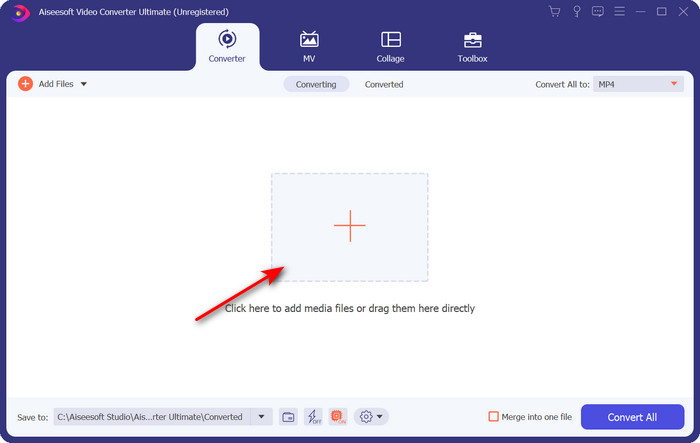
Шаг 2. Давайте добавим сюда ваш файл .mpeg, нажав на значок «+» в центральной части интерфейса. После нажатия откроется папка на вашем компьютере, выберите файл и нажмите Open.
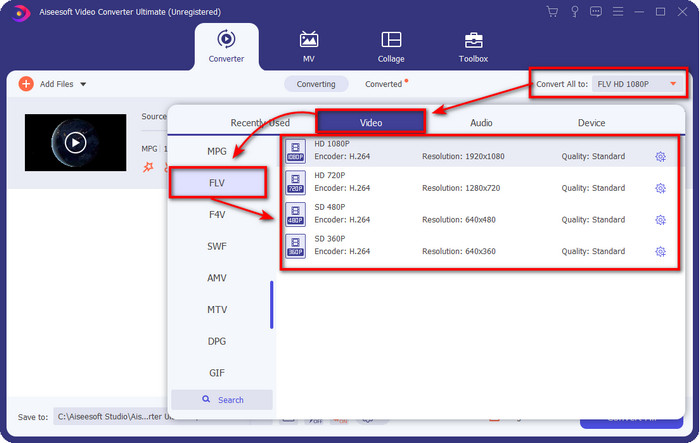
Шаг 3. Измените формат на FLV, щёлкнув и раскрыв меню Convert All to в правом верхнем углу интерфейса конвертера.
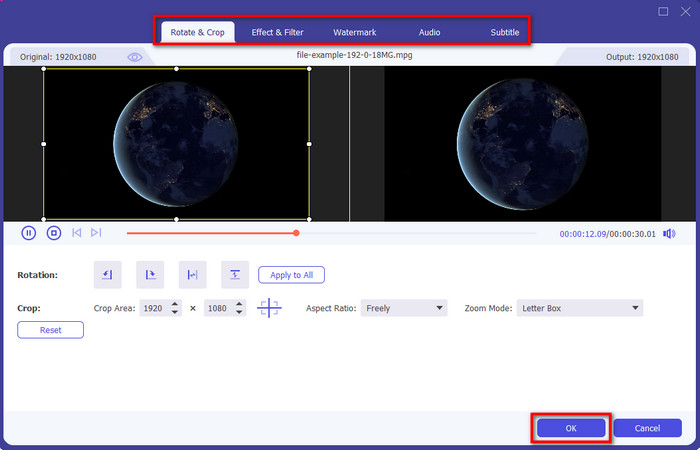
Шаг 4. Перед тем как конвертировать файл, вы можете отредактировать видео, нажав кнопку wand. В разделе редактирования вы можете поворачивать и обрезать видео, добавлять эффекты и фильтры, накладывать водяной знак, настраивать звук и добавлять субтитры. Когда закончите редактирование и будете готовы сохранить результат, нажмите OK.
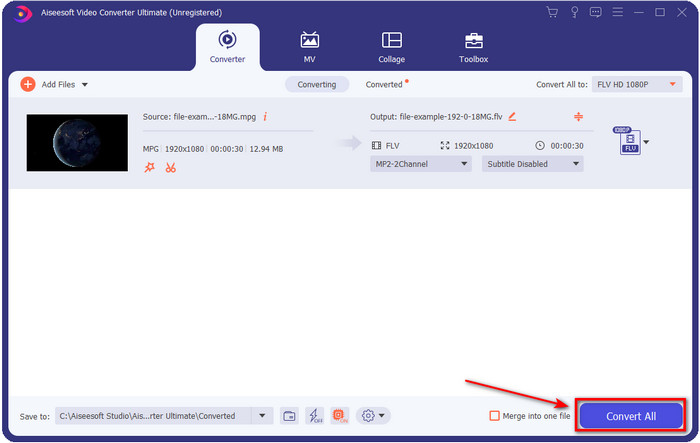
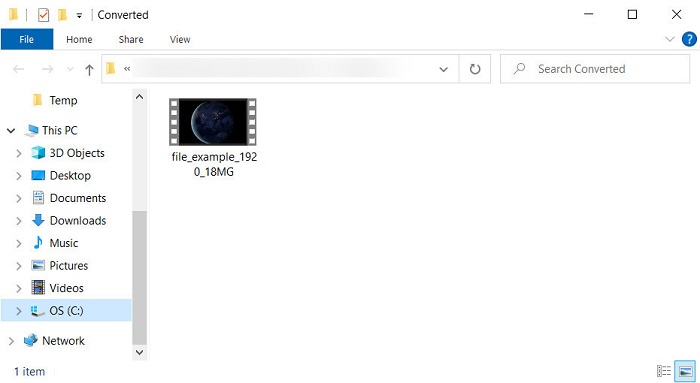
Шаг 5. Нажмите Convert All, чтобы начать конвертацию MPEG в FLV. Этот процесс займёт меньше минуты благодаря включённым аппаратному ускорению и быстрой конвертации. После завершения на экране откроется папка с результатом.
Часть 2. Преобразование MPG в MOV с помощью FFmpeg
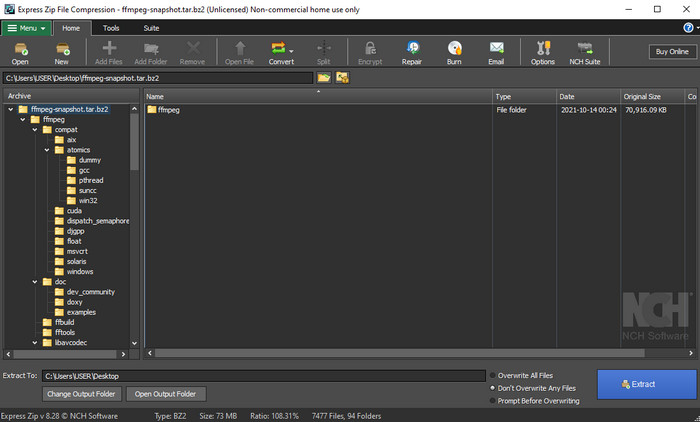
Одним из известных редакторов, с которым вы, вероятно, уже сталкивались, является FFmpeg. Если этот конвертер для вас в новинку, давайте кратко познакомимся с программой. Этот конвертер считается одним из самых сложных в использовании. Потому что, прежде чем приступить к конвертации, вам нужно работать с ним через текстовые команды в CMD. Хотя инструмент и сложен, его производительность, особенно при конвертации, выдающаяся. Вместо того чтобы искать в интернете, как использовать FFmpeg для MPEG в FLV, воспользуйтесь шагами ниже — они помогут вам освоить этот инструмент.
Шаг 1. Скачайте FFmpeg на свой компьютер.
Шаг 2. Откройте CMD на компьютере, чтобы запустить командную строку.
Шаг 3. Найдите расположение вашего файла .mpeg с помощью CMD. Затем введите в командной строке следующую команду: ffmpeg -i input.mpeg -vn -ar 44100 -ac 2 -b:a 192k output.flv и нажмите клавишу Enter на клавиатуре, чтобы начать процесс.
Плюсы
- Его можно скачать бесплатно.
- Хорошо работает при преобразовании формата в новую версию.
- Доступно в Windows и Mac.
Минусы
- Это не удобно.
- Не ваш типичный конвертер.
Часть 3. Преобразование MPG в MOV с помощью бесплатного онлайн-конвертера MPEG в MOV
Если вы хотите бесплатно конвертировать MPEG в FLV, используйте FVC Free Video Converter Online. Этот онлайн‑инструмент доступен во всех поисковых системах и помогает решить задачу конвертации. Хотя онлайн‑конвертер бесплатный, его функции и возможности не столь обширны, как у FVC Video Converter Ultimate. Но конвертацию файлов .mpeg или .mpg здесь выполнять проще и удобнее, чем в FFmpeg. Ещё одно достоинство этого веб‑инструмента в том, что вам не нужно устанавливать его на компьютер. Вы экономите место на накопителе, если пользуетесь этим сервисом. Хотите узнать, как им пользоваться? Если да, перейдём к шагам.
Шаг 1. Чтобы открыть онлайн‑конвертер MPEG в FLV, нажмите эту ссылку.
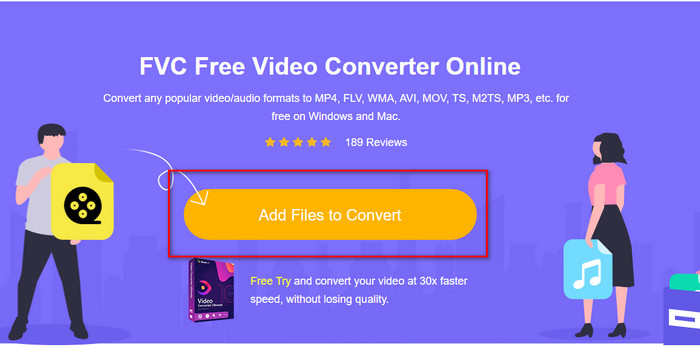
Шаг 2. Когда сайт откроется, нажмите Add Files to Convert, чтобы запустить веб‑инструмент. На экране откроется папка; в ней найдите файл .mpeg, который хотите конвертировать, затем нажмите Open.
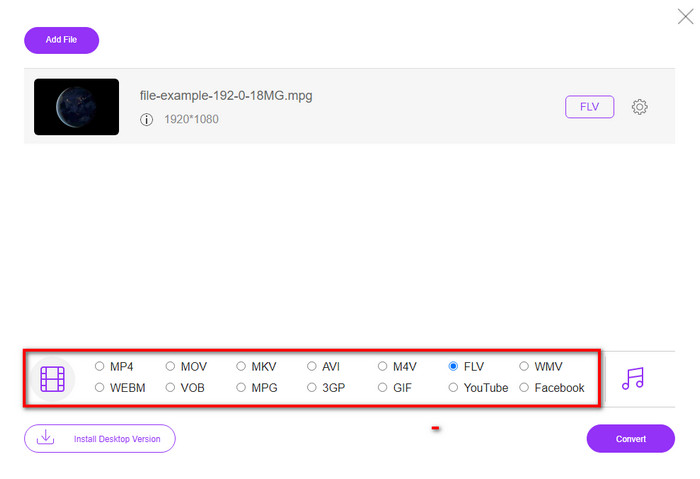
Шаг 3. Появится новый интерфейс; внизу выберите формат FLV.
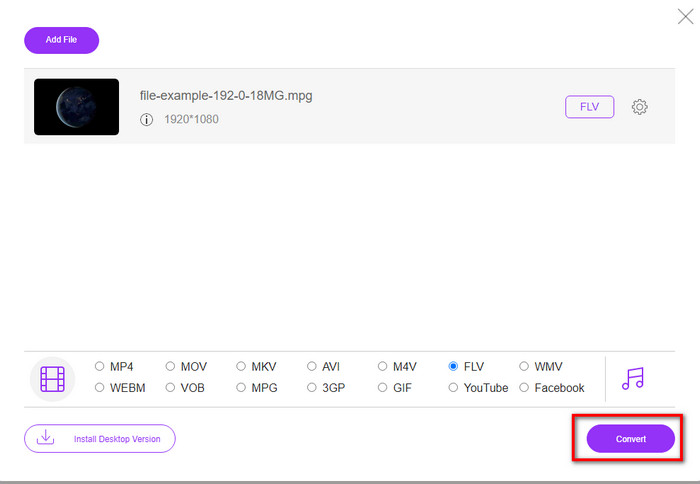
Шаг 4. Когда вы закончите выбор формата, нажмите Convert, чтобы запустить процесс.
Шаг 5. После конвертации откроется папка с полученным файлом.
Часть 4. Расширенные знания о MPEG и MOV
Группа экспертов по движущимся изображениям или MPEG — это один из стандартных форматов, появившихся в конце 1988 года. Этот формат значительно сжимает файл в MPEG-1 или MPEG-2, а затем распространяет их в Интернете или на DVD. Хотя MPEG использует определенное сжатие, расширение этого формата все еще может быть .mpg или исходным .mpeg, но это не повлияет на сохраненные файлы и качество. Несмотря на то, что качество не пострадает, он по-прежнему не может хранить видео высокой четкости и метаданные.
Вышеупомянутое, Flash Video или FLV похоже на MPEG, но с другой точки зрения. Эти два формата лучше всего подходят для передачи видеофайла через Интернет. Однако файлы FLV сильно сжаты и имеют гораздо лучшее качество по сравнению с MPEG. Теперь это стандартный формат видео в HTML 5 для потоковой передачи во всемирной паутине.
Поскольку формат MPEG имеет более низкое качество и более низкое сжатие, вы должны пересмотреть преобразование файла в формат FLV, если хотите лучшего качества и сжатия. Таким образом, выбор правильного конвертера MPEG в FLV онлайн или офлайн является обязательным условием для получения лучшей версии FLV.
Часть 5. Часто задаваемые вопросы о преобразовании MPEG в FLV
Как объединить несколько файлов MPEG в один?
Объединить или склеить два и более файлов в один очень легко, если вы используете подходящий инструмент. Не знаете, что использовать для объединения видеофайлов в один? Или как связать файлы между собой? Тогда прочитайте эту статью, чтобы узнать, чем и как объединить MPEG‑файлы в один.
Где я могу воспроизвести файлы MPEG?
Хотя формат MPEG — самый известный формат для фильмов, и поддержка этого формата огромна, некоторые медиаплееры воспроизводят видео с расширением .mpeg не очень плавно. Если вы ищете эффективный медиаплеер, перейдите по этой ссылке и ознакомьтесь с подробной информацией о MPEG‑плеерах.
Могу ли я сжимать файлы MPEG?
Да, вы можете сжать свои MPEG‑файлы, если их размер слишком велик для быстрой загрузки. Более того, вы можете прочитать эту статью и узнать, как сжать MPEG‑файлы до меньшего размера, не разрушая качество видео.
Заключение
В заключение мы получили чёткое представление о том, как конвертировать MPEG в FLV с помощью приведённых выше инструментов. Если вы хотите бесплатно конвертировать MPEG, используйте FVC Free Video Converter Online. Но если у вас уже есть FFmpeg и вы хотите им воспользоваться, прочитайте подробности выше. Какой бы из двух вариантов вы ни выбрали, лучшим по своим возможностям остаётся выдающийся конвертер FVC Video Converter Ultimate. Теперь выберите инструмент, который, по вашему мнению, лучше всего подходит для ваших задач по конвертации файлов, и выполняйте эффективную конвертацию.
-
 [2021] Лучшие инструменты и простые способы преобразования MPEG в MP3
 В этой статье в основном рассказывается о том, как конвертировать видео MPEG в MP3 с использованием самых надежных инструментов из списка.
-
 5 лучших вариантов для преобразования MPEG в формат AVI [онлайн и офлайн]
 Вы с трудом ищете конвертер для MPEG? Затем попробуйте прочитать эту статью, поскольку мы узнаем, как преобразовать формат MPEG в формат AVI с подробными инструкциями.
-
 3 эффективных метода преобразования MPEG в MOV [офлайн и онлайн]
 Вы устали искать медиаплеер для воспроизведения видео в формате MPEG? Попробуйте преобразовать его в другие форматы, которые могут воспроизводиться, особенно на Mac, например, в видеоформат MOV. Прочтите эту статью, чтобы узнать больше.
