


 Видео конвертер Ultimate
 Устройство записи экрана
 Видео ремонт
 Безопасная загрузка
Бесподобные и идеальные способы конвертировать AMV в MP4
Хотите без проблем смотреть свои AMV‑видеоролики во всех программах? Тогда вам нужно преобразовать файл AMV в формат MP4. Но не переживайте! Мы предложим вам оптимальное решение для конвертации ваших видеофайлов. В этой статье уже протестированы конвертеры, с которыми вы познакомитесь. Таким образом, вам не нужно волноваться по поводу безопасности этих приложений. Кроме того, мы расскажем о функциях, которыми вы сможете пользоваться в программе. Если мы вас заинтересовали и вы относитесь к пользователям, которые хотят конвертировать AMV в MP4, читайте эту статью и получите необходимые знания о преобразовании видео.

Часть 1: Введение в AMV и MP4
AMV
Расширение файла: .amv
Разработчик: MTV
Категория файла: формат видеофайла
Описание: Видео, сохранённые в формате файла Actions Media Video, который поддерживается некоторыми китайскими портативными медиаплеерами, известны как файлы AMV. В них содержится сжатый видеоролик с низким разрешением (от 96x96 до 320x240 пикселей). Воспроизводить файлы AMV могут как настольные программы, поставляемые с AMV‑плеерами, так и медиапроигрыватель VideoLAN VLC.
Связанные программы: K-Lite Codec Pack, VideoLAN и VLC Media Player
AMV
Расширение файла: .mp4
Разработчик: Moving Picture Experts Group (MPEG)
Категория файла: формат видеофайла
Описание: Видеостандарты AAC и MPEG-4 совместно определяют расширение MP4. Контейнер может содержать любой тип мультимедиа, включая аудио, видео, субтитры и 2D- и 3D-графику. Практически любой проигрыватель может воспроизводить файлы MP4 в Windows, но на Mac необходимо установить плагин или преобразовать файл MP4 в другой формат. Группа под названием The Moving Picture Experts.
Связанные программы: Apple, QuickTime Player, VLC Media Player, Microsoft, Windows Media Player и VideoLAN.
Часть 2: отличные процедуры для преобразования AMV в MP4 в автономном режиме
Если вы хотите конвертировать AMV в MP4 с помощью загружаемой программы, мы можем предложить вам лучшее решение. Используйте Video Converter Ultimate. Он поддерживает более 100 видеоформатов, включая AVI, MKV, WMV, MOV, FLV, M4V, SWF, MTS, M2TS и другие. У этого инструмента интуитивно понятный интерфейс и простые способы работы, поэтому он подойдёт пользователям любого уровня. С его помощью вы можете конвертировать несколько файлов одновременно, так как он поддерживает пакетную конвертацию. И это ещё не всё: одна из самых заметных функций при конвертировании — ультрабыстрая скорость, до 30 раз выше, чем у других конвертеров. Кроме того, с помощью этого инструмента вы можете редактировать свои AMV‑видео. Чтобы узнать больше о возможностях этого приложения, ознакомьтесь с дополнительной информацией ниже.
особенности
◆ Преобразование различных видеоформатов, таких как MP4, AMV, WMV, AVI, MKV, FLV, SWF, MOV и более 100 других.
◆ Он предлагает процесс пакетного преобразования для одновременного преобразования нескольких файлов.
◆ Он предоставляет инструменты для редактирования видео, такие как видеоулучшитель, триммер, обрезка, ротатор, коррекция цвета и многое другое.
Следуйте простым инструкциям ниже, чтобы преобразовать AMV в MP4 с помощью FVC Video Converter Ultimate.
Шаг 1: Сначала загрузите Video Converter Ultimate на свой компьютер с Windows или Mac. Нажмите кнопку Download ниже, затем установите и запустите программу.
Бесплатная загрузкаДля Windows 7 или более поздних версийБезопасная загрузка
Бесплатная загрузкаДля MacOS 10.7 или более поздних версийБезопасная загрузка
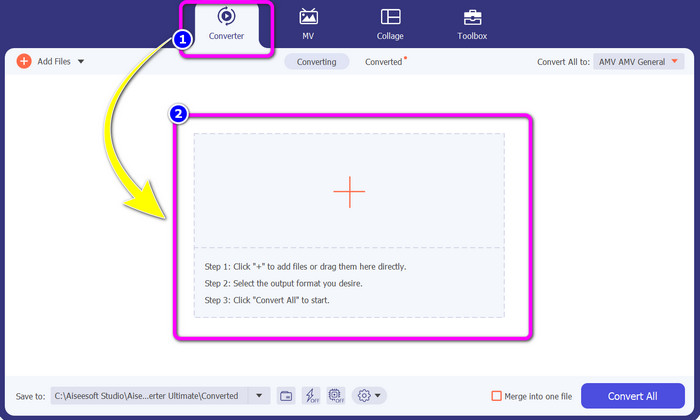
Шаг 2: Выберите вкладку Converter и нажмите кнопку со значком Plus. На экране откроется окно с папками — выберите AMV‑видео, которое хотите конвертировать.
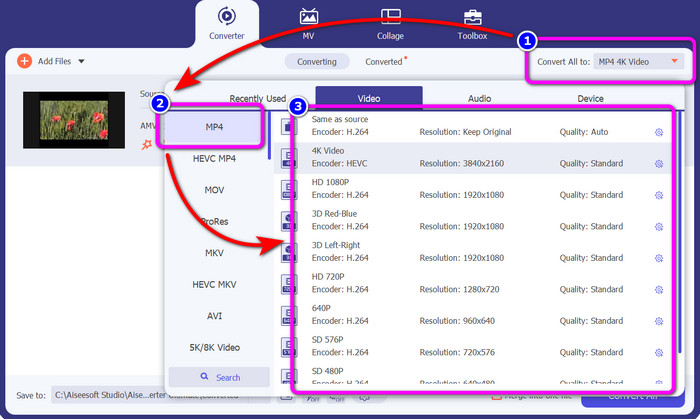
Шаг 3: Нажмите кнопку Convert All. Когда появится список доступных форматов, выберите нужный выходной формат — файл MP4. Затем вы можете выбрать разрешение для видео вплоть до 4K. Выберите подходящее разрешение или оставьте то же, что и у исходного видео.
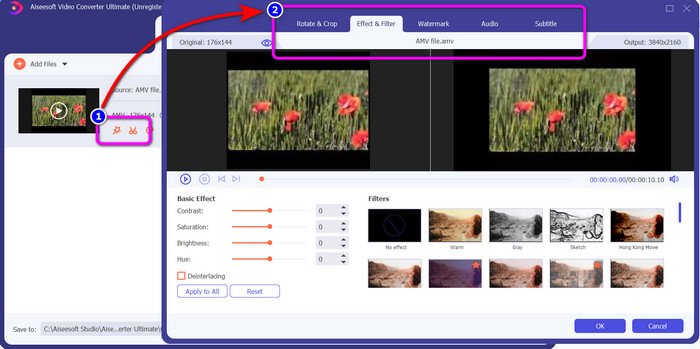
Шаг 4: Если вы хотите отредактировать видео, нажмите значок Edit. После этого вы сможете редактировать ролик: изменять, добавлять или удалять водяные знаки, применять эффекты и фильтры, поворачивать и обрезать видео. Затем нажмите OK. Так вы сможете улучшить своё видео.
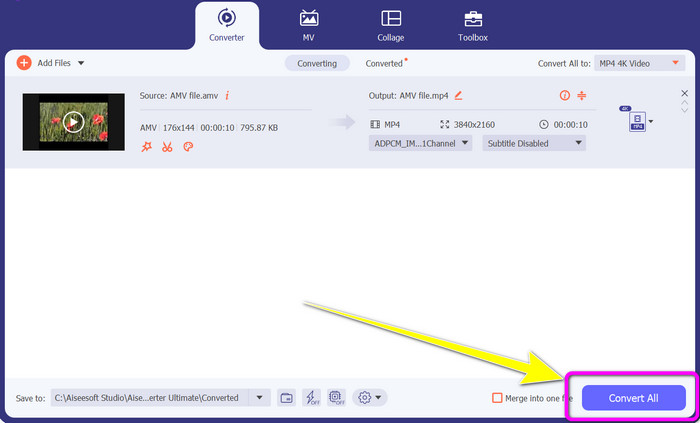
Шаг 5: После редактирования видео нажмите кнопку Convert All, чтобы запустить процесс конвертации. Затем сохраните конечный файл на компьютер и откройте получившееся видео, чтобы оценить результат. Нажмите здесь, чтобы узнать, как конвертировать DV в MP4.
Часть 3: Самый простой способ конвертировать AMV в MP4 онлайн бесплатно
Ещё один способ конвертировать AMV в MP4 онлайн — воспользоваться сервисом FVC Free Video Converter Online. Этот инструмент отличается простыми шагами и понятным интерфейсом, поэтому он подходит как опытным, так и начинающим пользователям. Вы можете конвертировать видео всего в несколько кликов. Кроме того, конвертер поддерживает множество форматов, таких как AVI, MP4, M4V, FLV, MOV, WMV, MKV и другие. Можно также выполнять пакетную конвертацию и преобразовывать сразу несколько файлов. Дополнительно вы можете менять разрешение видео во время конвертации. Также возможно настроить битрейт и частоту кадров вашего ролика. Этот онлайн‑сервис бесплатен, и вы можете загружать видео без каких‑либо лишних элементов — водяных знаков, логотипов, стикеров, текста и т.п. Он доступен во всех популярных браузерах, включая Google Chrome, Safari, Internet Explorer, Microsoft Edge и др.
Функции
◆ Преобразование различных форматов видео, включая MP4, AMV, FLV, AVI, MOV, VOB, MKV и другие.
◆ Предлагает процесс пакетного преобразования для более быстрой процедуры.
◆ Отредактируйте битрейт, частоту кадров и разрешение видео.
◆ Преобразование аудиоформатов, таких как MP3, FLAC, WAV, AAC, AC3 и т. д.
◆ Отрегулируйте битрейт аудио и частоту дискретизации.
Используйте простые процедуры ниже, чтобы преобразовать AMV в MP4 с помощью FVC Free Video Converter Ultimate.
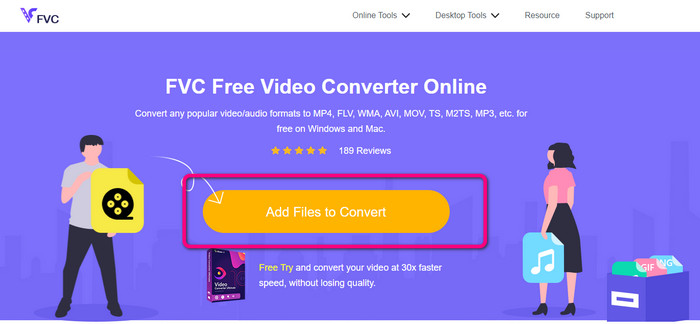
Шаг 1: Откройте браузер и перейдите на сайт FVC Free Video Converter Online. Нажмите кнопку Add Files to Convert, чтобы загрузить AMV‑видео, которое хотите конвертировать.
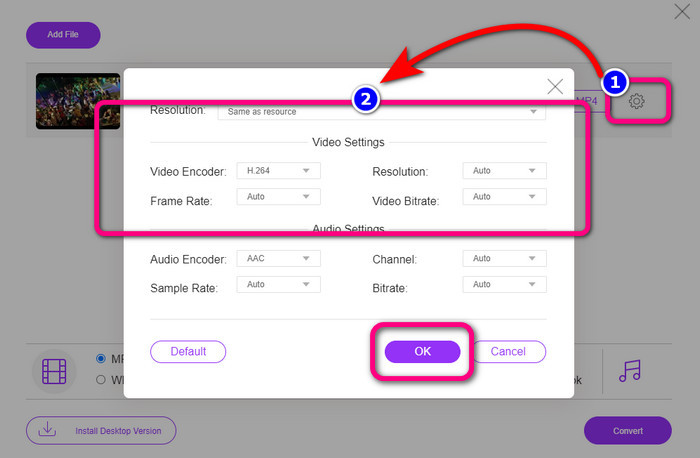
Шаг 2: После добавления AMV‑видео нажмите значок Setting, чтобы настроить частоту кадров, битрейт и разрешение. Затем нажмите OK.
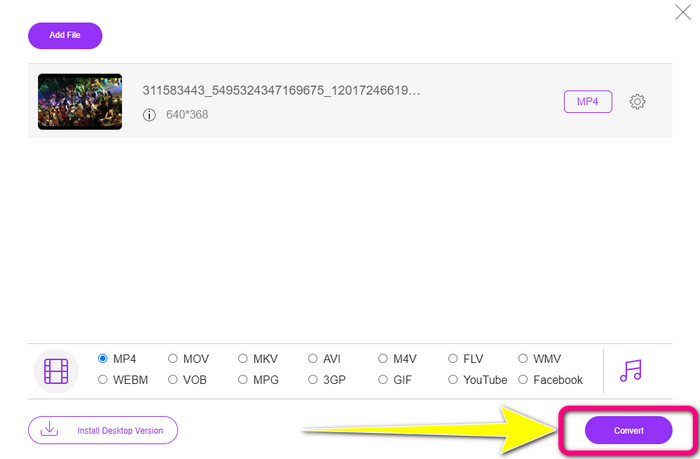
Шаг 3: В нижней части интерфейса выберите формат файла MP4. Затем нажмите кнопку Convert. Также вы можете использовать этот инструмент, чтобы конвертировать AMV в MKV.
Часть 4: Часто задаваемые вопросы о преобразовании AMV в MP4
1. Является ли AMV таким же, как WMV?
Они не то же самое. AMV — это формат видеофайлов, совместимый с MP4 и S1 MP3-плеером. По сравнению с другими видеоформатами, такими как WMV, он меньше по размеру. Для игры не требуется много вычислительной мощности.
2. Что лучше, AVI или AMV?
Вы можете использовать файл AVI, если хотите воспроизвести видео в любом месте. Однако формат файла AMV является хорошим выбором, если вы предпочитаете меньший размер файла.
3. Как преобразовать видеофайлы в MP4?
Вы можете использовать Video Converter Ultimate. Он поддерживает практически все форматы видео, и вы можете быстрее конвертировать видеофайлы.
Заключение
Конвертировать AMV в MP4 очень просто, если использовать два описанных выше конвертера. И продвинутые, и начинающие пользователи смогут работать с этими инструментами, поскольку у них интуитивно понятный интерфейс и простые шаги. Поэтому воспользуйтесь Video Converter Ultimate и FVC Free Video Converter Online уже сейчас!
-
 Успешные методы немедленного преобразования DIVX в MP4
 Как преобразовать DIVX в MP4? Если вы ищете лучшее решение, вы попали в нужную статью. Мы покажем вам, как легко конвертировать DIVX в MP4.
-
 Как конвертировать F4V в MP4 наиболее эффективными методами
 Ваши видео F4V не очень хорошего качества? Затем превратите его в файл MP4. Этот пост предложит лучший способ конвертировать F4V в MP4 онлайн и офлайн.
-
 Пять популярных подходов для преобразования Xvid в формат MP4
 Взгляните на эти удивительные методы преобразования Xvid в формат файла MP4 в этой статье. Кроме того, вы узнаете о лучших приложениях, которые можно использовать для преобразования
