


 Видео конвертер Ultimate
 Устройство записи экрана
 Видео ремонт
Откройте для себя способы воспроизведения файлов MKV на PS4
Воспроизведение фильмов поддерживает не только Xbox One S. Теперь и PS4 пытается не отставать от тренда. С использованием USB‑кабеля и через DLNA PS4 теперь может проигрывать MKV, MP4, AVI и многие другие форматы. Это означает, что MKV входит в число файлов, которые вы можете просматривать. Чтобы увидеть полный список поддерживаемых форматов, зайдите на официальный сайт PS4. Кроме того, вы бы не стали читать эту статью, если бы вас не интересовало воспроизведение MKV‑файлов на PS4. Продолжайте знакомиться с материалом — по ходу вы узнаете, как именно можно проигрывать MKV на PS4.

Часть 1. Можно ли воспроизводить все файлы MKV на PS4?
Могу ли я воспроизводить файлы MKV на PS4? Конечно можно. Формат файла MKV поддерживается PS4. Но не все файлы MKV могут воспроизводиться должным образом. Вы можете потерпеть неудачу в игре. Это потому, что вам нужно соответствовать стандарту, установленному PS4. В основном поддерживаются H.264 / MPEG-4 AVC. Те же правила применяются, если вы собираетесь воспроизводить файлы MKV с USB-накопителя. Между тем для аудио поддерживаются MP3, AAC LC, AC-3. Большинство из этих форматов - это форматы Dolby Digital. Если вы считаете, что выполнили стандарт, вы можете перейти к инструкциям по прямому воспроизведению MKV на PS4.
Шаг 1. Скачайте и установите DivX Media Server и запустите плеер. Затем включите общий доступ к файлам на вашем компьютере.
Шаг 2. Загрузите или импортируйте MKV‑файл на сервер.
Шаг 3. Прежде чем переходить к следующему шагу, убедитесь, что и компьютер, и PS4 подключены к одной и той же Wi‑Fi‑сети. Затем скачайте и установите медиаплеер DivX на вашу PS4. После этого откройте приложение медиаплеера на PS4 и выберите DivX Media Server в списке появившихся устройств.
Шаг 4. Наконец, перейдите в раздел «Видео», отметьте ролик, который хотите воспроизвести, и начните потоковую передачу.
Часть 2. Пошаговое руководство по воспроизведению MKV на PS4 с USB
Между тем, если вы используете USB-накопитель, убедитесь, что он отформатирован в FAT или exFAT, иначе он не будет обнаружен. Если вы думаете, что готовы и флешка совместима, ознакомьтесь с пошаговым руководством ниже.
Шаг 1. Включите PS4 и вставьте USB‑накопитель. Перейдите в главное Меню. Теперь выберите раздел Видео и найдите название вашего USB‑устройства.
Шаг 2. Когда увидите список файлов, нажмите Display All («Показать всё»), чтобы увидеть полный список файлов, сохранённых на вашем USB‑накопителе. Скопируйте нужный файл и перенесите его на PS4.
Шаг 3. В завершение убедитесь, что у вас достаточно свободного места для завершения переноса.
Часть 3. Альтернативный способ играть в MKV на PS4 через Plex Server
Помимо DivX есть и альтернативный плеер, который можно использовать для воспроизведения MKV на PS4. Это потоковый медиасервер под названием Plex. Данный сервер позволяет транслировать на ваше устройство видео в высоком качестве, музыку, телешоу и подкасты с компьютера. Хотя некоторые пользователи сталкиваются с проблемами при воспроизведении отдельных MKV‑файлов, Plex всё же можно использовать как альтернативу. Между тем, если вы действительно хотите пользоваться Plex и воспроизводить несовместимый файл, стоит подумать о его конвертации. Некоторые конвертеры способны преобразовать ваши MKV‑файлы в формат, поддерживаемый Plex. Путём изменения видеокодека, частоты кадров, битрейта и других параметров это вполне возможно. Есть ли инструмент, который способен на это? Да, есть — вы можете попробовать Video Converter Ultimate. Да, этот инструмент действительно это умеет. Попробуйте использовать его, чтобы решить проблему.
Шаг 1. Скачайте и установите Video Converter Ultimate на ваш ПК.
Бесплатная загрузкаДля Windows 7 или более поздних версийБезопасная загрузка
Бесплатная загрузкаДля MacOS 10.7 или более поздних версийБезопасная загрузка
Шаг 2. Добавьте файлы, которые хотите конвертировать, нажав Add files («Добавить файлы») или просто перетащив их в окно программы.
Шаг 3. Затем выберите формат, поддерживаемый Plex, нажав на выпадающее меню Convert to All («Конвертировать всё в»).
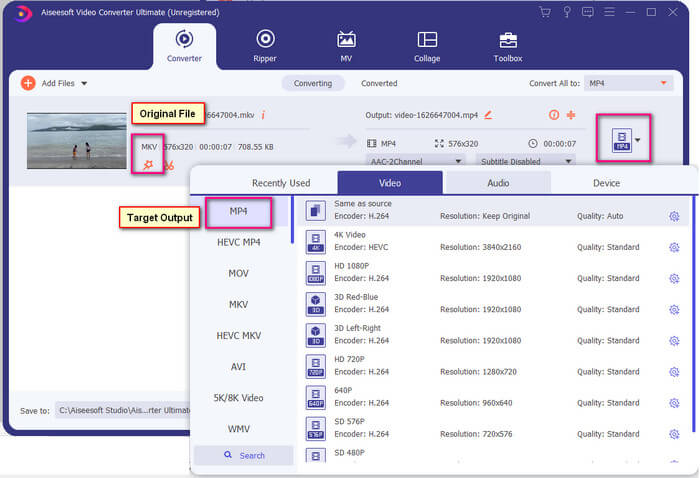
Шаг 4. Когда формат выбран, нажмите кнопку Convert All («Конвертировать всё»), чтобы запустить процесс конвертации. После завершения конвертирования автоматически откроется папка, в которой сохранён файл.
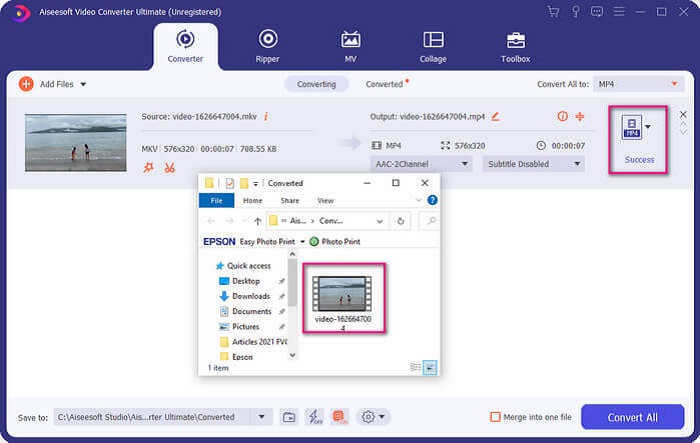
С Ultimate Video Converter есть еще кое-что. Вы можете проверить список преимуществ и недостатков ниже, чтобы узнать о других хороших функциях, которые он предлагает.
● Этот инструмент конвертирует всего за три секунды.
● Он имеет ускоряющую технологию, которая может улучшить преобразованный файл.
● Он поддерживает качество HD.
● Он имеет функции редактирования, такие как добавление фильтров и основных эффектов.
● Вы можете настроить субтитры и звуковую дорожку.
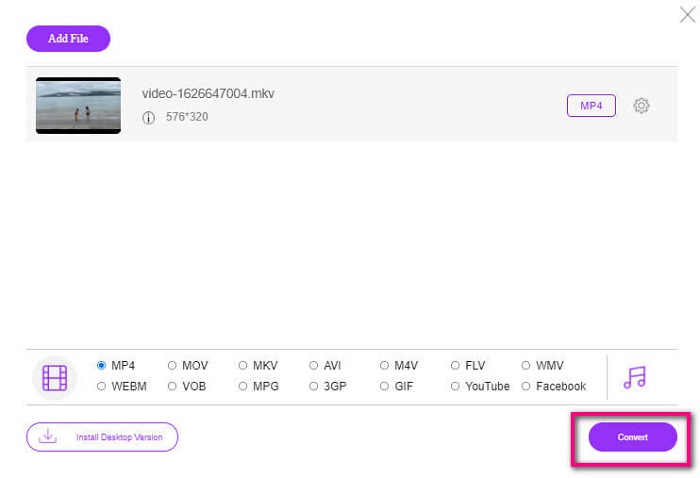
Если вы ищете бесплатный конвертер, можете также рассмотреть FVC Free Online Video Converter. Хотя он может быть не таким мощным, как Ultimate Video Converter, он всё же способен с ним соперничать. Безусловно, он может конвертировать файл и сделать его совместимым с Plex или DivX. Всё, что вам нужно сделать, — это…
Шаг 1. Запустите инструмент, перейдя на его официальную страницу по ссылке в описании.
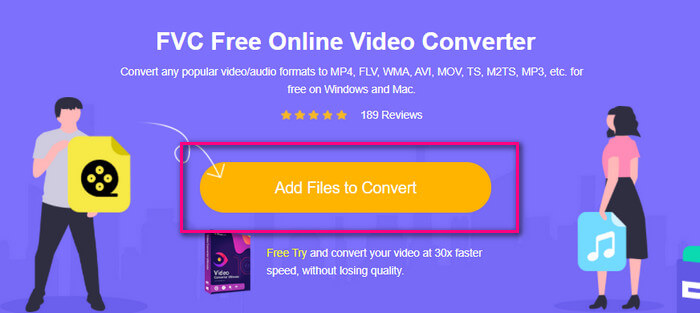
Шаг 2. Загрузите видео, нажав Add Files to Convert («Добавить файлы для конвертации»).
Шаг 3. Измените формат, выбрав нужный вариант, щёлкнув по соответствующему кружку ниже.
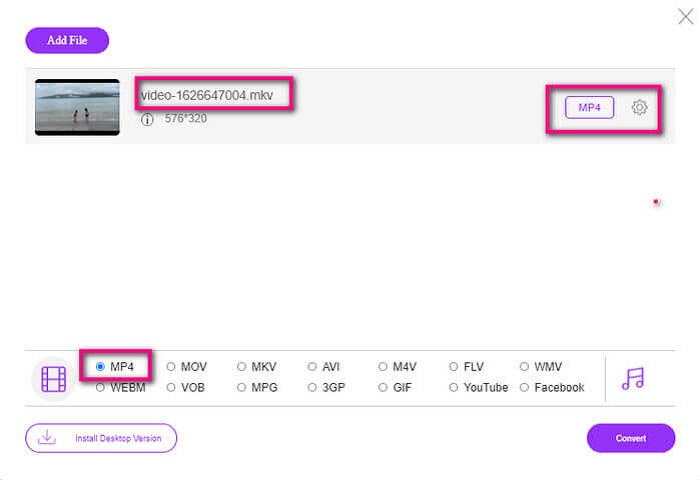
Шаг 4. Наконец, нажмите кнопку Convert («Конвертировать») и выберите папку, в которую хотите сохранить файл. Затем нажмите Okay («ОК»). Вы можете нажать на значок Folder («Папка»), чтобы просмотреть конвертированный файл.
Дополнительная литература
Воспроизведение MKV в Windows Media Player
Часть 4. Дополнительная информация о воспроизведении файлов MKV на PS4
Сколько стоит PS4?
Рыночная розничная цена в США составляет 399,99 долларов США, а в Канаде - 399,99 канадских долларов. Цены могут отличаться в зависимости от розничной цены в вашей стране.
Есть ли возможность играть в CC или Close Caption MKV на PS4?
Да, такая функция есть. Она находится в разделе Настройки специальных возможностей. Путь такой: откройте на PS4 меню Settings ('Настройки'), далее Accessibility («Специальные возможности»), а затем выберите Display Closed Captions («Отображать субтитры/скрытые субтитры»). После этого нажмите Options («Параметры»), чтобы активировать функцию скрытых субтитров.
Если PS4 поддерживает MKV, почему мои файлы не воспроизводятся?
Как упоминалось выше, вам необходимо убедиться, что файл MKV соответствует стандарту проигрывателя, который вы используете. Вам просто нужно проверить требования PS4 или другого сервера потокового мультимедиа. Большинство медиа-серверов также имеют классификацию для воспроизведения файлов MKV.
Какие форматы поддерживает PS4?
PS4 поддерживает несколько форматов файлов. Но вы заметите, что большинство форматов не сжаты и содержат большой файл. Хотя он также поддерживает несжатые файлы, такие как Mp4. Между тем, вот список форматов, о которых мы говорим: MKV, AVI, MPEG-2 PS, MPEG-2 TS, AVCHD, а также XAVC и MP4.
Заключение
В заключение, есть много способов прямо или косвенно воспроизводить файлы MKV на PS4. Были перечислены наиболее часто используемые среды. DivX Stream Server и Plex - это лишь некоторые альтернативы, которые вы можете использовать. Вместо этого настоятельно рекомендуется преобразовать файл, чтобы избежать хлопот и слишком длительного процесса.
-
 [Решено] VLC Player не воспроизводит MKV, как это исправить
 Поддерживает ли проигрыватель VLC файлы MKV? Почему VLC не воспроизводит MKV? В этом посте представлены 4 полезных совета по исправлению VLC-плеера, который не воспроизводит файлы MKV.
-
 Как воспроизводить файлы MKV на iPad 2025
 Как воспроизводить файлы MKV на iPad 2? Могу ли я конвертировать MKV в MP4 для воспроизведения на iPad Pro / Air / 2? В этом посте рассказывается о 2 простых способах играть в MKV на iPad.
-
 Как загрузить кодек MKV в проигрыватель Windows Media для плавного воспроизведения
 Не удается воспроизвести видео MKV в проигрывателе Windows Media? Вы можете бесплатно скачать кодек MKV для Windows Media Player. Напротив, конвертируйте MKV, чтобы его можно было воспроизводить в проигрывателе Windows Media.
