


 Видео конвертер Ultimate
 Устройство записи экрана
 Видео ремонт
 Безопасная загрузка
7 бесплатных инструментов для восстановления видео: лучшие инструменты для восстановления видеофайлов
Ваши дорогие видеофайлы страдают от сбоев, проблем с воспроизведением или повреждений? Не переживайте: существует решение, которое не стоит вам ни копейки. Добро пожаловать в мир бесплатных инструментов для восстановления видео — ваш ключ к восстановлению и возвращению к жизни повреждённых видеозаписей. Мы подробно рассмотрим возможности этих программных «самоцветов» и покажем, как без усилий спасти ваши ценные воспоминания. Получите эксклюзивный доступ к 7 лучшим бесплатным программам для восстановления видео в сети уже сегодня. Не просто пролистайте — внимательно прочитайте до конца.

Часть 1. 3 лучших бесплатных программы для восстановления видео (Windows/Mac)
1. Ремонт видео MiniTool
Никогда не говорите меньше, как следует из названия. MiniTool Video Repair может решить одну из самых больших проблем с видео. Никогда вы не сохраняли видео, одновременно экономя свое пространство. Предназначен для ремонта и восстановления поврежденных или поврежденных видеофайлов.
◆ Создано для свободолюбивых пользователей. Это удобное решение позволяет вам легко создавать, редактировать и улучшать свои видео без каких‑либо затрат. Дайте волю творчеству и воплотите свои видеоидеи в жизнь с помощью этого бесценного ресурса.
◆ Восстановление видео с любого устройства. От компьютера до карты SD — с дополнительными возможностями, такими как добавление образца видео, которое программа анализирует и использует данные для восстановления повреждённого файла.
◆ Восстановление нескольких видео за один раз. Экономит ваше драгоценное время и упрощает процесс восстановления.
Шаг 1. Установите программу с сайта Minitool.
Шаг 2. Запустите программу на компьютере и нажмите Add Video(s).
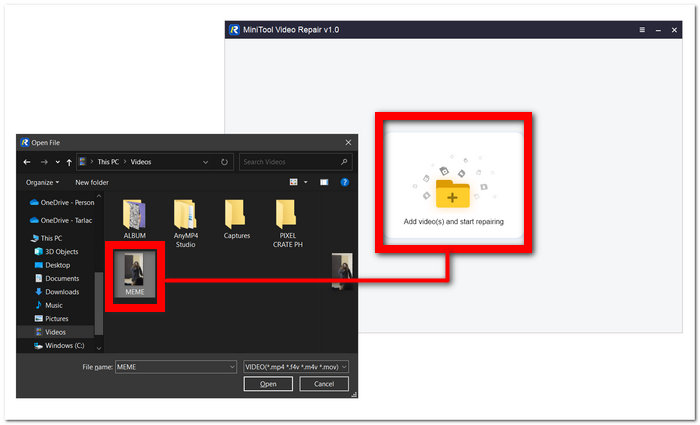
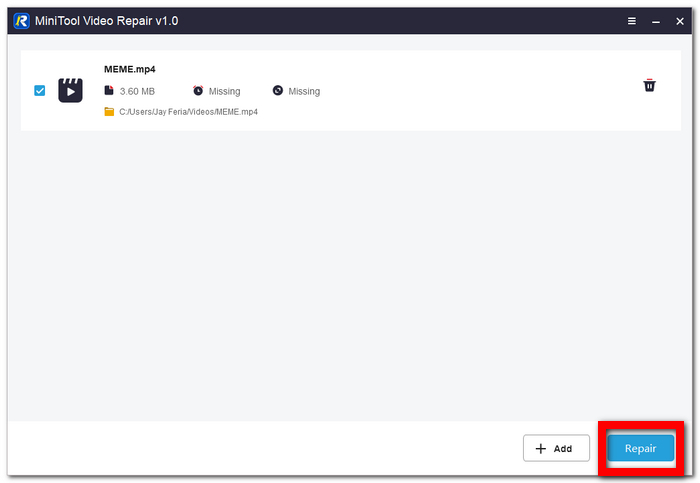
Шаг 3. Загрузите своё видео в программу и нажмите Repair.
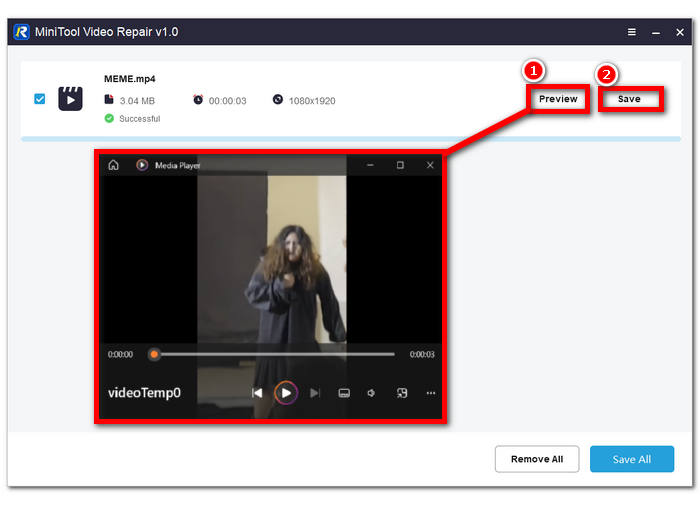
Шаг 4. После восстановления нажмите Preview, чтобы проверить качество, и затем Save, чтобы сохранить восстановленный видеофайл на компьютер.
2. Ремонт видео Aiseesoft
Исправление повреждённых файлов — то, в чём Aiseesoft Video Repair действительно силён. Больше никакого эмоционального разочарования от того, что ваши видео повреждены и не воспроизводятся. Программа использует технологии высокого уровня восстановления, благодаря чему по праву считается одним из лучших решений в сети.
◆ Прощайте, часы раздражения. Оцените «магию» бесшовного восстановления видео уже сегодня. Верните себе время и воспоминания, легко восстанавливая повреждённые ролики с помощью нашего интуитивно понятного ПО.
◆ Магия восстановления по образцу видео. Передовые технологии гарантируют, что ваши дорогие воспоминания или профессиональные проекты будут выглядеть так же впечатляюще, как и эталонный ролик, с сохранением каждой детали и чёткости для комфортного просмотра или презентации.
◆ Надёжные меры безопасности. Мы используем передовые методы шифрования, системы контроля доступа и надёжные протоколы аутентификации для защиты вашей информации. Вы можете быть уверены, что ваши данные надёжно защищены в процессе восстановления, что обеспечивает спокойствие и уверенность в наших услугах.
Шаг 1. Скачайте и установите программу на компьютер. После завершения установки запустите её.
Бесплатная загрузкаДля Windows 7 и новееБезопасная загрузка
Бесплатная загрузкаДля macOS 10.7 и новееБезопасная загрузка
Шаг 2. В главном окне щёлкните кнопку + в левой части интерфейса, чтобы добавить повреждённый видеофайл. Затем добавьте образец видео, нажав кнопку + в правой части интерфейса программы.
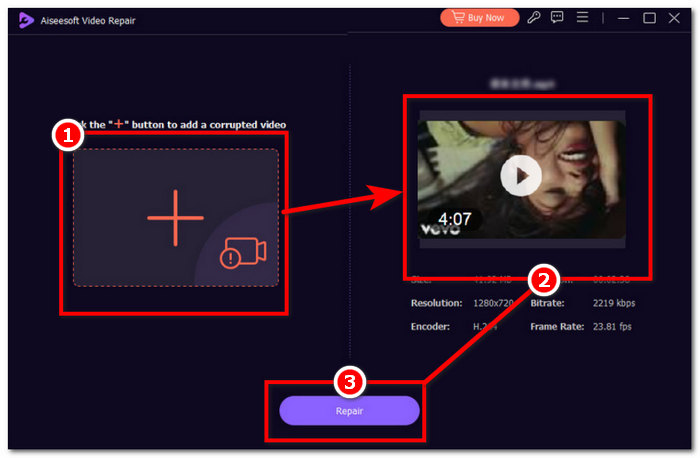
Шаг 3. Нажмите Repair, чтобы запустить процесс восстановления, и когда программа завершит восстановление повреждённого видеофайла, нажмите Preview, чтобы самостоятельно оценить качество.
Шаг 4. Когда результат вас устроит, нажмите Save, чтобы сохранить видео на компьютер.
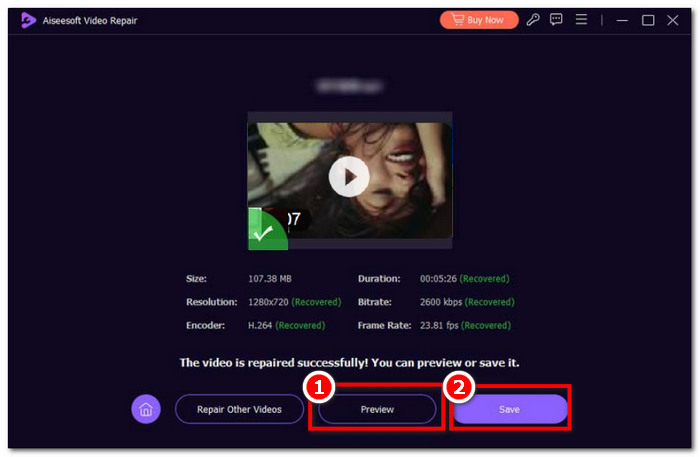
Высокая скорость, сочетания клавиш, надежная безопасность и предварительный просмотр — вот некоторые из ключевых функций Aiseesoft Video Repair. Интуитивное программное обеспечение для быстро меняющихся рабочих задач, обеспечивающее преимущество в качестве.
3. Инструмент для восстановления видео Stellar Phoenix
Поверьте, что Stellar Phoenix Video Repair Tool при использовании может упростить всю вашу работу. Бесплатная программа для восстановления видеофайлов со встроенными инструментами искусственного интеллекта, высочайшим качеством и простым дизайном.
◆ Инструмент с интегрированным ИИ. Профессиональное восстановление утерянных или повреждённых данных требует профессионального ПО, использующего постоянно развивающиеся алгоритмы искусственного интеллекта для максимально тщательного и «пиксельно-точного» ремонта.
◆ Высочайшее качество во всём. Ожидайте высокий процент успешных восстановлений и возможность предварительного просмотра безупречно восстановленного видео с максимальным качеством, частотой кадров и битрейтом, поддерживая привычные вам видеоформаты.
◆ Ещё более гладко и просто. Больше не нужно прилагать массу усилий, используя псевдопрофессиональные программы, которые не оправдывают ожиданий; вместо этого уже сегодня восстанавливайте видео с разных устройств благодаря простому и понятному интерфейсу.
Шаг 1. Перейдите на сайт Stellar Phoenix Video Repair Tool, скачайте и установите программу.
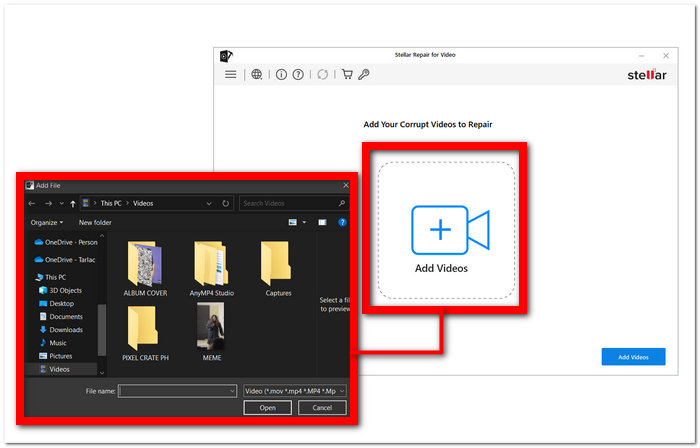
Шаг 2. После установки запустите программу и нажмите раздел Add Videos.
Шаг 3. Выберите повреждённые видео, которые хотите восстановить.
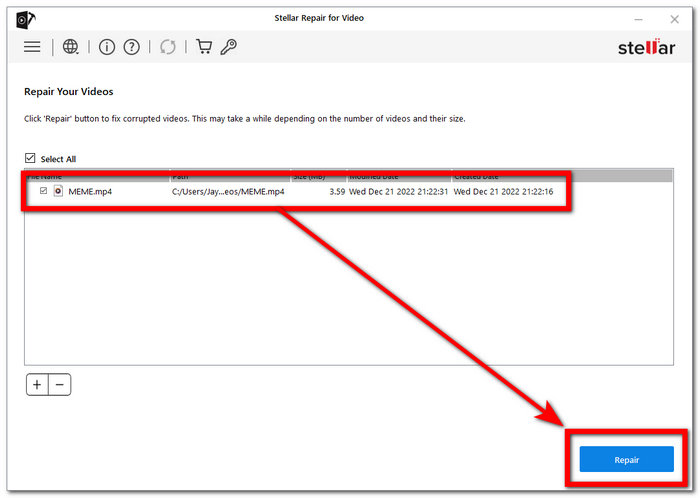
Шаг 4. Нажмите Repair, чтобы наконец начать процесс восстановления ваших видео.
Все профессионально продумано, чтобы максимизировать и раскрыть в вас профессионала при столь низкой стоимости системы. По своей сути FVC Video Repair специализируется на восстановлении видео, поэтому проблем с повреждением больше нет.
Часть 2. Топ-2 бесплатных онлайн-инструмента для восстановления видео
1. Видео ремонта EaseUS
Восстановить поврежденные видео с помощью нашего программного обеспечения очень просто, независимо от того, возникли ли проблемы во время съемки, редактирования, передачи или любого другого процесса. RepairVideo может обрабатывать различные форматы видео, включая MP4, MOV, M2TS, MKV, MTS, 3GP, AVI, FLV, M4V и другие.
◆ 19 лет опыта. Мы успешно восстановили бесчисленное количество видеозаписей — от домашних роликов до профессионального материала — чтобы наши клиенты могли вновь наслаждаться своими дорогими моментами без сбоев и искажений. Доверьтесь нашему огромному опыту и преданности делу, чтобы вернуть ваши видео к жизни, какими бы сложными ни были повреждения.
◆ Восстановление с разных устройств. С ведущих марок камер, таких как Canon, Nikon, Sony, GoPro, DJI и др. Будь то съёмка с мобильного телефона или других видеоустройств, наш инструмент позволит без труда восстановить ценный видеоконтент и сохранить важные воспоминания.
◆ Быстро и просто. Благодаря более чем 120 миллионам восстановленных видео мы гарантируем вам оперативный сервис.
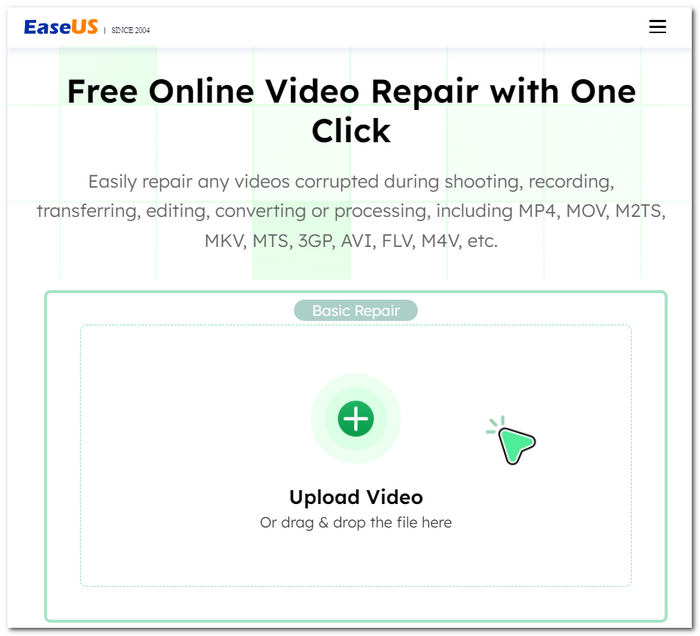
Попрощайтесь с неприятными сбоями видео и проблемами воспроизведения; наше решение поможет восстановить исходное качество ваших видео. Независимо от того, как ваши видео были повреждены, это эффективный способ их восстановления. Наслаждайтесь своими драгоценными воспоминаниями без каких-либо помех — доверьтесь нашему инструменту, и ваши видео будут как новые.
2. iSkysoft Repairit Online
Он поддерживает различные поврежденные форматы видеофайлов, включая MP4, MOV, 3GP и другие. Независимо от того, хранятся ли ваши видео на мобильных телефонах, камерах, картах памяти или компьютерах, наш инструмент легко и эффективно их восстановит.
◆ Профессиональный инструмент восстановления. Стремится сохранить каждую деталь и чёткость. С нашим ПО вы сможете заново пережить дорогие моменты без компромиссов по визуальному и звуковому качеству, каким бы ни было изначальное повреждение файлов. Ваши видео, ваши воспоминания — идеально восстановлены.
◆ Без потери данных видео. Ваши ценные воспоминания и контент остаются нетронутыми по качеству на всём протяжении процесса восстановления. Доверьте нам ваши видео — мы вернём их без ущерба для природной выразительности и чёткости.
◆ Восстановление с широчайшего спектра устройств. От мобильных телефонов и камер до карт памяти и компьютеров. С помощью нашего простого в использовании ПО вы сможете без лишних хлопот восстановить и просматривать свои видео, независимо от того, на каком устройстве они были записаны.
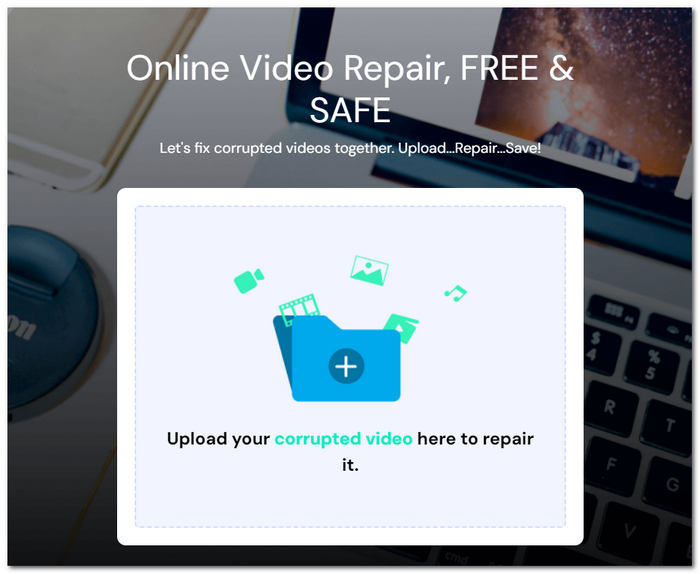
Процесс ремонта беспроблемный; просто загрузите поврежденные видеофайлы, и через несколько минут вы сможете загрузить полностью восстановленные версии. Вы можете быть уверены в безопасности своих данных, поскольку передача файлов защищена 2048-битным зашифрованным соединением, обеспечивающим вашу конфиденциальность и защиту.
Часть 3. Лучшие приложения для восстановления видео для исправления видео на iOS Android
1. Сращивание
Представляем мощное и удобное приложение для улучшения и редактирования видео, совместимое с устройствами Android и iOS.
◆ Простой и понятный интерфейс. Делает процесс улучшения ваших видео до профессионального уровня невероятно лёгким.
◆ Интуитивный набор инструментов. Вы можете без труда обрезать и резать видео, изменять скорость воспроизведения, повышать качество изображения и многое другое, чтобы ваши ролики выглядели и звучали наилучшим образом.
◆ Огромная библиотека музыки без лицензионных отчислений. Позволяет добавить идеальный саундтрек, не только исправляя качество ваших видео, но и делая их ещё более увлекательными и выразительными.
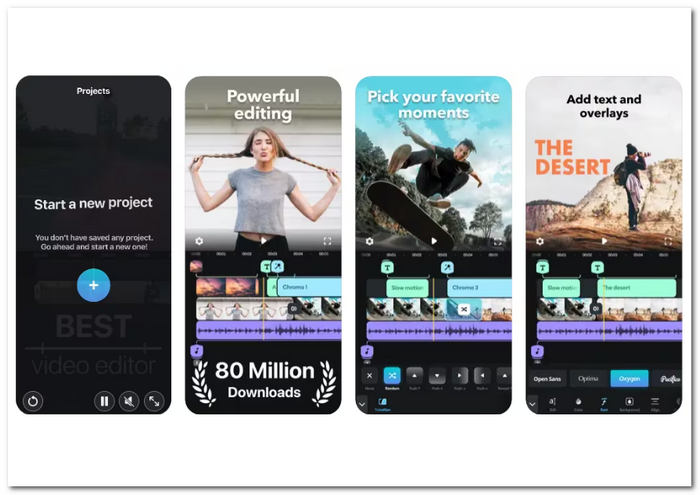
Независимо от того, являетесь ли вы создателем контента, видеоблогером или кем-то, кто хочет улучшить свои заветные воспоминания, Splice предлагает универсальное решение для всех ваших потребностей в редактировании видео. Загрузите приложение прямо сейчас в свой магазин приложений и раскройте весь потенциал своих видеотворений.
2. Резервное копирование Кинемастер
Широко известное приложение для улучшения видео для устройств Android и iOS. Это удобное приложение предоставляет набор инструментов для редактирования, которые позволяют преобразовывать ваши видео.
◆ Набор функций. Направленных на повышение качества видео. Вы можете настраивать яркость, контраст, насыщенность, освещение и многое другое, добиваясь по-настоящему профессионального уровня контента.
◆ Обработка видео в 4K. Обеспечивает максимально высокое разрешение вашего контента.
◆ Лёгкая интеграция с различными платформами. Позволяет загружать видео с YouTube, Instagram и других популярных социальных сетей.
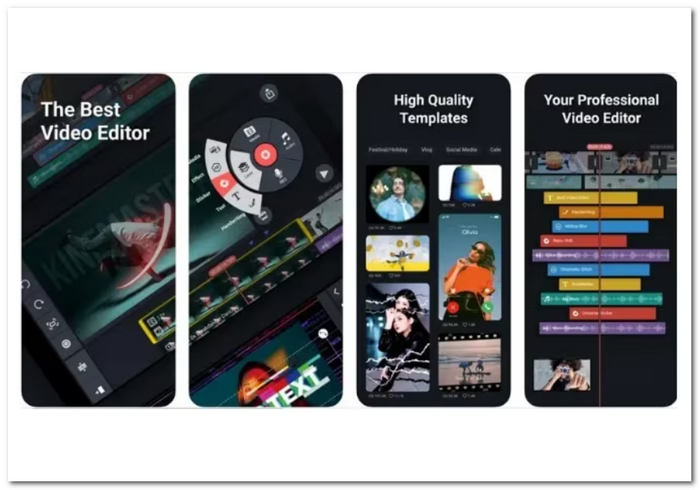
KineMaster позволяет вам улучшить ваш видеоконтент: от обрезки до добавления эффектов, фильтров, наложений и даже покадровой обрезки. Приложение позволяет накладывать видео на слои, предоставляя вам творческую свободу для плавного смешивания нескольких элементов.
Часть 4. Часто задаваемые вопросы о лучшем бесплатном ремонте видео
Является ли Wondershare Video Repair бесплатным?
Программа Wondershare Video Repair не является бесплатной. Обычно вы можете опробовать его возможности с помощью бесплатной пробной версии, но вам может потребоваться лицензия или подписка, чтобы получить полный доступ и возможности.
Есть ли бесплатное приложение для восстановления видео?
Да, существуют бесплатные приложения и инструменты для восстановления видео. Некоторые бесплатные варианты программного обеспечения для восстановления видео включают Splice и KinemasterBackup, как упоминалось ранее. Их можно бесплатно загрузить на устройства Android и iOS, а дополнительные премиум-функции можно получить по подписке.
Действительно ли работают бесплатные инструменты для восстановления видео?
При некоторых проблемах с видео могут оказаться весьма полезными бесплатные программы восстановления видео. Они очень полезны при распространенных проблемах, включая незначительные сбои воспроизведения, проблемы с синхронизацией и повреждение файлов. Тем не менее, степень разрушения видеофайла может определять его эффективность. При более сложных и серьезных проблемах могут потребоваться профессиональные услуги по ремонту видео или приобретенное программное обеспечение с расширенным функционалом. Прежде чем выбирать премиум-варианты, всегда полезно протестировать бесплатный инструмент, чтобы узнать, сможет ли он решить проблемы с видео.
Заключение
Бесплатные инструменты восстановления видео — настоящее спасение для всех, у кого есть повреждённые или испорченные видеофайлы. Они предоставляют экономичный способ вернуть ваши ценные воспоминания без обращения к платным специалистам. Благодаря разнообразию приложений и утилит вы можете выбрать то, которое лучше всего соответствует вашим задачам и предпочтениям.
Не позволяйте проблемам с воспроизведением портить впечатление от просмотра. Попробуйте один из этих бесплатных инструментов для восстановления видео уже сегодня и наслаждайтесь своими роликами так, как они и задумывались, — безупречными и незабываемыми.
-
 Как легко исправить ошибку «Невозможно воспроизвести видео 5»
 Случалось ли вам воспроизводить одно из загруженных видео, но вас прервало сообщение об ошибке 5 «Невозможно воспроизвести видео»? Вот все, что вам нужно знать.
-
 Мои видео не воспроизводятся. Что мне делать, чтобы это исправить?
 Застряли с видео, которые не воспроизводятся, и вы не знаете, как их исправить? Вы на правильном пути, чтобы решить свою проблему. Вот все, что вам нужно знать.
-
 5 рабочих решений 100% для исправления видео, которое не воспроизводится на iPad
 Ваши видео не воспроизводятся на iPad? Вот пять решений, которые помогут вам избавиться от этой проблемы, и тогда вы сможете легко наслаждаться любимыми видео на телефоне.
