


 Видео конвертер Ultimate
 Устройство записи экрана
 Видео ремонт
Добавьте свое волшебство в видео с помощью видеоредакторов Mac
В наши дни обмен видео привлёк гораздо больше внимания и популярности, чем когда‑либо. По сути, сегодня платформы для обмена медиа уже стремительно захватили весь мир, и, кажется, ничто не может их остановить. Когда нас одолевает скука, мы развлекаем себя, просматривая или создавая видео. Поэтому спрос на видеоредакторы также вырос — чтобы улучшать ваши ролики и делать их более привлекательными. Но если вы откроете рынок и начнёте искать лучший видеоредактор для Mac, вариантов окажется очень много. Так что вместо того, чтобы наугад пробовать разные инструменты, мы собрали для вас несколько подходящих решений. Продолжайте в том же духе, пока мы делаем поиск редакторов проще, чем когда‑либо. Без лишних промедлений перейдём к лучшим программам, которые дают впечатляющие результаты и оснащены функциями редактирования, на которые можно положиться.

Часть 1. Феноменальный видеоредактор премиум-класса для Mac (платная версия)
Этот феноменальный конвертер уже готов помочь вам и стать первой ступенью в видеомонтаже. FVC Video Converter Ultimate отлично справляется и с конвертированием, и с редактированием. Этот видеоредактор для ПК и Mac уже помогает пользователям, которым сложно улучшить свои видео и аудио. Кроме того, это полнофункциональный редактор, то есть он предлагает продвинутые возможности, которых нет у многих конкурентов, — и всё это с понятными и точными инструкциями. Если вы хотите получить исключительный опыт монтажа, даже будучи новичком, попробуйте этот инструмент. Просто следуйте шагам ниже, подготовленным для тех, кто любит делать свои ролики заметнее и лучше, чем у других.
Шаг 1. Нажмите кнопку скачивания для Mac и установите программу. Выполните быструю настройку и запустите её.
Бесплатная загрузкаДля Windows 7 или более поздних версийБезопасная загрузка
Бесплатная загрузкаДля MacOS 10.7 или более поздних версийБезопасная загрузка
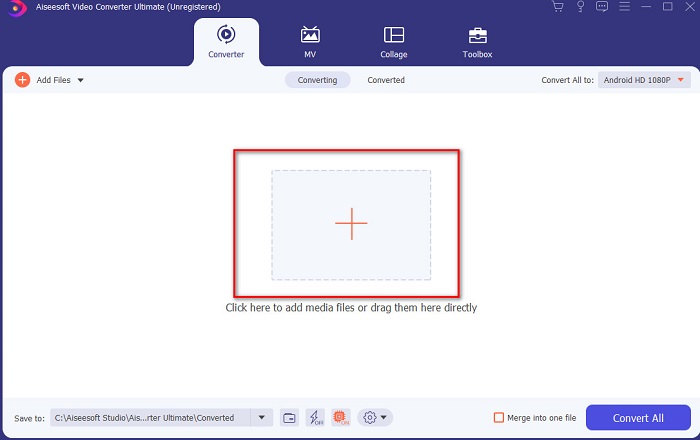
Шаг 2. Когда Ultimate Converter уже запущен в вашей системе, нажмите кнопку Add Files или значок «+» по центру, чтобы добавить видеофайл, который вы хотите отредактировать.
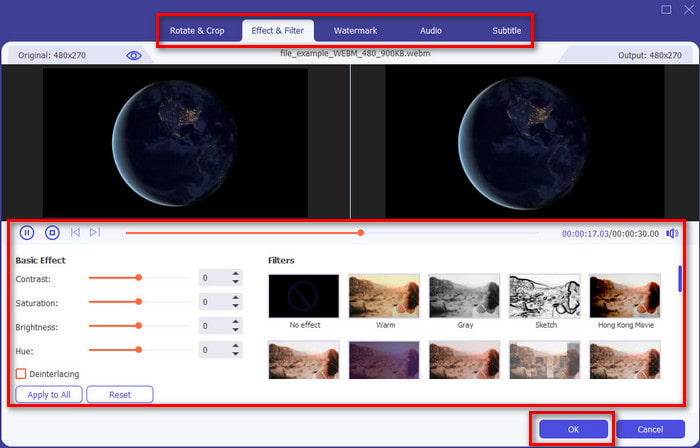
Шаг 3. Затем нажмите кнопку с волшебной палочкой (wand), чтобы перейти к редактированию и «сотворить магию» с видео. Вы можете применить к ролику различные опции — фильтры, эффекты, обрезку кадра и многое другое. Чтобы сохранить внесённые изменения, нажмите OK.
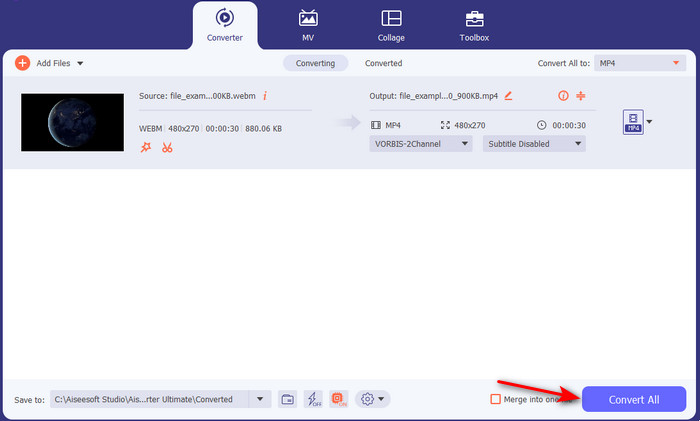
Шаг 4. Чтобы экспортировать отредактированное видео, нажмите Convert All. и подождите некоторое время, пока процесс завершится.
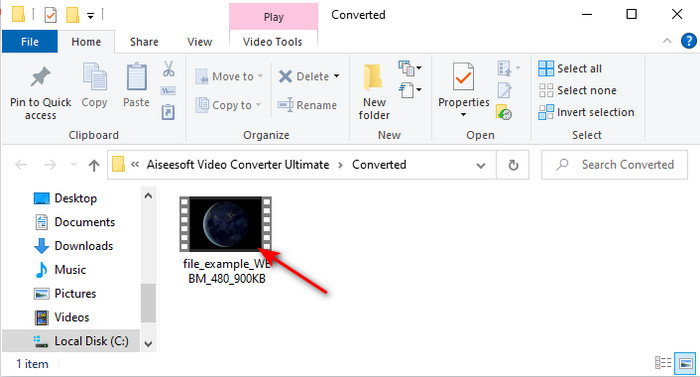
Шаг 5. На экране откроется папка с вашим отредактированным видео. Нажмите на файл, чтобы просмотреть его. Если вы хотите объединить его с другим роликом, загляните в потрясающий модуль склейки видео в разделе Toolbox.
Часть 2. Другие полезные видеоредакторы для Mac (бесплатная версия и предустановленный инструмент)
1. iMovie
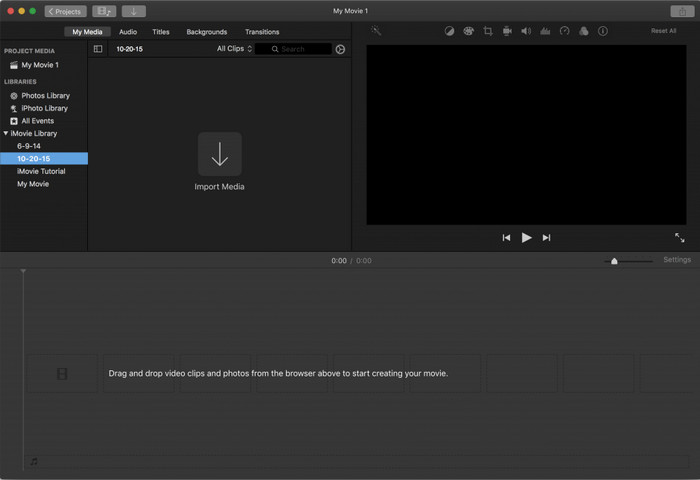
iMovie — это предустановленный бесплатный видеоредактор для Mac, так что если у вас ограниченный бюджет, вы можете воспользоваться именно им. Хотя этот инструмент предоставляет средний набор функций для монтажа, ему всё же не хватает продвинутых возможностей, таких как трекинг движения. Тем не менее это хороший редактор — не лучший, но вы можете бесплатно использовать его на Mac. Если же вы хотите получить по‑настоящему профессиональный результат, iMovie скорее должен быть «запасным вариантом», так как он предоставляет лишь базовые функции для простого монтажа. Зато он уже предустановлен в системе, так что вам не придётся скачивать сторонние приложения для редактирования.
Плюсы
- Легкий для понимания инструмент.
- Собственный редактор для пользователей Mac.
Минусы
- Ему не хватает большинства продвинутых функций, которые нужны профессионалу.
- Не лучший инструмент, если вы хотите поделиться качественным видео.
2. Авидемукс
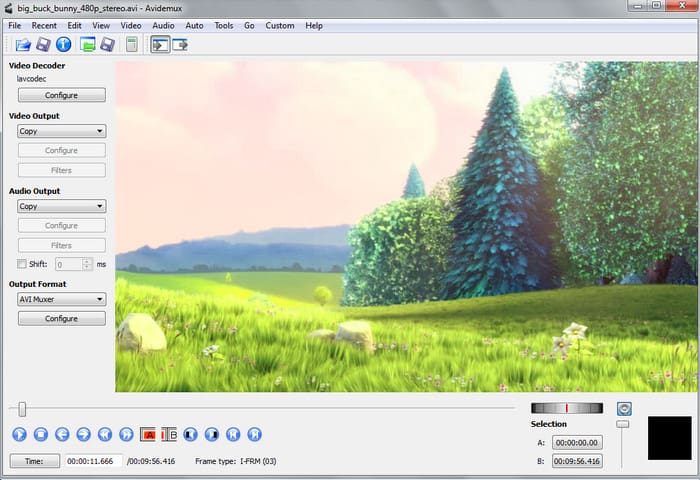
Avidemux — это видеоредактор для Mac с поддержкой замедленного воспроизведения, который также может быть довольно эффективным. Он предлагает простые функции редактирования, однако по возможностям iMovie даёт значительно больше, чем этот редактор. Кроме того, когда вы попадаете на главную страницу Avidemux, не рекомендуется вводить о себе какие‑либо данные, поскольку защита там слабая. Если вы попытаетесь указать личную информацию, например данные банковского счёта, существует высокий риск взлома. Тем не менее программа обеспечивает вполне приличное редактирование для нужных вам видео, но для профессионального уровня это скорее «удовлетворительный» вариант.
Плюсы
- Редактирование функций в порядке.
- Он поддерживает множество типов файлов для редактирования.
Минусы
- Не лучший выбор, если вы профессионал в редактировании, потому что в нем отсутствуют расширенные функции.
- Интерфейс инструмента тоже такой унылый.
3. Kdenlive
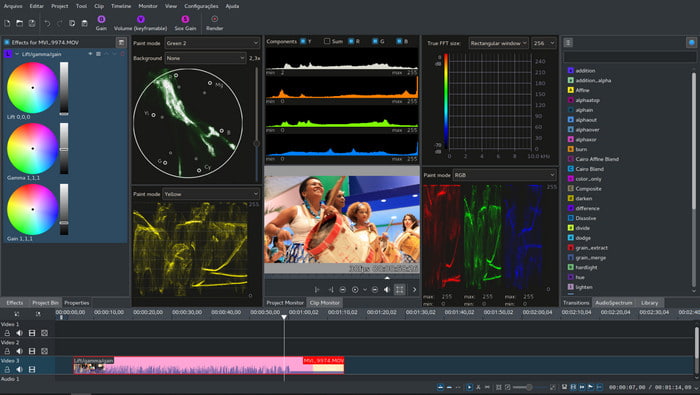
Ещё один видеоредактор для Mac, который вы можете установить на свой компьютер, — это Kdenlive. Этот инструмент обладает всеми ключевыми возможностями, которые должен иметь редактор. Однако при работе с ним всё ещё могут возникать незначительные и серьёзные ошибки или сбои. На ПК этот инструмент использовать удобнее, чем на Mac, поскольку именно на компьютерах у него больше сторонников. На Mac, как правило, доступна более старая версия программы, но она всё же функционирует. На первый взгляд из‑за ошибок или недостатка некоторых функций редактирования может показаться, что этот инструмент не особенно полезен, но всё же вполне стоит разобраться, как с ним работать.
Плюсы
- Он поддерживает все известные платформы.
- Не нужно платить, потому что это бесплатно.
Минусы
- У видео, которые вы здесь редактируете, мало шансов выделиться.
- Имеет множество технических проблем, которые еще не исправлены.
Часть 3. Часто задаваемые вопросы о Mac Video Editor
Как объединить разные видео в iMovie?
Если вы хотите объединить два или больше видео, снятых отдельно на iPhone, попробуйте использовать iMovie, чтобы 'слиять' их в один ролик. Чтобы узнать больше о том, как работает слияние видео в iMovie, перейдите по этой ссылке.
Почему мы редактируем наши видео?
Монтаж видео известен как пост-продакшн, когда вы улучшаете свое видео и удаляете ненужные клипы. Этот шаг очень важен, потому что он поможет вашему видео быть более впечатляющим и выделяющимся, чем другие. Даже если у вас потрясающий контент, если ваше отредактированное видео не так хорошо, то другие будут уделять ему меньше внимания.
Как редактировать гифки на Mac?
Хотя iMovie может редактировать видео, с GIF‑анимацией он не справляется. Поэтому мы подобрали несколько отдельных инструментов, которые можно использовать для редактирования GIF на Mac. Вот топ‑9 программ для редактирования GIF, доступных вам на выбор.
Заключение
Подводя итог, теперь вы можете заниматься монтажом самостоятельно, используя инструменты, перечисленные в этой статье. Хотя не все из них обеспечат вам феноменальные возможности редактирования, которых вы, возможно, ждёте, к Video Converter Ultimate это не относится — у него действительно огромный потенциал. Поэтому, если вы хотите произвести впечатление на зрителей ваших роликов, воспользуйтесь этим универсальным инструментом и создайте по‑настоящему впечатляющий результат.
-
 Конкретное руководство - как объединить две аудиодорожки в Audacity
 Audacity пользуется репутацией редактора аудио. Вы загрузили Audacity, но не знаете, как объединить звуковые дорожки в Audacity? Этот пост расскажет вам, как объединить треки в Audacity.
-
 2 эффективных метода объединения файлов MPEG для объединения старых телесериалов
 Если у вас есть старые телесериалы в формате MPEG, вы можете узнать больше о 2 эффективных методах объединения файлов MPEG в один фильм в соответствии с вашими требованиями.
-
 [Обновлено в 2025 году] 9 лучших редакторов GIF для ПК, Mac, iOS и Android
 Хотите добавить индивидуальности в свой GIF-файл, чтобы он стал более выразительным? Продолжайте читать эту статью, чтобы узнать, как редактировать и выбрать лучший инструмент для работы.
