


 Видео конвертер Ultimate
 Устройство записи экрана
 Видео ремонт
Самый надежный редактор метаданных MP4 для простого добавления, редактирования и удаления метаданных MP4
Теги MP4 помогают упорядочивать и управлять файлами, сортируя их по метаданным. Именно поэтому многие пользователи ищут идеальный редактор метаданных, который упростит эту задачу. К счастью, сегодня мы отобрали лучшие редакторы тегов для работы с файлами MP4, доступные на рынке. Основываясь на глубоком исследовании, давайте посмотрим, какой редактор метаданных MP4 стоит использовать, чтобы правильно организовать файлы.

Часть 1. 4 лучших бесплатных редактора тегов MP4, доступных в Интернете и офлайн
VLC Media Player
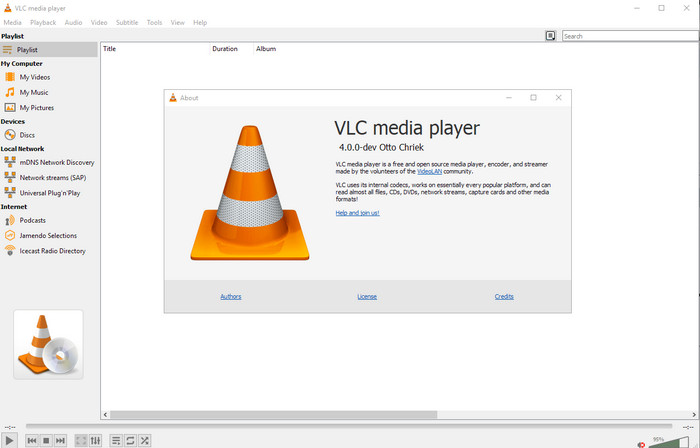
Доступно для: Windows, Mac и Linux
Первым в нашем списке идёт лучший видеоплеер, но если вам нужен бесплатный редактор метаданных MP4, возможно, стоит обратить внимание на него. VLC Media Player даёт вам бесплатную возможность редактировать или удалять теги, привязанные к вашим файлам MP4. С помощью этого инструмента вы можете легко изменять метаданные файла, такие как название, авторские права, жанр, исполнитель, дата, время и многое другое. Хотя многие пользователи утверждают, что редактировать метаданные здесь просто, другие с этим не согласны. Они считают работу с программой запутанной и неэффективной по сравнению с другими редакторами тегов. Тем не менее, если вы хотите безопасный инструмент для загрузки, который уже многократно доказал свою надёжность, попробуйте эту программу.
Редактор тегов Amvidia
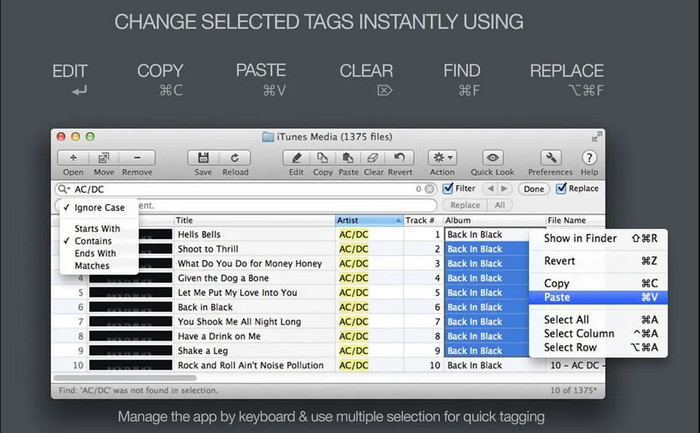
Доступно для: Mac
Ещё один редактор метаданных MP4 для Mac — это Amvidia Tag Editor. Если вам нужно добавить метаданные, обложки изображений, теги для iTunes или изменить имя файла, всё это можно сделать здесь; если требуется пакетное тегирование, этот инструмент вам также поможет. Кроме того, это бесплатное для загрузки ПО поддерживает значительное количество медиаформатов для импорта в программу, но её необходимо установить. Из‑за подробного набора функций новичкам может потребоваться время, чтобы освоиться с инструментом, так как нужно пройти несколько шагов перед добавлением метаданных. К тому же интерфейс программы устаревший, как и у VLC.
ТигоТаго
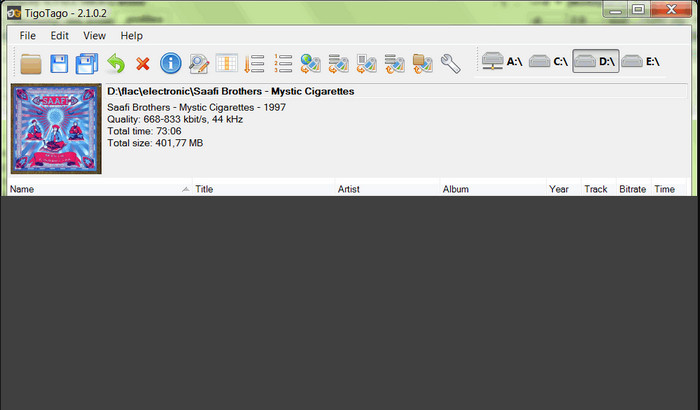
Доступно для: Windows
TigoTago — ещё один теггер метаданных MP4, который вы можете бесплатно использовать в Windows. Если вам нужно отредактировать конкретные данные или теги файла MP4, скачайте программу и с лёгкостью изменяйте теги MP4 по одному. С этим инструментом вы можете заполнять базовые теги файла, такие как название, альбом, дорожки и исполнитель, а также добавлять расширенные теги, например, текст песни, комментарии и т. д. Если сравнивать эту программу с VLC, можно сказать, что она значительно лучше, так как делает приоритетом именно редактирование тегов. Хотя она и превосходит медиаплеер по функциям редактирования тегов, инструмент всё ещё нуждается в улучшении, включая его графический интерфейс и дополнительные возможности.
InstantD3 — бесплатный онлайн-редактор тегов ID3
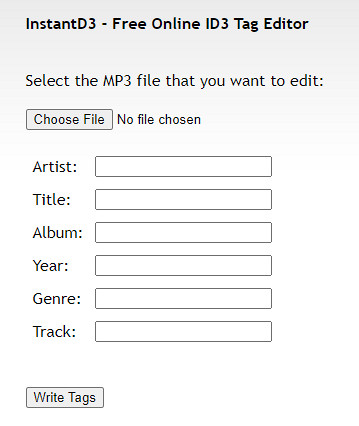
Доступно на: веб‑версии
Если вы не хотите загружать программное обеспечение, вы можете получить доступ к этому онлайн-редактору видеотегов MP4, InstantD3 - бесплатный онлайн-редактор тегов ID3. Хотя этот инструмент доступен в Интернете, он не может искать метаданные в Интернете, чтобы автоматически применять теги, которые вам нужны, к вашему MP4. Инструмент предлагает интуитивно понятный интерфейс, позволяющий пользователям легко добавлять теги к своим аудиофайлам. Поскольку инструмент бесплатный, на веб-сайте есть реклама, но мы должны предупредить вас, что реклама на его веб-сайте не подходит для лиц младше 18 лет. Кроме того, доступ к инструменту на свой страх и риск; после того, как вы зашли на веб-сайт инструмента, ваше интернет-соединение не защищено.
Часть 2. Лучший видеоредактор для добавления, редактирования и удаления метаданных на Windows и Mac
Доступно для: Windows, Mac и Linux
Описание вышеуказанных редакторов метаданных MP4 вполне достойное, однако FVC Video Converter Ultimate — это мощный редактор метаданных, который вам действительно нужен для редактирования или удаления этих данных. Этот инструмент предлагает лучшие функции редактирования, которыми легко пользоваться, при этом результат остаётся на профессиональном уровне. В отличие от упомянутых выше программ, поддерживающих ограниченное количество медиаформатов, с этим инструментом вы можете загружать MP4, MOV, MKV, FLV, AVI и более 1000 других форматов и быстро менять метаданные у всех этих файлов. Разве не впечатляет, на что способен этот инструмент? Если вас заинтересовала эта замечательная программа, вы можете легко следовать нашему пошаговому руководству, чтобы редактировать, добавлять и удалять теги в ваших файлах MP4.
Шаг 1. Сначала нажмите кнопку загрузки, чтобы скачать редактор тегов MP4 на Mac или Windows. После щелчка по файлу следуйте инструкции по установке и откройте программу.
Бесплатная загрузкаДля Windows 7 или более поздних версийБезопасная загрузка
Бесплатная загрузкаДля MacOS 10.7 или более поздних версийБезопасная загрузка
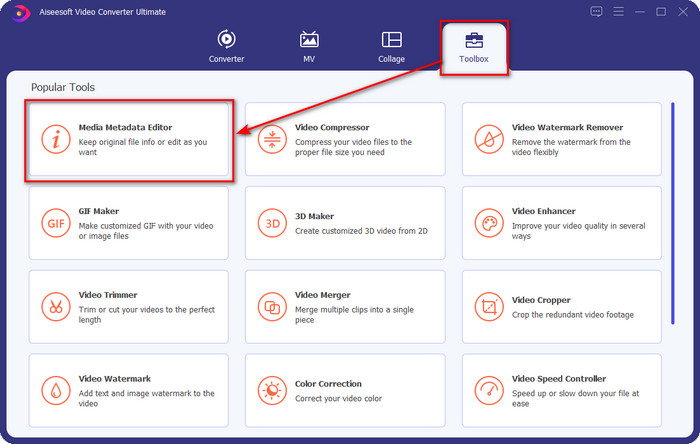
Шаг 2. Когда редактор будет открыт, выберите раздел Ящик инструментов (Toolbox) из трёх доступных; в нём нажмите Media Metadata Editor (Редактор медиа‑метаданных).
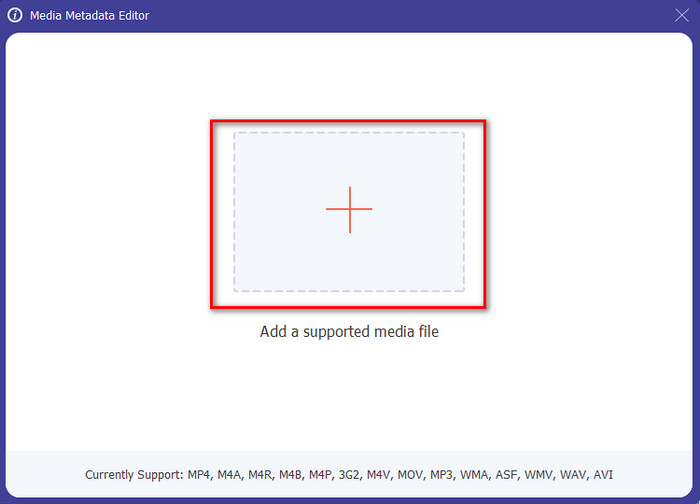
Шаг 3. Чтобы загрузить файл MP4, нажмите кнопку +, найдите .mp4 в папке, которая откроется, и нажмите Open, чтобы успешно добавить файл.
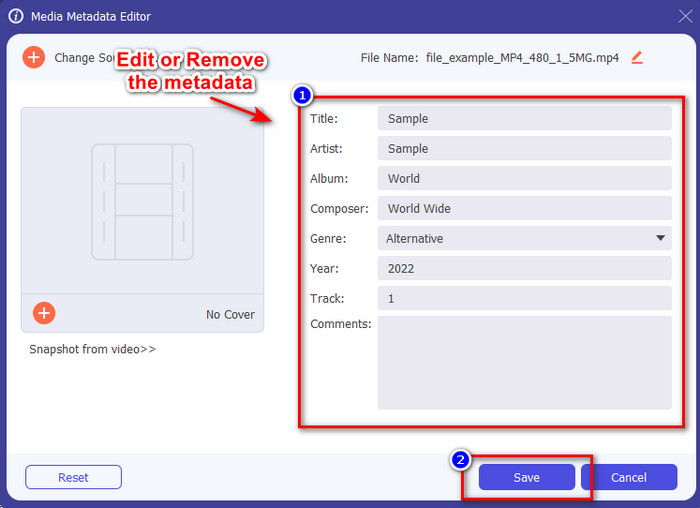
Шаг 4. Добавляйте, удаляйте и изменяйте информацию в текстовом поле, которое появится на экране; заполните его по своему усмотрению. Чтобы сохранить изменения, внесённые в теги MP4, нажмите кнопку Save. Вы сами убедитесь, что это проще простого, если выберете этот универсальный редактор.
Связанный материал:
Лучший редактор музыкальных тегов
Лучший редактор тегов аудиокниг
Часть 3. Часто задаваемые вопросы о редакторе тегов MP4
Как проверить метаданные MP4 в Windows?
Если вы хотите проверить метаданные вашего файла MP4, выполните следующие действия. Сначала найдите файл .mp4, нажмите правую кнопку мыши, перейдите в «Свойства» и, наконец, нажмите «Подробности». Вся информация, которая вам понадобится о ваших метаданных, находится в этом списке. Поэтому, если вы хотите отредактировать их в соответствии с вашими желаниями, выберите инструмент, который вы должны использовать выше.
Где я могу посмотреть файлы MP4?
Большинство медиаплееров поддерживает файлы MP4, так как это стандартный формат видеофайлов. Но возникает вопрос: где можно смотреть видео MP4 в высоком разрешении? В таком случае вам стоит нажать эту ссылку. Всё, что вам нужно знать, содержится в этой статье.
Как выбрать лучший редактор тегов MP4?
Вам нужно помнить несколько вещей, прежде чем выбрать редактор метаданных MP4, который вы будете использовать; если вы не знаете, что это такое, вы можете положиться на эти стандарты. Во-первых, убедитесь, что редактор метаданных поддерживает формат, который у вас есть; не все редакторы поддерживают широкий диапазон форматов. Использование редактора метаданных, который не поддерживает ваш формат, было бы бесполезным. Во-вторых, убедитесь, что инструмент прост в использовании; если вы новичок в редактировании метаданных, убедитесь, что выбранный вами инструмент не слишком сложен для изучения. Наконец, убедитесь, что это безопасно для использования; если он загружается или находится в Интернете, вам необходимо знать, безопасно ли его использовать. Прежде чем использовать редактор, убедитесь, что вам нужно следовать всем этим простым стандартам, чтобы иметь только самое лучшее.
Заключение
Редакторы метаданных MP4, которые мы включили в эту статью, помогут вам быстро редактировать, добавлять и удалять метаданные в ваших файлах MP4. Благодаря подробным обзорам инструментов, приведённым выше, мы можем сравнить их и понять, какой вариант лучше всего подходит под наши задачи по редактированию тегов MP4. Если вы всё ещё не решили, какой инструмент использовать, мы предлагаем вам лучшее решение из списка — FVC Video Converter Ultimate. Этот потрясающий инструмент удовлетворит ваши потребности; единственный способ получить его — скачать программу. Поэтому нажмите кнопку загрузки, следуйте приведённым нами шагам и наслаждайтесь редактированием тегов без лишних усилий.
-
 5 самых простых способов удалить метаданные в любых медиафайлах
 Как удалить метаданные? Трудно ли это сделать? Нужно ли покупать или использовать бесплатный инструмент для удаления тегов? На все эти вопросы есть ответы в этой статье.
-
 5 лучших экстракторов метаданных, доступных онлайн и офлайн [2025]
 Вы можете найти несколько экстракторов метаданных на рынке, но сегодня мы выбираем только пять наиболее популярных экстракторов тегов в зависимости от аудитории.
-
 5 лучших редакторов метаданных видео 2025 года [Непредвзятый обзор]
 Хотите просмотреть метаданные видео? Если да, прочитайте подробности ниже, чтобы полностью понять тему и узнать, какой инструмент подходит вам лучше всего.
