


 Video Converter Ultimate
 Skärminspelare
 Video reparation
 Säker nedladdning
Hur konverterar du MP4 till WMV för Mac / Windows
Before introducing a suggested list of MP4 to WMV converters, let me ask you something about video formats.
To save digital video data on a computer system, we need to use a file format designed for video. So what kind of video formats do you know? MP4? WMV? FLV? AVI? Well, these truly are commonly used video formats while storing digital video data. But have you ever wondered why are there so many video file formats? What’s the difference between MP4 and WMV?
Generellt är MP4 kompatibel med nästan alla typer av enheter på marknaden, vilket innebär att du kan spela MP4 överallt, även på din dators eller telefons standardvideospelare. Men om du använder Windows-enheter tror jag att WMV kan tjäna dig bättre. Inte bara för att den är utvecklad av Microsoft utan för att den kan spara HQ-videon i ett litet skivutrymme.
So today you’re gonna learn how to change a MP4 file to WMV with the best video converters that we recommend.

Del 1. Hur man konverterar MP4 till WMV online gratis
Förutom att installera klassisk skrivbordsprogramvara, är det nu också ett alternativ att använda webbaserade omvandlare. Även om det är enkelt är många online-omvandlare något långsamma under konverteringen. Vissa begränsar till och med storleken och kvantiteten på filerna du laddar upp och kan inte garantera kvaliteten på de utgående videorna.
Thus, we here introduce you FVC Free Online Video Converter, a free, fast and efficient video converter which can assist you in converting a bunch of videos or audio losslessly.
As a multifunctional free online MP4 to WMV converter, FVC Video Converter supports almost every type of video formats. You can convert large MP4 files to/from MKV, MOV, WMV, AVI, TS, etc. You can also edit your video according to your need. It is a breeze to adjust video bitrate, sample rate, frame rate, resolution and volume on FVC. And there’s no watermark on your video after converting.
Nu kan du oroa dig för att det med alla dessa funktioner kan vara svårt att förstå hur man använder den här omvandlaren. Faktum är att sanningen är helt motsatt. Det tar bara några steg för dig att behärska denna MP4 till WMV-omvandlare.
Step 1. Click here to navigate to FVC Free Online Video Converter. Then Click Add Files to Convert to download FVC Launcher first.
Ladda ner Skrivbordsversionen för att konvertera filer i batch.
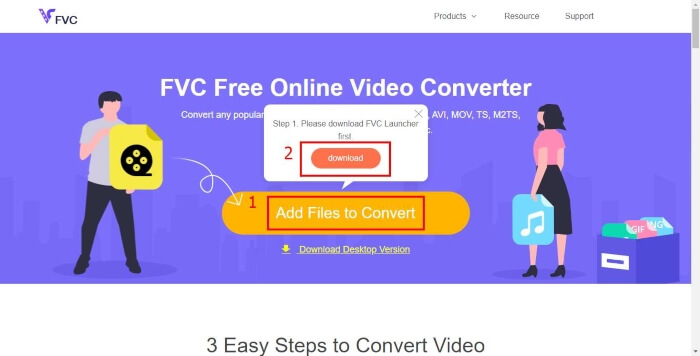
Step 2. After installing the launcher, the Open File window will pop up. Just find the MP4 file you want to change.
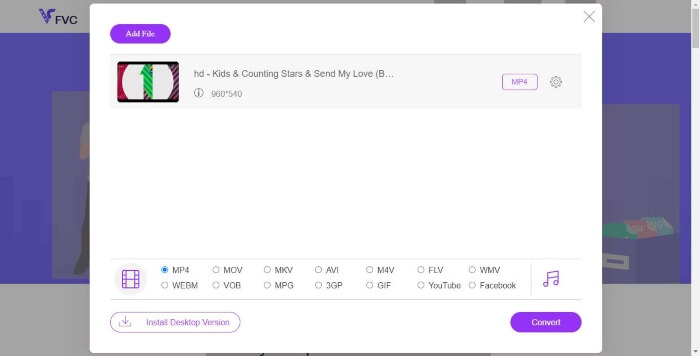
Step 3. Then in the converting page, choose output format WMV. By the way, if you want to change the video parameters, just open the Settings window by clicking the Setting icon. Click the Convert button and pick a destination to store the converted video.
Del 2. Konvertera MP4 till WMV med Desktop Software
1. RealPlayer
RealPlayer has become one of the most popular media player since 1995. It can not only help you easily manage your videos, music and pictures, but convert videos into multiple formats and transfer them to other mobile devices.
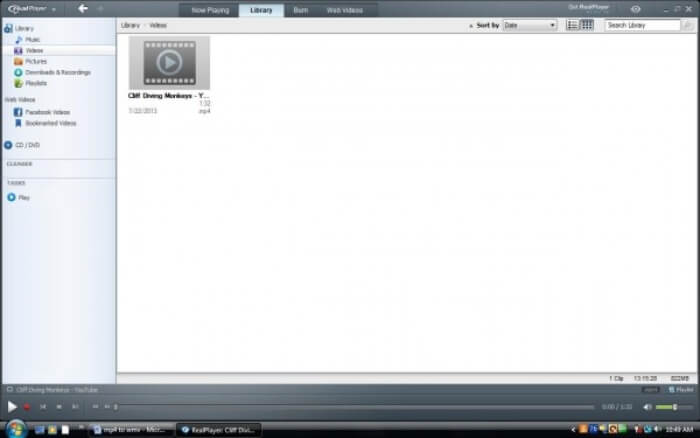
Step 1. If RealPlayer has been installed to your computer, save the MP4 file into the RealPlayer library. Select Library after launching RealPlayer. Find your file in the Video list.
Step 2. Click the file and select the More option from the popup menu. Then select the Convert option.
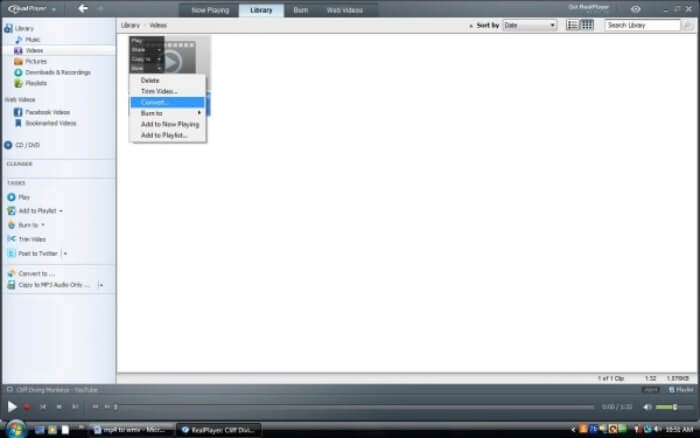
Step 3. Choose WMV from the Select a Device menu and click OK. Now click the Start button. In a few seconds, your video will be in the RealPlayer library.
2. VLC Media Player
VLC is an open source, cross-platform player that can play videos in different formats. It also supports file conversion to many popular formats. Follow these steps below to export WMV file from MP4.
Step 1. Open VLC Media Player and click Convert / Save in the menu of Media.
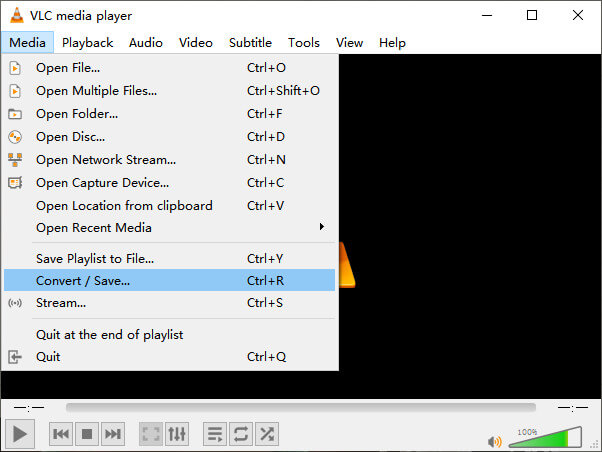
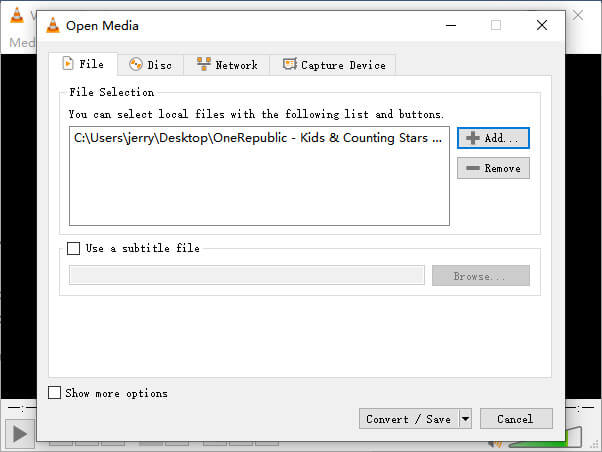
Step 2. Add the file to VLC. Then click the Convert / Save button.
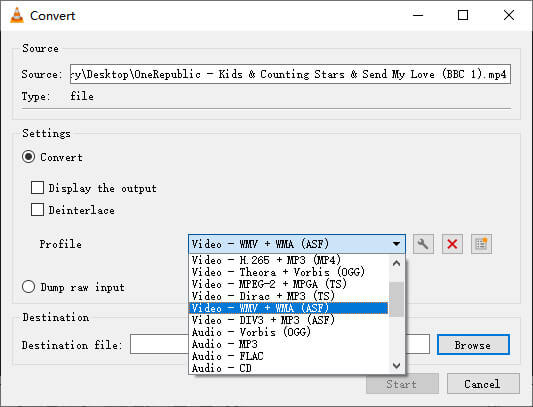
Step 3. Find WMV from Profile and select a folder as the saving destination of the output file. Then click Start.
MP4 kontra WMV
MP4-formatet släpptes av Moving Picture Experts Group (MPEG) 2001 och kan hjälpa dig att spara video-, ljud-, undertext- och bilddata i separata spår. Det är en förkortning för MPEG-4 Part 14. Dessutom är det ett av de mest populära formaten som används för att streama och dela videor.
Producerat av Microsoft var WMV ett av de vanligaste videoformaten på 2000-talet. Den kan ses över webben och spelas upp av olika mediaspelare på Windows. Och det är också standardvideofilformatet för Windows Media Player. Men det har tagits över av andra format nyligen.
Del 3. Vanliga frågor om MP4 till WMV-konvertering
1. Kan handbroms konvertera MP4 till WMV?
After doing a research, unfortunately the latest Handbrake cannot convert MP4 to WMV.It is true that Handbrake supports most common multimedia files. But that’s for input sources. The options for output formats are MP4(.M4V) and MKV.
2. Kan jag konvertera en MP4-fil som är över 100 MB till WMV online gratis?
It depends. Different free online video converters have different limitations. Some converters like FVC Free Online Video Converter allow you to change over 100MB. But some other converters may charge you for that.
3. Kan Windows Media Player konvertera MP4 till WMV?
You can’t convert MP4 file to WMV with Windows Media Player. That’s because it is just a player, not a converter. If you want to convert MP4 to WMV, you should use an efficient video converter.
4. Kan jag spela WMV-filer på Mac?
The built-in video tools on Mac cannot play WMV files. But you have other ways to play WMV videos on MacOS. You can convert WMV to other format that is supported by Mac. Or install Windows Media Player for Mac to play WMV files.
Slutsats
Even though MP4 and WMV both have their similarities, they also have their own characteristics. So you should make decisions in accordance with specific conditions.Hope that after reading this post, the issues of converting MP4 to WMV will no longer be your problem. Next time when you need a WMV file, just follow the guide above and convert the file with ease.
-
 Hur konverterar du dina MP4-videofiler till animerade GIF-bilder utan kvalitetsförlust
 Letar du efter det bästa sättet att konvertera din MP4-video till animerade GIF? Här är en detaljerad guide för att göra det i Photoshop, Windows Movie Maker, onlinevideoomvandlare och mer.
-
 Hur konverterar du dina FLV-videofiler till MP4 utan att betala ett öre
 Den här guiden delar fyra gratis metoder för att konvertera dina FLV-videofiler till MP4-format på Windows 10/8/7 / XP och Mac OS X, så att du kan njuta av videorna på alla enheter.
-
 Hur konverterar du MOV till MP4 utan att förlora kvalitet
 Vill du konvertera MOV (Apple QuickTime Movie) -filer till MP4? Det här inlägget delar 4 gratis metoder för att konvertera dina MOV-videofiler till MP4-format på Windows 10/8/7 / XP och Mac OS X.

