


 Video Converter Ultimate
 Skärminspelare
 Video reparation
Samla dina tankar och ta reda på hur du snabbar upp en video på iMovie
Du älskar att titta på dokumentärer på din nya iPhone, och du ser dem alltid för berättelsen de förmedlar. Utan någon särskild anledning vill du nu samla alla och redigera dem på ett snabbt sätt. Du söker efter den bästa appen som både kan redigera och samtidigt snabba upp din video, och då hittar du iMovie. Men eftersom du är ny både på iPhone och själva appen vet du inte hur du ska använda den och hur du ska snabba upp en video med iMovie. Fortsätt läsa, för den här artikeln ger dig många detaljer så att du kan lära dig mer om appen.

Del 1. Hur man snabbar upp video i iMovie
Frågan om hur man snabbar upp en video kan besvaras med hjälp av iMovies funktioner. Dess högkvalitativa videoutgång, olika mallar och efterbehandlingsverktyg till hands kan ge uppspelningshastighetskontroll till iPhone för första gången. iMovie har också kraften att snabba upp en video som andra applikationer. Ett av dess verktyg kan göra justeringar av din video tillsammans med dess andra tillgängliga verktyg. Det är nu lätt att komma åt videor som du vill snabba upp med den här applikationen som endast är tillgänglig på iOS-operativsystem och Mac. Nu vet du om verktyget, låt oss gå och prata om procedurerna du måste följa.
För iPhone-användare
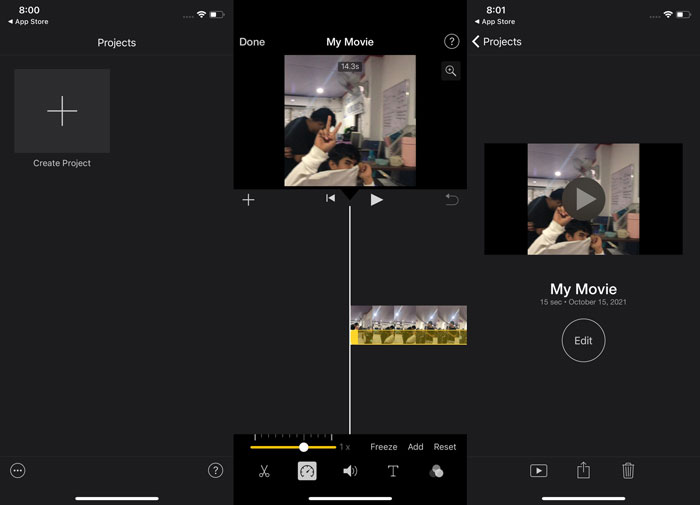
Steg 1: Gå till App Store på din iPhone eller iPad och ladda ner appen iMovie. När en översikt av gränssnittet visas väljer du Fortsätt. När du är på sidan Projekt trycker du på plustecknet + för att börja med ett helt nytt videoklipp. Fortsätt genom att välja Film i fönstret Nya projekt.
Steg 2: När du har valt en video från din kamerarulle trycker du på knappen Skapa film längst ned på skärmen. Tryck på tidslinjen och vänta tills redigeringsverktygen visas innan du använder hastighetsverktyget, som ser ut som en hastighetsmätare. För att spola framåt eller bakåt i din video flyttar du helt enkelt den gula nedre reglaget. Du kan snabba upp videon upp till två gånger, eller sakta ned den till en åttondel av dess ursprungliga hastighet.
Steg 3: När du är klar går du till det övre vänstra hörnet på skärmen och klickar på Klar. För att spara din färdiga video går du till menyn Dela och väljer var du vill lagra den bland de alternativ som visas.
För Mac-användare
Steg 1: Markera ett klipp i tidslinjen i iMovie-appen på din Mac och ändra sedan klippets hastighet.
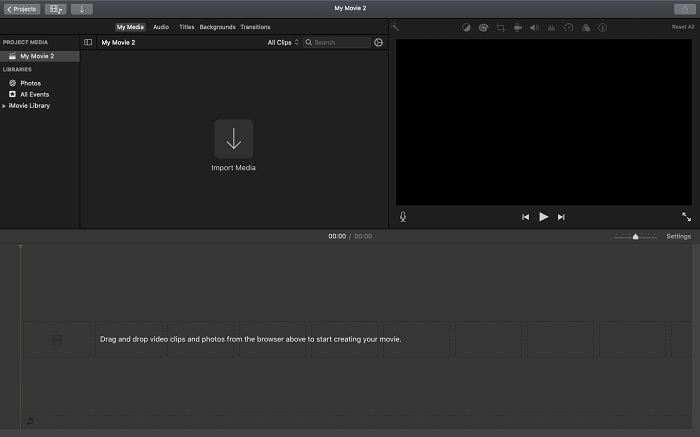
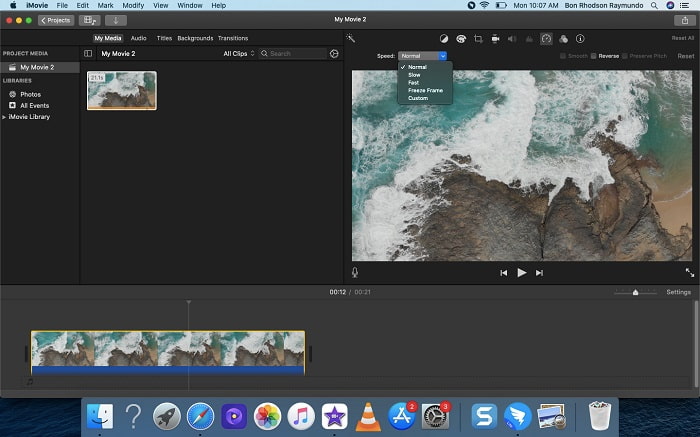
Steg 2: Genom att klicka på knappen Hastighet högst upp i gränssnittet kan du visa inställningarna för hastighet. Välj helt enkelt mellan Långsam och Snabb hastighet via en hastighetsknapp för att finjustera uppspelningshastigheten.
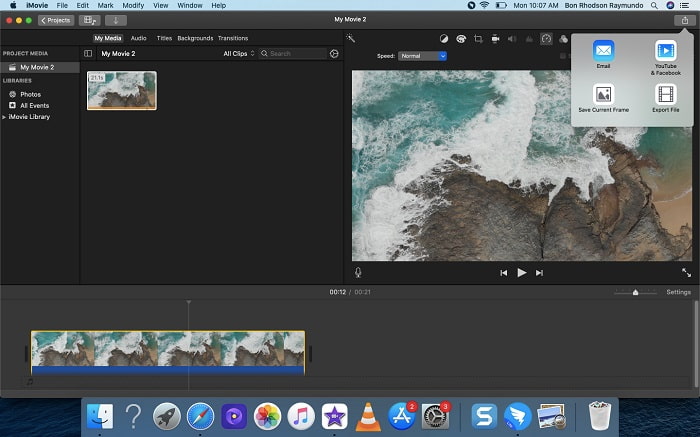
Steg 3: Klicka på ikonen Ladda upp uppe i det övre hörnet av gränssnittet för att exportera filen till skrivbordet.
Del 2. Ett annat enklare sätt att snabba upp video
Att använda en iPhone eller andra onlineappar som bara finns på iPhone som videoredigerare kan vara svårt om du vill öka uppspelningshastigheten på din video. Video Converter Ultimate är det bästa alternativet att överväga, eftersom det låter dig permanent snabba upp din video. Du kan justera uppspelningshastigheten på din video med det här verktyget, som du kan få gratis. Det har flera olika verktyg, bland annat Video Speed Controller, som kan öka uppspelningshastigheten på din video med högkvalitativ utdata och mycket snabb konvertering. För att få veta mer om detaljerna följer du stegen nedan:
Steg 1: Klicka på Gratis nedladdning för att spara programvaran på din dator. Anpassa sedan programvaran genom att installera den.
Gratis nedladdningFör Windows 7 eller senareSäker nedladdning
Gratis nedladdningFör MacOS 10.7 eller senareSäker nedladdning
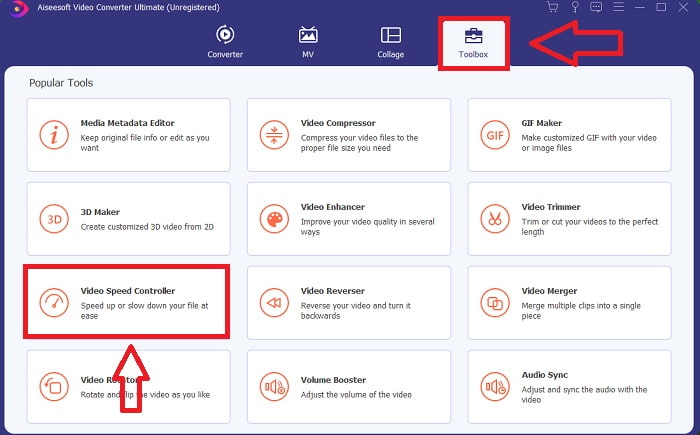
Steg 2: När du har startat programmet för första gången efter installationen väljer du funktionen Verktygslåda och sedan funktionen Video Speed Controller.
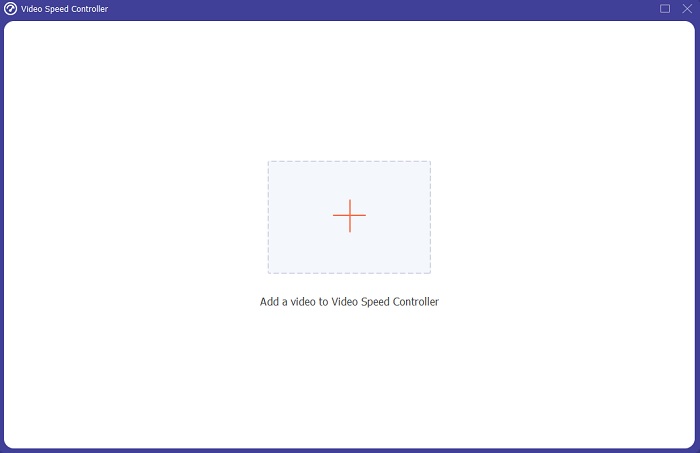
Steg 3: För att börja redigeringsfasen kan du nu ladda upp en videofil från din dator genom att klicka på plustecknet + som visas efter att du valt verktyget Video Speed Controller.
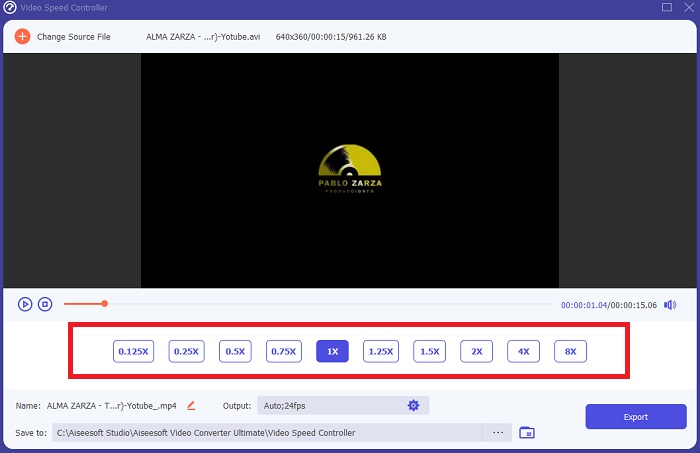
Steg 4: Du kan nu snabba upp en video mer än iMovie, eftersom det här verktyget ger dig olika val för hur snabbt du vill tillämpa hastighetsmultiplikatorn på din video. Du kan också spela upp en förhandsvisning av videon efter att du valt din önskade hastighetsjustering för att se om resultatet är tillfredsställande.
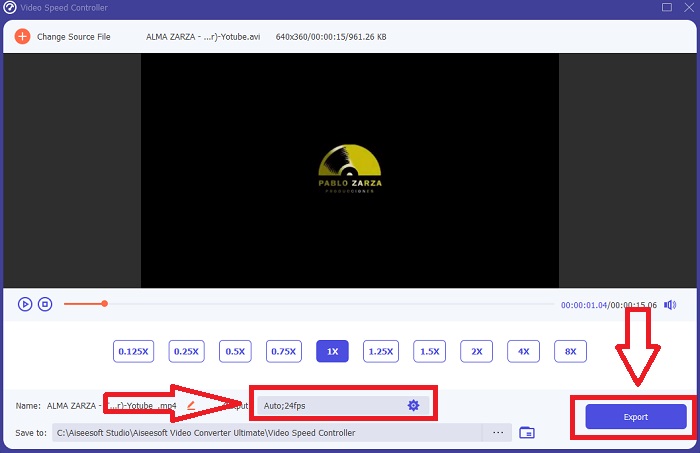
Steg 5: Du kan välja din önskade utdata genom att ändra format, upplösning och kvalitet på videoklippet när du är klar med att justera uppspelningshastigheten, samt andra inställningar. När du är redo att spara ditt arbete väljer du Exportera och anger en plats.
Relaterat:
Bästa videospelaren för iPhone
Hur man slår ihop videor på iPhone
Del 3. Vanliga frågor om hur man snabbar upp videor
Vad händer om jag skickar en snabb video och tar emot en långsam video för att minska videostorleken?
Nej, det påverkar bara presentationen av data och inte mängden data i sig. Det är dock möjligt att minska videons storlek genom att få den att köras med en lägre bildfrekvens. Med färre bilder per sekund håller den samma hastighet som originalet. 60 mot 30 bilder per sekund har en betydande inverkan på videofilstorleken. På grund av att variationer bildruta till bildruta övervägs under videokodning. Minska videons upplösning, till exempel från 1080p till 720p, för att ytterligare minska storleken. Filstorleken kommer att minskas avsevärt på grund av detta.
Vilka är dina alternativ för att snabba upp videouppspelningen på en Mac?
För att öka uppspelningshastigheten med två eller fler gånger (5 eller fler), klicka på framåt- eller bakåtspolningsknappen tills videon spelas upp med önskad hastighet, till exempel 30 eller 60 gånger. Medan videon spelas upp kan du ändra uppspelningshastigheten i steg om 1,1x genom att Alternativ-klicka på framåt- eller bakåtspolningsknappen.
Hur ändrar jag permanent videouppspelningshastighet?
Tänk på hur många steg det krävs för att ändra uppspelningshastigheten på dina videor. Även om videoverktyg och videoredigerare är lättillgängliga online letar du fortfarande efter det bästa verktyget för att åtgärda problem med uppspelningshastigheten i ditt videoklipp. Det finns många webbaserade verktyg på internet, några är gratis att använda men kräver betalning för att låsa upp alla funktioner. Video Converter Ultimate, ett gratis program för att snabba upp videor, är ditt bästa val för att permanent ändra uppspelningshastigheten.
Slutsats
Sammanfattningsvis är iMovie en utmärkt app som finns på iOS-enheter som Mac och iPhone för att lösa problemet med uppspelningshastigheten i en video. Den är tillgänglig för ett stort antal användare, den är praktisk och den är gratis. Ja, den är bra för att justera uppspelningshastighet – men hur är det med andra viktiga videofaktorer? Därför rekommenderar vi att du använder Video Converter Ultimate som den bästa programvaran för att fixa uppspelningshastigheten i en video; inte bara det, den har också många funktioner som kan hjälpa dig att skapa en enastående video som du aldrig kunnat föreställa dig.
-
 Android DVD -spelare - Hur man spelar DVD -videor på Android -mobiler
 Hur spelar jag DVD -filer på Android -mobiler? Finns det några Android DVD -spelare? I den här artikeln lär du dig om 3 sätt att spela DVD -videor på Android -mobiler med eller utan den externa drivrutinen.
-
 De bästa 10 gratis Android MP4 -spelarna för att spela HD/4K -videor
 Även om Android-mobiler har standardspelare för att spela MP4-videor, stöder de inte justering av uppspelningsinställningar och andra funktioner. Således kan du lära dig om de 10 bästa Android MP4-spelarna från den här artikeln.
-
 Samsung videospelare fast: Topp 5 bästa videospelare för Samsung
 När du spelar upp videor via standard Samsung -videospelare kan det hända att det alltid fastnar. För att få en smidig och bättre tittarupplevelse kan du lära dig om de fem bästa videospelarna för Samsung från den här artikeln.
