


 Video Converter Ultimate
 Skärminspelare
 Video reparation
Detaljer du behöver för att bli upplyst när du konverterar MPG till AVI
Generellt sett är en MPG-fil en typisk videofil som använder ett digitalt videoformat som har standardiserats av Moving Picture Experts Group (MPEG). Den lagrar video, ljud och metadata i en enda, sammanflätad fil. Det är vanligt att använda MPG-filer för att skapa filmer som distribueras över internet. Den här typen av videoformat är inte lätt att konvertera om du saknar kunskap eller erfarenhet av någon omvandlare som stöder eller konverterar MPG till AVI. Fortsätt läsa den här artikeln för att få klarhet i detaljerna och de val du bör överväga för att genomföra den konverteringsprocess du vill ha.

Del 1. MPG och AVI - En översikt
MPEG är ett video filformat som utvecklats av Moving Picture Experts Group, samma grupp som tagit fram format som MP3 och MP4. Beroende på hur det ska användas, använder MPEG antingen MPEG-1- eller MPEG-2-komprimering.
För att komprimera rå VHS-video och CD-musik ned till 1,5 megabit per sekund utan att offra alltför mycket kvalitet skapades MPEG-1. Som ett resultat har det blivit ett av de mest populära och mest kompatibla video/ljud-formaten i världen. Videodata för MPEG-1 överförs vanligtvis med 30 bildrutor per sekund (frames per second), med en upplösning på cirka 352×240 pixlar.
Windows-datorer använder dock AVI som standardvideoformat. I ett multimediacontainerformat, som DivX eller XviD, kan ljud och video lagras med hjälp av flera olika codecs. Många alternativa videoformat, såsom MPEG och MOV, använder mindre komprimering och mer lagringsutrymme än en AVI-fil. Det är också möjligt att skapa AVI-filer utan komprimering. Detta leder till mycket större filstorlekar – omkring 2–3 GB per minut video – eftersom filerna då är förlustfria. Oavsett hur många gånger du öppnar eller sparar filen behåller en förlustfri fil sin kvalitet. Ytterligare fördelar är uppspelning utan att några codecs behöver installeras.
Del 2. Mest effektiv programvara för att konvertera MPG till AVI
Om du någonsin har undrat hur man konverterar en MPG-videofil till AVI gratis, är denna nya och bästa programvara vad den här artikeln rekommenderar att du använder. Video Converter Ultimate är ett gratis nedladdningsbart program för Windows och Mac som kan konvertera din MPG-fil till AVI mycket snabbare än att konvertera filer online. Förutom dessa två videoformat stöder programmet också en rad andra format som du kan välja mellan. Det är bäst tack vare den högkvalitativa utdata du får om du använder programmet. Nu när du har fått en förhandsvisning av vad programmet kan göra, spänn fast säkerhetsbältet så tar vi reda på hur det fungerar:
Steg 1. För att komma igång klickar du helt enkelt på knappen Free Download nedan. När nedladdningen är klar kan du välja att installera programmet på antingen Windows eller Mac. När programmet har installerats på datorns skrivbord kan du börja använda det genom att klicka på knappen Start Now.
Gratis nedladdningFör Windows 7 eller senareSäker nedladdning
Gratis nedladdningFör MacOS 10.7 eller senareSäker nedladdning
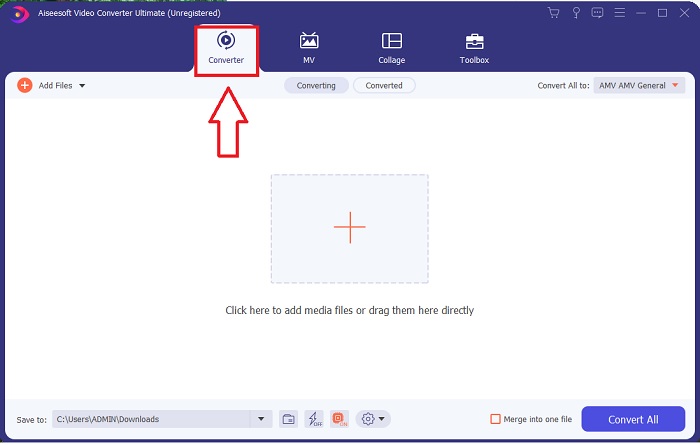
Steg 2. Öppna programmet du just har laddat ner. När du först öppnar programmet ser du ett fönster med gränssnittet Converter. Det är här du påbörjar processen med att transkoda din video.
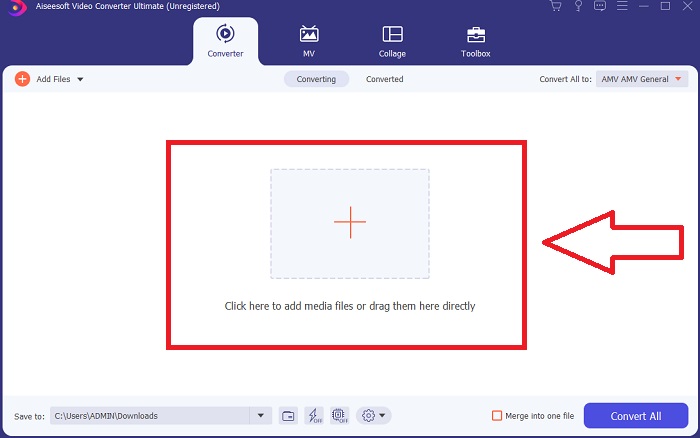
Steg 3. Du kan starta konverteringsprocessen genom att importera dina filer till programmet. Att konvertera en video är lika enkelt som att dra den till Plus-symbolen.
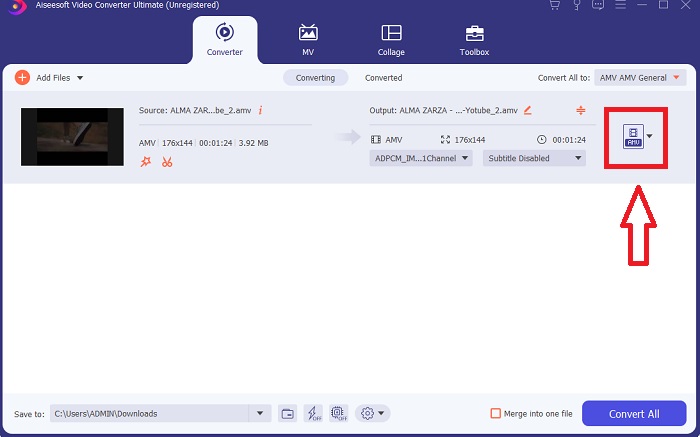
Steg 4. Högerklicka på ett videoformat och välj Save to eller Save to external storage. Sök sedan efter och välj filtypen AVI i rullgardinsmenyn. När du har valt AVI som filtyp finns det många inställningar för videokvalitet. Du kan ändra kvalitetsinställningarna om den önskade videoutgången inte finns angiven. Med kugghjulsikonen kan du ändra skärmens upplösning, bildfrekvens och ljudkvalitet. För att spara dina ändringar klickar du på knappen Create New.
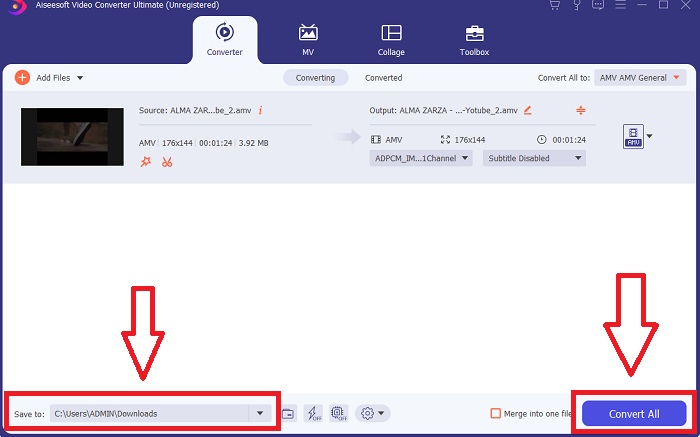
Steg 5. Klicka på Convert All när du har redigerat den valda videon och den är redo att överföras till din dator.
Del 3. Snabbtips: Andra effektiva verktyg du bör överväga
Metod 1. Använd CloudConvert
CloudConvert är en videokonverterare online. Denna onlinekonverterare stöder även MP4, WEBM och AVI, bland andra format. Du kan välja kvalitet, upplösning och filstorlek för videon. Om du funderar på hur du konverterar MPG till AVI i detta onlineverktyg, här är proceduren för hur du använder det:
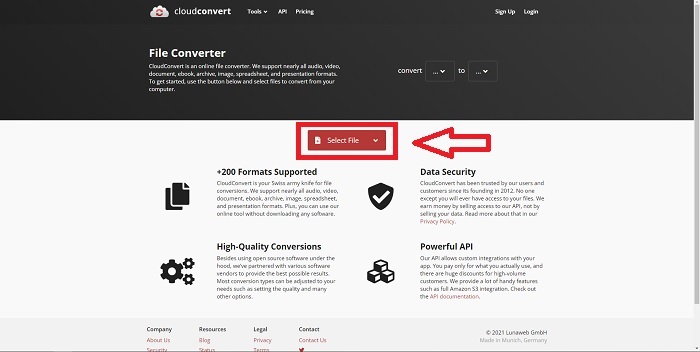
Steg 1. Ladda upp en fil från din dator genom att klicka på Select the File.
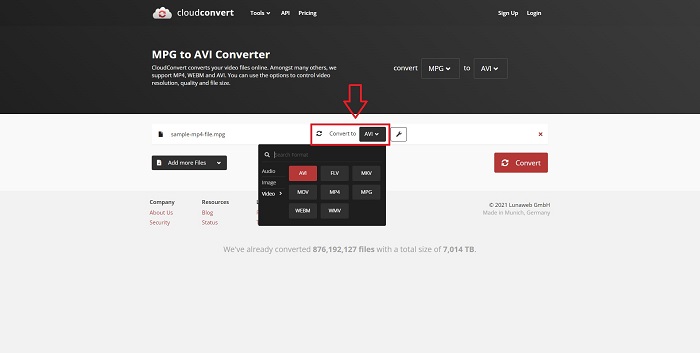
Steg 2. Fortsätt sedan med att välja vilket format din fil ska konverteras till genom att klicka på formatsektionen bredvid skiftnyckelikonen. Du har också möjlighet att lägga till fler filer att konvertera.
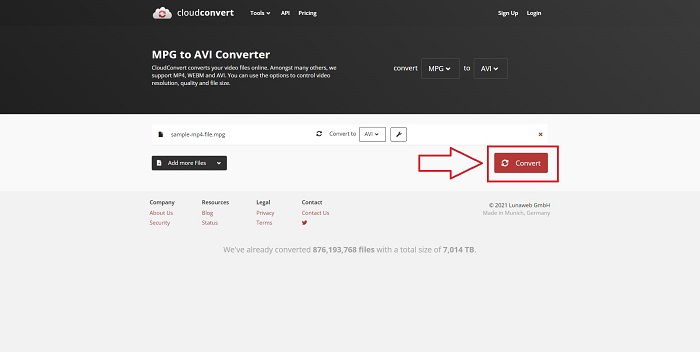
Steg 3. Klicka på Convert för att konvertera alla filer du har laddat upp.
Metod 2. Använd Zamzar
Zamzar är ett webbaserat verktyg för att konvertera filer. Konverteringar kan utföras i en mängd olika format utan att behöva ladda ner någon programvara. Zamzar kan konvertera en fil från ett format till ett annat, såsom en Adobe PDF till ett Microsoft Word-dokument, genom att skriva in en URL eller ladda upp en eller flera filer (så länge som alla är i samma format). För att få kunskap om detta onlineverktyg, här är stegen för dig:
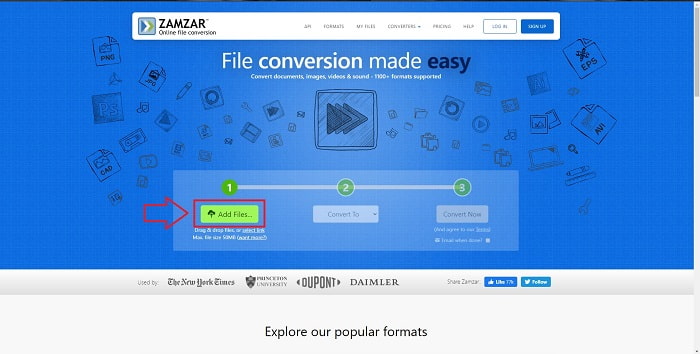
Steg 1. Sök efter Zamzar i valfri sökmotor. När du har klickat på webbplatsen kan du nu ladda upp en fil i dess gränssnitt genom att klicka på Add Files.
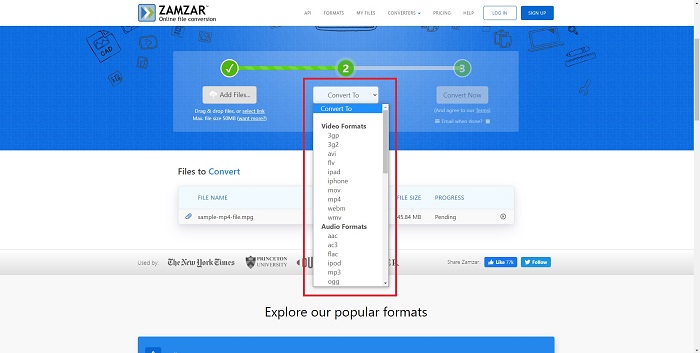
Steg 2. Därefter kan du konvertera filen genom att välja den fil du vill ha. Klicka på Convert To för att se alla format som det här onlinetoolet stöder.
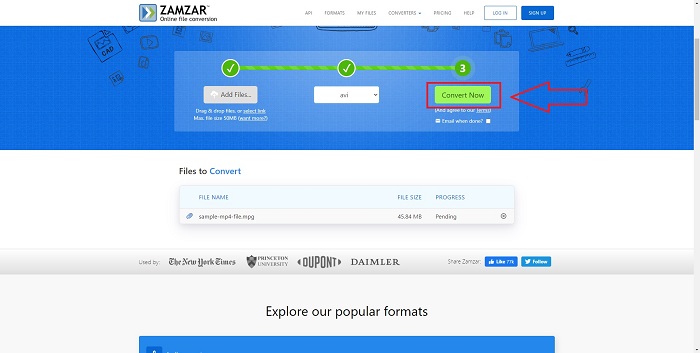
Steg 3. För att konvertera filen klickar du på Convert Now.
Del 4. Vanliga frågor om MPG och AVI
Är AVI eller MPG bättre?
Lagring är möjligt med AVI-filer, medan videoinspelning sker med MPEG-filer. AVI är något bättre än MPEG; men om MPEG är formatet att använda vill du bränna DVD-videor. Microsoft Windows utvecklade AVI-filformatet som svar på Apples MOV-filformat, medan Moving Picture Group utvecklade MPG-formatet.
Vilka är fördelarna och nackdelarna med AVI?
Jämfört med andra filformat kan AVI-filer vara extremt stora om de inte komprimeras. Du måste vara villig att ge upp lite skivutrymme i utbyte mot fördelarna med AVI-filen, eftersom du inte kommer att kunna lagra så många filer som du annars skulle. Om du komprimerar en AVI-fil online efter en viss punkt kommer videokvaliteten att försämras som ett resultat.
Vilken är den mindre storleken AVI eller MPG?
När det gäller internet tar större filer längre tid att ladda ner. Det är logiskt att koda filmer i mindre filstorlekar, även om det innebär en viss kvalitetsförlust. När det gäller uppspelning föredras fortfarande AVI framför MPG eftersom fler set-top-boxar kan spela AVI-filer än MPG-filer. Vill du spela upp dina MPG-filer på datorn, klicka här för att lära dig mer.
Slutsats
För att sammanfatta allt vi har diskuterat är Video Converter Ultimate den bästa omvandlaren du bör överväga att använda jämfört med alla de online-omvandlare för MPG till AVI som listats ovan. Programmet är gratis, och det har en snabbare konverteringsprocess än de webbaserade verktygen. Det stöder också många format och ger dig hög kvalitet på videoutdata. Utöver detta finns det ingen anledning att inte använda programmet.
-
 Hur konverterar du MPEG till MP4-filer gratis på Windows, Mac, online
 Läs och få 3 gratis sätt att konvertera MPEG till MP4-filer på din dator. Du kan använda videokonverterare online och stationärt för att enkelt vända MPEG till MP4-format.
-
 [2025] Bästa verktyg och enkla sätt att konvertera MPEG till MP3
 Den här artikeln talar främst om hur du kan konvertera dina MPEG-videor till MP3 med hjälp av de mest pålitliga verktygen på listan.
-
 4 effektiva sätt att konvertera MOV till AVI på PC och Mac [2025]
 Vill du veta vad som är den bästa MOV till AVI-omvandlaren på webben? Och varför FVC Ultimate Video Converter kan vara något för dig.
