


 Video Converter Ultimate
 Skärminspelare
 Video reparation
Lär dig hur du konverterar AMV till MOV utan att försämra kvaliteten
AMV is a proprietary video format used to store video playbacks on S1 MP3 and MP4 media players. This .amv file extension is low resolution and compressed to hold the file on this portable media player. Although the format still exists, the media player's compatibility for the phone is tough to find because this format is old. Instead of searching for a compatible media player, why don't you convert the AMV files into a new format that gains many supports like the MOV. Therefore, if you want to know the best way to convert AMV to MOV, let's start the investigation.

Del 1. Kort introduktion om AMV och MOV
Tanken med Action Media Video eller AMV är att ersätta MP4 som ett universellt format eftersom detta format är bättre och mycket mer komprimerat. Detta format är också den bättre versionen av AVI-formatet. Men formatet har ignorerats genom denna nya era eftersom det inte får någon uppdatering för att förbättra upplösningskvaliteten. Och nu, om du lagrar detta format på våra mobila enheter och spelar det, förvänta dig att du inte kan spela det eftersom formatet inte stöds. Så om du vill spela upp en video i detta format måste du ladda ner en tredjeparts mediaspelare för AMV. Medan MOV får detta format mycket stöd eftersom det är det ursprungliga filformatet som QuickTime utvecklar.
Del 2. Konvertera AMV till MOV med Ultimate Desktop Software
FVC Video Converter Ultimate
Convert AMV to MOV with the help of this professional video converter that produces phenomenal output that no one can rival against, FVC Video Converter Ultimate. This converter is available on PC and Mac, and they both have the same advanced features this tool provides. Another is that the fast conversion and hardware acceleration available on PC are also open on Mac. A lot of users have already chosen this software as their first choice converter to fix their problem. Furthermore, before you can use this tool, you will need to buy it from the FVC. Although it needs payment, still you will not be going to spend a hundred dollars, and the price will be worth it. Without further ado, let's test this tool to see if we can achieve the ultimate conversion as the name promised.
Steps on How to Convert AMV to MOV with the FVC Video Converter Ultimate:
Step 1. Download the FVC Video Converter Ultimate on your desktop by clicking the button below; install the software after the downloading process.
Gratis nedladdningFör Windows 7 eller senareSäker nedladdning
Gratis nedladdningFör MacOS 10.7 eller senareSäker nedladdning
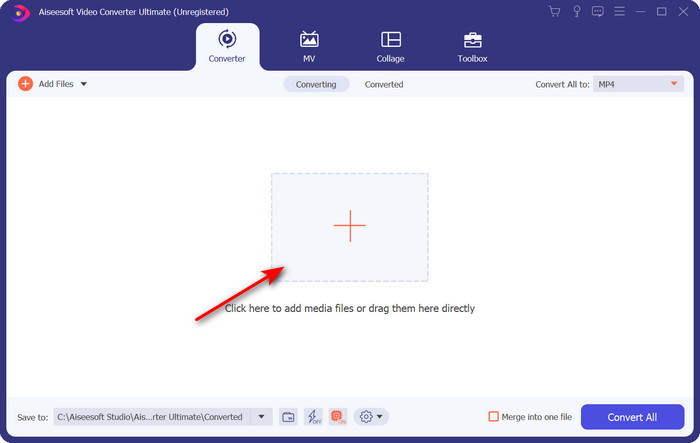
Step 2. Open the software to use it, and to upload the .amv, click the + sign. Search the file on the folder and press Open to insert.
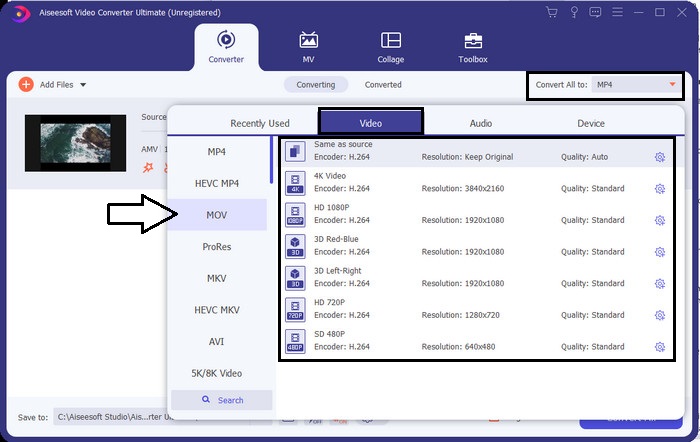
Step 3. To change the format to MOV, click Convert All to: and choose the MOV or what format is your desire.
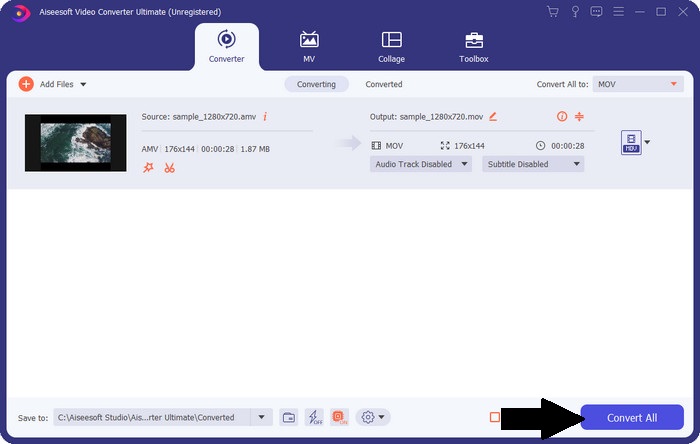
Step 4. To turn the AMV file to MOV, click Convert All to start the conversion process.
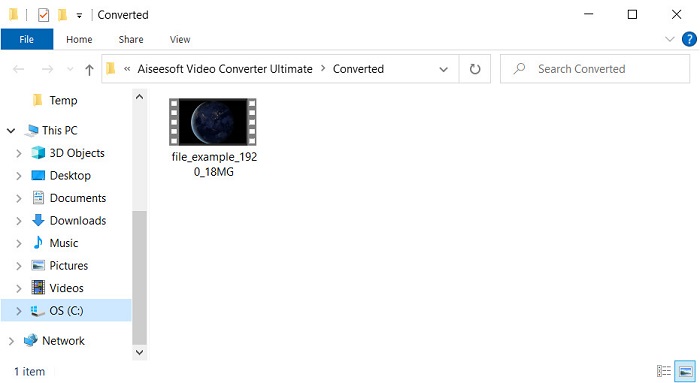
Step 5. Converting the file will only take an ample second. Then wait for the folder to show with the .mov file you've made earlier; click the file to watch it on your native media player.
Del 3. Konvertera AMV till MOV med 2 Online Service Converter tillgänglig
1. Konvertera filer
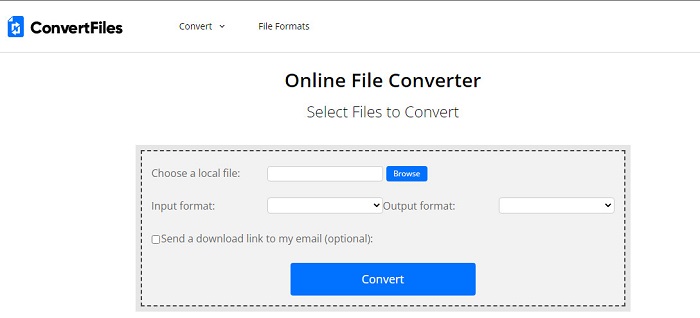
One of the best online converters you can access on your favorite browser is the ConvertFiles. This online tool can convert your format into a new format without any trouble. Also, this tool supports a small set of formats you can choose from. However, downloading the converted file here took a lot of time because it doesn't provide fast conversion. Another not good thing about here is the ads; there is a lot of it on the interface. Despite the problem with the downloading process and ads, this tool performs well as a free online tool.
Steps on How to Convert AMV to MOV with the ConvertFiles:
Step 1. Open your favorite browser and search the ConvertFiles.
Step 2. Once the website is open, click Browse to locate the file on the folder; on the Output Format, find the MOV, and click Convert.
Step 3. If converting is done, click the blue highlighted to download the file on your computer.
2. MConverter
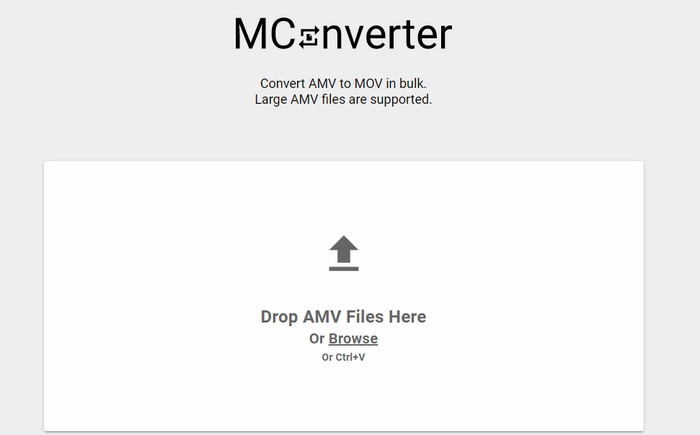
Don't want any ads on the interface to peacefully convert AMV to MOV? Then try to use the MConverter Available on your browser. Also, this tool supports batch conversion to make your conversion efficient, like the FVC Video Converter Ultimate. However, the downside about this online tool is that you can't exceed the file size to 200MB. So, if you want to convert a long video and the file size overlaps the supported size, then this is not a choice you should use. But if you want to experience the converting much better than ConvertFile, follow the steps below.
Steps on How to Convert AMV to MOV with MConverter:
Step 1. Search the MConverter on your search engine and open it.
Step 2. Click the Upload button to insert the file, wait for a moment for the webtool to load, search the MOV, and click it. Converting of the file will begin after you click the MOV format.
Step 3. Press Download All to save the file.
Del 4. Vanliga frågor om AMV och MOV
Kan jag förvandla min MP4 till AMV?
You can turn your MP4 to AMV to transfer the file quickly online. Especially if the video is an hour-long, we suggest you convert the .mp4 files into .amv because it is much smaller in size if we compare the two formats.
Stöder VLC AMV?
Luckily, you can use the VLC Media Player to play the .amv files on this media player even though it is outdated. But did you know that there are media players that surpass this media player? So if you want to know what this media player is, you must click this link to learn the 5 alternatives media player for VLC.
Hur gör jag om min AMV till AVI?
AMV is the better version of AVI; however, if we speak quality-wise, AVI produces phenomenal performance compared to this old version format. Also, AVI is very compatible with all platforms. So now, if you want to watch your AMV in a better version and on all platforms, you must learn how to convert AMV to AVI.
Slutsats
Diskussionen måste få ett slut här; även om vi vill lagra en AMV-fil på vår disk, är kompatibilitetsproblemet en anledning till att vi behöver konvertera den. När allt kommer omkring sägs AMV vara populärt tidigare på grund av hur den här behållaren komprimerar filen. Men idag måste du överväga att konvertera det till ett nytt format för att fortfarande använda det. Dessutom konverterar lösningarna som tillhandahålls här effektivt. Ändå presterar FVC Video Converter Ultimate fenomenalt jämfört med de andra två verktygen. Så om du vill uppleva det bästa verktyget är det ett måste att ladda ner detta på din dator och kopiera stegen ovan.
-
 De 4 bästa metoderna för att enkelt konvertera MOV till MP3 på Windows och Mac
 När du vill extrahera MP3-ljudfiler från MOV-filer kan du lära dig mer om de 4 mest effektiva MOV till MP3-omvandlarna för att få önskade filer från artikeln.
-
 MKV till MOV - Hur konverterar man MKV till MOV
 Hur konverterar jag MKV till MOV på Mac? Kan iMovie läsa MKV? Vad betyder MOV-format? Det här inlägget berättar om två enkla sätt att hjälpa dig konvertera MKV till MOV med gratis online och professionella videokonverterare.
-
 FLV till MOV - Hur man konverterar FLV till MOV på Mac / PC / gratis online
 Hur konverterar man FLV till MOV? Hur konverterar jag FLV till MOV på Mac? Finns det något gratis sätt att konvertera YouTube FLV till MOV online? Detta inlägg delar 3 FLV till MOV-omvandlare för att ändra FLV-filer till MOV.
