


 Video Converter Ultimate
 Skärminspelare
 Video reparation
Olika sätt att konvertera RMVB till MOV för offline och online
På grund av det stora antalet förvirrande videofilformat som finns på internet har många användare svårt att välja vilken mediaspelare de ska använda för just den video de har fått. Tro det eller ej, att spela upp en video är inte alltid lika enkelt som att ladda ner den. Vissa format är exklusiva för sin upphovsman, medan andra i princip kan spelas var som helst. Det är dock viktigt att veta vilka videofilformat du ska leta efter som stöds av de spelare du har. Men vi bör inte nöja oss bara med detta. Att veta hur man konverterar filformat som man inte stöter på varje dag är det bästa sättet att gå vidare. Därför ger vi dig alla möjliga sätt att konvertera RMVB till MOV för din bekvämlighet.
Del 1. En översikt: RMVB och MOV
RMVB och MOV är två olika videoformat från två andra företag som utvecklade dem. Du bör känna till RMVB-filer, en förkortning för RealMedia Variable Bitrate, ett RealNetworks-utvecklat tillägg med variabel bithastighet till RealMedia multimedia digitala containerformat. Vissa använder RMVB för multimediamaterial som sparats lokalt. Eftersom de har mindre filstorlekar och lägre bithastigheter, men med bättre kvalitet, har RMVB-filer blivit ett populärt format för Anime och asiatiska filmtitlar. Filtillägget '.rmvb' används för detta format.
Å andra sidan är MOV ett Apple-utvecklat multimediacontainerfilformat sparat i QuickTime File Format (QTFF). Behållarformatet kan hantera olika medieformat för att underlätta multimediaöverföring över enheter, operativsystem och applikationer. QTFF multimediafiler lagrar .mov-filer. Men de kan också spara som .qt-filer.
| Filtillägg | RMVB | MOV |
| Filtyp | RealMedia variabel bithastighetsfil | Apple QuickTime-film |
| Utvecklaren | RealNetworks | Äpple |
| Fördelar | RMVB är ett format för att lagra och dela multimediainformation. Och det är särskilt känt för att distribuera asiatiskt innehåll, som kinesiska tv-avsnitt och filmer. | En MOV-fil kan innehålla många dataspår, som var och en innehåller en digital mediaström eller relaterar till en ström i en annan fil. Som ett resultat kan du helt enkelt ändra filer utan att behöva göra om data efteråt. |
| Nackdelar | De är inte vanliga på grund av att de inte är kompatibla med andra mediaspelare. | Varje MOV-fil kan innehålla någon av flera olika codecs, vilket gör det utmanande att spela. |
| Program stöder filen | RealPlayer VLC mediaspelare iOrgSoft Video Converter | Microsoft Windows Media Player Apple QuickTime Player VideoLAN VLC mediaspelare |
Del 2. Tillgänglig och bästa metod för att konvertera RMVB till MOV [Offline]
Att konvertera en video från RMVB till MOV behövs ibland vid en oväntad tid och dag. Hela processen kräver för det mesta en internetanslutning som inte alltid är tillgänglig var som helst. Så, Video Converter Ultimate är rätt väg att gå om du vill konvertera din video till ett format som är lämpligt för den situation du befinner dig i. Den låter dig till och med konvertera flera videor samtidigt, vilket sparar besväret med upprepade processer. Det ger dig till och med olika alternativ som att välja en viss upplösning, bildhastighet och bithastighet för din video. Namnge en upplösning och Video Converter Ultimate kommer att ge dig den.
Steg 1: Gå till webbplatsen, där du ser en knapp som heter Free Download och For Mac OS. Klicka på den för att ladda ner .exe-filen. Du måste installera programvaran och vänta tills den är klar. När detta är gjort öppnar du filen för att fortsätta installationsprocessen.
Gratis nedladdningFör Windows 7 eller senareSäker nedladdning
Gratis nedladdningFör MacOS 10.7 eller senareSäker nedladdning
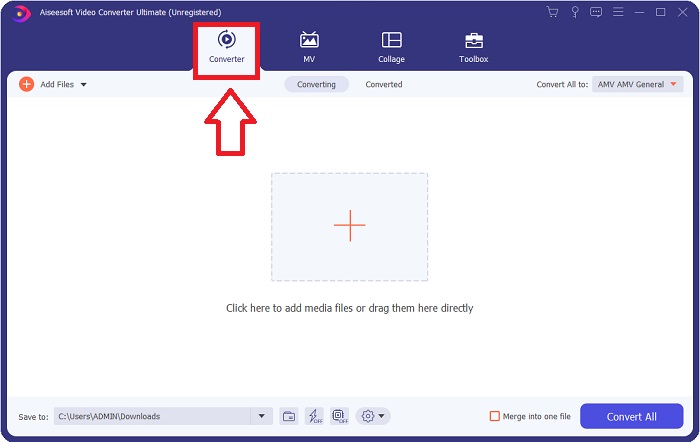
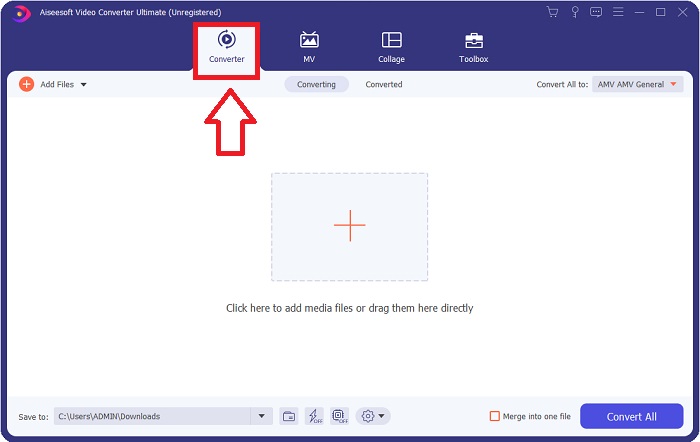
Steg 2: Efter att installationen är slutförd startar du programvaran och ett fönster öppnas. Det visar ett gränssnitt med flikar högst upp. Inledningsvis befinner du dig på fliken Converter och om inte, markera den bara.
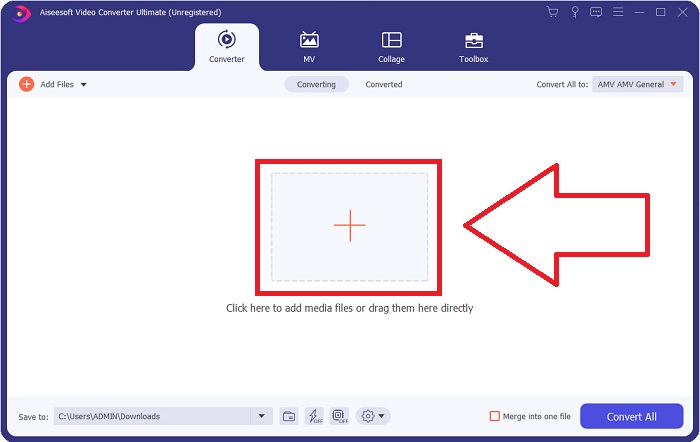
Steg 3: I gränssnittet ser du en fyrkantig knapp med en +-ikon i mitten. Klicka på den för att importera videofilen du vill konvertera, eller så kan du bara dra och släppa utan krångel.
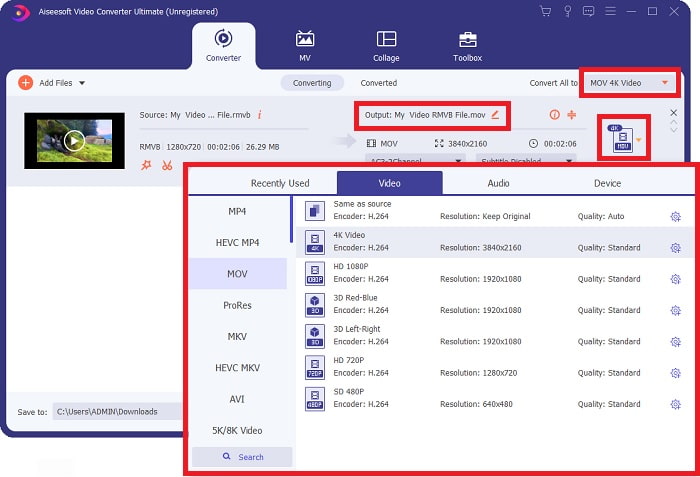
Steg 4: Ett nytt gränssnitt med alla alternativ för att redigera din video visas. Längst till höger väljer du formatet du vill ha för din konverterade video. Klicka bara på rullgardinspilen så visas alla tillgängliga format.
I det här fallet väljer du MOV. Du kan också klicka på kugghjulsikonen bredvid den upplösning du har valt för att ändra inställningar som bildhastighet för video och samplingsfrekvens för ljud. För att spara ändringarna klickar du på Create New.
Steg 5: När du är klar med alla ändringar du har gjort i din video kan du starta konverteringsprocessen genom att klicka på knappen Convert All längst ned till höger i fönstret.
Del 3. En annan utmärkt metod för att konvertera RMVB till MOV [Online]
Om du inte vill ladda ner och installera programvara på din dator och bara behöver en engångskonvertering av dina filmer finns här ett helt webbaserat alternativ du kan prova. FVC Free Video Converter Online är ett webbverktyg som erbjuder olika inställningsalternativ för video och ljud, samtidigt som du sparar tiden det tar att installera själva programvaran. Det omfattar bara tre enkla steg för att få jobbet gjort:
Steg 1: Gå först till webbplatsen, där du hittar en gul knapp i mitten av sidan med texten Add Files to Convert. Klicka på knappen för att importera videofilen du vill konvertera.
Ladda ner Skrivbordsversionen för att konvertera filer i batch.
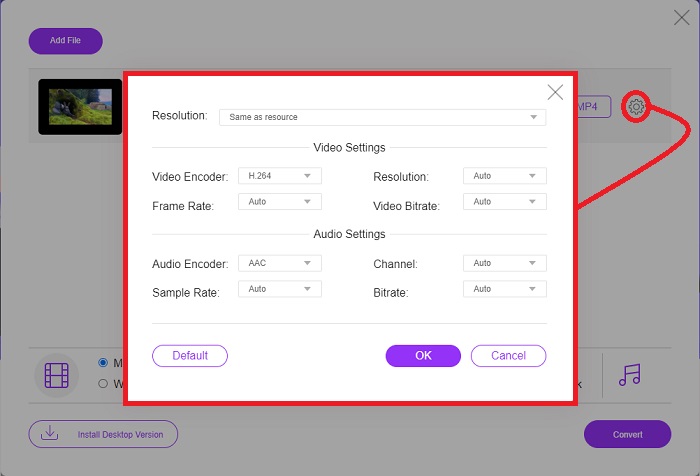
Steg 2: Ett fönster dyker upp som visar videofilen du har importerat överst och alla tillgängliga format längst ned. Eftersom du vill konvertera din RMVB-fil till MOV väljer du MOV. För ytterligare alternativ klickar du på kugghjulsikonen längst till höger för att redigera video- och ljudinställningar för de extra alternativen. För att spara ändringarna klickar du på OK.
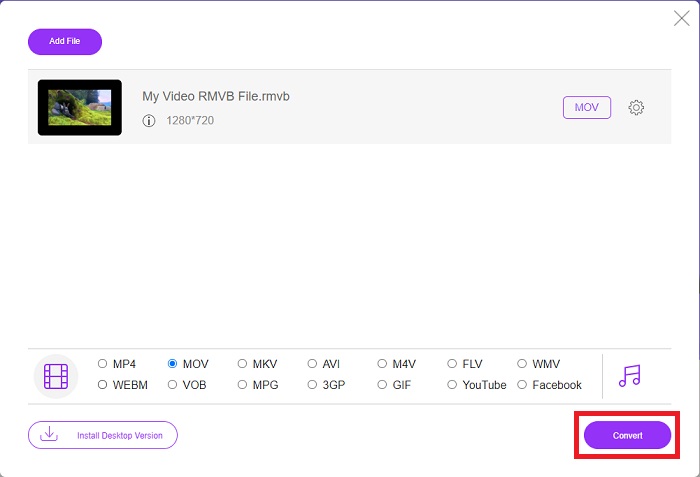
Steg 3: Om alla ändringar som gjorts motsvarar vad du behöver för din video kan du nu börja konvertera din video genom att klicka på knappen Convert längst ned till höger i fönstret. Välj vilken mapp du vill att din helt konverterade fil ska exporteras till och vänta tills processen är klar.
RMVB kontra MOV
RMVB, en nyare variant av standardformatet Real Media (.RM), är ett Real Media-videofilformat komprimerat med en variabel bithastighet. Det är ett populärt format för asiatiska filmer och anime. RMVB-filer är mindre i storlek och har lägre bithastigheter men bättre kvalitet.
MOV-formatet kan användas för att lagra en film, TV-program, kort videoklipp eller hemmafilm. Den sparas faktiskt i QuickTime File Format (QTFF), som introducerades av Apple 1991. MOV-filer används ofta när folk vill spara en video med hög kvalitet.
Del 4. Vanliga frågor om RMVB till MOV-konvertering
Vad är egentligen en RMVB-fil?
Alla RMVB-filer är en Real Media-videofil komprimerad med en variabel bithastighet som är optimal för videons innehåll. Det är en nyare version av det grundläggande Real Media-filformatet (.RM) som erbjuder bättre komprimering.
Vad kan spela upp RMVB-filer?
Eftersom olika program använder filer med filtillägget RMVB för olika ändamål behöver du programvara som är kompatibel med just den fil du försöker öppna. RealNetworks RealPlayer (Windows), VLC media player (multiplattform) och GRETSCH GOM Player (Windows) är alla kostnadsfria mediaspelare som kan spela RMVB-filer.
Finns det några fel möjliga med .rmvb-filer?
Om du inte har Real Media Player eller något annat lämpligt filöppnarverktyg kan du få problem med att öppna .rmvb-filer om filen blir korrupt på grund av felaktiga sektorer på hårddisken eller en felaktig nedladdning. Om problem uppstår i Windows-systemregistret, där filassocieringsinformationen för .rmvb-filen lagras, kan ett tredje fel uppstå.
Slutsats
Att välja om man vill behålla en programvara eller bara använda ett onlineverktyg för att konvertera en video är inte att oroa sig för om FVC ska användas. Både programvaran och dess onlineversion erbjuder de bästa alternativen för dina konverteringsbehov. Vi rekommenderar dock starkt att du laddar ner Video Converter Ultimate för den extra verktygslåda som den ger dig när du letar efter ytterligare redigeringar för din video förutom endast konverteringen. Du vet aldrig när du behöver nybörjarvänlig programvara, så det är bättre att alltid ha den vid din dator.
-
 Guide om hur man konverterar RMVB till MP4 på Windows / Mac (3 gratis sätt)
 Vill du konvertera RMVB till MP4 för enkel uppspelning på din dator eller mobiltelefon? Du hittar enkla sätt att konvertera dina RMVB-filer till MP4 i den här guiden.
-
 Topp 4 gratis RMVB till FLV Converter-appar på skrivbordet eller online
 Den här artikeln kommer att berätta de bästa RMVB till FLV-omvandlare och webbappar som kan konvertera RMVB (RealMedia Variable Bitrate) -filer till FLV-video.
-
 Hur man konverterar MP4 till MOV på Mac / PC / Online
 Hur konverterar man MP4 till MOV på Mac? Finns det något gratis sätt att konvertera MP4 till MOV utan kvalitetsförlust? Det här inlägget delar 4 enkla sätt att hjälpa dig att göra videokonvertering från MP4 till MOV på Mac, Windows PC och online.

