


 Video Converter Ultimate
 Skärminspelare
 Video reparation
Framstående och hjälpsamma sätt att konvertera 3GP till FLV [Beprövat]
Ljud- och videofiler kan lagras i 3GP-formatet, som vanligtvis används i 3G-telefoner. Det fungerar även i 2G- och 4G-telefoner. Via internet skickar och tar detta MP4-baserade containerformat emot multimediafiler. Många onlinetjänster för video- och ljudströmning använder dock FLV, ett videobehållarformat som är kompatibelt med Flash. Förutom Adobe Flash Player kan många andra videospelare spela FLV-filer. För att göra 3GP-filer mer lättillgängliga och mindre i filstorlek finns det flera enkla sätt att konvertera dem till FLV. Nedan finns omvandlarna du bör överväga att använda för att konvertera 3GP till FLV.

Del 1. Utmärkta metoder för att konvertera 3GP till FLV [Offline]
Video Converter Ultimate är ett perfekt verktyg för att konvertera 3GP-filer till FLV utan att offra kvaliteten. Med hjälp av programmets SuperSpeed-teknik kan användare konvertera även stora filer inom några minuter. Dessutom låter appen dig redigera dina filer som du vill: beskära, rotera och trimma dina videor; justera färgparametrar; ändra videoupplösning och bithastighet; eller lägg till undertexter. Alla de mest populära enheterna, inklusive iPhone, iPad, Android-baserade enheter, Xbox och PlayStation, kan stödjas av denna programvara. Nu vet du en kort introduktion till denna programvara, det är dags för dig att förstå hur du konverterar 3GP till FLV med denna programvara.
Steg 1: Ladda först ner programvaran genom att klicka på Free Download nedan. Du kan ladda ner den till Windows eller Mac. När du har laddat ner den, installera programvaran på datorn och starta den genom att klicka på Start Now i fönstret som visas på din skärm efter installationen.
Gratis nedladdningFör Windows 7 eller senareSäker nedladdning
Gratis nedladdningFör MacOS 10.7 eller senareSäker nedladdning
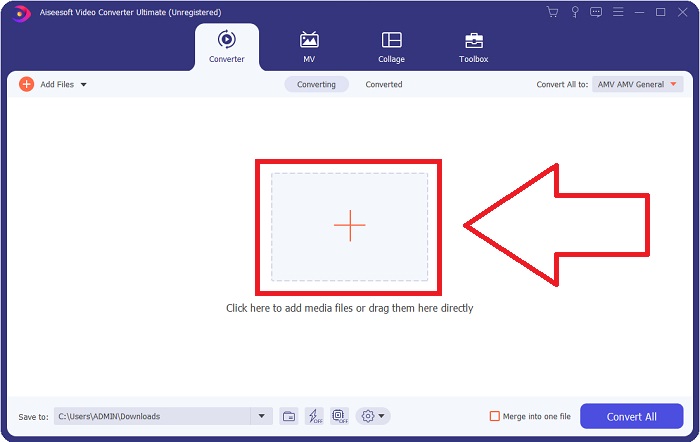
Steg 2: För att starta konverteringen måste du först ladda upp en fil, och för att göra det klickar du på +-knappen i mitten av programmets gränssnitt, eller så kan du enkelt dra dina videofiler från datorn.
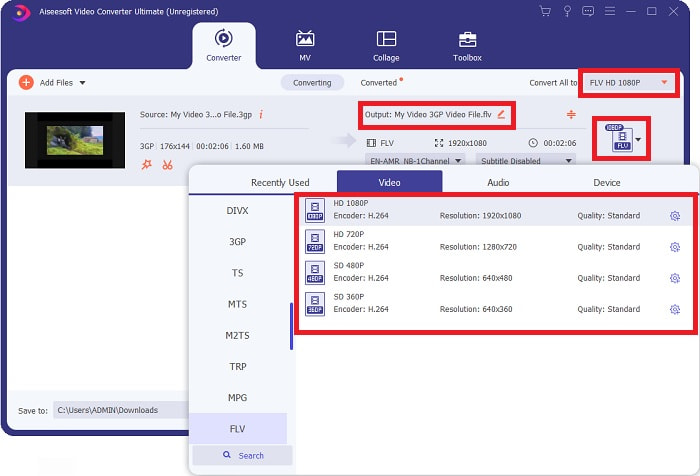
Steg 3: När du har laddat upp en fil kan du nu välja FLV-formatet i formatvalet som finns i det högra hörnet av skärmen. Du kan välja vilken kvalitet du vill ha eftersom alla möjliga inställningar som du kan använda visas.
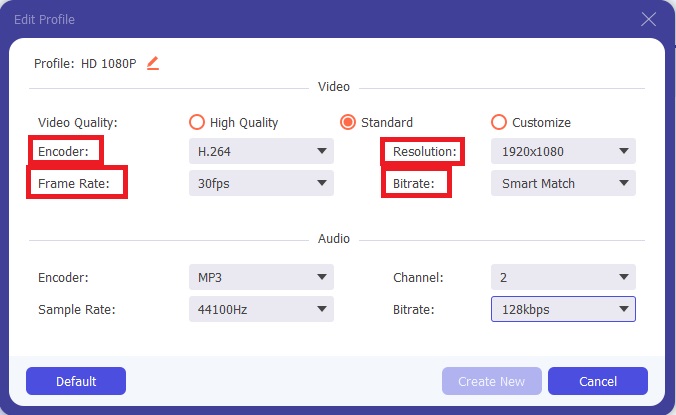
Steg 4: Trots kvalitetsvalen som visas kan du skapa den kvalitet du vill ha om din föredragna kvalitet inte finns bland alternativen. Klicka på kugghjulsikonen och justera allt innehåll du ser efter att ett fönster har dykt upp. Upplösning handlar om bildskärmens visningskvalitet och bildfrekvensen om hur ofta videon uppdateras; bithastigheten avser mängden data som kodas åt gången. Slutligen är kodaren ansvarig för hur videoformatet levereras.
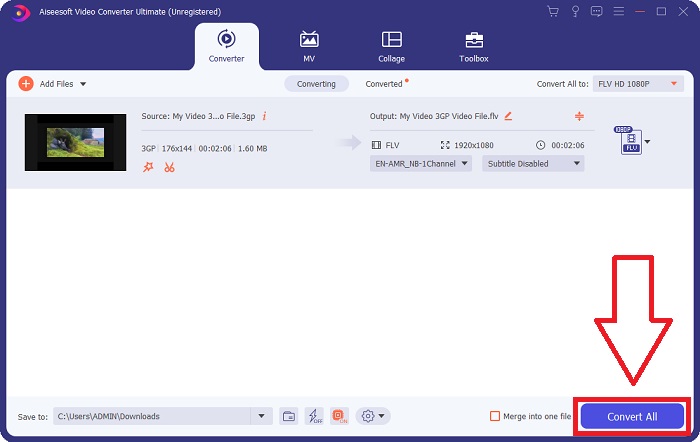
Steg 5: När du har gjort alla justeringar du behöver för din videoutgång kan du nu konvertera den genom att klicka på Convert All.
Del 2. En annan intressant metod för att konvertera 3GP till FLV [Online]
Nog om själva programvaran – låt oss prata om det här onlineredskapet som verkligen kan hjälpa dig att konvertera 3GP till FLV. Får vi presentera Free Video Converter Online, där många format stöds av denna onlineomvandlare, inklusive 3GP och FLV. Du kan konvertera en fil direkt från din dator genom att ladda upp den. För att ladda upp en fil som är större än 500 MB kan du använda detta onlineverktyg för att konvertera 3GP till FLV. Användare kan ändra många inställningar innan konverteringen börjar. Du kan till exempel ändra ljudkodek och ljudvolym. Du kan också ändra video-upplösningen. Efter all denna information går vi igenom alla procedurer du behöver känna till.
Steg 1: Här är länken till onlineredskapet. Klicka på den så öppnas huvudsidan i din webbläsare. Klicka på Add Files to Convert för att ladda ner startprogrammet som du använder för att hantera onlineredskapet. Installera startprogrammet och börja ladda upp en fil.
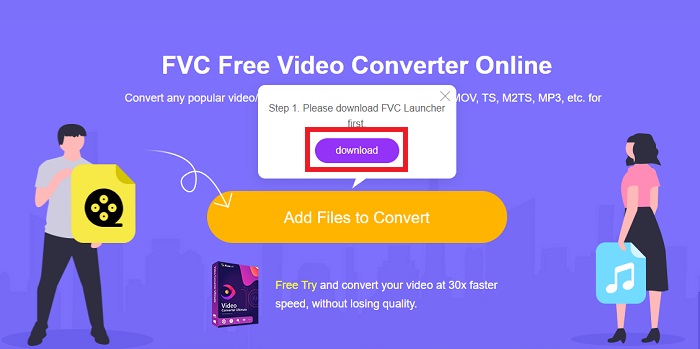
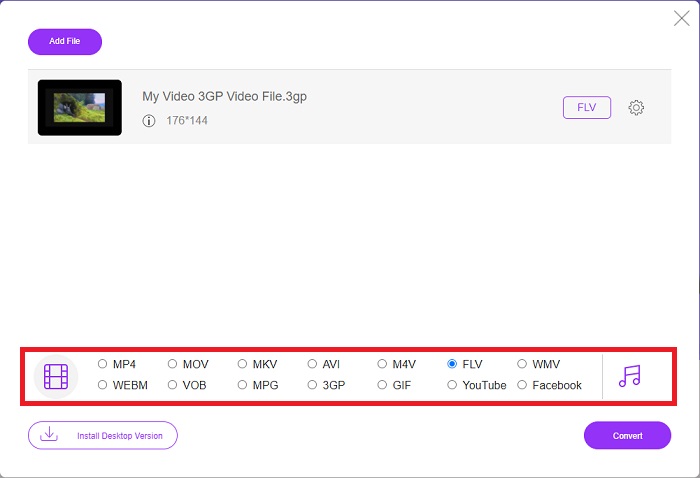
Steg 2: För att ladda upp en fil klickar du på Add Files to Convert igen. När du har laddat upp en fil kan du nu välja videoformatet FLV i listan över videoformat längst ned i fönstret.
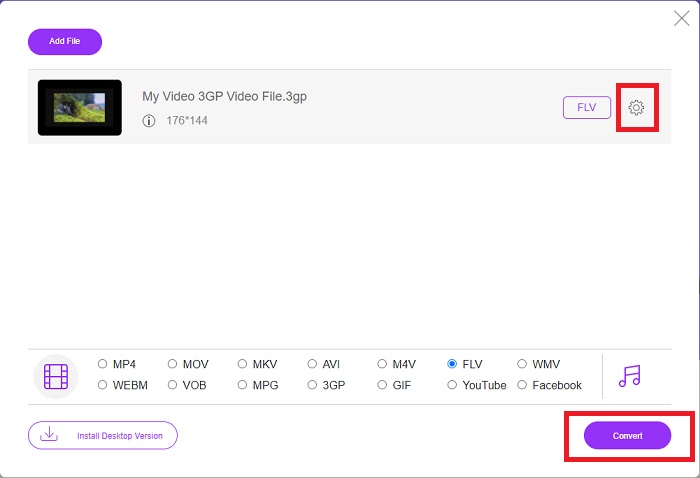
Steg 3: Du kan också redigera kvaliteten på din video eller andra specifikationer som upplösning, bildfrekvens eller bithastighet genom att klicka på kugghjulsikonen bredvid det videoformat du har valt längst upp till höger i fönstret. När du har justerat alla dina önskade inställningar för utdata kan du nu konvertera filen genom att klicka på Convert.
Del 3. En översikt: 3GP vs. FLV
Om du någonsin har velat spara ett ljud- och videoklipp i 3GP-format, har du kommit till rätt ställe! (3GPP). ISO-mediafilformatet fungerar som grunden för 3GPP, ett multimediacontainerformat. H.263 eller H.264 videoströmmar och AMR-WB, AMR-WB+, AMR-NB, HE-AAC v1, AAC-LC eller Enhanced aacPlus ljudströmmar stöds alla. Vanligtvis använder 3GP-filer 3G-mobiltelefoner för att spela in video, men användare kan också spela upp dem på vissa 2G- och 4G-telefoner. Även om 3GP-filer fortfarande används, har deras popularitet minskat eftersom effektivare videoformat har ersatt 3GPP-formatet.
Men videofiler som sparats i Adobe Flash Video (FLV) containerformat är FLV-dokument. Ljud- och videoströmmar kan koda på samma sätt som standard Flash. SWF-format och metadatapaket innehåller en kort rubrik. Plugin-programmet Flash Video Exporter (tillgängligt med Adobe Animate) eller ett program som stöder FLV-filer kan producera Flash Video-innehåll och exportera det som FLV-filer. Adobe Media Encoder kan också koda video i QuickTime- eller Windows Media-format. Nu när du har en idé om 3GP och FLV, tillhandahåller vi ett jämförelsediagram för att veta detaljerna i specifika frågor.
| Filtillägg | 3GP | FLV |
| Filtyp | ISO mediafil | Flash-videofil |
| Utvecklad av | Tredje generationens partnerskapsprojekt | Adobe System |
| Fördelar | Det är lättare för mobilanvändare att dela och lagra videofiler eftersom 3GP-filformatet minskar videostorleken och ljudkomponenterna. Även om det 3GP-designade filformatet använder 3G-kompatibla enheter, kan många 2G- och 4G-enheter spela detta format. | För webbplatser som vill inkludera animationer och interaktiva element är Adobe Flash ett utmärkt val. På lång sikt kan det få en betydande inverkan. Under sin topp, använde Flash enkla spel. |
| Nackdelar | Även om video- och ljudströmmarna kan komprimeras till en enda fil, kvaliteten och den minskade upplösningen, kan användarna förbättra användarupplevelsen avsevärt jämfört med andra format, såsom ljudkvalitet, skärmupplösning, uppspelningshastighet, etc. | Det är förstås en nackdel att FLV:s popularitet har minskat de senaste åren. Det tar mycket tid och pengar att skapa FLV-innehåll. En annan nackdel med Flash är att den inte kan ses på iOS-enheter, vilket kraftigt begränsar dess förmåga att locka nya fans. |
| Program öppnar videoformatet | ◆QuickTime Player ◆Windows Media Player | ◆VLC Media Player ◆Adobe Flash Player |
Del 4. Vanliga frågor om 3GP till FLV-konvertering
Är 3GP bra kvalitet?
Variabel bithastighet och bildhastighet stöder 3GP, precis som i MP4. 3GP var ett populärt format för långtidstelefoner när de fortfarande var den vanligaste kommunikationsformen. Vi behöver en video som är liten eftersom utrymme var en lyx förr. Kvaliteten är i nivå med kamerorna av potatiskvalitet vi hade i telefoner på den tiden, så det är inte chockerande.
Varför spelar inte 3GP?
Prova att spela upp 3GP-filen i VLC Media Player i stället för din standardmediaspelare om den inte stöder 3GP-codecs. VLC är en utmärkt videospelare med öppen källkod eftersom den kan spela upp i stort sett alla videoformat. Förutom för Windows och iOS finns VLC även för Linux och Android.
Är FLV ett lämpligt inspelningsformat?
Adobe Flash Player använder filformatet FLV. Som ett universellt stödt videformat är det ett av de mest använda formaten. Plattformar för videoströmning online, som YouTube, drar nytta av att använda FLV-formatet. Det är mycket praktiskt eftersom filerna är små. Här är de bästa FLV-inspelarna du kan prova.
Slutsats
Generellt sett är alla omvandlare som tillhandahålls för dig den bästa och mest rekommenderade programvaran och onlineomvandlarna du bör överväga att använda. Eftersom de har dessa professionella och användarvänliga funktioner, kan du inte jämföra dessa två med andra program och onlineverktyg. Njut av att använda den, och glöm inte att skriva en recension efter att ha använt den.
-
 De 4 mest effektiva sätten att konvertera 3GP till AVI-format [2025]
 Kan jag konvertera mina 3GP-filer till AVI? Tja, du kan enkelt konvertera det om du provar dessa tillgängliga verktyg eftersom vi samlade alla möjliga lösningar på ditt 3GP till AVI-konverteringsproblem.
-
 Bästa sätten att konvertera VOB till FLV [Gratis och online ingår]
 Vill du konvertera en VOB-fil till en FLV-fil? Du kan enkelt slutföra uppgiften med antingen stationära eller online-omvandlare. Läs den här guiden och lär dig hur du omvandlar VOB till FLV enkelt och snabbt.
-
 Topp 3 sätt att konvertera DAT till FLV på skrivbordet och online
 Vill du konvertera DAT till FLV men vet inte hur? Kontrollera våra rekommenderade DAT till FLV-videokonverterare och följ vår konkreta guide för att enkelt slutföra jobbet.
