


 Video Converter Ultimate
 Skärminspelare
 Video reparation
2 av de bästa M4V till FLV-omvandlarna för Windows/Mac/Online
A video and audio container made primarily to use on every Apple iTunes, M4V. This format is protected to avoid copyright issues by DRM copyright protection. In this case, the file is hard to play if you don't have your account on iTunes with the credentials. So if you want to watch the videos on your PC or Android phone, it is a must to convert them into playable FLV. To know how to convert M4V to FLV, read this article and have a brief idea about M4V and FLV.

Del 1. Första valet om att konvertera M4V till FLV på Mac och PC
It is the most efficient converter you would love to use, especially if you convert M4V to FLV on Mac or PC. FVC Video Converter Ultimate is the most pick converter a lot of users already depend on. Furthermore, if you want to have a multi-purpose tool that provides phenomenal output, this is a must. Also, you can convert any media file in here and set the quality to SD, HD, 1080 even 4k videos. Expect nothing less if you download this tool on your drive because it is said in its name that it is ultimate. Moreover, follow the tutorial written below if you want to experience this tool's maximum conversion capacity.
How to Convert M4V to FLV with the Help of the FVC Video Converter Ultimate:
Step 1. Click the download button below, choose what OS you are currently using. After downloading, click Install, and a welcome interface will show, then press Start Now.
Gratis nedladdningFör Windows 7 eller senareSäker nedladdning
Gratis nedladdningFör MacOS 10.7 eller senareSäker nedladdning
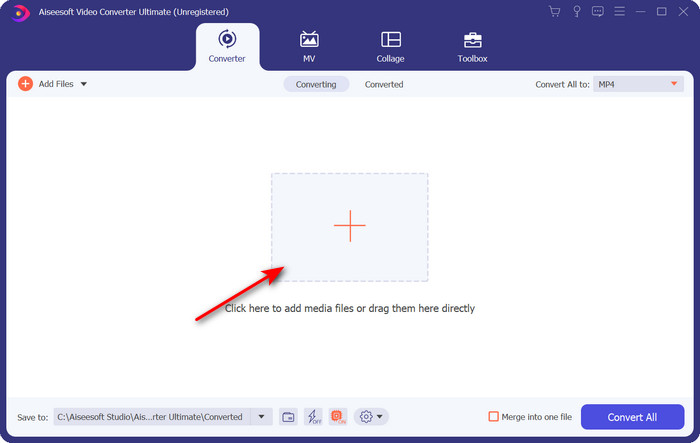
Step 2. Start the tool, click + sign in the middle of the interface and select the .m4 file on the folder that will show, click it and press Open.
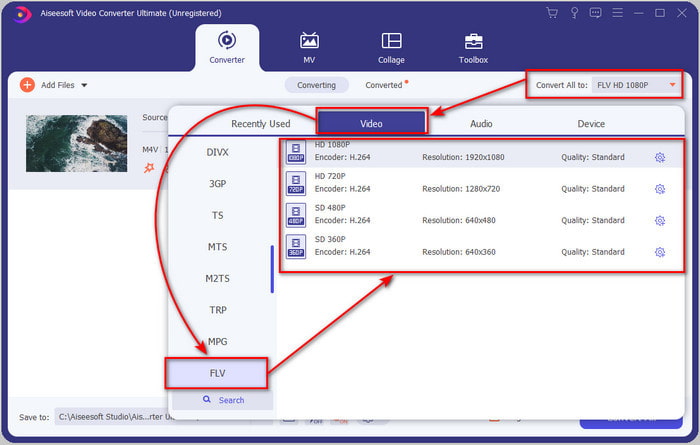
Step 3. Once the .m4v file is on the interface, click Convert All to and find the FLV format.
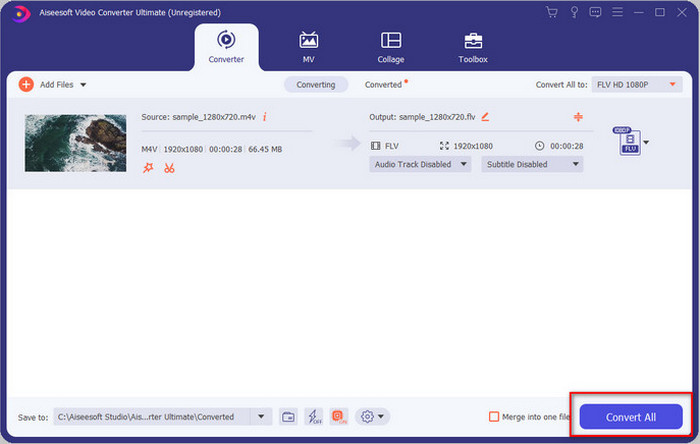
Step 4. Go ahead and click Convert All to start the changing of M4V to FLV.
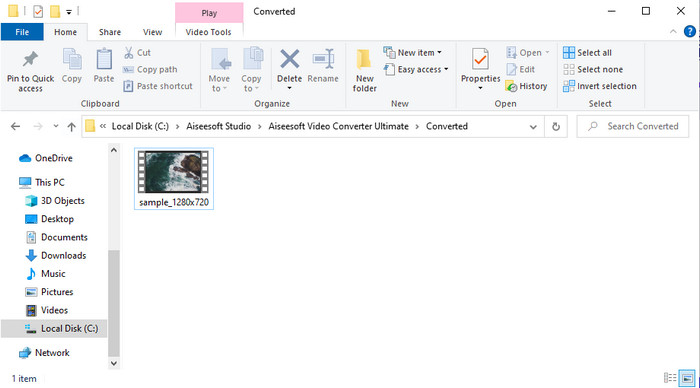
Step 5. Converting the file will take less than a minute because of the fast conversion this tool provides. A folder will show your converted file; click the file to watch or share it online.
Fördelar
- Snabb konvertering och hårdvaruacceleration är tillgängliga för den bästa upplevelsen.
- Tillgänglig på alla plattformar som PC eller Mac.
- Att utföra redigering av videor för att göra dem enastående kan överträffas här.
Nackdelar
- Betalning före användning men priset för det är överkomligt.
- Ladda ner programvaran före användning.
Del 2. Andra valet om att konvertera M4V till FLV gratis via online
Converting your files online can be efficiently executed if you use a proper convert M4V to FLV online with the help of FVC Free Video Converter Online. This online tool is the best converter you can access on all web browsers if you have an internet connection. Also, you can convert here without a limit in size, but you can't perform the batch conversion here. Even though the online software is excellent still internet connectivity is needed, so if you don't have then this is not a choice like the other web converters available. But, if you have an internet connection and want to experience a well-done free converting online, you must follow the steps below.
How to Convert M4V to FLV with the Help of the FVC Free Video Converter Online:
Step 1. Hit this link to go to the free online converter the FVC provides for you.
Step 2. On the web interface, click Add Files to Convert to download the installer. Once downloading the installer is done, hit the Add Files to Convert again and a folder, then select the M4V file.
Ladda ner Skrivbordsversionen för att konvertera filer i batch.
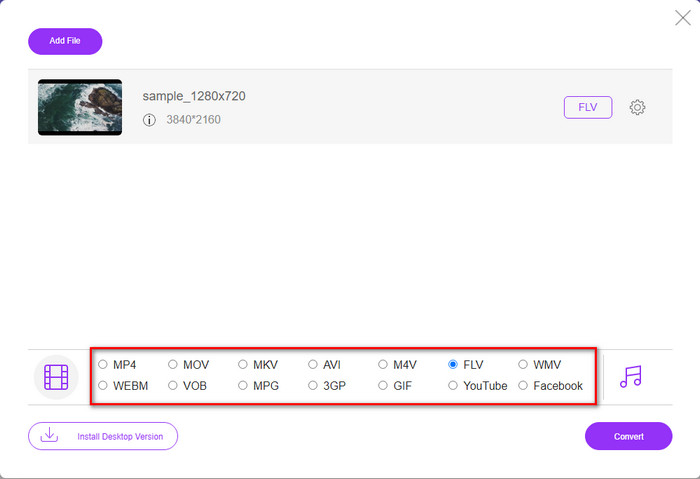
Step 3. A new web interface will show the below choose the FLV format by clicking it.
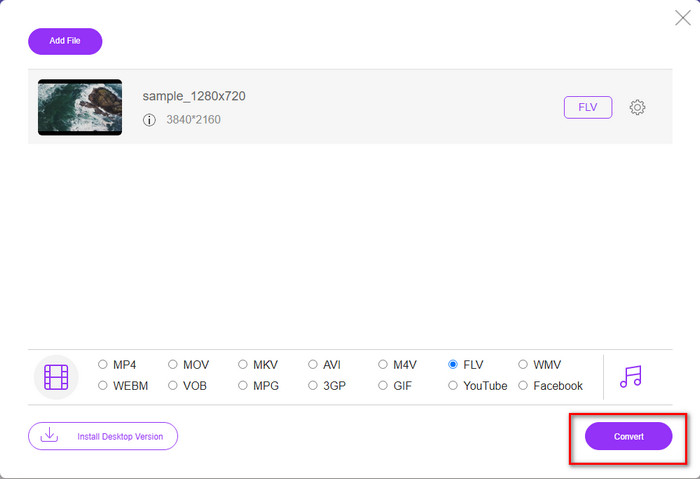
Step 4. So, to begin to convert M4V to FLV for free, click Convert.
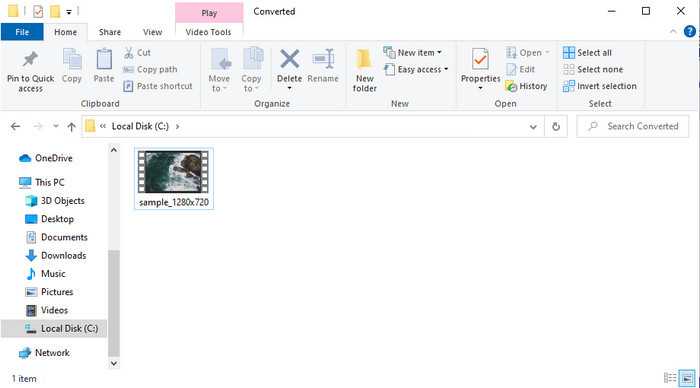
Step 5. After the conversion, a folder will show on the interface; click the file to play it on your local media player.
Fördelar
- Gratis och kompatibel i alla webbläsare.
- Obegränsad filstorlek och konvertering.
- Säkert och inga annonser i det primära webbverktyget.
Nackdelar
- Det krävs internetanslutning för att använda verktyget.
- Mindre format som stöds att ladda upp och konvertera till.
Del 3. Skillnader mellan M4V- och FLV-format
M4V lagrar den högsta videokvaliteten som laddats ner på din Apple iTunes Store. Detta format liknar MP4 eftersom de använder MPEG-4 codec som en kompressor. Men M4V-videorna är skyddade under upphovsrättsskyddet Apple FairPlay DRM. Så det är svårt att spela upp videor i det här formatet eftersom det inte kommer att spelas direkt om du sätter in dem i en annan mediaspelare än iTunes eller Quicktime Player. Oskyddade M4V-filer kan nås på din mediaspelare genom att ändra filtillägget till .mp4.
Däremot används FLV för att överföra video- och ljuddata över webben så snabbt som möjligt. Flash Video är det mest fördelaktiga formatet som finns på varje HTML 5-webbplats. Detta format avbröts dock eftersom Adobe Flash redan hade gått i pension. Ändå kan du fortfarande spela det på dina mediaspelares plug-ins som behövs när du laddar ner det eller konverterar det.
M4V kontra FLV
M4V är utvecklad av Apple, som också använder MPEG 4. M4V-filer används ofta för att lagra de videor som laddats ner från Apple iTunes Store, som musikvideor, TV-avsnitt, etc. Du kan hitta vissa M4V-filer kopieringsskyddade eftersom den använder Apples FairPlay DRM upphovsrättsskydd.
Adobe Flash Player använde FLV för att leverera videoinnehåll som filmer och TV-program. Numera utvecklar Adobe inte längre spelaren och rekommenderar användare avinstallera den av säkerhetsskäl. Du kan dock fortfarande använda FLV-formatet på många icke-Adobe/Macromedia-program.
Del 4. Vanliga frågor om M4V till FLV-konvertering
Vilket är bättre; MP4 eller M4V?
Om du vill skydda din fil så är M4V formatet du måste använda eftersom detta endast är tillgängligt på Apples, och det är skyddat. Men anta att du vill ha ett format som är kompatibelt med alla mediaspelare, redigeraren och mer. I så fall är MP4 det universella mediaformatet du skulle älska att använda.
Kan jag spela M4V på VLC?
VLC is free to use and compatible with all platforms; also, it can play almost all of the media formats. But the protected M4V can't be played here because it is protected. So now, if you want to watch .m4v on VLC, it is a must to convert the M4V file into MP4 or AVI.
Förlorar jag kvaliteten efter att ha konverterat M4V?
Efter konvertering av M4V bör kvaliteten på den behålla standardnivån för den ursprungliga M4V-kvaliteten. Vissa omvandlare stöder dock inte att konvertera videon till HD, 1080 eller 4k. Så det är bättre att välja det perfekta verktyget och inte det okej verktyget som räcker till dina behov för att konvertera utan att förlora sin kvalitet.
Slutsats
All in all, the two online and offline tools presented here are destined for greatness, especially if you want to convert M4V to FLV. Also, we gain insights into the two formats, the M4V and FLV. Although altering the M4V is necessary to watch the protected file, choosing the right tool for the right job is tricky. So, we present two tools you can use to convert the format for free by using FVC Free Video Converter Online. Or rather experience new heights of converting by using the FVC Video Converter Ultimate. And now, what are you waiting for if you want to watch your M4V for free? Choose the tool above, follow the quick and easy steps presented above, and voila, enjoy the video.
-
 [Guide] Hur man konverterar M4V -videor till animerade GIF -filer på Windows/Mac
 Om du vill skapa animerade GIF -filer från dina favorit M4V -videor kan du lära dig om två enkla och effektiva sätt att konvertera M4V -videor till GIF med anpassade inställningar.
-
 3 Video Converter Program Används för att konvertera iTunes M4V till AVI på Mac
 Har du ingen aning om hur man konverterar MKV till ett AVI-format? När vi fortsätter att läsa den här artikeln kommer vi att känna till de 3 verktygen som kan hjälpa dig att konvertera detta filformat.
-
 Gratis M4V till MOV Converter – Hur man konverterar M4V till MOV
 Om din mediaspelare'inte stöder M4V, har du någonsin kämpat för att se en film på din iPhone? Huvudämnet för den här artikeln är att konvertera den till en MOV-videofil.

