


 Video Converter Ultimate
 Skärminspelare
 Video reparation
Hur man konverterar AMV till FLV på ett pålitligt och tillförlitligt sätt
För den som inte känner till det står AMV för Anime Music Video. Filändelsen .amv används för komprimerade videofiler. Bärbara mediespelare som tillverkas i Kina är de som oftast använder AMV-filer. Videofiler med låg upplösning passar skärmen på mediespelaren där videofilen kan visas vid uppspelning. Adobe Systems har däremot skapat filformatet FLV (Flash Video File), som innehåller ett kort filhuvud, sammanflätade ljud-, video- och metadatapaket samt ljud- och videodata som lagras i SWF-filer. Videoströmmar kan bäddas in med Flash Video i Adobe-program och Flash-insticksmoduler. Nu när du har fått en kort introduktion till dessa två format kan du förbereda dig på att fördjupa dig i konverteringsverktygen. Du bör överväga att konvertera AMV till FLV.

Del 1. Den mest utmärkta omvandlaren att använda för att konvertera AMV till FLV
Video Converter Ultimate är ett professionellt program som kan hantera din videokonvertering. Det stöder enkel och förlustfri konvertering från FLV till MOV på både Windows- och Mac-datorer, och det är gratis tillgängligt. Dessutom kan verktyget konvertera mellan över 100 olika format, inklusive högupplösta filer. Ett komplett videoredigeringsverktyg ingår också, som gör att du kan beskära, trimma, klippa, lägga till vattenstämplar och använda specialeffekter. Förutom videokonvertering stöder Video Converter Ultimate videonedladdning, videöverföring och andra funktioner. För att lära dig hur du använder denna programvara behöver du bekanta dig med instruktionerna som ges i det här avsnittet.
Steg 1: För att få tillgång till programvaran måste du först ladda ner den till din dator. För att göra detta klickar du bara på knappen Free Download längst ned i detta steg. Som du kan se har du två alternativ när du laddar ner programvaran, antingen Windows eller Mac. Installera programvaran på din dator efter nedladdningen och starta sedan programmet.
Gratis nedladdningFör Windows 7 eller senareSäker nedladdning
Gratis nedladdningFör MacOS 10.7 eller senareSäker nedladdning
Steg 2: Ett fönster visas när du startar programvaran. Converter-gränssnittet visas på skärmen samtidigt som du ser uppladdningsområdet. Klicka på +-knappen, eller dra valfria videofiler från skrivbordet för att fortsätta.
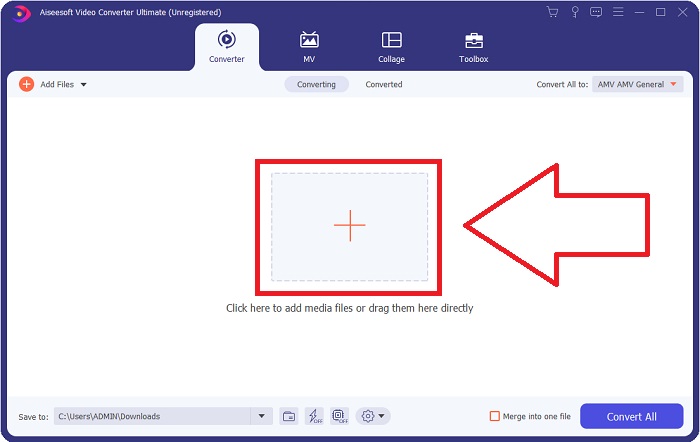
Steg 3: För att konvertera AMV-videoformatet till FLV behöver du, efter att ha laddat upp en fil i programmet, gå till formatvalet och välja FLV-format. Du kan också välja valfri videokvalitet efteråt.
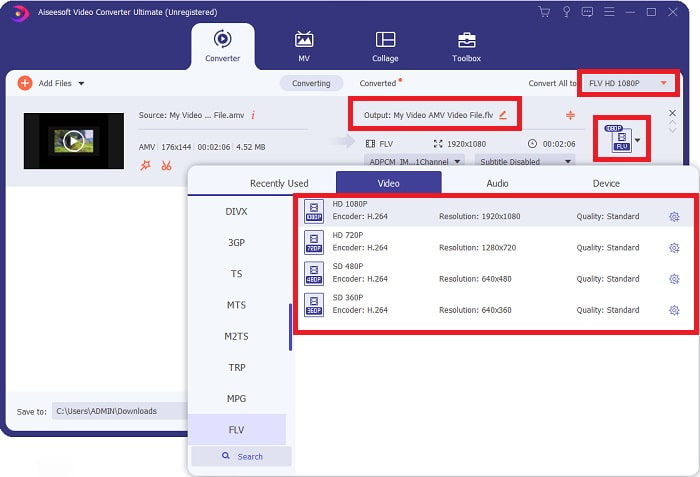
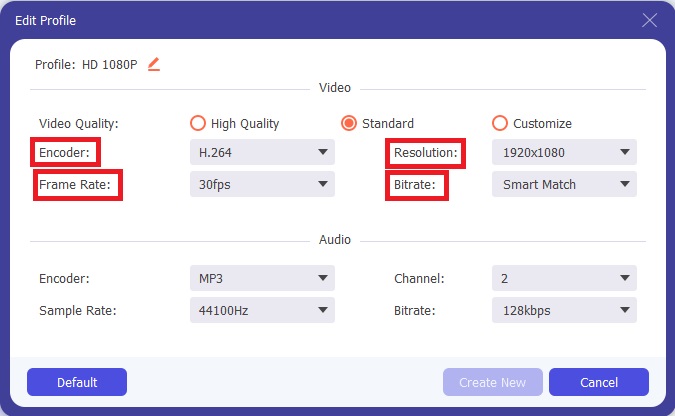
Steg 4: Om du behöver anpassa eller skapa en ny videokvalitet efter dina önskemål kan du klicka på kugghjulsikonen bredvid valet av videokvaliteter.
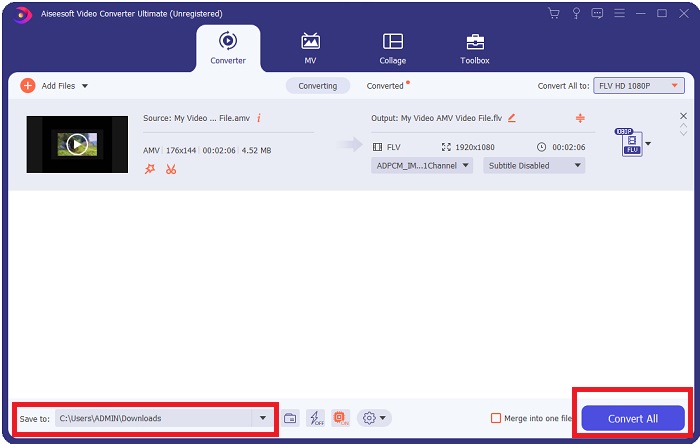
Steg 5: Nu är du nästan klar! När du har ställt in alla specifikationer och justeringar som du vill ha kan du välja plats för din konverterade fil genom att klicka på mappikonen bredvid fältet Save to längst ned i fönstrets hörn. Nu kan du konvertera din videofil genom att klicka på knappen Convert All.
Del 2. Onlineverktyg att överväga att använda vid konvertering av AMV till FLV
Det är enkelt att använda onlinekonverterare eftersom de inte kräver att någon programvara laddas ner eller installeras. Free Video Converter Online är ett utmärkt exempel på ett program som snabbt och enkelt kan konvertera AMV till FLV. Du kan konvertera ett brett utbud av ljud- och videoformat med detta program, och det är helt gratis att använda. Du kan ladda upp två filer till programmet för konvertering, och när processen är klar sparas den konverterade filen automatiskt på din hårddisk. Låt mig presentera alla steg du behöver känna till för att använda detta fantastiska onlineredskap.
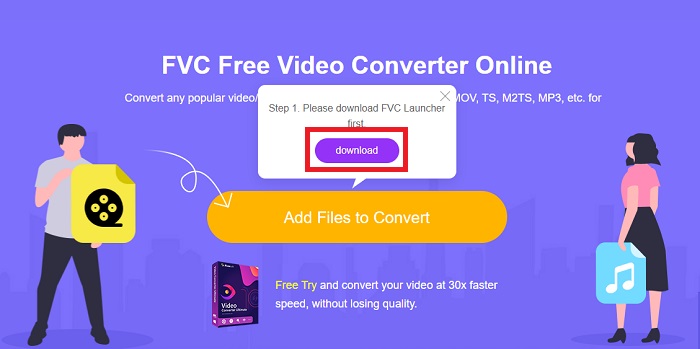
Steg 1: Klicka på denna länk för att gå till huvudsidan för onlinetjänsten. När du har kommit vidare kan du börja konvertera en fil genom att klicka på Add Files to Convert. Nedladdningsknappen visas sedan i det övre hörnet av skärmen. När startprogrammet har installerats klart kan du börja ladda upp en fil från din dator till detta verktyg.
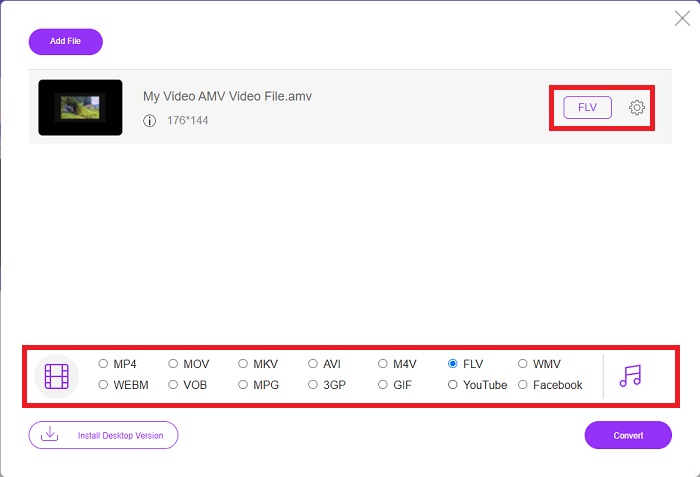
Steg 2: När din importerade fil är redo klickar du på FLV-videoformatet nedtill. Precis som i programvaran kan du också justera alla specifikationer för din utgående video genom att klicka på kugghjulsikonen.
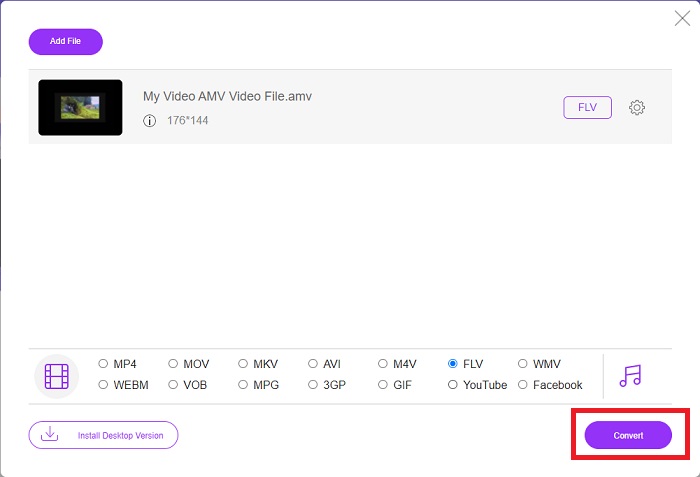
Steg 3: Till sist klickar du på knappen Convert för att ändra dina AMV-filer till FLV-format.
Relaterat:
Del 3. Utökad kunskap om AMV & FLV
AMV optimerar låg mångsidiga mediaspelare med långsamma processorer och små skärmar, som S1 MP3-spelaren. Videocodec är Motion JPEG med fasta kvantiseringstabeller. Ljudkodeken är IMA ADPCM, där de första 8 byten av varje ram är källan (16 bitar), index (16 bitar) och mängden krypterade 16-bitars sampel (32 bitar). Avkodningskostnader för dessa förenklade codecs är försumbar. Videokomprimeringen är låg (4 pixlar/byte mot över 10 pixlar/byte för MPEG-2), men filstorlekarna är små på grund av den reducerade upplösningen (96x96 högre än eller lika med 208x176) och fps (10, 12, eller 16 bilder/s). En 30-minuters video komprimerad till 128x96 pixlar och 12 frames/s blir 80 MB.
Däremot En videofil med extension.flv som du kan använda filtillägget FLV om du vill strömma video eller ljud från Adobe Flash Player eller Adobe Air över internet. Under lång tid var Flash Video standardvideoformatet för nästan alla onlinevideor, inklusive de på webbplatser som YouTube, Hulu och otaliga andra. Av denna anledning använder streamingtjänster och mjukvaruutvecklare inte längre Adobes proprietära Flash-format. Med all denna jämförelse angiven, här är lite hjälp för dig, den här artikeln gav dig ett jämförelsediagram:
| Filändelsen | AMV | FLV |
| Filnamn | Anime musikvideo | Flash-videofil |
| Utvecklad av | Jim Kaposztas | Adobe System Incorporated |
| Fördelar | ◆ AMV är en av de mest populära fangjorda anime-musikvideorna hittills. ◆ Filstorleken är liten. | Adobe Flash för dynamiska och interaktiva webbsidor kan vara en stor fördel. Även om detta är en enkel process kan resultaten bli betydande. Flash var en gång ett populärt val för enkla videospel också. |
| Nackdelar | ◆ Inkompatibel med de flesta mediaspelare och enheter; låg kvalitet. | FLV:s nedgång i popularitet har varit en nackdel. Att skapa FLV-innehåll kan vara tidskrävande och dyrt. Bristen på stöd för Flash på iOS-enheter begränsar kraftigt dess förmåga att locka nya användare. |
| Program som stöder filen | ◆ VLC Media Player ◆ iOrgsoft AMV Converter | ◆ RealPlayer ◆ Apple QuickTime Player ◆ VLC Media Player ◆ MPlayer |
Del 4. Vanliga frågor om AMV till FLV-konvertering
Vad är syftet med en AMV?
Synkronisering och enhet i en AMV kan uppnå olika videoredigeringsstilar. Det är möjligt att uppnå råredigering med enkel in- och utzoomning av "effekter" och enkla övergångsövergångar. Bland de många exemplen finns följande.
Hur tillverkas AMV?
För att en AMV ska bli framgångsrik måste den använda en låt som är nära relaterad till ämnet och nästan perfekt beskriver den. Alla som läser detta kan svara genom att säga: 'Wow, det här är fantastiskt! Den här låten är hans ledmotiv. På grund av detta har du valt en bra bit.
Är FLV bättre kvalitet?
FLV-formatet och MP4 kan lagra högkvalitativ video- och ljudkodning. Kvaliteten på FLV-filer är en fråga om debatt, men fördelarna och nackdelarna med FLV kan diskutera filformatet. Högre kompressionsförhållanden i MP4 resulterar i mindre kvalitetsförlust.
Slutsats
Avslutningsvis vet du vikten av att välja den bästa omvandlaren för att konvertera AMV till FLV. Andra kommer att producera lågkvalitativa och osynkroniserade videor efter att videon har konverterats. Men de två omvandlarna som den här artikeln rekommenderar är den förstklassiga omvandlaren som du inte behöver oroa dig för kvaliteten den kommer att ge.
-
 Bästa metoden att använda för att konvertera AMV till AVI [Godkänd]
 Har du svårt att konvertera din videofil i AMV-format till AVI? Här är några tips som du bara kan hitta i den här artikeln.
-
 3 nyaste AMV-omvandlare tillgängliga för att konvertera AMV till MOV-format [2022]
 Vet du inte hur man konverterar dina AMV-filer till MOV-format? Sedan talar den här artikeln om de 3 AMV till MOV-omvandlarna som du kan använda online eller offline.
-
 4 verifierade metoder för att konvertera TS till FLV på Desktop / Online
 Du kan inte öppna TS på din dator eller mobil som standard. Det enda sättet att titta på videofilerna är att konvertera TS till FLV eller andra format med vår konkreta guide.
