


 Video Converter Ultimate
 Skärminspelare
 Video reparation
Offline- och onlineverktyg för att konvertera TRP till FLV som du bör känna till
TRP är ett filformat för lagring av inspelade TV‑filer. Eftersom få spelare kan hantera den här filtypen i dess ursprungliga version kan du behöva konvertera filen till ett annat format innan du kan titta på den. För att kunna konvertera TRP‑filer till FLV‑filer behöver du använda rätt programvara. Som tur är blir detta mycket enklare med vår programvara eller dess webbaserade motsvarighet, som inte orsakar någon som helst olägenhet under hela konverteringsprocessen. Följ stegen vi anger för att konvertera dina TRP‑videor till FLV‑format på ett lyckat sätt.

Del 1. Offlinemetod för att konvertera TRP till FLV
TRP som filformat är i stort sett ovanligt för de flesta videokonsumenter och används inte särskilt ofta av skapare. På grund av detta stöder de flesta program och webbaserade verktyg inte den här typen av videofil. Därför är Video Converter Ultimate ett alternativ att räkna med när du behöver konvertera videor från ett format till ett annat. Den här programvaran kan konvertera din TRP‑fil till valfritt format du önskar med ett enda klick.
Detta videokonverteringsverktyg ger avancerade redigeringsfunktioner och har ett grafiskt gränssnitt som är enkelt att använda även om du inte har några tekniska kunskaper eller färdigheter. Med hjälp av denna applikation kan du konvertera filer och dra nytta av supersnabba konverteringstider och högkvalitativa utdata. Här ger vi dig de enkla stegen du måste följa:
Steg 1: Ladda ner .exe‑filen genom att klicka på knappen Free Download nedan, beroende på vilket operativsystem du använder. När nedladdningen är klar öppnar du filen och startar installationsprocessen. Vänta tills installationen är färdig och starta sedan programmet.
Gratis nedladdningFör Windows 7 eller senareSäker nedladdning
Gratis nedladdningFör MacOS 10.7 eller senareSäker nedladdning
Steg 2. Ett gränssnitt visas när programmet startar. Klicka där på +-knappen i mitten för att börja importera videofilen du vill konvertera, eller dra och släpp helt enkelt filen.
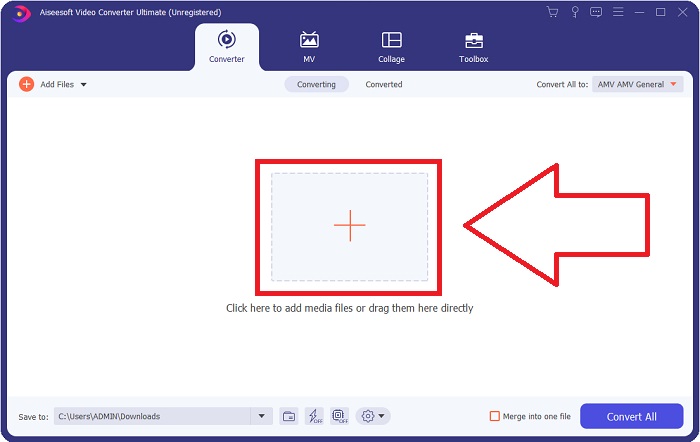
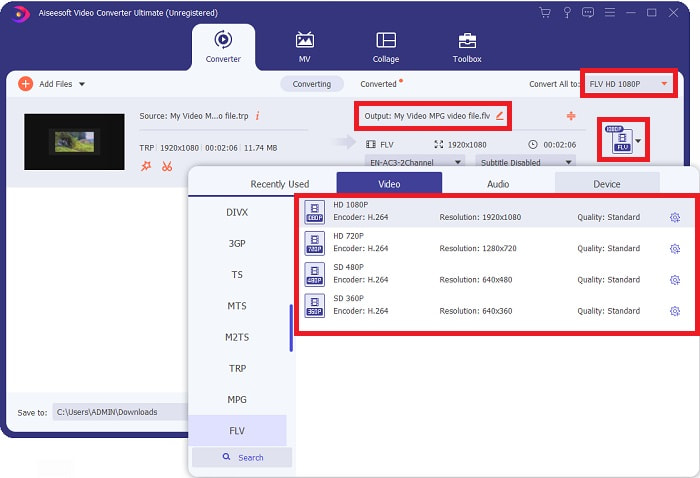
Steg 3: Du ser den aktuella formattypen för din video på höger sida om filen. För att välja vilket format videon ska konverteras till klickar du på denna, så visas alla tillgängliga format. Leta efter FLV eller skriv bara in det i sökfältet. Det finns också videokvaliteter att välja mellan till höger.
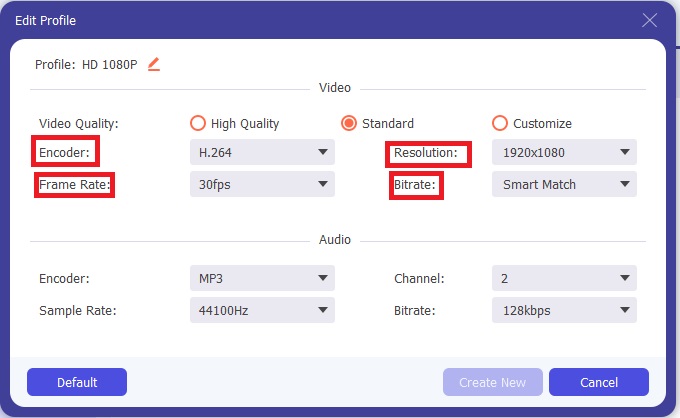
Steg 4: För de extra funktionerna vi nämnde klickar du på kugghjulsikonen till höger om den videokvalitet du valt, så visas ytterligare ett gränssnitt. Där kan du redigera en mängd video- och ljudinställningar efter dina behov. Klicka på knappen Create New för att spara ändringarna.
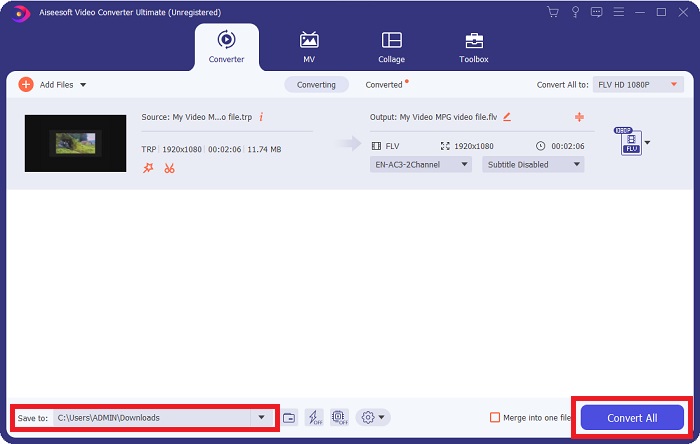
Steg 5: När du är klar med alla justeringar klickar du på knappen Convert All längst ned till höger i gränssnittet för att starta konverteringsprocessen och väntar tills den är färdig.
Del 2. Onlinemetod för att konvertera TRP till FLV
Att konvertera videofiler är ett annat alternativ att överväga om du vill få jobbet gjort genom att använda ett webbaserat verktyg i stället för att installera hela programmet. I det här fallet har vi också en online‑motsvarighet till programvaran – FVC Free Video Converter Online. Den ger fortfarande tillgång till extra inställningar som i programvaran, men inte alla funktioner. Den uppfyller dock sitt syfte inom en rimlig tid. Följ stegen nedan för att använda detta webbaserade verktyg:
Steg 1: Gå till konverteraren genom att klicka på denna länk. Där kan du börja med att ladda ner startprogrammet som krävs för att importera dina filer. Klicka på knappen Add Files to Convert i mitten av sidan för att inleda processen.
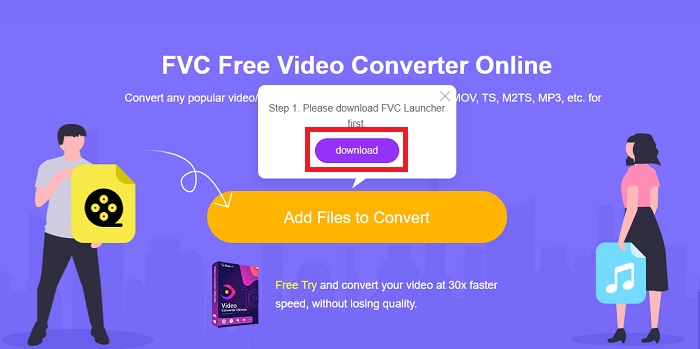
Steg 2: Klicka på samma knapp igen och ladda upp videofilen du vill konvertera. När du har importerat en fil visas ett nytt gränssnitt som visar alla tillgängliga format att välja mellan. I det här fallet väljer du FLV.
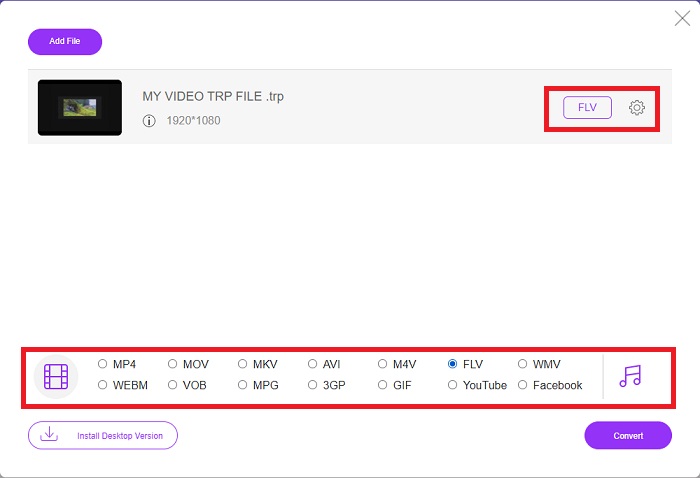
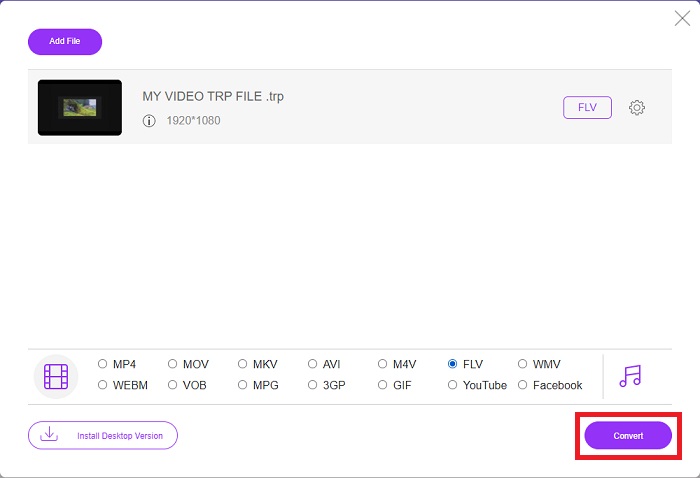
Steg 3: För de extra alternativen, precis som i själva programmet, klickar du på kugghjulsikonen till höger. Video- och ljudinställningarna visas så att du kan finjustera videon vad gäller upplösning, bildfrekvens och mycket mer. När du är klar klickar du på OK för att spara ändringarna. Starta slutligen konverteringsprocessen genom att klicka på knappen Convert längst ned till höger.
Relaterat:
Del 3. Utökade kunskaper om TRP och FLV
För att veta mer om de två nämnda formaten ger vi dig kort information samt en jämförelse av de två.
TRP-filer är vanligtvis associerade med VideoLANs VLC. TRP-filnamnstillägget kan samlas med MPEG-2 Part 1 som innehåller högupplösta filmer. TRP-filer kan innehålla och lagra datapaket som skickas som digital video och ljud över digitala videosändningsnätverk, radiofrekvenser eller linjära inspelningsenheter som videobandspelare. Flera ljud- och videoströmmar, såväl som felkorrigerande kod, ingår i en TRP-fil. Användare kan också inkludera metadata som inspelningstid, kamera-id och källa i filens innehåll.
Å andra sidan står en fil med filtillägget .flv för Flash Video. FLV-filtillägget hänvisar till en video- eller ljudfil som skickas över internet med hjälp av Adobe Flash Player eller Adobe Air. Flash Video har länge varit det primära videoformatet för nästan alla inbäddade videor på internet, inklusive videor på YouTube, Hulu och olika andra webbplatser. Streamingleverantörer och mjukvaruutvecklare har å andra sidan övergett Flash till förmån för HTML5 och andra format sedan Adobes formella upphörande.
| TRP | FLV | |
| Filtillägg | .trp | .flv |
| Utvecklaren | VideoLAN projektteam | Adobe Systems Incorporated |
| Stödprogram | ◆ SMPlayer ◆ VLC Media Player ◆ Apple QuickTime Player | ◆ RealPlayer ◆ Apple QuickTime Player ◆ Mplayer ◆ VLC Media Player |
Del 4. Vanliga frågor om TRP till FLV-konvertering
Hur öppnar man TRP-videoformat med VLC?
När VLC Media Player har installerats på din dator, leta upp TRP-videofilen på din hårddisk och välj den med höger musknapp. Välj 'VLC media player' från rullgardinsmenyn 'Öppna med'. Systemet kommer att öppna videofilen som kommer att spelas upp från det här programmet så snart det startas.
Hur konverterar jag en FLV-fil till Windows Media Player?
Du måste först välja FLV-filen som du vill konvertera. Du kan välja WMV som format som du vill konvertera din FLV-fil till. För att konvertera din FLV-fil, välj "Konvertera" från rullgardinsmenyn.
Kan jag spela TRP var som helst?
Att konvertera TRP till allmänt kända MP4, AVI, MOV, MKV, FLV, WMV och andra format är ett föreslaget alternativ om du vill spela TRP-filer överallt och på eller på vilken enhet eller mediaspelare som helst.
Slutsats
Sammantaget är Video Converter Ultimate och dess motsvarighet till onlineverktyg den du letar efter för att få hela konverteringsprocessen gjord samtidigt som du tillhandahåller alla nödvändiga funktioner du behöver. Det orsakar inga besvär, plus att det är tillgängligt när som helst på dygnet om du har programvaran installerad på skrivbordet. Du kommer aldrig att veta när du kommer att behöva en omvandlare som denna, så vi rekommenderar att du använder den här programvaran för din enkelhet.
-
 Enklaste guiden om hur man konverterar TRP till AVI på Windows och Mac
 Kanske är du inte bekant med TRP-videoformatet och undrar hur du ska konvertera TRP till AVI? Läs den här artikeln ytterligare för att veta detaljerna som rör problemet.
-
 3 lösningar för att konvertera MTS till FLV gratis och online
 Vill du konvertera MTS till FLV? Här är 3 gratis MTS till FLV-konverteringsprogram som du kan försöka konvertera MTS till FLV på Mac OS X och Windows 10/8/7.
-
 Bästa sätten att konvertera VOB till FLV [Gratis och online ingår]
 Vill du konvertera en VOB-fil till en FLV-fil? Du kan enkelt slutföra uppgiften med antingen stationära eller online-omvandlare. Läs den här guiden och lär dig hur du omvandlar VOB till FLV enkelt och snabbt.
