


 Video Converter Ultimate
 Skärminspelare
 Video reparation
Hur man konverterar MTV till FLV i 2 ojämförliga tillvägagångssätt

Del 1. Hur man konverterar MTV till FLV offline
Video Converter Ultimate är en av de bästa MTV‑till‑FLV‑omvandlarna. Du kan ändra videoformatet från MTV till FLV med bara några få klick. Med hjälp av den här programvaran kan du även redigera och komprimera MTV‑videor. Den här MTV‑till‑FLV‑omvandlaren finns för både Windows‑ och Mac‑datorer och är helt gratis. Du kan enkelt konvertera MTV‑filer till FLV‑format genom att ladda ner och installera omvandlarappen och sedan importera de videor du vill konvertera. För en mer detaljerad förklaring kan du läsa följande guide.
Steg 1: Klicka på knappen Gratis nedladdning nedan för att börja ladda ner programvaran. När du har klickat på den, förbered dig på att installera den efter en liten stund.
Gratis nedladdningFör Windows 7 eller senareSäker nedladdning
Gratis nedladdningFör MacOS 10.7 eller senareSäker nedladdning
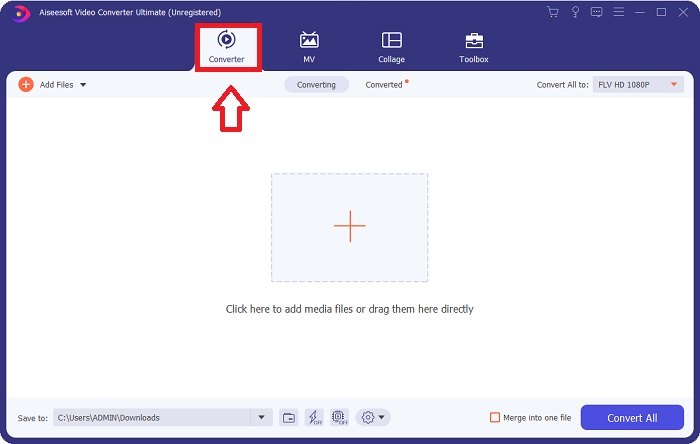
Steg 2: När du har installerat programvaran på din dator startar du den, och ett fönster visas på skärmen. Programvaran visar gränssnittet Converter på skärmen, redo att importera en fil.
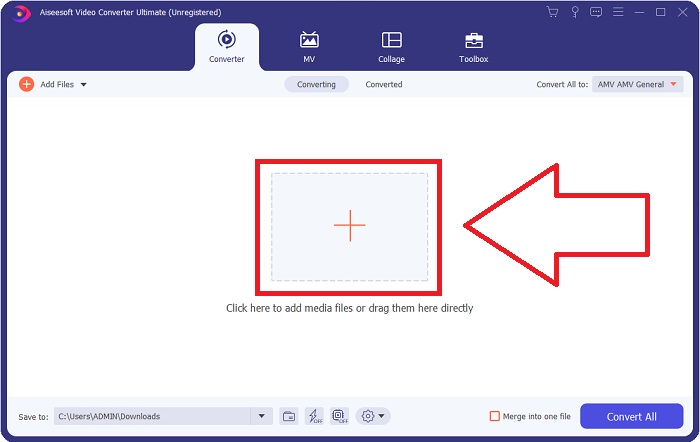
Steg 3: För att importera en fil till programmet måste du klicka på +-knappen i mitten av programmets fönster, eller så kan du helt enkelt dra in valfria videofiler.
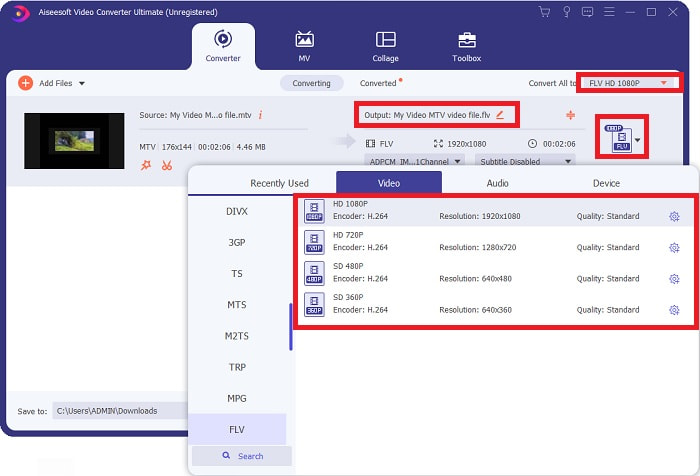
Steg 4: Nu är det dags att välja videoformatet FLV, som finns i det högra hörnet av fönstret nära videoutgången. Klicka där och leta upp videoformatet FLV och bestäm vilken kvalitet du föredrar.
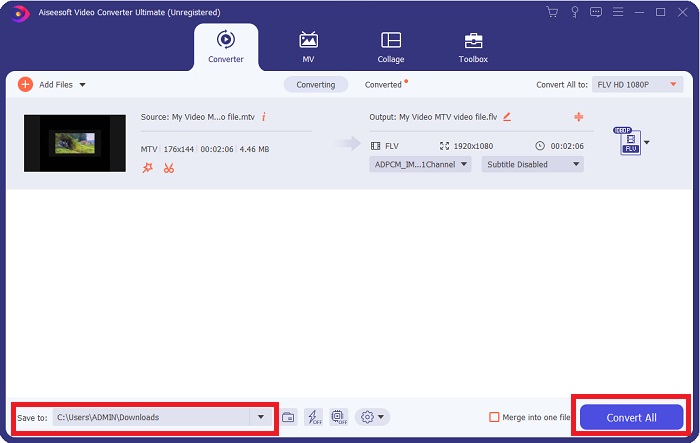
Steg 5: Du kan nu konvertera din fil genom att klicka på knappen Convert All längst ned till höger i fönstret. Välj också platsen dit den konverterade filen ska sparas genom att klicka på nedrullningsmenyn bredvid Save to.
Del 2. Hur man konverterar MTV till FLV Online
Här är ett kostnadsfritt onlineverktyg som du kan lära känna och som kan konvertera MTV till FLV. Free Video Converter Online kan konvertera video- och ljudformat som MP4, WMV och ASF till olika format. Du kan återställa dina högupplösta videor till populära filtyper med bara några få klick samtidigt som den ursprungliga visuella kvaliteten bevaras. Att konvertera flera video- eller ljudfiler samtidigt försämrar inte kvaliteten. Här är stegen du behöver följa:
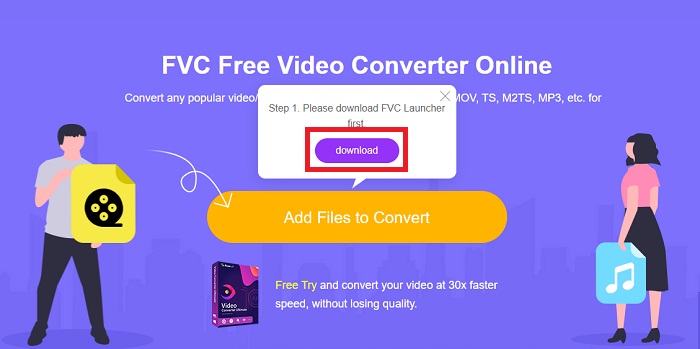
Steg 1: Gå till huvudsidan för Free Video Converter Online genom att klicka på den här länken. Därefter ska du klicka på knappen Add Files to Convert som visas på huvudskärmen för att ladda ner startprogrammet som låter dig använda det här onlineverktyget. När nedladdningen är klar klickar du på den igen för att importera filer från din dator.
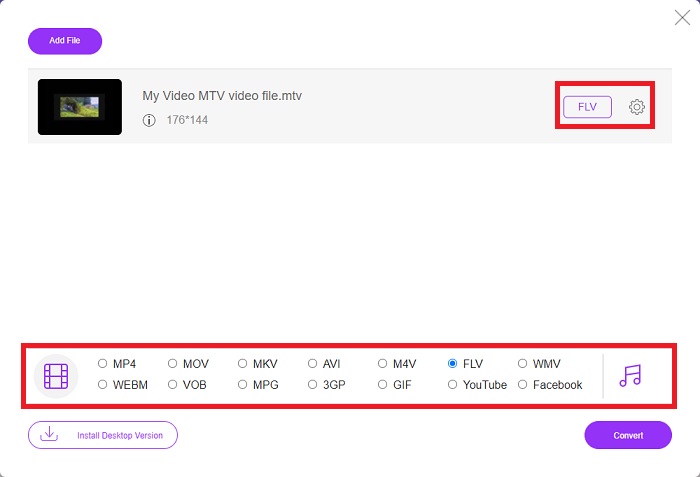
Steg 2: Välj videoformatet FLV från listan över videoformat längst ned i fönstret. Om du vill se alla specifikationer för utgångsvideon klickar du på kugghjulsikonen. Justera inställningarna efter dina önskemål och klicka på OK när du är klar.
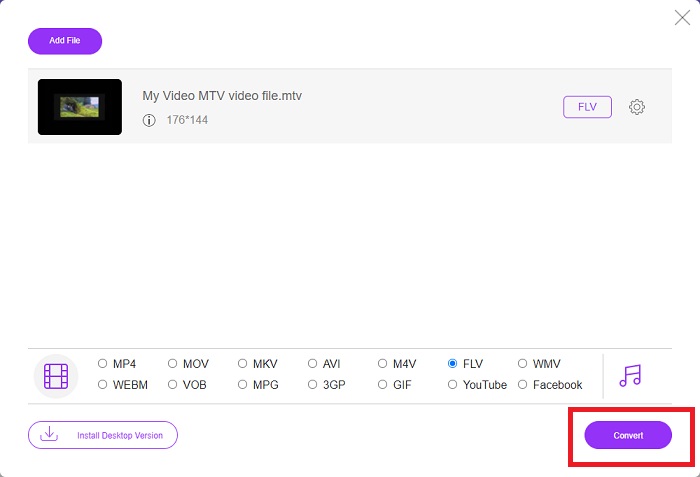
Steg 3: När du är nöjd med alla justeringar kan du konvertera ditt MTV‑videoformat till FLV genom att klicka på knappen Convert.
Relaterat:
Del 3. Utökad kunskap om MTV och FLV
Vissa kinesiska bärbara MP4-videospelare använder enorma kunskaper om MTV- och FLV-videofiler i MTV-format för att lagra videor. Med en hastighet av 12 bilder per sekund kombinerar den MP3-ljud med en mängd bilder. Det finns vissa likheter mellan MTV-filer och AMV-filer, men formateringen är något annorlunda. Flera billiga kinesiska bärbara MP4-spelare lagrar eller spelar inte upp MP4-videor. MTV-videor visas däremot. Lågupplösta (128x128 pixlar) och småformatvideor är normerna på MTV (en minuts video är ungefär 24 MB data). Mediaspelare behöver inte mycket lagringsutrymme eller processorkraft. för att lagra och spela många MTV-videor. Även om MTV-formatet är som AMV-formatet, som kinesiska bärbara mediespelare också använder, skiljer sig formaten tillräckligt för att inte alla AMV-kompatibla enheter eller mediaspelare kan spela MTV-filer.
Adobe Systems Flash Video Format kan dock användas för onlinevideor på YouTube, Hulu, Vevo och många andra tjänster för strömmande video. Förutom iOS kan nästan alla operativsystem läsa och visa FLV-filer med Adobe Flash Player (inklusive plugin-program för webbläsare) och programvara från tredje part. FLV kan spela på iPhone och Android-enheter via öppen källkod och specifika webbläsare. Flash orsakar fortfarande problem på iOS. Användare av Android-versionen Jellybean kan använda FLV-filer. Endast FLV-spelarprogram kan visa filer med FLV-tillägget. FLV-videoskärminspelning är möjlig med hjälp av programvara för skärmfångning och inspelning.
| Filtillägg | MTV | FLV |
| Filtyp | Kinesisk MP4/MTV-spelare | Flash-videofil |
| Utvecklad av | Robert W. Pittman | Adobe Systems |
| Fördelar | En av de viktigaste fördelarna med MTV-formatet är dess förmåga att spelas på de flesta datorer runt om i världen. | FLV-format är vanligt på internet. Tusentals webbplatser använder det; det ger betydligt fler funktioner än andra videofiltillägg och producerar betydligt mindre filer än de flesta andra videoformat. FLV-videor är bra för att visa anständig kvalitet och ladda snabbt. |
| Nackdelar | På grund av dess dåliga ljudförbättringsmöjligheter har den begränsad bildupplösning och kan inte visa helskärms- och fullrörelsevideo. | Det är nödvändigt att ha flash-plugin-program installerade för att spela flash-filfiler online. |
| Program som stöder/öppnar | ◆ VLC Media Player ◆ AVS Media Player | ◆ VLC Media Player ◆ Adobe Flash Player |
Del 4. Vanliga frågor om att konvertera MTV till FLV
Hur konverterar jag MTV till FLV på Mac?
Du kan använda den ovan nämnda Video Converter Ultimate för att konvertera dina MTV-filer till FLV. Först måste du ladda ner programvaran på din Mac och sedan starta den efter installationen. Lägg sedan till dina filer i programmet och välj önskat FLV-format. Till slut klickar du på knappen Konvertera alla för att starta konverteringen från MTV till FLV.
Hur öppnar jag en MTV-fil?
Vissa MTV-filer kanske inte spelas upp i plattformsoberoende VideoLAN- eller VLC-mediaspelare eller i Windows-only Online Media Technologies AVS-mediaspelare. Ljuddelen av vissa MTV-filer kan till exempel bara spelas upp med VLC. MTV-videor kan konverteras till AVI eller MP4 med FFmpeg, AnyMP4 Video Converter eller AVS Video Converter från Online Media Technologies, alla plattformsoberoende applikationer (Windows).
Kan VLC konvertera videor till FLV?
Spela upp en video med VLC Media Player. Välj alternativet Konvertera/spara från rullgardinsmenyn på fliken Media. .flv-videofiler från systemet kan läggas till genom att klicka på knappen "Lägg till" på sidan Öppna media.
Slutsats
Med tanke på alla punkter som tagits upp i den här artikeln finns det två rekommenderade omvandlare du bör överväga att använda: Free Video Converter Online och Video Converter Ultimate. Som nämnts ovan har dessa två visat sin fulla potential och är bättre än andra omvandlare som finns online.
-
 [Online och gratis] 3 metoder för att konvertera MTV till AVI problemfritt
 Har du någonsin hört talas om ett videoformat som MTV? Eftersom du inte vet allt om det här formatet och du vill konvertera en MTV-video till AVI, läs den här artikeln noggrant för att lära dig mer om det här problemet.
-
 Konkret guide som hjälper dig att konvertera AVI till FLV gratis
 För att konvertera AVI till FLV behöver du en kraftfull videokonverterare. Lyckligtvis kan du lära dig två och deras steg-för-steg-guide från den här artikeln.
-
 2 enklaste sätten att konvertera WMV-filer till FLV på PC / Mac
 Hur kan du konvertera WMV till FLV? Först måste du läsa vår rekommendation och hitta din favoritmetod och sedan följa vår guide för att göra jobbet snabbt.
