


 Video Converter Ultimate
 Skärminspelare
 Video reparation


2 enkla sätt att konvertera M4V till WMV enkelt och förlustfritt
Vissa företag har videokomprimeringsformat. Apple och Microsoft har utvecklat videofiler exklusivt för sina mediespelare. Så när man laddade ner eller köpte M4V-filer från Apple iTunes Store och ville dela dessa med vänner eller familj med datorer, kan det vara bäst att konvertera M4V till WMV innan man gör det. Därför förser vi dig med den unika omvandlaren som gör det här jobbet snabbt, effektivt och exceptionellt problemfritt.

Del 1. Hur man enkelt konverterar M4V till WMV på Mac och Windows
Free Video Converter Ultimate är en enkel men effektiv videokonverterare från FVC Studio. På din Windows- eller Mac-dator kan du konvertera video- och ljudfiler. Dessutom är videoformaten som stöds av denna videokonverterare många och inkluderar de mest använda – den stöder populära MP4, FLV, M4V, WMV, TS, M2TS, iPhone/Android-filer. Denna programvara använder HEVC-teknik, så du behöver inte oroa dig för kvaliteten vid högkvalitativ konvertering. När det gäller kvalitet stöder den även 4K UHD. För att använda den följer du de här enkla stegen:
Steg 1: Ladda ner .exe-filen genom att klicka på knappen Free Download nedan enligt ditt operativsystem, för Windows eller Mac. När nedladdningen är klar öppnar du filen och börjar installera programvaran. Kör sedan programvaran.
Gratis nedladdningFör Windows 7 eller senareSäker nedladdning
Gratis nedladdningFör MacOS 10.7 eller senareSäker nedladdning
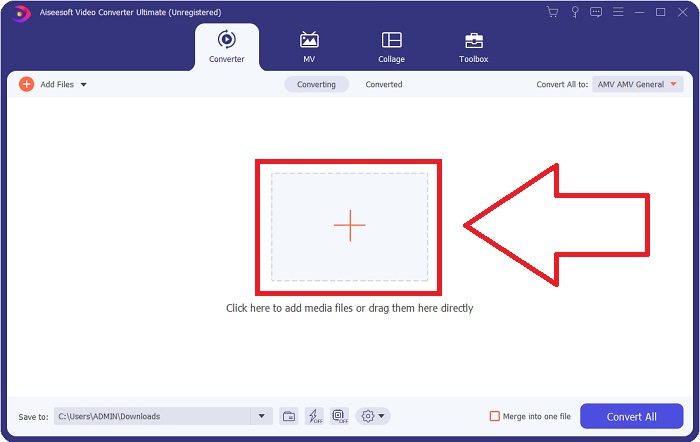
Steg 2: Ett fönster öppnas och där visas ett gränssnitt med en +-knapp i mitten. Du måste klicka på den för att importera videofilen du vill konvertera. Du kan också dra och släppa filen på ett enkelt sätt.
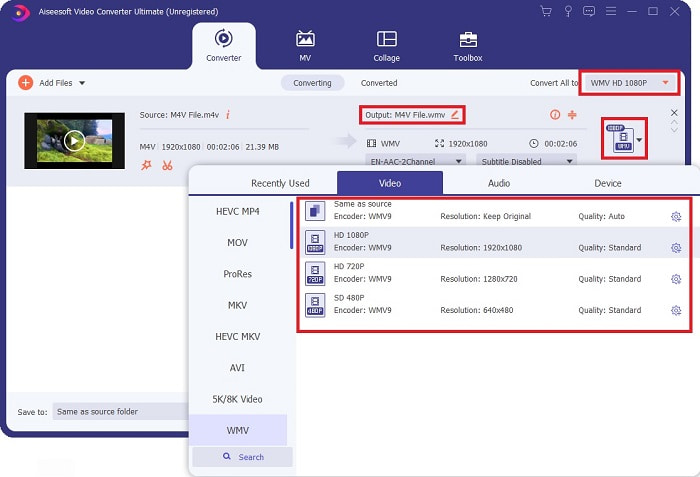
Steg 3: Du kommer att se filen du importerade i gränssnittet. Till höger om den visas vilket format videon för närvarande har. Klicka på det, så visas alla tillgängliga format du kan välja mellan. I det här fallet bläddrar du ner och hittar WMV eller skriver bara in det i sökfältet för ett snabbare sätt. Dessutom finns alla videokvaliteter att välja på på höger sida av fliken. Du kan välja den du föredrar.
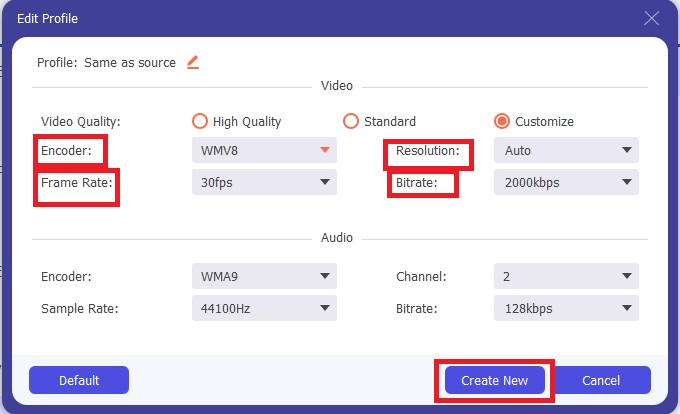
Steg 4: Utöver den nämnda kvalitetsvalet kan du ytterligare redigera resultatet av din video genom att klicka på kugghjulsikonen på höger sida om den videokvalitet du valt. Där visas alla möjliga justeringar, inklusive bildfrekvens, upplösning, bitrate, samplingsfrekvens, kodare och mycket mer. Klicka bara på knappen Create New för att spara ändringarna.
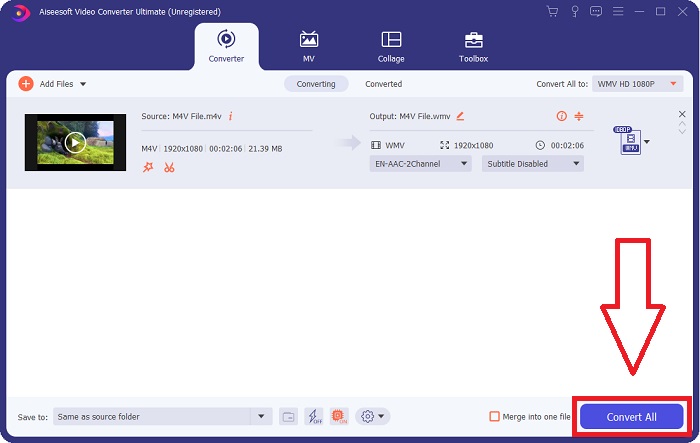
Steg 5: För att avsluta konverteringsprocessen klickar du på knappen Convert All längst ned till höger i fliken, väntar tills den är klar och får sedan din konverterade fil.
Del 2. Hur man konverterar M4V till WMV med handbroms
Handbrake är ett populärt gratis konverteringsprogram som körs på Windows, Mac och Linux-plattformar. Användare kan ladda upp videor i valfritt format från DVD- och Blu-ray-källor till denna transcoder med öppen källkod för konvertering till WMV. Konverteringsproceduren är snabb och enkel tack vare ett användarvänligt gränssnitt. Följ dessa enkla instruktioner för att konvertera M4V till WMV med en handbroms.
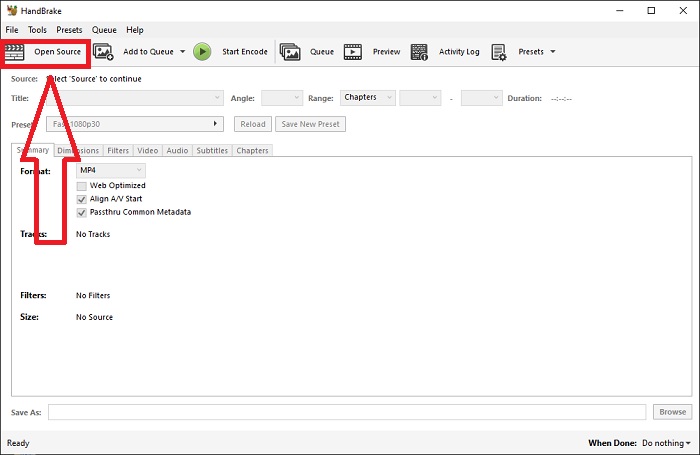
Steg 1: Starta Handbrake-programmet på din dator. Klicka på knappen Open Source på huvudsidan för att bläddra efter och lägga till konverterade WMV-filer. Du kan också helt enkelt dra och släppa videorna i gränssnittet.
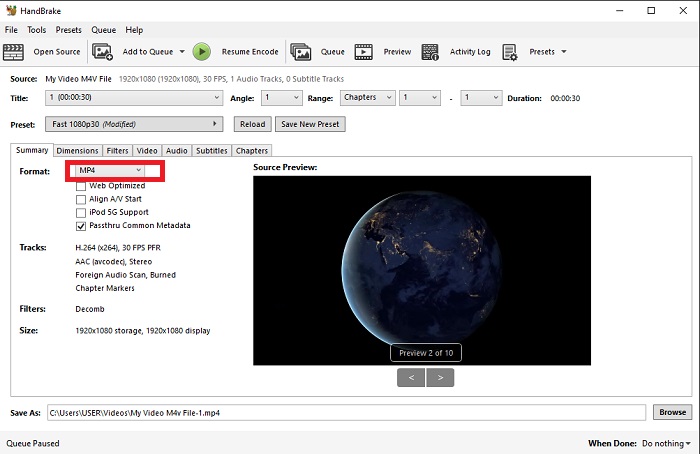
Steg 2: Den nyligen infogade filen visas i Source-området. Välj sedan WMV som önskat utdataformat i rullgardinsmenyn Format på fliken Summary. Filter, videokodekar och andra filegenskaper kan justeras vid behov.
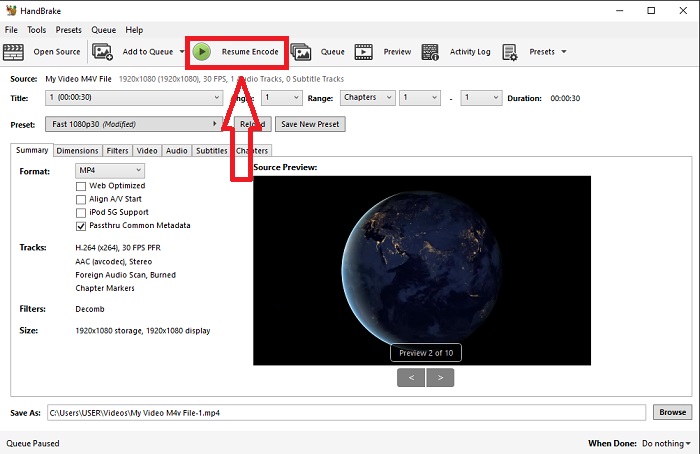
Steg 3: Välj filnamn och plats för utdatafilen på din dator under avsnittet Destination. Klicka slutligen på knappen Start Encode för att konvertera M4V-filen till WMV.
Del 3. Ett annat användbart verktyg för att konvertera M4V till WMV Online
Som ett gratis internetverktyg är FVC Free Video Converter praktiskt. MP4, MOV, MKV, AVI, M4V, FLV, WMV, WEBM, VOB, MPG, 3GP, GIF och videoformat som godkänts av YouTube och Facebook är bland de typer som stöds. Dessutom kan denna gratis online videokonverterare också konvertera ljudfiler, så att du kan konvertera din video eller musik till MP3, AAC, AC3, WMA, WAF, FLAC och andra format. FVC Free Video Converter låter dig också ange filer innan du börjar konvertera. Du kan ändra videons upplösning, bildhastighet och videobithastighet, såväl som ljudets kanal, samplingshastighet och bithastighet.
Steg 1: Klicka på denna länk för att gå till själva onlineverktyget. Först måste du snabbt ladda ner en startmodul. Det gör du genom att klicka på knappen Add Files to Convert i mitten av sidan. Detta steg gör att du kan importera dina filer.
Steg 2: Klicka på den nämnda knappen igen för att slutligen ladda upp videon. Du vet att uppladdningen lyckades när alla tillgängliga format visas i gränssnittet. Välj därifrån WMV bland de andra.
Steg 3: Du hittar en kugghjulsikon till höger för fler alternativ i programmet. Klicka på den så kan du göra ändringar i video- och ljudinställningarna när det gäller upplösning, bildfrekvens och liknande. När du är klar, klicka på OK och sedan på knappen Convert för att avsluta konverteringsprocessen.
Relaterat:
Del 4. Utökad kunskap om M4V och WMV
För ytterligare information du kanske vill ha om de två formaten kan du läsa vad vi tillhandahåller nedan:
M4V är ett Apple-skapat filformat. Det är extremt likt MP4-filformatet, förutom att M4V-filer kan ha Apples Fairplay DRM-skydd. M4V-formatet kan hittas i videomaterial som köpts från iTunes Store. Om M4V-filen har DRM aktiverat måste iTunes-kontot som används för att köpa filen vara auktoriserat på maskinen som spelar den.
Å andra sidan är WMV-filer videofiler skapade av Microsoft som vanligtvis innehåller ljud. På både Mac- och PC-plattformar kan användare spela dessa filer med flera videospelare. Digital Rights Management (DRM)-skydd kan inkluderas i vissa WMV-filer, vilket förhindrar användare från att göra illegala kopior av filer köpta från online-återförsäljare.
| M4V | WMV | |
| Filtillägg | .m4v | .wmv |
| Utvecklaren | Apple Inc. | Microsoft |
| Stödprogram | ◆ Media Player Classic ◆ VLC Media Player ◆ KMPlayer ◆ Zoomspelare | ◆ VLC Media Player ◆ MPlayer ◆ Media Player Classic ◆ Windows Media Player |
Del 5. Vanliga frågor om att konvertera M4V och WMV
Är M4V högre kvalitet än MP4?
Vi vet nu att det inte finns någon grundläggande skillnad mellan MP4 och M4V efter att ha gjort en M4V MP4-jämförelse sida vid sida. Efter att ha tagit bort DRM-skyddet från M4V-videofilen är MP4- och M4V-videofilerna identiska.
Tar handbromsen bort DRM?
Det är ett bibliotek för att titta på DVD-skivor krypterade med Content Scramble System (CSS), en metod som används flitigt av gratis spelarprogramvara för att dekryptera skyddade skivor. Den är kompatibel med Windows, macOS, Linux och olika operativsystem. HandBrake kan effektivt ta bort DRM från DVD-skivor och rippa dem.
Vilken är den bästa användningen av WMV?
Microsoft skapade WMV-videoformatet som används flitigt i Windows mediaspelare. WMV-filer är mindre och mer komprimerade än MP4-filer. Det är därför det är populärt att strömma internetvideo.
Slutsats
Det finns onekligen många sätt att konvertera M4V till WMV, men bara ett fåtal kan göra det samtidigt som man gör justeringar på några specifikationer ytterligare. Det är därför vi rekommenderar Video Converter Ultimate eftersom den finns vid din sida när du behöver en omvandlare. Om tiden inte tillåter installation av programvaran är dess onlinemotsvarighet alltid tillgänglig att använda. Så hjälp oss att hjälpa dig att leverera den bästa videoredigeringsupplevelsen genom att använda FVC Video Converter Ultimate.
-
 Gratis | De 3 bästa metoderna för att konvertera MP4 till WMV utan att förlora kvalitet
 Detta inlägg delar hur du konverterar MP4-video till WMV-format på Mac eller Windows. Vi kommer också att erbjuda dig flera alternativ, inklusive skrivbordsprogramvara och webbaserade omvandlare online. Redo att känna till de bästa MP4 till WMV-konverteringsverktygen?
-
 Topp 3 sätt att konvertera FLV till WMV på Windows och Mac
 Letar du efter det bästa sättet att konvertera FLV till WMV utan att förlora kvalitet på PC eller Mac? Du har tur eftersom vi delar här tre metoder för att göra jobbet enkelt.
-
 En enkel guide om hur du gör din GIF till WMV på Windows/Mac
 Vill du veta hur man konverterar GIF till WMV-format? Följ sedan den här artikeln eftersom den visar upp olika lösningar du kan välja på.

