


 Video Converter Ultimate
 Skärminspelare
 Video reparation
Omfattande guide om hur man konverterar AMV till WMV med steg [löst]
Want to enjoy watching AMV video files on your Windows or use it for online streaming? If so, you must read this article to know how to convert AMV to WMV, improve the quality, and make it compatible. In this list, you will learn the software you can use to convert your AMV files. So without further ado, you must now fasten your seatbelt and learn a lot more about AMV and WMV format.

Del 1. Konvertera AMV till WMV med FVC Video Converter Ultimate
FVC Video Converter Ultimate is our first choice for converting AMV to WMV because it allows you to transcode media and device-specific formats. And more, it is capable of converting not only one, two, or three files simultaneously but more. Furthermore, this converter is dedicated to its users to provide nothing but greatness on their conversion. Want to know why? Then read the key features below.

FVC Video Converter Ultimate
4 355 888+ nedladdningar- Det kan hjälpa dig med ditt konverteringsproblem på AMV till WMV, AVI, FLV, SWF, MP4, AVI.
- Den stöder ultrasnabb konvertering för att konvertera formatet ännu snabbare.
- Redigera dina AMV-videor med de unika redigeringsfunktionerna som detta verktyg ger.
- Hjälp dig att bli expert inom några få klick.
- Den stöder alla plattformar som Windows och macOS.
Gratis nedladdningFör Windows 7 eller senareSäker nedladdning
Gratis nedladdningFör MacOS 10.7 eller senareSäker nedladdning
Är du förvånad över funktionerna i verktyget? Om så är fallet, låt oss läsa proceduren för att konvertera AMV-filer och kopiera stegen för att lyckas konvertera.
Step 1. Download the FVC Video Converter Ultimate on your computer drive by clicking the download button presented below. Proceed on clicking the installer to install and press Start Now to launch the tool.
Gratis nedladdningFör Windows 7 eller senareSäker nedladdning
Gratis nedladdningFör MacOS 10.7 eller senareSäker nedladdning
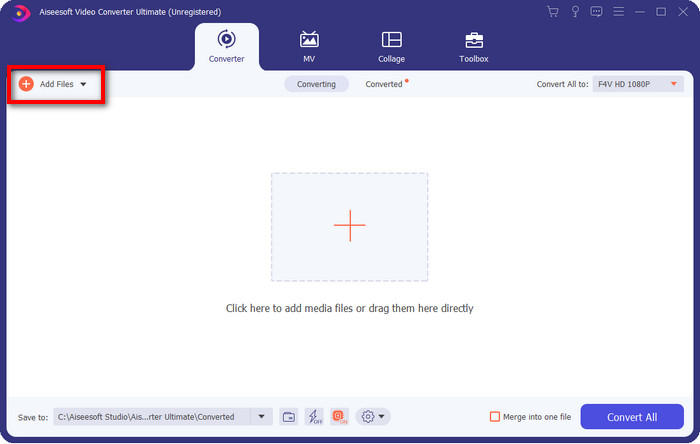
Step 2. After launching the software, you can add one or more files by clicking the Add Files option. The computer folder will show on your screen, select the AMV file, and press Open to upload it.
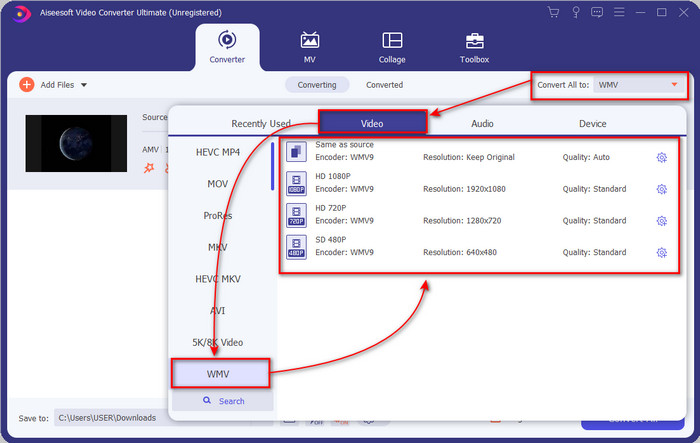
Step 3. By clicking the Convert All to option, a format list will show. Find the WMV format and choose the resolution, encoder, and quality you want to have.
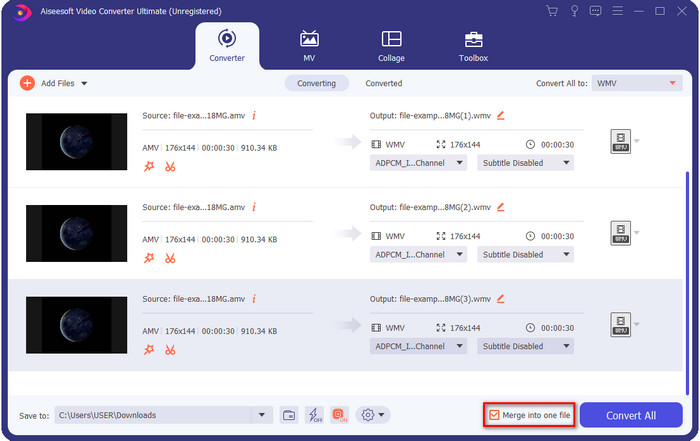
Optional. Want to make your AMV files into one WMV format? Then it would help if you ticked the box saying merge into one file.
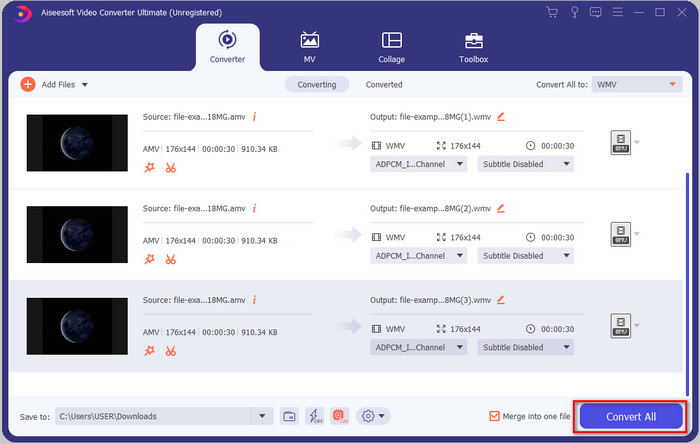
Step 4. Press the Convert All for the process of converting to start. After the process, a folder will display on your screen with the converted WMV file.
Del 2. Konvertera AMV till WMV Online
Don't you want to download an offline converter because you don't have enough storage to download one? Then use the FVC Free Online Video Converter. Because you will not need to download the full converter; instead, you will need the launcher, but it is tiny and won't affect your computer storage. Moreover, this web converter converts AMV to WMV, adjusting the resolution. However, converting the file will depend on the speed of your internet. Do you have an internet connection? Then you must try to use this and experience online conversion.
Step 1. Hit this link to open the main website of the converter.
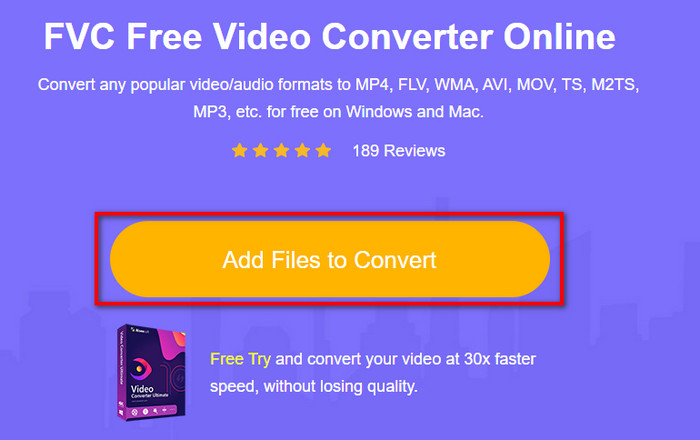
Step 2. By clicking the Add Files to Convert, a folder will show where you can find the AMV file and press Open.
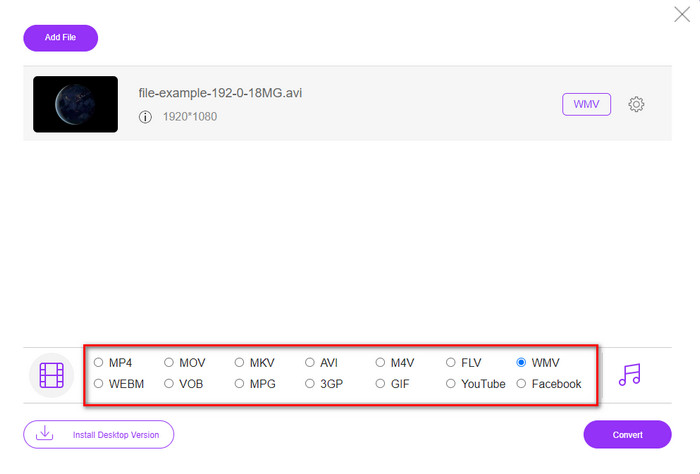
Step 3. Choose the WMV format that will display on the screen.
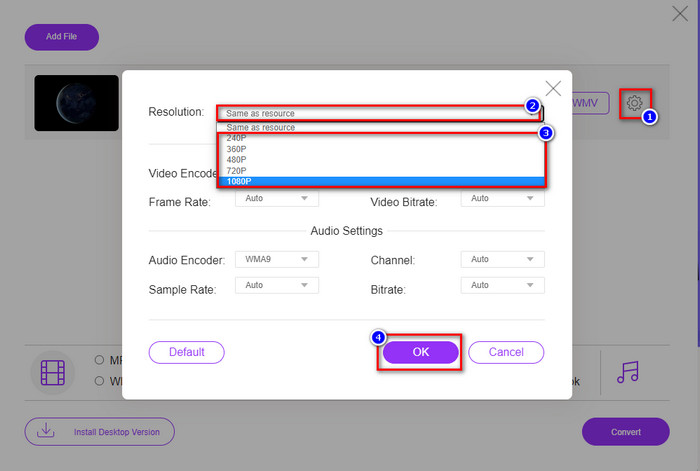
Optional. As we said earlier, you can adjust the resolution here. So now, let's modify the resolution by clicking the gear button. At the upper part, click the drop-down button, and a list of resolutions will show; choose one and press OK to proceed.
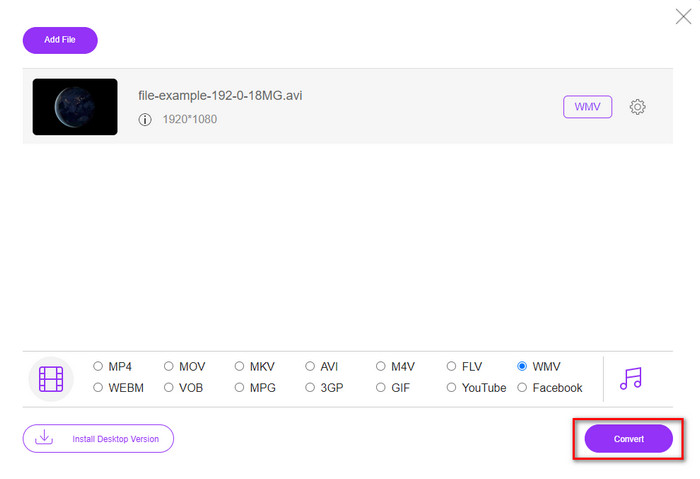
Step 4. So now, if you want to start the conversion, you can click the Convert button, and the process will begin.
Del 3. Vad är skillnaden mellan AMV och WMV
Först och främst blev dessa två mediebehållare populära på grund av deras unika kapacitet som format. Men idag kommer vi att studera vad som är fördelarna och nackdelarna med själva formatet. Dessutom kommer vi att specificera tre aspekter genom att göra det till en fråga för att veta mer om AMV och WMV.
Vilket format har bättre mediaupplösning?
Mellan de två formaten, utan tvekan, har WMV en bättre kvalitet. En WMV-fil kan lagra och strömma en videoupplösning på upp till 300 000 pixlar för en mer detaljerad visuell utdata. Men du kan ställa in hastigheten på 528x576 skärmupplösning. Och för AMV är kvaliteten den kan innehålla 96x96 till 320x240, vilket är ganska lågt jämfört med den låga upplösningen hos WMV. En anledning till att AMV har en mindre upplösning är att den måste passa på skärmen på den kinesiska mediaspelaren.
Vilket format har en mindre filstorlek?
Denna seger kommer att gå med AMV eftersom detta format är superkomprimerat. Även om WMV har en kompressor är storleken på AMV mer ekonomiskt vänlig, särskilt på din datorenhet, än WMV.
Vilket format är mer kompatibelt?
We can say that they have different strengths if we talk about compatibility because WMV is for Windows programs only. If you are a Mac user, you can't just use this format and play it on Quicktime or edit it on iMovie. Instead, you will need to convert WMV to MOV to make it compatible. In the case of AMV, this format uses a portable Chinese media player to play this format. But today, you can use a portable media player instead of buying an AMV media player. However, looking for an AMV media player is a pain in the ass because they are numbered players supporting this kind of format and the encoder. We can say that WMV has gained more compatibility than AMV, especially if we transfer the file to Windows.
Och nu när vi vet orsaken är det nödvändigt att konvertera filen till ett nytt format i det här fallet. Av den anledningen måste du lära dig hur du konverterar AMV till WMV för att göra mediafilen kompatibel med Windows-programvaran.
Del 4. Vanliga frågor om AMV- och WMV-konvertering
Hur förvandlar jag min AMV till MOV?
There are a lot of techniques and methods we can search and try on that are available if we query it on the web. But it is hard to choose which tool is better to use to convert AMV to MOV. So, to make it short, click this link and understand how to convert AMV to MOV and make it compatible with macOS.
Kan jag använda en VLC-mediaspelare för att titta på och spela AMV?
Absolutely, you can download the VLC media player on your desktop to play your AMV files without needing to download an additional codec. But if you want to know more about the VLC and its alternative, try to read this article by clicking this link.
Varför måste jag komprimera AMV?
We compress our media file and AMV because we need to free some space up on our hardware drive. So want to learn how to compress AMV files? Then click this link.
Slutsats
Dessa två lösningar ger excellens för att göra din konvertering från AMV till WMV enkel och framgångsrik. Dessutom är det här de bästa lösningarna vi kan hitta på webben. Så nu är det i din hand att välja vilken konverterare du använder för att konvertera din AMV-fil till WMV. För att nå framgång måste du använda FVC-verktygen ovan.
-
 Bästa metoden att använda för att konvertera AMV till AVI [Godkänd]
 Har du svårt att konvertera din videofil i AMV-format till AVI? Här är några tips som du bara kan hitta i den här artikeln.
-
 [Beprövat] 2 sätt att konvertera AMV till FLV offline och online
 Har du någonsin funderat på att testa en omvandlare för att konvertera dina AMV-filer till FLV-filformat. För att lösa ditt problem med att titta på en AMV-video, läs den här artikeln för att veta vilka lämpliga omvandlare du bör använda.
-
 Gratis | De 3 bästa metoderna för att konvertera MP4 till WMV utan att förlora kvalitet
 Detta inlägg delar hur du konverterar MP4-video till WMV-format på Mac eller Windows. Vi kommer också att erbjuda dig flera alternativ, inklusive skrivbordsprogramvara och webbaserade omvandlare online. Redo att känna till de bästa MP4 till WMV-konverteringsverktygen?
