


 Video Converter Ultimate
 Skärminspelare
 Video reparation
Online- och offlinekonverteringsprocess: SWF till WMV
SWF är ett äldre filformat som skapades av Adobe för Shockwave Flash‑spelaren. Flash stöds inte längre av många webbläsare, har aldrig stötts av iOS‑enheter och SWF‑formatet används numera sällan på grund av prestanda‑ och säkerhetsproblem. WMV är å andra sidan en uppsättning videokomprimeringscodecs som skapades för tidig videoströmning på internet och fysiska medier som HD‑DVD och Blu‑ray. Video i detta filformat kan spelas upp direkt på Windows‑enheter, så du kan vilja konvertera SWF‑filer till WMV eftersom Flash‑spelare blir allt mindre stödda och du inte längre kan spela upp SWF‑filer. Därför erbjuder vi dig två alternativ för att konvertera din SWF till WMV.

Del 1. Hur man enkelt konverterar SWF till WMV på Windows och Mac
Video Converter Ultimate är en multimediekonverterare som i princip kan konvertera alla större video- och ljudfiler till det utdataformat du önskar. Den kan konvertera videofiler i batchar, vilket gör den kraftfullare än den verkar. Den stannar inte vid konvertering; den gör det också möjligt för användare att redigera sina videor med hjälp av praktiska redigeringsverktyg. Dessutom stöder den här videokonverteraren olika format, inklusive de som används mest i dag. Ännu viktigare är att den konverterar i högre hastighet än jämförbar programvara. För att använda just denna programvara följer du dessa enkla steg:
Steg 1: Klicka på knappen Free Download för att ladda ner .exe‑filen du behöver för att installera programvaran. Vänta tills nedladdningen är klar, öppna filen och följ installationsprocessen. Klicka på Start Now och starta programmet.
Gratis nedladdningFör Windows 7 eller senareSäker nedladdning
Gratis nedladdningFör MacOS 10.7 eller senareSäker nedladdning
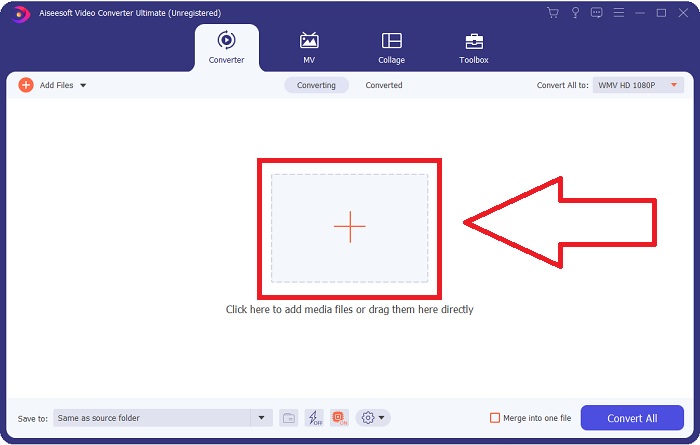
Steg 2: Ladda upp videofilen du vill konvertera genom att klicka på +-knappen i mitten av gränssnittet. Alternativt kan du dra filen från skrivbordet och släppa den i gränssnittet, så importeras den automatiskt.
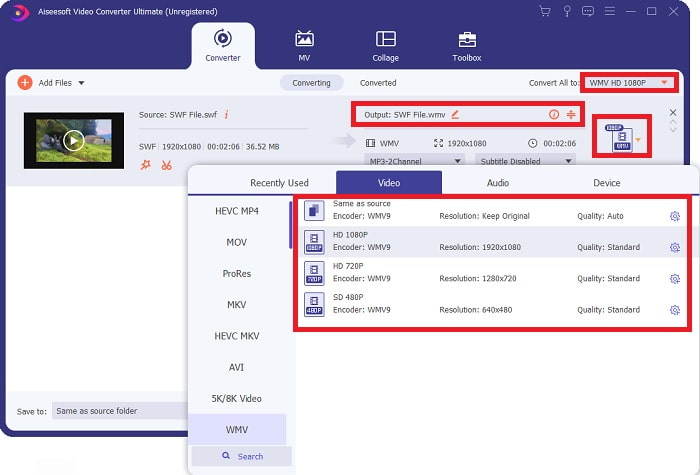
Steg 3: Klicka på rullgardinspilen till höger där du ser vilket format din video har nu, så visas alla tillgängliga format att välja mellan. I det här fallet scrollar du ner och väljer WMV eller skriver in det i sökfältet. Alla videokvaliteter finns också att välja mellan i panelen till höger.
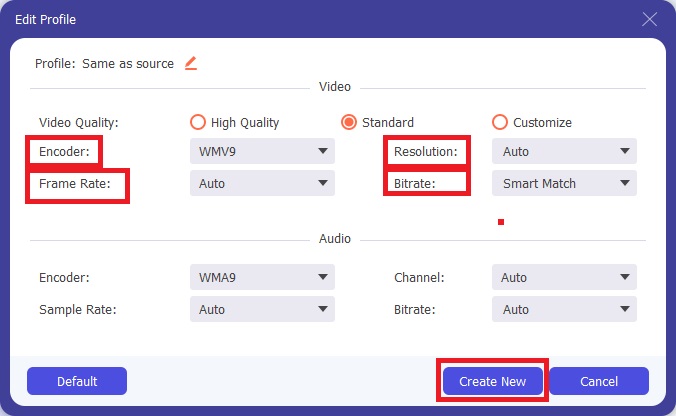
Steg 4: För att redigera din video ytterligare klickar du på kugghjulsikonen till höger för att visa alla praktiska redigeringsverktyg. Därifrån kan du göra alla nödvändiga justeringar som bäst passar dina behov. Klicka bara på knappen Create New när du är klar.
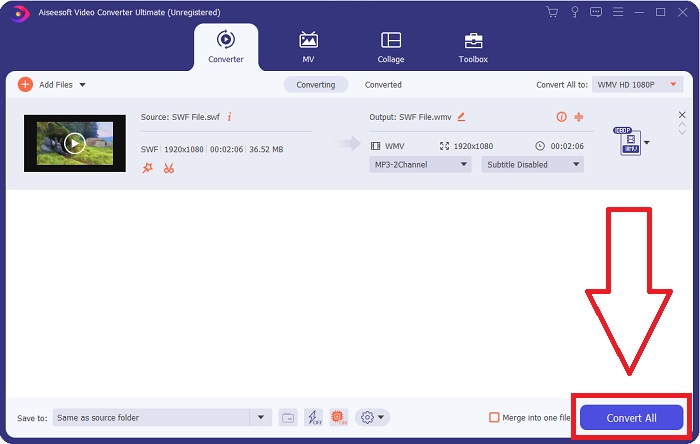
Steg 5: Avsluta konverteringsprocessen genom att slutligen klicka på knappen Convert All längst ned i fönstrets högra hörn och vänta tills den är klar.
Del 2. Ett annat tips för att konvertera SWF till WMV Online
FVC Free Video Converter är alltid gratis och kräver ingen registrering. Vissa gratis videoomvandlare online begränsar tidsramar för konvertering eller filstorlek. Om du har använt alla dina kostnadsfria konverteringstider eller om din fil är för enorm, måste du köpa en plan, även om du sällan konverterar videor. Men FVC Free Video Converter har inga sådana begränsningar och kan konvertera videor när som helst.
Dessutom behöver denna tjänst inte registreras för att konvertera större filer, till skillnad från de flesta onlinevideokonverterare kräver registrering för att konvertera videor som är större än 1 GB. Här är stegen du måste följa för detta fantastiska verktyg:
Steg 1: För att gå till webbplatsen klickar du på denna länk. Ladda sedan snabbt ner startprogrammet genom att klicka på knappen Add Files to Convert och vänta tills det är klart.
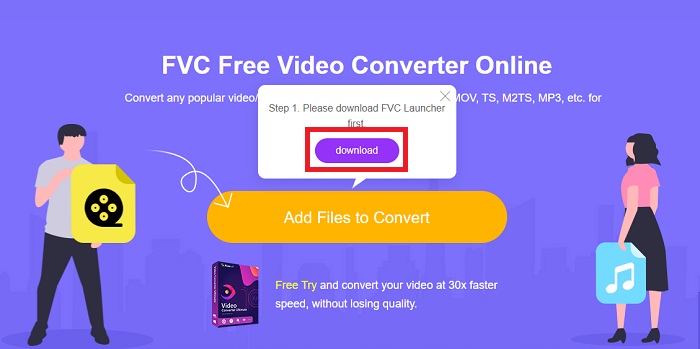
Steg 2: Klicka på samma knapp igen; den här gången kan du ladda upp videofilen du vill konvertera. Välj sedan WMV bland alla tillgängliga format.
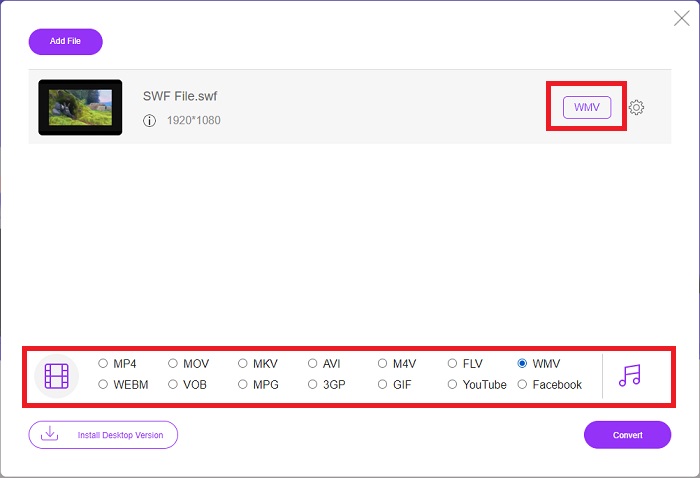
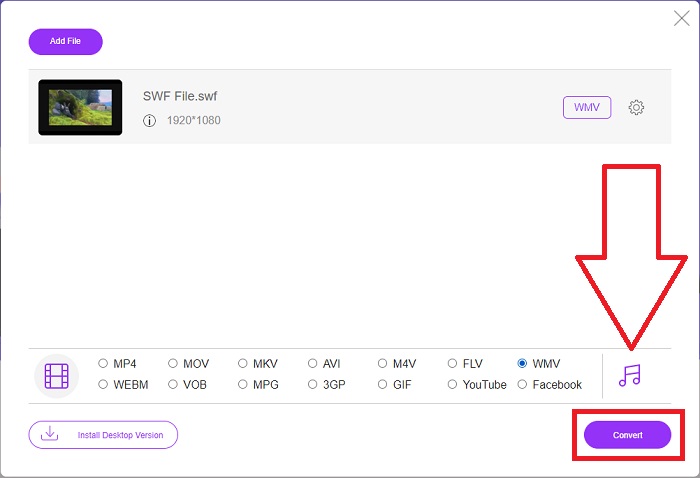
Steg 3: Du kan fortfarande använda praktiska redigeringsverktyg precis som i programvaran. Klicka bara på kugghjulsikonen så visas alla justeringar du kan göra. För att spara de ändringar du gjort klickar du på OK och när du är färdig med justeringarna klickar du på Convert för att starta processen.
Relaterat:
Del 3. Omfattande kunskap om SWF- och WMV-format
Om du vill veta mer om de två formaten, fortsätt att läsa den här artikeln. Vi tillhandahåller all nödvändig och viktig information du kan behöva som bakgrund.
Adobe använder SWF-filformatet för att lagra filmer och vektorbaserade animationer. Small Web Format är förkortningen; men det är också känt som ShockWave Format. Det används vanligtvis för att sända video via internet, särskilt webbläsarbaserade spel. Tyvärr uppgav Adobe att det skulle sluta stödja Flash-formatet i slutet av 2020 på grund av prestanda- och säkerhetsproblem.
Å andra sidan är en WMV-fil en Windows Media Video-fil som kan komprimeras med ett eller flera av Microsofts videokomprimeringsformat. Det är ett populärt videolagringsformat i Windows, vilket är anledningen till att det används av vissa tredjepartsappar för saker som korta animationer. Den är designad för att fungera med Microsofts mediaspelare som Windows Media Player och Movies & TV. För användning med DRM-system (Digital Rights Management) kan WMV-filer vara krypterade.
| Litet webbformat | Windows Media Video | |
| Filtillägg | .swf | .wmv |
| Utvecklaren | Adobe Systems Incorporated | Microsoft |
| Stödprogram | ◆ Adobe Flash Player ◆ Adobe Flash ◆ Professionell CC ◆ GOM-spelare ◆ Adobe Dreamweaver 2020 | ◆ VLC Media Player ◆ MPlayer ◆ Media Player Classic ◆ Windows Media Player |
Del 4. Vanliga frågor om konvertering av SWF och WMV
Vad är användningen av WMV-filer?
WMV-videofiler är det bästa formatet för att sälja videomaterial online eller via HD DVD och Blu-ray-skivor.
Vad är användningen av SWF-filen?
Flash-filer, eller SWF-filer, används ofta för effektiv distribution av multimediainformation över internet.
Kan SWF-filer redigeras?
Adobe Flash är ett filformat som används av Adobe. Till skillnad från andra multimediafiler kräver en SWF-fil plugin-programmet Flash Player för att se en webbläsare. Dessutom kan användare inte redigera SWF-filer direkt.
Slutsats
FVC Video Converter Ultimate är det perfekta alternativet för dig om du är nybörjare eller helt enkelt en amatör när det kommer till videokonvertering. Du konverterar inte videoformat särskilt ofta. Dess fördelar, såsom konstant videoformatkonvertering, snabb videofilkonvertering jämfört med jämförbara program, enkel hantering, stöd för olika format och så vidare, hjälper den att bli den bästa videokonverteraren som finns. När det kommer till videokonvertering är Video Converter Ultimate och dess onlinemotsvarighet de mest acceptabla alternativen.
-
 [2 lösningar] Hur man enkelt konverterar SWF till GIF -filer gratis
 När du inte exporterar GIF-format via Flash-programvara kan du först försöka spara filerna i SWF-format. Sedan kan du lära dig två enkla sätt att konvertera SWF till GIF-filer från den här artikeln.
-
 Top of the Line 5 bästa gratis SWF till AVI-omvandlare [webb- och skrivbordsbaserade]
 Vill du veta hur du konverterar din SWF-fil till AVI? Så om inte, läs den här artikeln när vi tillhandahåller en lösning på din konvertering av SWF-problemet.
-
 [Gratis och enkelt] Exceptionella verktyg att använda för att konvertera SWF till MOV
 Har du testat att konvertera SWF till MOV eftersom du inte kan redigera videor? Vem bär skulden för din videoredigerares inkompatibilitet? Fortsätt läsa för din lösning.
