


 Video Converter Ultimate
 Skärminspelare
 Video reparation
6 bästa videohastighetskontroller för Windows/Mac/Android/iOS
Att snabba upp eller sakta ner en video kan skapa en otrolig illusion om du är trött på att bara använda effekter. Denna videoredigeringsteknik är enkel men effektiv. När du söker på internet finns det många olika hastighetskontroller på marknaden, och vi vet att det är svårt att välja. Men om du läser den här artikeln kommer vi att gå igenom appar för hastighetskontroll som du kan använda för att ändra uppspelningshastigheten. Är du intresserad av de bästa apparna för hastighetskontroll? I så fall är det bara att köra vidare för att lära dig mer om den videohastighetskontroll som finns tillgänglig på dina plattformar.

Del 1. Topp 6 videohastighetskontroller för Windows, Mac, Chrome, iOS och Android
Topp 1. Video Converter Ultimate (Windows & Mac)
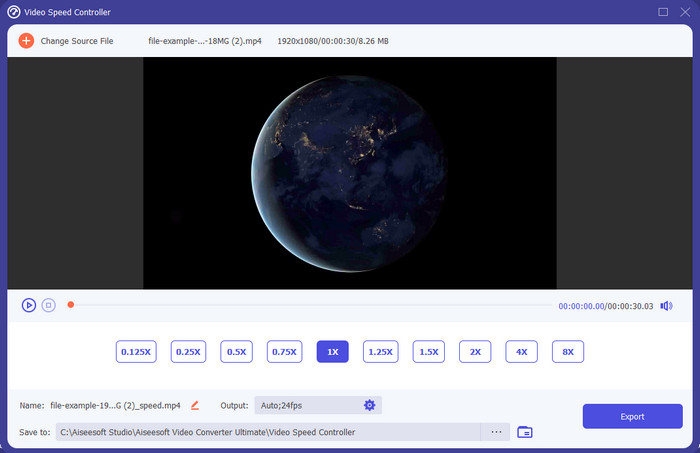
Behöver du en videohastighetskontroll som är mycket effektiv och smidig när det gäller att snabba upp och sakta ner videon? I så fall är Video Converter Ultimate lösningen på den här typen av problem. Det är det mest lättanvända verktyget du kan använda för att ändra videons hastighet utan ansträngning, oavsett om du behöver hög hastighet eller slowmotion. Även om du ändrar hastigheten kommer den ursprungliga videokvaliteten att behållas, men inte videons rörelse, eftersom du justerar hastigheten.
Förutom det kan du göra många saker som att konvertera, slå samman, skära och mer; i grund och botten är det ett allt-i-ett-verktyg. Vill du veta vilka andra erbjudanden du kan ha med denna snabba videoapp? Om så är fallet, läs verktygets funktioner för att lära dig mer, eller så kan du ladda ner programvaran på ditt skrivbord just nu för att testa den.

Video Converter Ultimate
5 689 200+ nedladdningar- Den kan snabbt ändra videoramarna uppåt eller nedåt i alla videoformat, som MP4.
- Det finns gott om videoredigeringsfunktioner och effekter.
- Det är flexibelt på alla plattformar som Windows eller macOS.
- Den ultrasnabba processen gör att du laddar ner eller exporterar på ett ögonblick.
- Att exportera eller ladda ner videon du redigerar kommer inte att ha en vattenstämpel.
Gratis nedladdningFör Windows 7 eller senareSäker nedladdning
Gratis nedladdningFör MacOS 10.7 eller senareSäker nedladdning
Fördelar
- Ändra bildruta per bildruta i videon även om du är proffs eller inte.
- Lätt att förstå videouppspelningsalternativ.
- En enastående förmåga att dela sociala medier.
- Det är gratis att ladda ner, men det erbjuder köp i appen.
Nackdelar
- Behöver köpa om du vill ha verktygets fulla kapacitet.
Topp 2. Clipchamp (Windows)
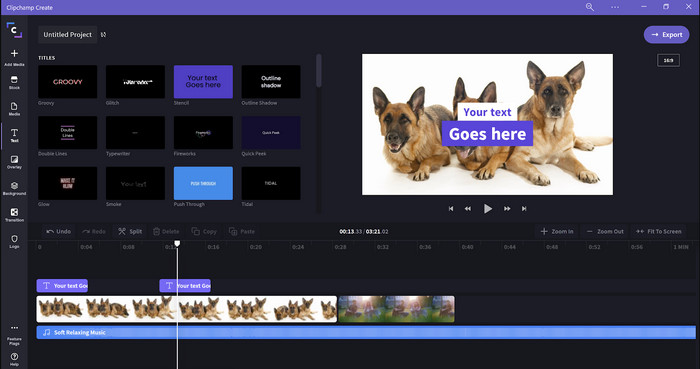
Clipchamp är en videohastighetsredigerare som du kan använda på Windows. Det här verktyget har en relativt lätt inlärningskurva, så om du är ny inom redigering kan du vilja testa det. Det stöder också flera funktioner du kommer att vilja använda. En stor nackdel med verktyget är dock videokvaliteten på exporten. Du kan bara exportera filen i 480‑upplösning, vilket är lågt jämfört med andra gratisverktyg. Men om du behöver exportera i 720 eller 1080 kan du prenumerera genom att betala abonnemangsavgiften. Sammantaget är verktyget bra, men fortfarande inte lika bra som den första redigeraren.
Fördelar
- Enkelt GUI och lätt att använda.
- Den erbjuder ytterligare funktioner för redigering.
- Styr videouppspelningen enkelt.
Nackdelar
- För gratisversionen är den slutliga utgången 480.
- Ibland blev verktyget oflexibelt med uppgiften.
Topp 3. Videohastighetskontroll (Chrome)

Vill du använda en tilläggsmodul för en videohastighetskontroll i Chrome? Då kan du använda Video Speed Controller. Det här verktyget finns i alla Chrome‑webbläsare för att snabba upp eller sakta ner videon du tittar på. Det är lätt att använda för alla och säkert att komma åt, eftersom det är ett Chrome‑tillägg. Om du exporterar videon kommer dock uppspelningen att förbli densamma även om du ändrat den. Detta beror på att verktyget bara fungerar på videon du för närvarande tittar på i Chrome och inte utanför den. Ytterligare information: när du väl har snabbat upp videon med detta tillägg kommer alla videor du spelar upp i Chrome att spelas i samma hastighet.
Fördelar
- Hastighetsregulator som du kan använda på Chrome.
- Kan enkelt spola tillbaka eller återställa videouppspelningshastigheten i Chrome.
- Den stöder kommandot korta tangenter.
Nackdelar
- Videokontrollpanelen är inte synlig.
- Du kan inte ändra hastigheten på videon utanför Chrome.
Topp 4. Accelerate för Safari (iOS och Mac)
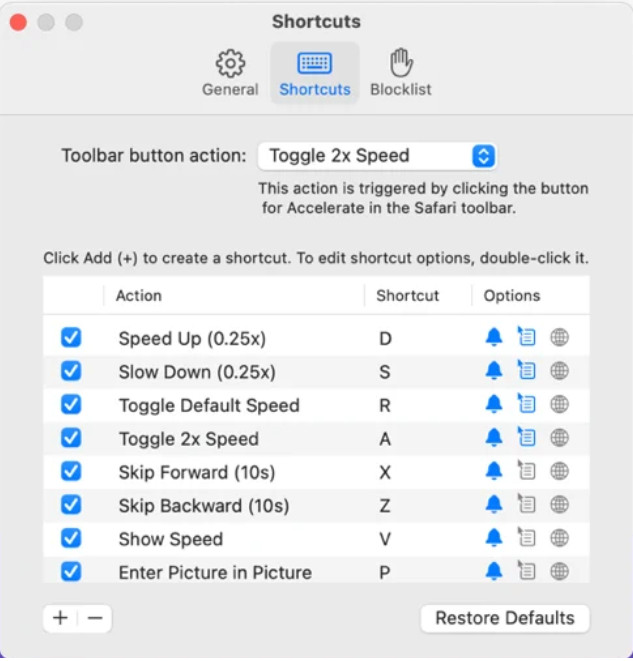
Behöver du en videohastighetskontroll i Safari? Accelerate for Safari finns tillgängligt i varje Safari‑webbläsare på Apple‑enheter. Det här verktyget kan ändra uppspelningshastigheten för varje HTML5‑video i Safari. Precis som Chrome‑tillägget ovan är det begränsat till Apple‑enheter. Så om du är Apple‑användare kan du vilja använda detta hastighetskontrolltillägg för att snabba upp eller sakta ner videon. Dessutom kan du använda tangentbordstangenterna för att styra verktyget och ändra videons uppspelning.
Fördelar
- Det är säkert att använda i alla Safari.
- Den stöder också Picture-in-Picture och AirPlay.
- Kortkommandon är tillgängliga för att ta kontroll över verktyget.
Nackdelar
- Den stöder inte en annan webbläsare än Safari.
- Begränsat till HTML 5-videor.
Topp 5. Långsamt Snabbt Långsamt - Styr hastigheten på dina videor (iOS)
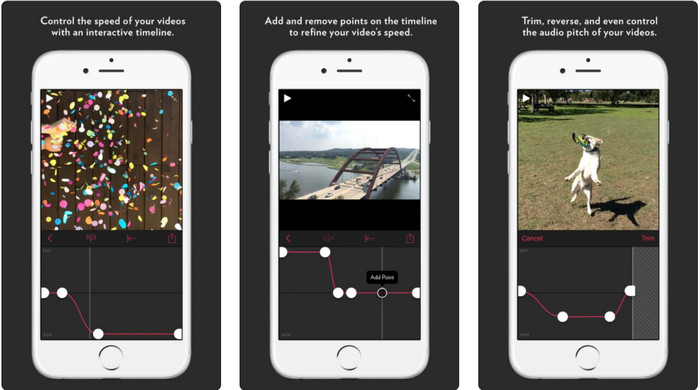
För en videohastighetskontroll på iPhone kan du använda Slow Fast Slow. Det här verktyget hjälper iOS‑användare att omedelbart justera videons uppspelningshastighet; det fungerar särskilt bra för slowmotion. Dessutom har det en mycket interaktiv inbyggd tidslinje för att justera hastigheten. Det stöder också andra funktioner som pitch‑böjning och omvänd uppspelning av klippet. Detta verktyg kräver dock iOS 10, så du kan inte använda det om ditt system inte är version 10.
Fördelar
- Den stöder andra funktioner för din video.
- Användarvänlig.
- Kan sakta ner videor upp till 1/16 hastighet.
Nackdelar
- Den stöder inte 4k-utgång och val av FPS.
- Det fungerar inte på vissa av de nya iOS-enheterna.
Topp 6. Video Speed Controller Pro (Android)
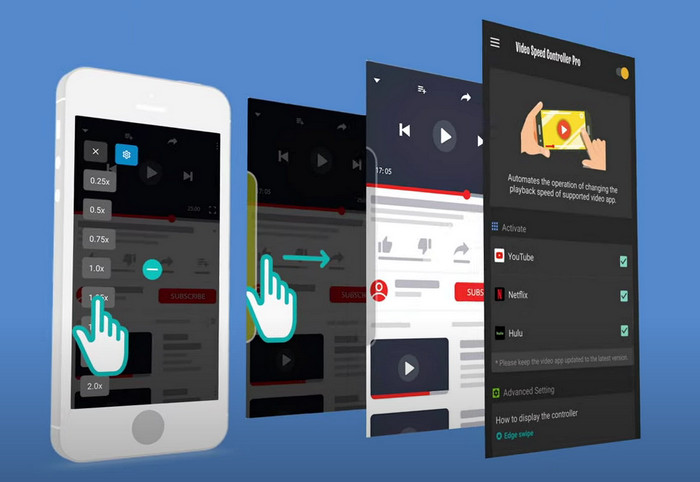
Om du behöver en videohastighetskontroll på Android, gissa vad? Du kan använda Video Speed Controller Pro genom att installera den via Play Store. Med hjälp av det här verktyget kan du enkelt snabba upp alla videor som spelas på din Android‑enhet. Dessutom fungerar detta verktyg som ett hastighetskontrolltillägg på Android. Även om verktyget kan snabba upp din video är den högsta hastigheten bara 2x. Om du däremot behöver snabba upp videouppspelningen kan du använda det på YouTube, Netflix och andra videoplattformar på Android.
Fördelar
- Den är enkel att använda.
- Verktyget i sig är på plats.
- En menyrad är tillgänglig för att visa alternativen på din uppspelning.
Nackdelar
- Alternativen för uppspelningshastighet är begränsade.
- Ibland fungerar det inte bra.
Del 2. Jämförelsediagram
| Funktioner | Video Converter Ultimate (Windows och Mac) | Clipchamp (Windows) | Videohastighetskontroll (Chrome) | Accelerate för Safari (iOS och Mac) | Långsamt Snabbt Långsamt – Styr hastigheten på dina videor (iOS) | Video Speed Controller Pro (Android) |
| Hastighets kontroll |  | | | | | |
| Högkvalitativ videoutgång | |  | | | | |
| Redigeringsfunktioner | | | | | | |
| Ultrasnabb exportprocess | | | | | | |
Del 3. Vanliga frågor om Video Speed Controller
Varför måste jag använda en hastighetsregulator?
I vissa fall måste du titta på en video i hög hastighet eller sakta ner. Ett bra exempel på att titta på en snabbare video är att avsluta videon du tittar på direkt, eller liknande. Att snabba upp videor är till stor hjälp för dessa användare. Medan det är slow-mo, används detta vanligtvis på en omedelbar repris av sporter i högt tempo som racing, basket, volleyboll och mer. Oavsett om av de två, behöver du en effektiv hastighetsregulator för att manuellt åsidosätta den normala hastigheten till dina behov.
Kan jag snabba upp videor på Tiktok?
Ja, du kan spela in videor i hög hastighet i Tiktok. Men du kan inte titta på videor i Tiktok i hög hastighet. Om du behöver hjälp av ett bra verktyg för att snabba upp, klicka och läs den här artikeln för att få veta hur du snabbar upp en video på Tiktok.
Hur saktar man ner videor?
Till skillnad från att snabba upp videor kan du skapa slowmotion‑klipp med hjälp av de redigeringsprogram som finns på marknaden. Vilket verktyg ska du använda? Ingen fara, vi presenterar de bästa slowmotion‑programmen du kan använda för att skapa en slowmotion‑effekt. Om du behöver veta mer kan du klicka på den här länken.
Slutsats
Nu har du fått kunskap om både betalda och gratis appar för att snabba upp videor på olika plattformar. Hastighetskontrollerna erbjuder en unik uppsättning funktioner som hjälper olika användare att snabba upp videor. Om vi läser noggrant kan vi se att FVC Video Converter Ultimate erbjuder allt för användare som behöver hjälp. Så om du vill ladda ner det ultimata verktyget till din dator kan du klicka på nedladdningsknappen och njuta av en fullständig upplevelse av verktyget.
-
 Hur man snabbar upp en video med de 5 bästa tillgängliga programmen [Windows/Mac/Linux]
 Vill du veta hur du enkelt kan snabba upp video? Läs sedan den här texten när vi förklarar hur du snabbar upp effektivt på Windows, Mac och Linux.
-
 Enklaste sätten att snabba upp en video på dina Android-enheter [2021]
 Visste du att du kan snabba upp en video på din Android? Så om du vill veta hur du snabbar upp en video på din Android-telefon, läs den här texten.
-
 Utmärkta tips från 2021: Hur man snabbar upp en video på iMovie
 Din vän föreslår iMovie för att hjälpa dig med ditt problem med hur man snabbar upp en video med iOS-operativsystemet, men du vet inte vad du ska göra? Se mer om detta när du läser mer genom denna artikel.
