


 Video Converter Ultimate
 Skärminspelare
 Video reparation
 Konvertera MOD till valfritt format som MP4, MOV, AVI, MP3, etc.
7 gratis MOD-omvandlare tillgängliga på din plattform för att enkelt förvandla MOD-format
Behöver du ändra din MOD‑fil? I så fall behöver du inte längre oroa dig eller slita med olika konverterare. Stressa inte, för i dag har vi lösningen åt dig. Direkt här visar vi de bästa sätten att konvertera MOD till MP4, MOV, MPEG2, DVD eller vilket videoformat du vill, med steg‑för‑steg‑anvisningar att följa.

Del 1. Topp 7 gratis MOD-konverterare för att konvertera MOD-filer online och offline
1. FVC Video Converter Ultimate – Bästa MOD Converter på Windows och Mac
Först på vår lista är den mest använda MOD‑konverteraren som finns tillgänglig på flera plattformar, FVC Video Converter Ultimate. Den här konverteraren erbjuder en ultrahög hastighet i konverteringsprocessen för sina användare och gör dem aldrig besvikna. Även om konverteringen med verktyget går snabbt försämras inte kvaliteten, eftersom den skyddas medan formatet ändras.
Vad är mer än dess blixtsnabba process? Den stöder också de massiva formaten du kan importera eller exportera, som MOD, MP4, MOV, MKV, FLV, WMV och många fler. På grund av det format som stöds blev kunderna förtjusta i verktyget, och många av dem rekommenderar detta till andra medanvändare som behöver konvertera sitt format. Så om du behöver hjälp med att konvertera MOD till MP4 eller vilket videoformat du vill, är det här verktyget en utmärkt hjälp genom att följa de angivna stegen nedan.
Steg 1. För att ladda ned konverteraren till datorn klickar du på nedladdningsknappen nedan och väljer vilket system du använder. Följ sedan installationsprocessen snabbt och starta programmet. Om du är ny på filkonvertering behöver du inte vara rädd, för stegen här gör att du kan konvertera MOD‑filen på rätt sätt.
Gratis nedladdningFör Windows 7 eller senareSäker nedladdning
Gratis nedladdningFör MacOS 10.7 eller senareSäker nedladdning
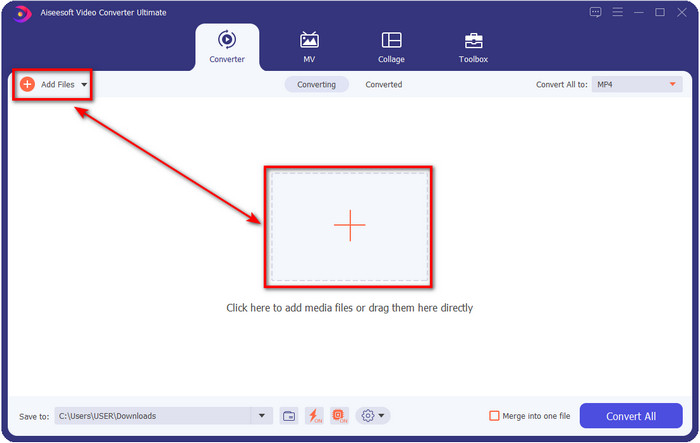
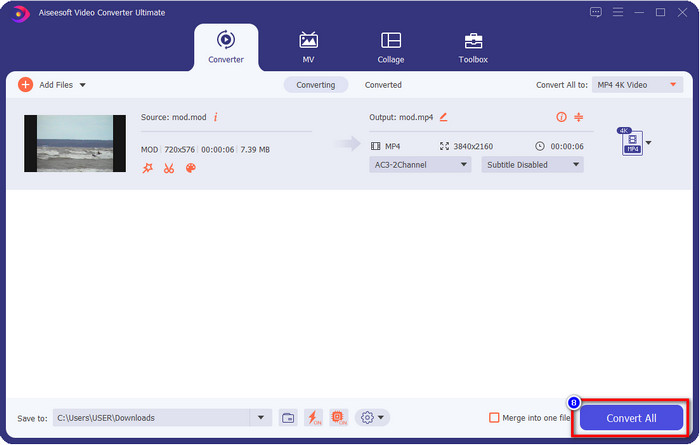
Steg 2. Ladda upp MOD‑filen genom att klicka på Add Files, eller tryck på den stora +-knappen i mitten av gränssnittet. Därefter visas ett datorfönster på skärmen; leta nu upp och klicka på MOD‑filen och tryck på Open för att gå vidare till nästa steg.
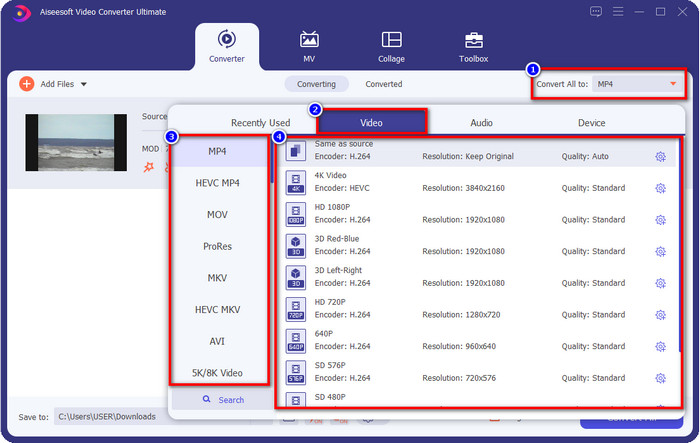
Steg 3. För att ändra formatet till MP4, MOV, MKV eller något annat format du behöver klickar du på Convert All to och väljer.
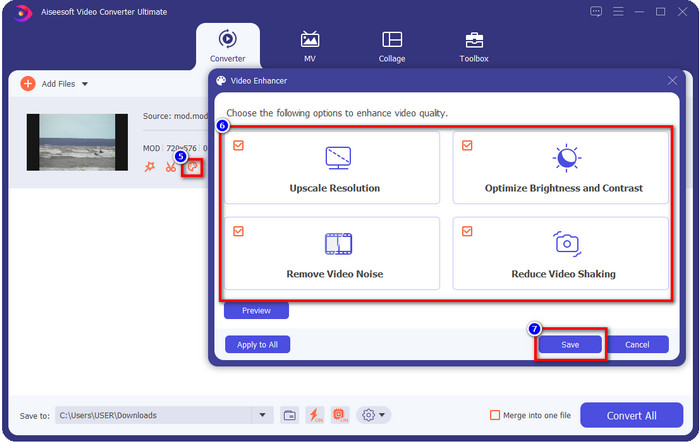
Valfritt. En av de fantastiska funktioner som det här verktyget erbjuder är förbättringsverktyget. Om du klickar på paint tray visas ett nytt mini‑gränssnitt; nu kan du göra betydande justeringar av videon genom att markera rutorna. Klicka på Save för att tillämpa ändringarna du gjort på din MOD‑video.
Steg 4. När du har utfört alla steg är det dags att konvertera MOD genom att klicka på Convert All. Så enkelt som 1‑2‑3 har du nu lärt dig att konvertera MOD‑formatet till ett nytt format.
Fördelar
- Konvertera MOD till MP4, MOV, MKV, FLV, AVI eller till 200+ format tillgängliga effektivt.
- Avancerade redigeringsfunktioner inkluderar trimning, skärning, beskärning och mer.
- Det är säkert och fritt från skadlig programvara att ladda ner.
- Finns att ladda ner på alla stationära plattformar som Windows och Mac.
Nackdelar
- För att kunna utnyttja alla avancerade funktioner måste du köpa verktyget.
2. iMovieSoft Free TOD Converter
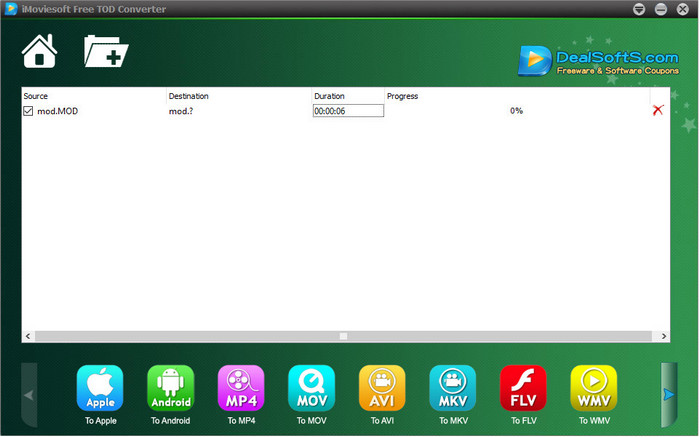
En annan konverterare du kan ladda ned till datorn är iMoiveSoft Free TOD Converter. Med den kan du enkelt konvertera ditt MOD‑format till de format som finns tillgängliga. Verktyget stöder dock inte så många format, men de vanligaste finns med. Dessutom är verktygets huvudsida inte anslutningssäker; även om det finns en varning testade vi ändå att ladda ned den till vårt system för att kunna ge steg för hur man konverterar MOD‑filer till MOV, MP4, AVI osv.
Steg 1. Ladda ned konverteraren till datorn och öppna den.
Steg 2. Klicka på Folder och leta upp de MOD‑filer som ska läggas in.
Steg 3. Klicka på formatet nedtill och tryck på Convert.
Fördelar
- Det är gratis att ladda ner på Windows och Mac.
- Lätt att använda.
- Grundläggande redigeringsfunktioner är tillgängliga.
Nackdelar
- Huvudwebbplatsen är inte anslutningssäker.
- Den har ett formatalternativ som du kan välja på.
- UI behöver förbättras.
3. iOrgSoft Converter
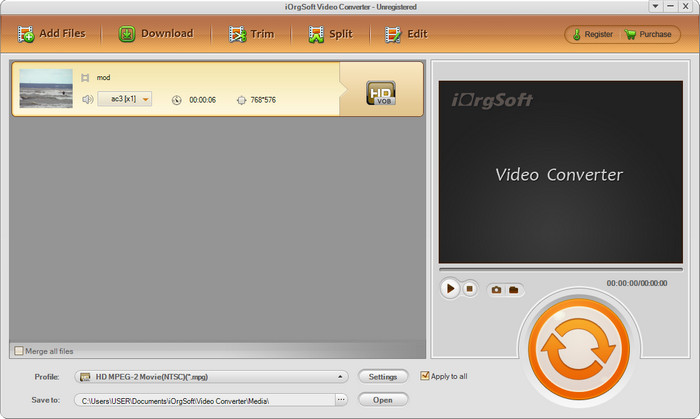
iOrgSoft Converter är ett alternativ om du enkelt behöver konvertera MOD till MPEG2. Huvudsidan för den här konverteraren har också en oskyddad anslutning, precis som iMovieSoft. Du kan även använda en extern länk för att ladda ned programmet här. Även om verktyget erbjuder vissa inställningar har dess användargränssnitt lägre prioritet, vilket innebär att du inte ska förvänta dig ett särskilt snyggt UI. Dessutom kan krascher och buggar uppstå när du ska konvertera.
Steg 1. Sök upp konverterarens huvudsida och ladda ned den därifrån.
Steg 2. Öppna konverteraren, klicka på Add Files för att lägga in MOD‑filer, klicka på formatfältet och välj det format du vill ha.
Steg 3. Tryck på konverteringsknappen för att starta konverteringen.
Fördelar
- Den stöder fler format än iMovieSoft.
- Enkel att använda och lätt att förstå.
- Ladda ner den på Windows och Mac.
Nackdelar
- Osäker anslutning till dess huvudwebbplats.
- Användargränssnittet är fruktansvärt.
4. FFmpeg
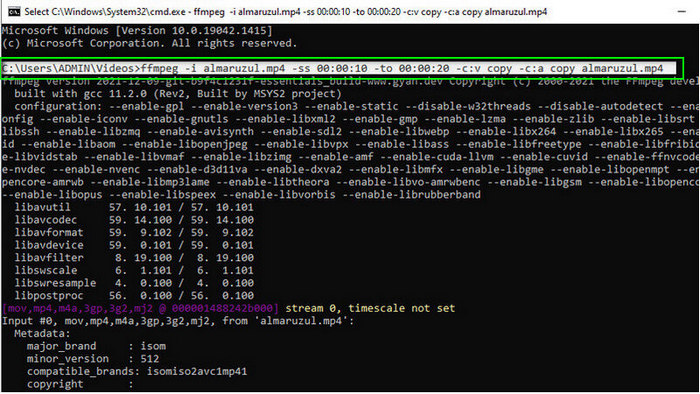
Om du behöver en gratis MOD‑till‑MOV‑konverterare finns FFmpeg här för att hjälpa dig. Till skillnad från de andra konverterarna på listan använder den ett CLI‑baserat gränssnitt där du kommunicerar med verktyget via text. Även om detta inte är så bekant för många använder vissa fortfarande detta som sin konverterare. Om verktyget nu har fångat ditt intresse följer du stegen nedan.
Steg 1. Ladda ned FFmpeg och kör exe‑filen.
Steg 2. Öppna CMD; nu kan du kommunicera med verktyget där.
Steg 3. Leta upp filens plats via kommandotolken. Kopiera och klistra sedan in denna text, ffmpeg -i input.mod -vn -ar 44100 -ac 2 -b:a 192k output.mp4 som MP4. Du kan också ändra formatet till MOV, MKV, AVI med mera. Tryck på Enter på tangentbordet för att starta processen.
Fördelar
- Unik videoomvandlare tillgänglig på de flesta plattformar.
- Säker att använda.
- Det är tillförlitligt när det gäller att konvertera ditt format.
Nackdelar
- Det är inte särskilt lätt att använda.
- Det är inte det bästa valet för nybörjare eller nybörjare att konvertera format.
5. CloudConvert
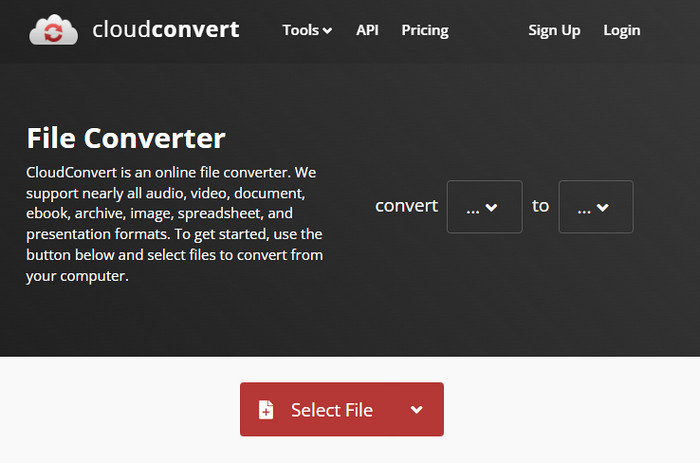
Vill du inte ladda ned en konverterare till datorn? I så fall kan du fortfarande konvertera MOD‑format med CloudConvert online. Det här onlinverktyget erbjuder en enkel men effektiv konverteringsprocess för sina användare. Det stöder också konvertering av andra filtyper som PDF, arkiv, e‑böcker med mera till ett nytt format.
Steg 1. Sök efter CloudConvert i din favoritwebbläsare.
Steg 2. Klicka på Select File och ladda upp MOD‑filen. Tryck på rullgardinsmenyn och välj ditt önskade format. Klicka sedan på Convert.
Steg 3. När konverteringen är klar klickar du på Download för att spara den nya filen på din enhet.
Fördelar
- Att ladda ner verktyget behövs inte.
- Gratis webbverktyg online.
- Användarvänlig.
Nackdelar
- Nätverksberoende.
- Processens förlopp kommer att bero på hastigheten på ditt internet.
6. Converter365
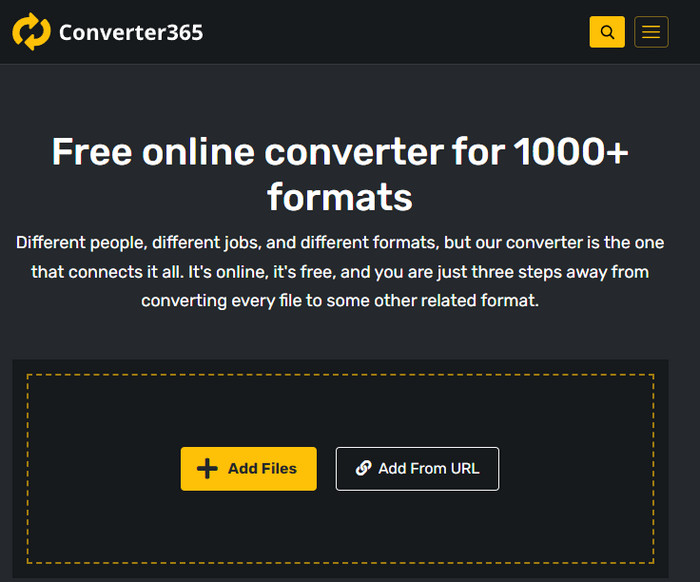
En annan gratis MOD‑till‑MP4‑konverterare online som du kan använda är Converter365. Det är ett av de webbaserade verktyg som vi kan säga har ett elegant gränssnitt. Tack vare det känns det professionellt att använda verktyget; dock hade vi problem med videokonvertering här eftersom det kraschade. Om du ändå snabbt behöver konvertera din MOD‑fil kan det här vara till hjälp.
Steg 1. Öppna webbläsaren och sök efter Converter365.
Steg 2. Klicka på Add Files och leta sedan upp .mod‑filen. När du har hittat filen väljer du format genom att klicka på rullgardinsmenyn.
Steg 3. Tryck på Start Conversion, så startar konverteringen.
Fördelar
- Omvandlaren är tillgänglig via webben.
- Det ger en enkel men effektiv konvertering.
- Användargränssnittet ser professionellt ut.
Nackdelar
- Den behöver en internetanslutning för att kunna använda.
- Ibland uppstår fel när formatet konverteras.
7. Zamzar
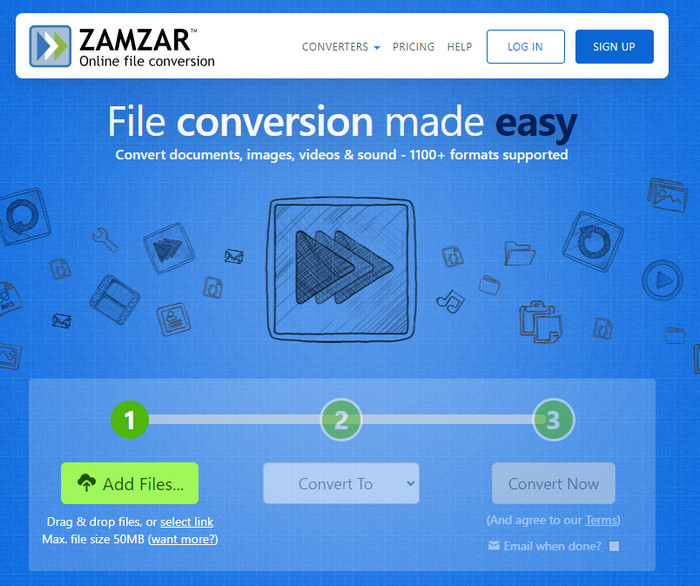
Om du behöver en enkel och praktisk MOD‑konverterare online är Zamzar ett bra hjälpmedel. Det här verktyget erbjuder en rak och tydlig process för att konvertera dina .mod‑filer. Dessutom är det utan tvekan en av de säkraste konverterarna som finns på nätet. Om du vill prova verktyget kan du följa stegen nedan.
Steg 1. Gå till Zamzar genom att söka efter det i din favoritwebbläsare.
Steg 2. Tryck på Add File för att lägga in MOD‑filen du behöver konvertera. Klicka på Convert To och välj det format du behöver.
Steg 3. Klicka på Convert Now och vänta på att processen slutförs. Klicka sedan på Download för att spara filen på datorn.
Fördelar
- Ett av de bästa alternativen om du behöver konvertera ett format.
- Det ger en enkel process för konvertering.
- Finns i alla webbläsare.
Nackdelar
- Internetberoende, inget internet du kan inte använda det.
- Den stöder färre formatalternativ.
Relaterat:
Del 2. Vanliga frågor om MOD-omvandlare
Vad är MOD?
MOD är ett tvåvägsformat som kan användas som ljud för vanliga digitala musikspårningsapplikationer. Den innehåller notmönster, instrumentnummer och meddelandekontroller med olika spår för sampelljud. Som det nämns är det tvåvägs; du kan också använda detta som ett videoformat för digitala videokameror tillverkade av Panasonic och JVC. Även om detta format har stöd från kända varumärken, är det lite föråldrat om vi skulle jämföra det med den andra videobehållaren.
Stöder mediaspelare .mod-tillägget?
Alla mediaspelare stöder inte detta format, särskilt om din spelare inte har en MPEG-2-videocodec inuti. Det är ett stort problem för alla; du kan ladda ner ett MPEG-2-videotillägg om du behöver det för att spela. Men du kan också konvertera filen till ett format som stöds till dina plattformar, detta är hittills det enklaste och säkraste sättet. Så nu, om du behöver konvertera din MOD-fil kanske du vill använda FVC Video Converter Ultimate istället. Har du ingen aning om verktyget? Läs i så fall detaljerna ovan.
Är MOD kompatibel med DVD-spelaren?
Den är inte kompatibel med DVD-spelaren; Du kan dock bränna den till DVD för att göra den kompatibel med DVD-spelaren.
Slutsats
Dessa sju verktyg är de bästa alternativen om du behöver en MOD‑konverterare tack vare deras prestanda och effektivitet. Vi har noggrant testat all programvara och kommit fram till att FVC Video Converter Ultimate ger ett fenomenalt resultat och funktioner som de andra verktygen inte kan slå. Om du vill uppleva hur bra verktyget är kan du ladda ned det till datorn och använda det när du vill.

FVC Video Converter Ultimate
2 999 368+ nedladdningar- Konvertera MOD till valfritt populärt format.
- Förbättra videokvaliteten naturligt
- Gör videokollage smidigt med högkvalitativ utdata
- Redigera videor som ett proffs, inklusive beskära, rotera, lägga till filter, etc.
Gratis nedladdningFör Windows 7 eller senareSäker nedladdning
Gratis nedladdningFör MacOS 10.7 eller senareSäker nedladdning
-
 2 ultimata MPG-omvandlare för att konvertera MPG till WMV gratis
 Vill du konvertera MPG till WMV gratis? I så fall har du tur eftersom vi fick reda på att det finns två verktyg du kan använda för att konvertera dina MPG-filer.
-
 Hur man ändrar iTunes M4V till MKV på Mac och Windows snabbaste sättet
 Om du behöver konvertera M4V till MKV på Mac måste du läsa den här artikeln. Eftersom vi tillhandahåller fakta om omvandlarna som hjälper dig med din konverteringsprocess.
-
 Topp 5 gratis MPEG till MKV-omvandlare tillgängliga på alla plattformar
 Vilka är tillgängliga MPEG till MKV-omvandlare? Behöver du veta mer om MPEG-omvandlarna som finns på din plattform? Då är den här artikeln för dig.
