


 Video Converter Ultimate
 Skärminspelare
 Video reparation
Hur man tar bort vattenstämpel från videor snabbt
Need to remove a watermark from a video in an easy way? Well, you need to use the perfect tool. For instance, users want to remove this watermark text or logo to watch a video in a complete experience. However, this task is complicated for some editors because not all provide an effective watermark remover on their toolset. Ideally, you'll need to purchase an expensive editor for this task, and somehow, not all perform well. But today, we will present the best solution to your problem, whether you are using a computer or an iOS device. Additionally, all the software we offer you has sifted out carefully. So without further ado, let's dive into this article to know how to remove the watermark on any video.

Del 1. Ultimate lösning för att ta bort vattenstämpel från alla videor på Windows och Mac
Learning how to remove a watermark from a video is a simple task for the best video editor Video Converter Ultimate. For you, there is no need to have vast experience in editing because this tool provides an interactive interface and easy-to-understand. Moreover, it also offers numerous advanced features you can use like merging, cutting, color correction, reverser, enhancer, and more.
När det gäller idag har många användare redan laddat ner det här verktyget, och alla är nöjda eftersom de gjorde det. Imponerande eller hur? Vill du prova att använda det här verktyget? I så fall, låt oss kontrollera stegen nedan och se om det här verktyget är den bästa lösningen på vårt problem med vattenstämpeln.

FVC Video Converter Ultimate
5 689 200+ nedladdningar- Det är det bästa valet för alla som vill ta bort sin vattenstämpel på alla videor.
- Detta ultimata verktyg är det enda som fungerar som en omvandlare, beskärare, sammanslagning, skärare.
- Tillgänglig på alla stationära plattformar för nedladdning, som Windows och Mac.
- Det är lätt att använda, men det är det mest utvalda angående problemet på deras video.
Gratis nedladdningFör Windows 7 eller senareSäker nedladdning
Gratis nedladdningFör MacOS 10.7 eller senareSäker nedladdning
Step 1. Download the ultimate tool on your computer, choose whether you are using a Windows or Mac. After the downloading process, follow the installation process and click Start Now to run the tool on your system.
Gratis nedladdningFör Windows 7 eller senareSäker nedladdning
Gratis nedladdningFör MacOS 10.7 eller senareSäker nedladdning
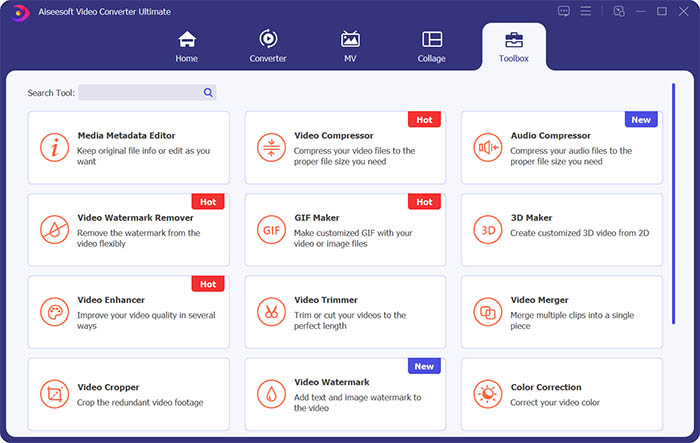
Step 2. Go to the Toolbox section and click Video Watermark Remover to erase the watermark from the video.
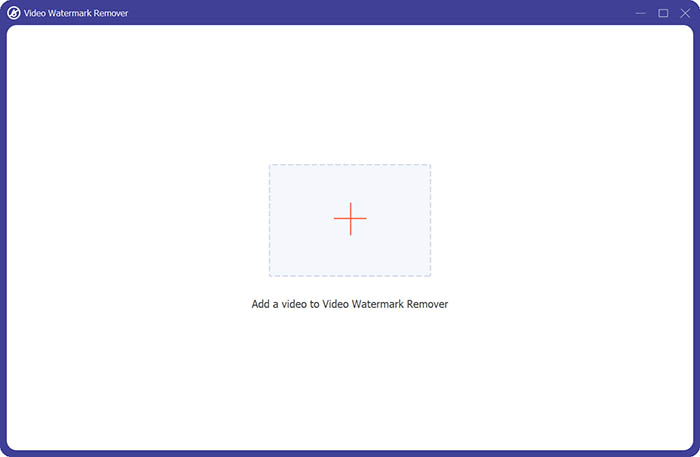
Step 3. Next, you need to click the central plus sign to import the video you want to remove the watermark.
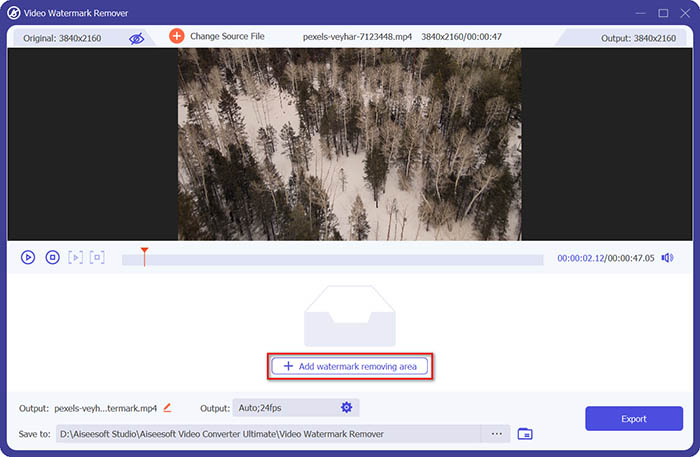
Step 4. After adding the video to the watermark remover, you should click the Add watermark removing area button to select the watermark area.
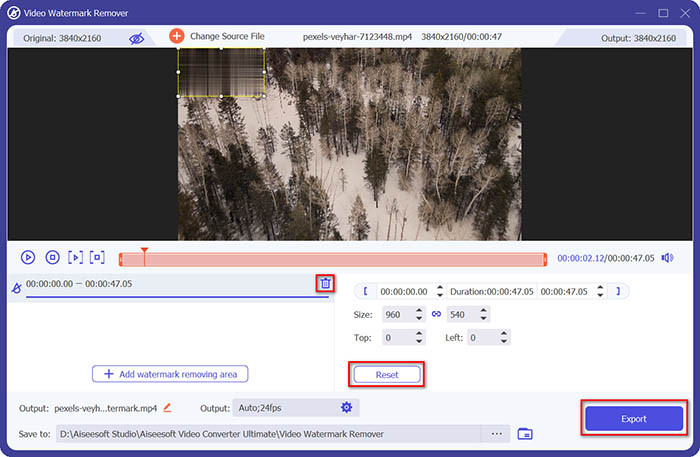
Step 5. Finally, you can click the Export button to get the video without the watermark.
Del 2. Hur man tar bort vattenstämpeln från valfri video på iPhone
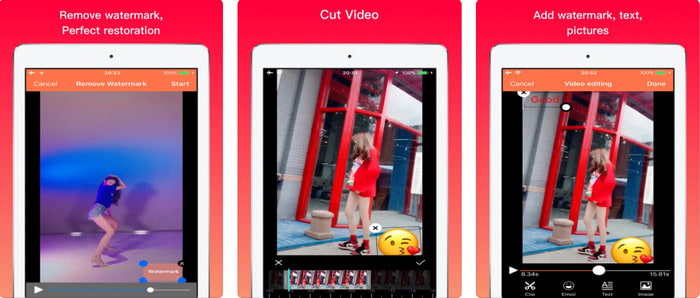
Video Eraser - Remove Logo 4+ already helps a lot of iOS users with their problems in regards to watermark. This app is free to download on every Appstore, but it also provides an app-in purchase to purchase the pro version. Although the tool offers an effective way of removing the watermark, it still encounters some problems, like the video quality won't be the same after you export it here. The watermark is blurred rather than removed. Also, uploading the file here became a problem because it takes much time even though the video is under 30 seconds. But if you want to learn how to remove watermark from video on iPhone, follow the steps below.
Step 1. Download the tool on the App Store, then open it, and press + to import the video with a watermark.
Step 2. Click the information button and click Remove Watermark, click the watermark, and press Start.
Step 3. After the process, the watermark is removed from the video.
Del 3. Hur man blir av med vattenstämpeln på alla videor på webben
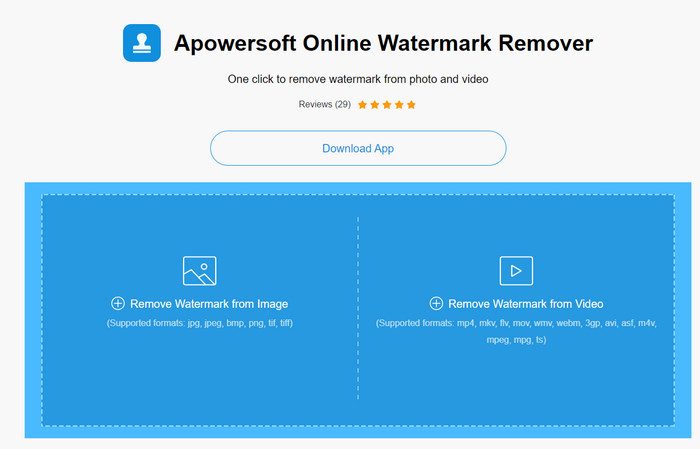
Apowersoft Online Watermark Remover is a free and accessible web tool you can use to remove watermarks. This online tool provides an effective way of removing the watermark even though you didn't download it because it is web-based. Even though it is an effective watermark remover, you will need to have a stable internet connection to finish the process, or else you'll need to repeat to one. So now, if you are on a tight budget and want to learn how to remove watermark from video online, then this is the tool for you.
Step 1. Search the Apowersoft Online Watermark Remover on your favorite web browser and open it.
Step 2. Press Remove Watermark from Video to upload the file with watermark on it. Wait for the uploading process to take place.
Step 3. On the video, hold the left click on your mouse and drag it on the watermark; once it is inside the broken line, you can now release it. Press Erase to begin the removing process, click Download to save it on your computer.
Del 4. Vanliga frågor om att ta bort vattenstämplar från videor
Varför måste jag bli av med vattenstämpeln på videon?
Vi måste ta bort det irriterande vattenstämpeln för att kunna njuta av videon som en helhetsupplevelse. Det är endast tillämpligt för personligt bruk, men det kan bli en konsekvens om du använder det för att dra fördel om du lägger upp det online och tjänar på den andras arbete.
Vilka är de andra sätten att ta bort vattenstämplar?
Du kan täcka över vattenstämpeln eller ersätta den med din vattenstämpel om du vill. Denna process är överliggande; det fungerar bara bäst om vattenstämpeln är liten eller på sidan av videon. Eller så kan du klippa videon med en vattenstämpel på den och sedan slå samman den med den andra videon. Denna skärprocess fungerar bara bäst om vattenstämpeln är pop-up. Det finns två olika sätt att ta bort vattenstämplar: sudda ut och beskära videon. Dessa två fungerar med verktygen vi presenterade ovan.
Hur lägger man till en vattenstämpel i Photoshop?
If you want to add a watermark on Photoshop, click this link and read it thoroughly to grasp the idea.
Slutsats
With the tool presented in this article, you can easily remove the watermark from the video for free, or you can also use the ultimate tool and purchase it. Although the watermark remover available in this article are easy to use, we still believe that the Video Converter Ultimate presents the most straightforward interface yet most effective one. So, if you want to have the, you can click the download button above to test it out and see if it suits you well.
-
 De 2 bästa sätten att konvertera DivX till MKV-format [löst]
 Varför behöver jag konvertera DivX till MKV? Vilka omvandlare kan jag använda? Har du samma tanke? Sedan hjälper den här artikeln dig att veta mer om DivX och MKV.
-
 2 ultimata MPG-omvandlare för att konvertera MPG till WMV gratis
 Vill du konvertera MPG till WMV gratis? I så fall har du tur eftersom vi fick reda på att det finns två verktyg du kan använda för att konvertera dina MPG-filer.
-
 Hur man ändrar iTunes M4V till MKV på Mac och Windows [snabbaste sättet]
 Om du behöver konvertera M4V till MKV på Mac måste du läsa den här artikeln. Eftersom vi tillhandahåller fakta om omvandlarna som hjälper dig med din konverteringsprocess.
