


 Video Converter Ultimate
 Skärminspelare
 Video reparation
3 Online & Offline MPG till MP4-omvandlare Du måste försöka konvertera MPG-filer
MP4 är ett av de vanligaste filformaten du ser på internet idag. Även om MPG och MP4 har många likheter, finns det också skillnader. Och om du vill konvertera din MPG-fil till MP4-format har vi testat videokonverterare som är populära nuförtiden. Dessutom har vi valt ut de bästa MPG till MP4-konverterarna för dig att kolla in!

Del 1. Varför behöver du konvertera MPG till MP4
Vad är betydelsen av att konvertera MPG till MP4? MPG och MP4 är format som ofta används för videor på internet. Men vad är skillnaden mellan dem? MPG eller MPEG är det ursprungliga formatet som använder MPEG-codec. Det är en kodare som ger videoutmatningar av hög kvalitet.
Å andra sidan är MP4 ett av de vanligaste videofilformaten och använder modern videokomprimering. Så vilken är bättre? Den höga komprimeringsförmågan hos MP4 gör att filer kan komprimeras i mindre storlekar än något annat videofilformat som MPG.
Del 2. 3 sätt att konvertera MPG till MP4
Här är de utmärkta videokonverterare du kan använda online och offline och lära dig hur du ändrar MPG till MP4.
1. Använd Video Converter Ultimate
Video Converter Ultimate är en mediefilkonverterare som låter dig konvertera din MPG-fil till MP4-format enkelt. Denna konverterare har ett lättanvänt gränssnitt men ger imponerande resultat. Den har funktioner som låter dig redigera, förbättra och komprimera din MPG-fil. Dessutom kan du batchkonvertera dina MPG-filer till MP4 i denna konverterare.
Video Converter Ultimate har också ett alternativ där du kan kollage bilder och videor. Om du vill skapa en GIF har den här omvandlaren den funktionen. Utöver det, när du använder denna omvandlare, kan du konvertera stora filer utan att förstöra deras kvalitet. Även om dess funktioner verkar professionella, kan du använda dem snabbt eftersom de bara är enkla att använda.
Steg 1. För att ladda ner denna konverterare, klicka på nedladdningsknappen nedan. Följ installationsprocessen och öppna sedan programmet.
Gratis nedladdningFör Windows 7 eller senareSäker nedladdning
Gratis nedladdningFör MacOS 10.7 eller senareSäker nedladdning
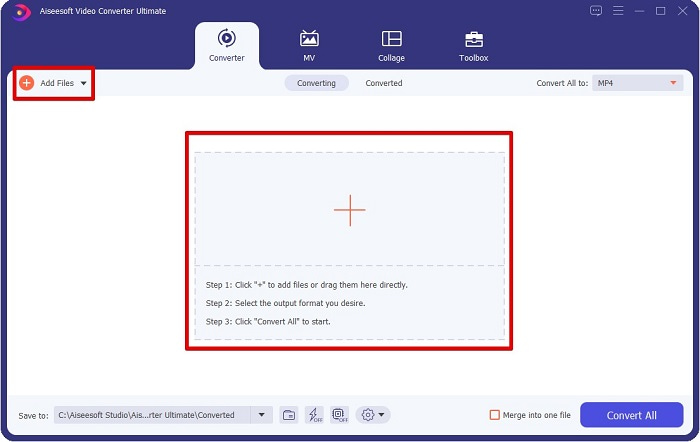
Steg 2. När du har startat konverteraren klickar du på knappen Add Files eller +-knappen för att ladda upp din MPG-fil. Dina datorfiler visas, där du letar upp din fil i mapparna. Klicka sedan på Open för att lägga till filen i kön.
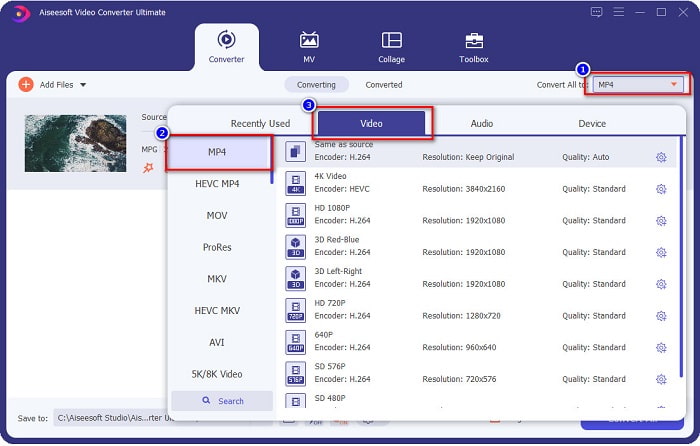
Steg 3. För att ändra formatet på din MPG-fil klickar du på Convert All to uppe i det högra hörnet av skärmen. När du ser en lista över filformat väljer du filformatet MP4.
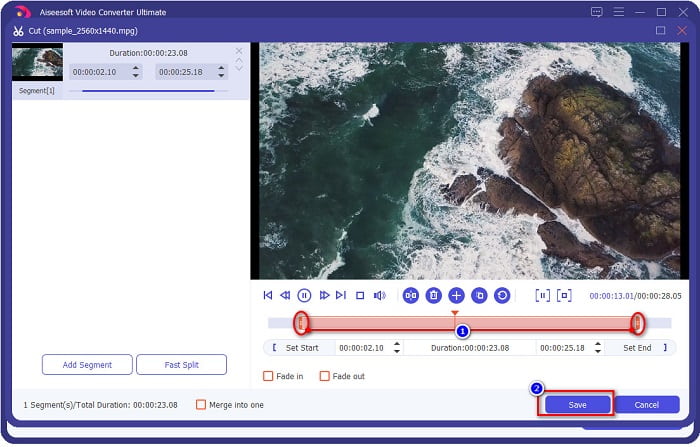
Om du vill kapa längden på din video klickar du på sax-knappen för att trimma videon. Genom att dra play head-knapparna kan du justera videons längd. Klicka på Save för att avsluta.
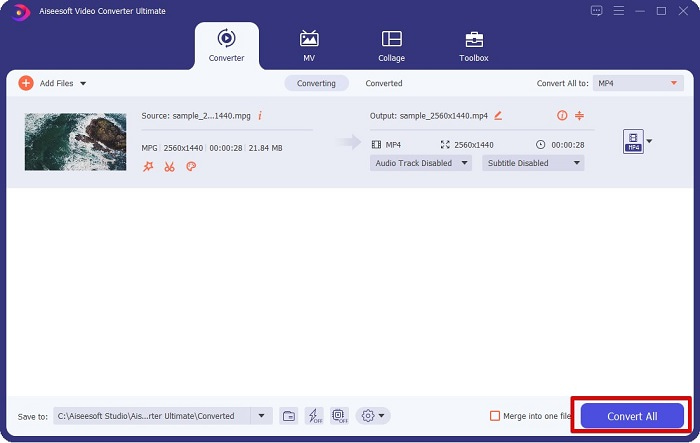
Steg 4. När du har valt det filformat du vill ha klickar du på Convert All för att konvertera din MPG-fil till en MP4-fil. Vänta en liten stund så kommer din MPG-fil att konverteras till en MP4-fil. Med dessa enkla steg har du konverterat din MPG-fil till MP4 utan krångel.
2. Använd Free Online Converter
FVC Free Online Video Converter låter dig konvertera din MPG-fil till MP4-format gratis utan registrering. Det är en kostnadsfri online-videokonverterare som låter dig konvertera utan begränsningar. Dessutom kan du konvertera stora filer online med den här konverteraren. Du behöver inte heller ladda ner något eftersom du kommer åt den online. Nackdelen är dock att den är internetberoende, vilket innebär att hastigheten på din konvertering beror på hur snabbt ditt internet är. Ändå har många användare använt denna konverterare, och den har visat sig vara en fantastisk videokonverterare.
Här är listan över steg för att konvertera i FVC Free Online Video Converter:
Steg 1. Gå till din webbläsare och sök efter FVC Free Online Video Converter.
Steg 2. När du är på webbsidan klickar du på Add Files to Convert. En textruta visas där du först måste ladda ner startprogrammet. När startprogrammet har laddats ner kommer du att föras till dina filer; välj den MPG-fil du vill konvertera.
Ladda ner Skrivbordsversionen för att konvertera filer i batch.
Steg 3. När du har valt din MPG-fil ser du det första gränssnittet där listan över videoformat visas. Välj MP4 innan du konverterar din MPG-fil till MP4 online.
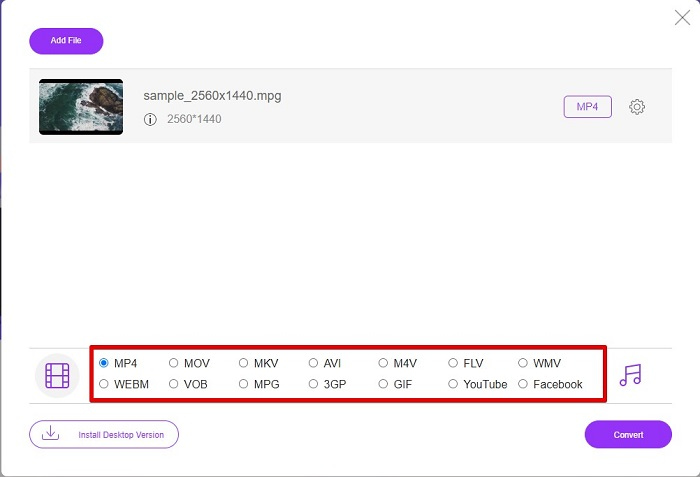
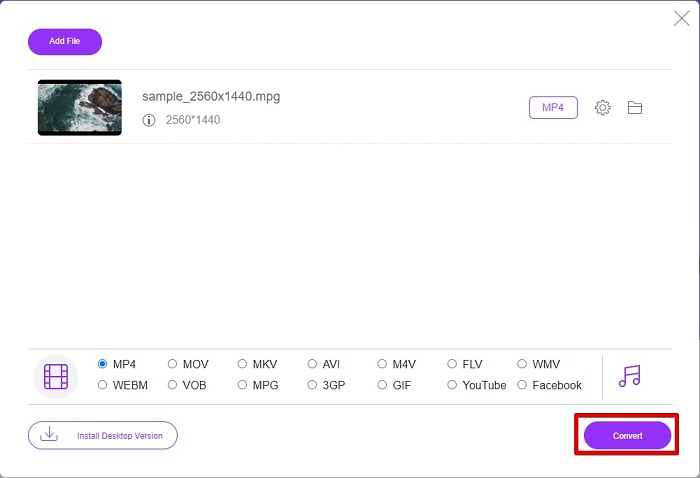
Steg 4. Klicka på knappen Convert för att starta konverteringen. En ny flik visas där du väljer var du vill spara din konverterade fil bland datorns filer, klicka sedan på select folder.
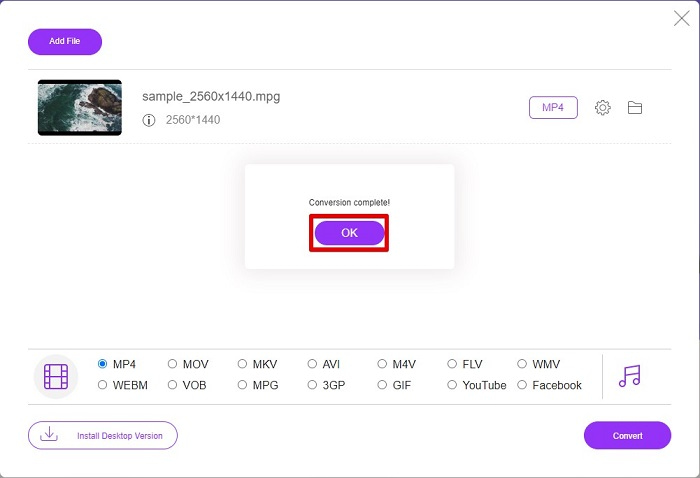
Steg 5. Till sist börjar din fil konverteras och när den är färdig klickar du på OK för att avsluta. Och det var allt! Du är klar med konverteringen lika enkelt som 1-2-3!
3. Använd ConvertFiles.com
ConvertFiles.com är en gratis onlinekonverteringsapp för att konvertera din MPG-fil till MP4. Det låter dig konvertera filformat, upp till 300 varianter av filformat. Och om du letar efter en MPG till MP4-omvandlare online som gör att du kan konvertera dokument, ritningar, videor, presentationer och mer. Men när du använder denna onlinekonverterare kommer du att stöta på många störande annonser. Ändå är denna online-omvandlare fortfarande värd att prova och har visat sig lovande.
Så här konverterar du din MPG-fil till MP4-filformat:
Steg 1. Sök efter ConvertFiles.com i din webbläsare för att gå direkt till webbsidan.
Steg 2. Välj din MPG-fil genom att klicka på den rektangulära knappen eller knappen Browse bredvid Choose a local file. Leta upp din MPG-fil och välj den.
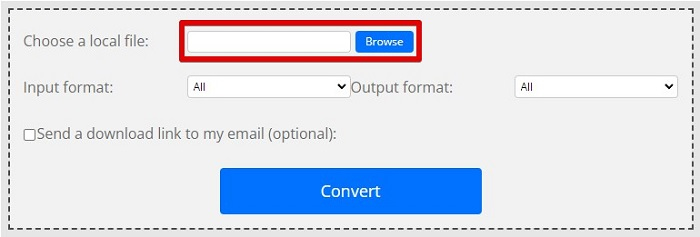
Steg 3. När du har valt MPG-filen som du vill konvertera väljer du i utdataformatet .mp4-format genom att klicka på drop-down-knappen.
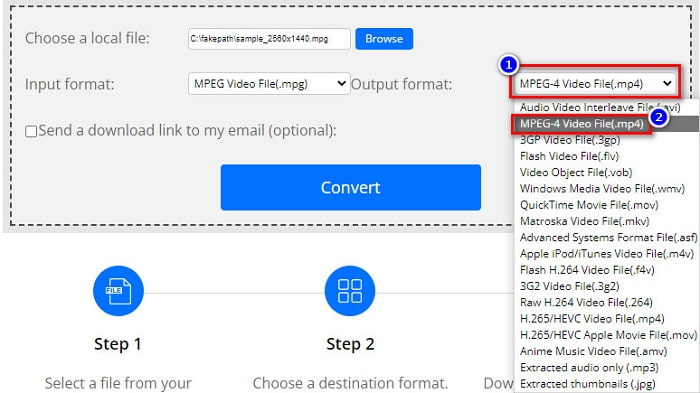
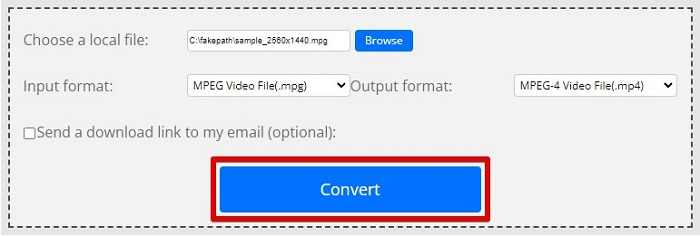
Steg 4. När du har valt det filformat du vill ha kan du nu konvertera din fil genom att klicka på Convert.
MPG kontra MP4
Tillverkad av MPEG (Moving Picture Experts Group), är MPG ett vanligt digitalt videoformat för att lagra video-, ljud- och metadatainformation. Det är ganska användbart när du skapar filmer för delning på Internet. Dessa filer i MPG innehåller vanligtvis MPEG-1 eller MPEG-2 video/ljudkomprimering.
MP4-formatet släpptes av Moving Picture Experts Group (MPEG) 2001 och kan hjälpa dig att spara video-, ljud-, undertext- och bilddata i separata spår. Det är en förkortning för MPEG-4 Part 14. Dessutom är det ett av de mest populära formaten som används för att streama och dela videor.
Del 3. Vanliga frågor om MPG- och MP4-format
Kan jag konvertera MPG-filer till MP4 utan att förlora kvaliteten?
Ja. Video Converter Ultimate låter dig konvertera din MPG till MP4-format, utan att förlora kvaliteten, trots filstorleken.
Var kan jag spela MPG-filer?
MPG-filer stöds brett. Därför kan många mediaspelare öppna detta filformat, inklusive Microsoft Windows Media Player och VideoLAN VLC Media Player. Du kan läsa den här artikeln för mer information. Bästa 4 MPG/MPEG-spelarna för Windows/Mac/Android/iPhone [2021]
Kan jag konvertera MP4 till MPG?
Ja. Du kan konvertera MPG till MP4 filformat med hjälp av filkonverterare som vi har listat ovan.
Slutsats
Konverterarna som vi listade ovan är bevisat pålitliga. De är lätta att använda och gratis! Men om du vill ha en filkonverterare som kan konvertera din MPG-fil till MP4-format och har fantastiska funktioner som kan förbättra din fil, är Video Converter Ultimate det bästa valet. Dessutom, om du vill ha en onlinekonverterare som är fri från annonser och som också kan konvertera stora filer med lätthet, prova FVC Free Online Converter.
-
 3 enkla sätt att konvertera MPG till MOV på din Mac/Windows/Online
 Vill du konvertera dina MPG-filer och senare transportera dem till din iOS, iPod, iPad eller Mac? Den här artikeln hjälper dig att ta reda på hur du konverterar MPG till MOV med steg.
-
 Hur man konverterar MPG till FLV utan att förlora kvalitet [Bevisat]
 Du måste titta på din favoritfilm på den här mediaspelaren, men den stöder inte MPG. Försök att konvertera din MPG-fil till FLV med dessa omvandlare som den här artikeln introducerar.
-
 2 ultimata MPG-omvandlare för att konvertera MPG till WMV gratis
 Vill du konvertera MPG till WMV gratis? I så fall har du tur eftersom vi fick reda på att det finns två verktyg du kan använda för att konvertera dina MPG-filer.

