


 Video Converter Ultimate
 Skärminspelare
 Video reparation
4 Effektiva Metadata Viewer-verktyg för att visa metadata från filer
Som en del av ett videoelement innehåller metadata den information du behöver känna till om filen. Men frågan är: hur kan du visa filens metadata? Så om du vill se metainformationen i din video är detta det perfekta inlägget för dig. Fortsätt att läsa den här artikeln, för vi går igenom den bästa metadatavisaren du kan använda för att se metadata – och om möjligt även redigera den.

Del 1. 2 av de finaste metadatavisarna för Windows och Mac från 2022
Video Converter Ultimate [Bästa video- och ljudmetadatavisare och redigerare]
Video Converter Ultimate erbjuder dig den bästa metadatavisaren för video på Mac och Windows. Med det här verktyget kan du enkelt lägga till och visa metadata i alla video- och ljudformat med bara några få klick. Även om du inte har någon erfarenhet av just den här typen av uppgift kan du förlita dig på den här visaren för att få hjälp. Till skillnad från andra verktyg som bara låter dig visa metadata, erbjuder den här programvaran kraftfulla funktioner som hjälper dig med fler olika uppgifter, som att redigera metadata. Vill du veta vilka de är? Läs då om nyckelfunktionerna du får tillgång till när du skaffar den här programvaran.

FVC Video Converter Ultimate
5 689 200+ nedladdningar- Det är det bästa verktyget för att visa och redigera metadata på varje video eller video.
- Stöder olika medieformat, inklusive MP4, AVI, MOV, MKV, FLV och mer.
- Du kan infoga stora video- och ljudfiler här för att kontrollera deras metadata.
- Till att börja med är detta den bästa metadatavisaren med användarvänligt gränssnitt.
- Tillgänglig i alla olika typer av skrivbordsplattformar som Windows och Mac.
Gratis nedladdningFör Windows 7 eller senareSäker nedladdning
Gratis nedladdningFör MacOS 10.7 eller senareSäker nedladdning
Så nu, om du vill lära dig hur du visar metadata, måste du ladda ner verktyget först genom att klicka på lämplig nedladdningsknapp som visas nedan, installera det nästa och sedan öppna det.
Gratis nedladdningFör Windows 7 eller senareSäker nedladdning
Gratis nedladdningFör MacOS 10.7 eller senareSäker nedladdning
Hur man visar metadata på Video Converter Ultimate
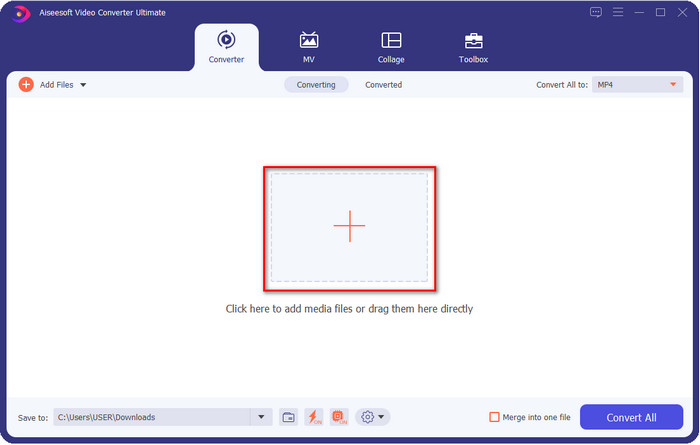
Steg 1. Genom att klicka på +-knappen visas en dialogruta på skärmen där du kan hitta den video- eller ljudfil vars metadata du vill kontrollera. När du har valt filen klickar du på Öppna och går vidare till nästa steg.
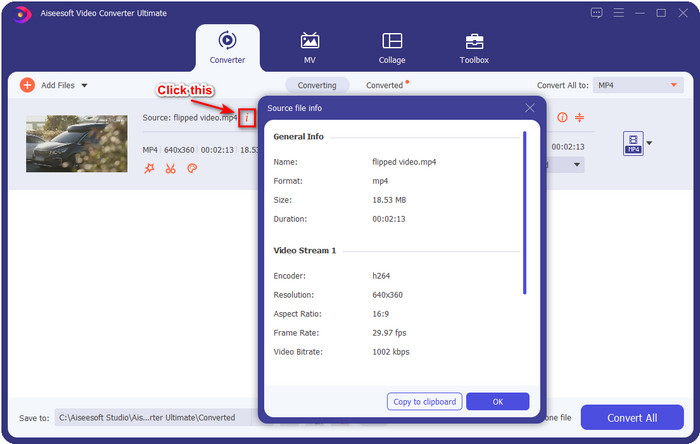
Steg 2. När filen står i kö klickar du på i‑ikonen; voilà, nu kan du se metadatan för din videofil som är sparad på datorn.
Hur man lägger till eller redigerar metadata för video- eller ljudfilen med den bästa metadataredigeraren
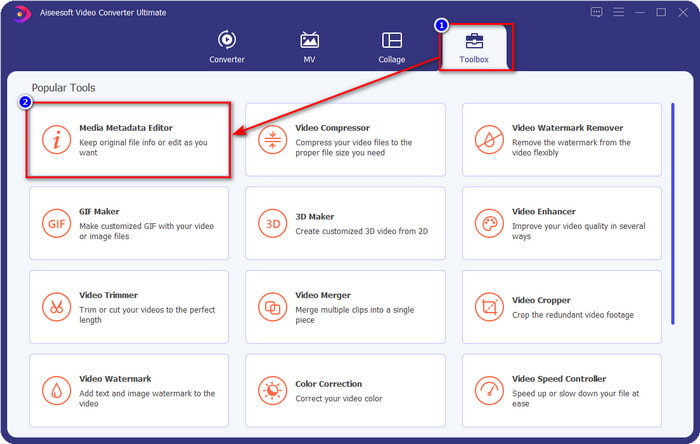
Steg 1. När du har öppnat programvaran måste du gå till avsnittet Verktygslåda, och där ser du funktionen Media Metadata Editor, klicka sedan på den.
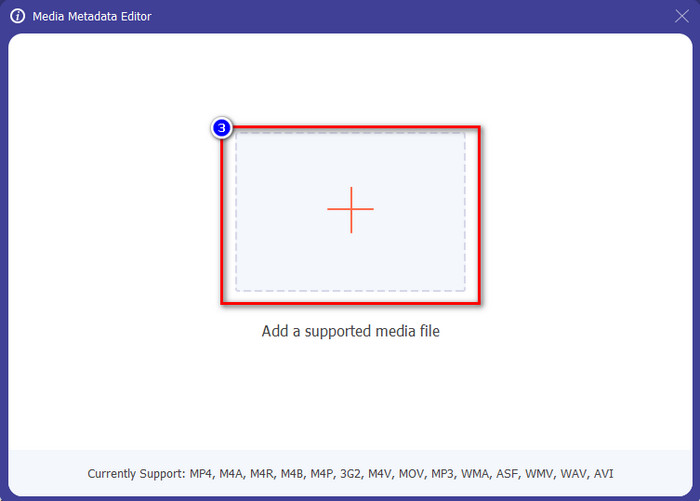
Steg 2. Ett nytt fönster visas, klicka på +‑knappen, leta upp video- eller ljudfilen i datorns mapp och klicka på Öppna.
Steg 3. Lägg till eller redigera informationen om filen efter dina behov; klicka sedan på Spara för att tillämpa de ändringar du gjort.

Photoshop [Bästa metadatavisare för professionella]
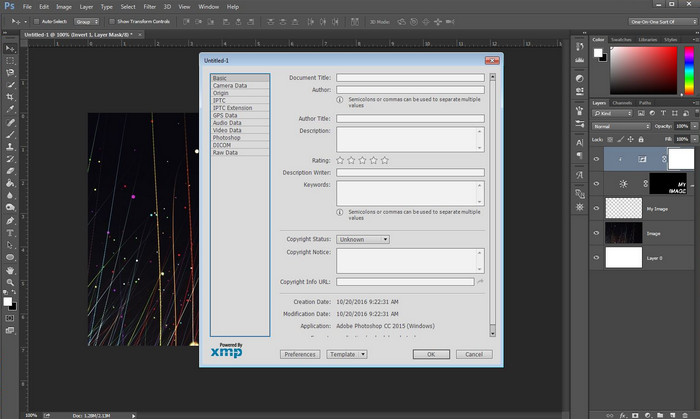
Photoshop har blivit känt som den ledande fotoredigeraren du kan använda på professionell nivå. Det här verktyget ger användarna avancerade redigeringsmöjligheter som du behöver för att få dina bilder att se bättre ut än tidigare. Även om verktyget erbjuder avancerad redigering är det för vissa användare för dyrt bara för att visa filens metadata. Du kanske undrar varför vi tar med den här redigeraren på listan – den är populär och många använder den redan, så varför inte? Även om den kan lägga till metadata i varje PSD‑fil är den metadata som stöds ganska begränsad, det handlar mest om grundläggande information. Så om du vill visa metadata i Photoshop måste du köpa programmet.
Fördelar
- Det är den bästa editorn du kan hitta på webben.
- Den stöder ett brett utbud av bildfilformat som du kan infoga och senare kontrollera dess metadata.
- Redaktörens val för att vara ett förstklassigt redigeringsprogram på skrivbordet.
Nackdelar
- Om du köper verktyget, förvänta dig att det är dyrt.
- Den behöver en avancerad dator för att få en bättre upplevelse av att använda den.
- Inte det bästa valet för nybörjare att börja med.
Relaterat:
Hur man lägger till en vattenstämpel i Photoshop
Del 2. 2 gratis metadatavisare tillgängliga på webben
Jeffreys bildmetadataredigerare
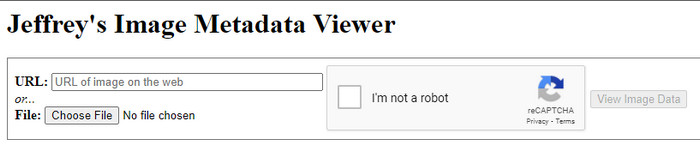
Om du vill ha en enkel, kostnadsfri metadatavisare på webben kan du prova Jeffrey's Image Metadata Editor. Det här webbaserade verktyget är effektivt för att visa metadata för alla mediefiler du har, helt gratis. Även om användargränssnittet inte är lika imponerande som hos andra verktyg fyller det fortfarande sin funktion som metadataredigerare och ‑visare. Dessutom, om du vill prova och använda det här verktyget måste du vara försiktig, eftersom webbplatsen inte är skyddad i olika webbläsare, vilket innebär att inloggning på sidan kan leda till intrång eller att du förlorar filer. Kom ihåg att du måste iaktta försiktighet om du försöker använda verktyget för att visa eller redigera din metadata. Hittills finns det inga rapporter om någon som blivit hackad medan de använder webbplatsen.
Fördelar
- Gratis att komma åt i alla webbläsare.
- Den stöder olika format; du kan ladda upp och se metadata.
- Du kan infoga URL:en istället för filen för att spara lite utrymme.
Nackdelar
- Captcha är lite irriterande om du vill se metadata.
- Webbplatsen är inte säker.
Metadata2go
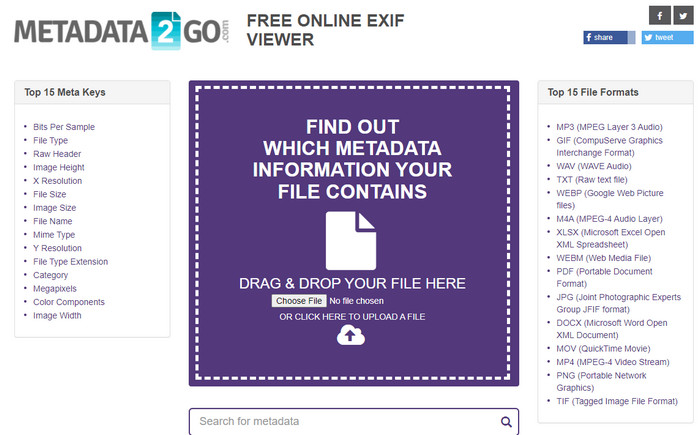
Metadat2go stöder ett brett urval av bildformat där du kan lägga in och senare visa metadata. Även om gränssnittet är tyngre än i det första webbaserade verktyget vi tog upp, är det fortfarande lätt att använda för alla som vill använda det. Även om verktyget är säkrare att använda än det första finns det vissa funktionsbegränsningar, och dra‑och‑släpp‑funktionen fungerar ofta inte så bra. Men om du vill lära dig att öppna och läsa metadata från video är det här verktyget tillräckligt för dina behov.
Fördelar
- Det är gratis och säkert att komma åt på olika sökmotorer.
- Den gör uppgiften smidigt.
- Den stöder många bildformat.
Nackdelar
- I vissa fall fungerar inte alternativen bra, som dra och släpp.
- Det stöder andra format, men det är få utvalda.
Del 3. Jämförelsediagram om 4 Metadata Viewer [Online & Offline]
| Funktioner | FVC Video Converter Ultimate | Photoshop | Jeffreys bildmetadataredigerare | Metadata2go |
| Visa och redigera metadata enkelt |  | | | |
| Säker att använda | | |  | |
| Budgetvänligt | | | | |
| Användarvänlig | | | | |
| Avancerade funktioner tillgängliga | | | | |
| Programbaserad | Desktopbaserat program | Desktopbaserat program | Webbaserat program | Webbaserat program |
Del 4. Vanliga frågor om Metadata Viewer
Vad finns inuti metadata?
Inuti metadata kommer du att se en annan uppsättning information om filen, till exempel författarens namn, genre (om det är musik), filtitel, filstorlek och många fler.
Varför behöver jag se metadata?
Tja, metadata hjälper dig att få kort information om filen som du inte kan se på filen. Genom att titta på metadata får du en uppfattning om data i en viss fil, oavsett om det är en bild, video, ljud, PDF eller mer.
Kan jag använda metadata för att skydda filen?
Ja, du kan lägga till metadata för att skydda din fil från personer som vill försöka stjäla detta från dig. På så sätt kan du få de inloggningsuppgifter du gjort som fungerar om någon försöker stjäla detta från dig. Det finns dock vissa tekniker för att ta bort filens metadata; även om någon kan ta bort data, är det bäst att lägga till metadata till filen för extra och enkelt skydd.
Slutsats
Nu när vi har presenterat metadatavisarna är det dags att välja en och använda den för att se vad som finns i dina filer. Dessutom är de två första verktygen vi presenterade utan tvekan de bästa för att visa metadata, men vi kan konstatera att Photoshop är alltför dyrt jämfört med det ultimata verktyget. Därför, om du vill ha ett billigt och säkert sätt att visa eller redigera din metadata, bör du använda FVC Video Converter Ultimate, eftersom det är det perfekta verktyget för den här uppgiften. Är du ändå inte övertygad av vår recension av verktyget? Då kan du ladda ner programmet till din dator och prova själv!
-
 3 bästa lösningarna för hur man enkelt tar bort vattenstämpel från videor
 Vill du ta bort den irriterande vattenstämpeln på videon? Med den här bloggen kan du lära dig olika idéer om att ta bort vattenstämpeln på en video.
-
 4 bästa sätten att lägga till vattenstämpel på alla videor snabbt
 Låt oss lära oss hur du lägger till vattenstämpel till alla videor på Windows, Mac, Online, iOS och Android med detaljerade steg om du läser den här artikeln.
-
 4 effektiva sätt att ta bort Tiktok-vattenstämplar från Tiktok-videor
 Behöver du ta bort Tiktok-vattenstämpeln från dina exporterade Tiktok-videor? Du kan göra det här med hjälp av verktygen vi presenterar; du kan enkelt göra det.
