


 Video Converter Ultimate
 Skärminspelare
 Video reparation
[Beprövat] 2 av de bästa tagredaktörerna som är tillgängliga att använda på Windows och Mac
De flesta av ljudfilerna vi spelade in på Windows är i WMA-format, och du kan redigera deras metadata med en WMA-metadatarredigerare. Att välja rätt metadatarredigerare att använda på din dator kan dock vara en ganska svår uppgift för enskilda användare. Men numera är denna uppgift inte så svår som du tror, tack vare två redigerare som du kan använda på Windows och Mac. Vill du veta vilka de två är? Om du fortsätter att läsa den här artikeln kommer vi att ge en opartisk jämförelse mellan de två programmen du kan ladda ner, så att du kan se vilket som är bättre. Håll dig kvar och njut av att läsa detta blogginlägg för att lära känna de två utmärkta verktyg du inte bör missa under 2022.

Del 1. Använd Ultimate WMA Tag Editor tillgängligt på Windows och Mac för att redigera WMA-taggar
Först på vår lista är den bästa WMA-metadataredigeraren FVC Video Converter Ultimate, verktyget som presenterar en kraftfull redigerare för sina taggar som alla älskar. Med det här verktyget kan du enkelt hantera detta problem som ett proffs, även om du inte har erfarenhet av att redigera dina WMA-taggar. Till skillnad från andra taggredigerare behöver du inte stor kunskap om denna metadataredigerare om hur du använder den; inom några få klick och en del av en sekund kommer du att få din WMA taggad utan att svettas.
Vill du ha mer? En av de bästa funktionerna som det här verktyget erbjuder är Verktygslådan, där du kan göra flera saker som andra verktyg inte kan erbjuda dig, såsom att komprimera, trimma, lägga till eller ta bort vattenstämplar, spela upp baklänges och mycket mer. Så alla typer av uppgifter du kan tänka dig för mediefiler kan enkelt hanteras av dig med hjälp av detta verktyg. Dessutom kan du konvertera ditt WMA-format till över 1000 nya format snabbt med hjälp av den ultrasnabba konverteringsprocessen. Anmärkningsvärt, eller hur? Det är just vad det här ultimata verktyget klarar av. Och för att lära dig hur du lägger till en WMA-tagg kommer stegen nedan att hjälpa dig att göra det som ett proffs.
Steg 1. Klicka först på nedladdningsknappen nedan och välj om du använder Windows eller Mac. Installera programmet direkt och starta det när installationen är klar.
Gratis nedladdningFör Windows 7 eller senareSäker nedladdning
Gratis nedladdningFör MacOS 10.7 eller senareSäker nedladdning
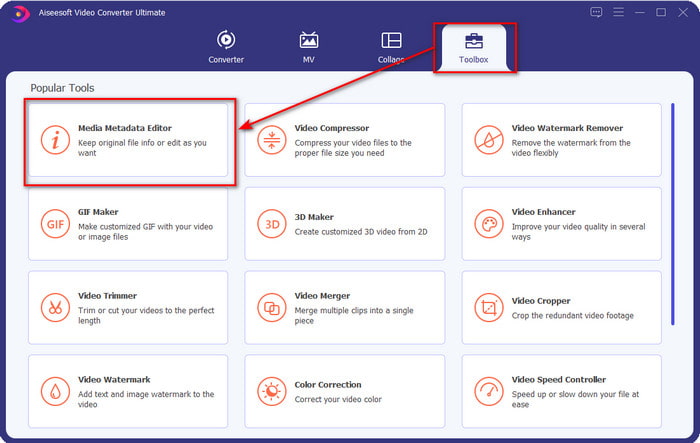
Steg 2. Klicka på Verktygslåda i den övre delen, och gör sedan samma sak med Media Metadata Editor.
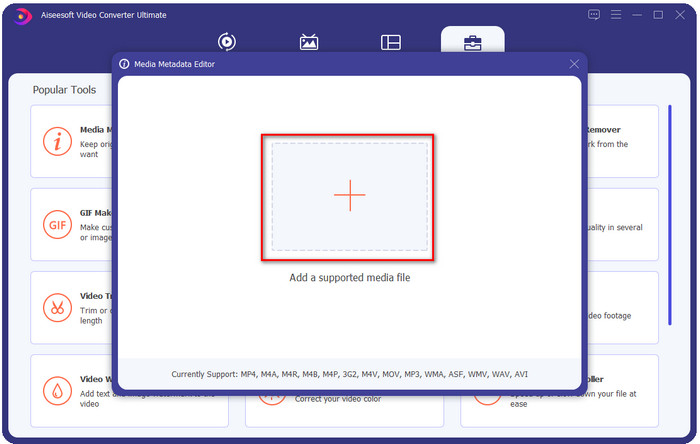
Steg 3. Lägg till filen genom att klicka på +-ikonen i minifönstret som visas, leta upp WMA-filen i mappen och tryck på Öppna för att gå vidare till nästa steg.
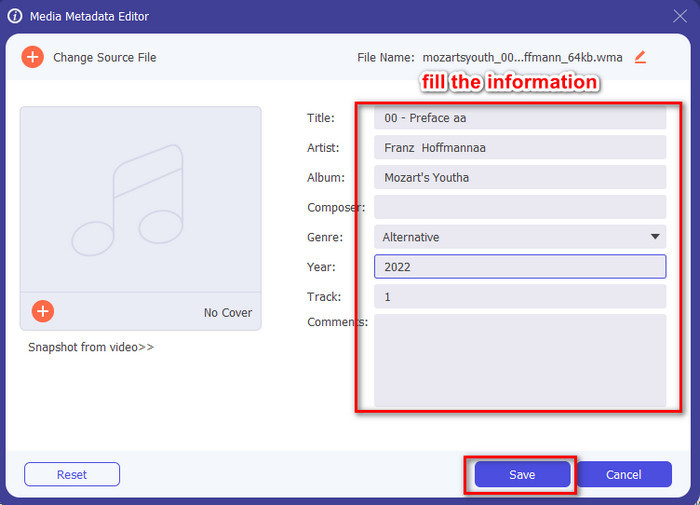
Steg 4. Här kan du redigera metadata eller taggar i din WMA-fil och fylla i textrutan därefter. När allt är klart klickar du på Spara för att tillämpa ändringarna du har gjort i din ljudfil. Därmed har du lagt till metadata i ljudfilen på nolltid.
Del 2. Använd den kostnadsfria WMA Tag Editor tillgänglig på Windows och Mac för att ändra WMA-metadata
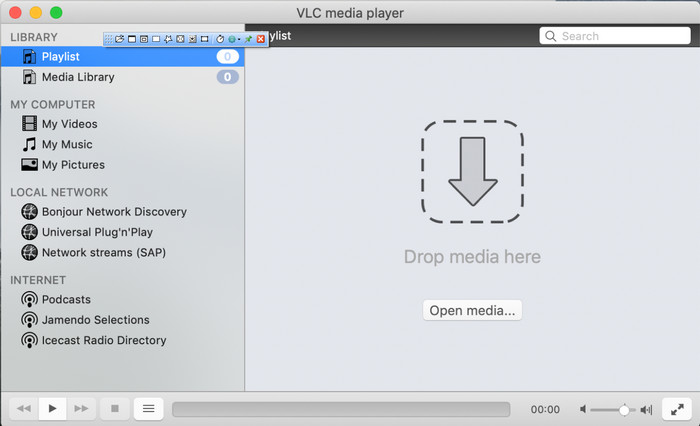
VLC Player är en annan WMA-taggredigerare som du kan ladda ner gratis på Windows och Mac. Den här mediespelaren kan hjälpa dig att redigera taggarna i dina video- och ljudfiler. Till skillnad från den första programvaran som nämndes är detta verktyg inte särskilt framtaget för att lägga till metadata i mediefiler. Det används för att spela upp olika mediefiler som den ursprungliga eller inbyggda mediespelaren inte kan spela upp utan att du laddar ner ytterligare en codec. Även om verktyget kan lägga till taggar är det ändå inte lika effektivt som en dedikerad taggredigerare.
Dessutom har detta verktyg bevisat många saker för oss eftersom det är pålitligt och säkert att ladda ner. Utöver dessa funktioner kan det här verktyget också konvertera, enkelt redigera och skärminspelning om du behöver en. Vi kan säga att det är ett mångsidigt verktyg som inte ger en sådan excellens på andra funktioner, men att spela upp videor är utan tvekan det bästa på marknaden.
Del 3. Jämförelsediagram mellan gratis och ultimat WMA Tag Editor
För att göra recensionen ännu enklare för oss att förstå, inkluderar vi ett jämförelsediagram för att veta vilket verktyg som är mycket bättre att ladda ner på din enhet. Vänligen läs den noggrant för att jämföra och kontrastera FVC Video Converter och VlC Player och bedöma den, som är den bästa WMA-metadataredigeraren.
| FVC Video Converter Ultimate | MOT | VLC-spelare |
 | Tillgänglig på Windows och macOS | |
| Stöder ett brett utbud av format för att redigera taggar |  |
| Flerfunktionsfunktioner som trimning, klippning, redigering och mer | |
| Användarvänlig | |
| Bästa grafiska användargränssnittet | |
Del 4. Vanliga frågor om WMA Metadata Editor
Kan jag spela WMA på VLC?
Ja, du kan enkelt spela upp WMA-filen i VLC eftersom formatet stöds. Om du vill veta mer om VLC kan du läsa den här artikeln; genom att trycka på den här länken får du lära dig mer om VLC och dess andra tillgängliga alternativ.
Vad är WMA?
WMA är ett ljudformat som används för att lagra en serie ljudcodecs som skapats av Microsoft med hjälp av kompositören Stan LePard. Det här ljudformatet är en av de välkända konkurrenterna till det standardiserade ljudformatet MP3. Formatet är dock inte så populärt som du kanske förväntar dig, så om du vill överföra en fil med ändelsen .wma kan du räkna med att du behöver en app från tredje part om mottagarna i andra änden inte använder Windows. Så, vad bör du göra? Kan du konvertera WMA till MP3 för att göra den kompatibel med mottagaren? Med hjälp av den här artikeln får du veta hur man konverterar WMA till MP3 på Windows, Mac och online.
Behöver jag en extra codec för att spela WMA?
Det beror på vilket program du använder för närvarande; om du är en Windows-användare behöver du inte ladda ner en extra codec för att spela upp ljudfilen på ditt skrivbord. Men alla var inte Windows-användare, så att konvertera ljudfilen är det bästa sättet att göra WMA kompatibel med dina enheter. Om du letar efter en omvandlare föreslår vi att du väljer den bästa ljudkonverteraren du kan ladda ner på Windows och Mac, FVC Video Converter Ultimate. Följ dessa steg om du vill veta hur. Ladda ner verktyget på skrivbordet och installera det sedan. Öppna verktyget och klicka på +-ikonen för att ladda upp WMA-filen; på den övre högra sidan, klicka på Konvertera alla till och välj det tillgängliga ljudformatet i listan. Tryck på Konvertera alla för att starta konverteringsprocessen. Lätt som det.
Slutsats
Nu när vi har en idé om FVC Video Converter Ultimate och VLC-spelaren är det dags att välja den bästa WMA-taggredigeraren du ska använda. Dessa verktyg är utmärkta för att redigera dina WMA-filers taggar, så oavsett om du föredrar det kan du hantera redigeringen av taggarna snabbt. Men om du vill ha ett proffsverktyg för att hantera den här uppgiften, välj det ultimata verktyget. Genom att trycka på nedladdningsknappen kan du ha detta på båda operativsystemen för att justera dina WMA-taggar.
-
 Vad är metadata: Lär dig grundläggande information om metadata
 Vad är Metadata? Är detta viktigt? Vilka är delarna av metadata? Har du samma fråga? I den här artikeln kommer du att lära dig grundläggande information om metadata.
-
 4 av de bästa metadatavisarna online och offline [Uppdaterad 2025]
 Kan jag kontrollera metadata för min fil? Ja, det kan du, med hjälp av det här inlägget kommer vi att presentera de olika metadatavisare du kan använda.
-
 6 favoritval Snapchat Animerade Snapchat-filter på Snapchat
 Vill du veta de bästa sätten att lägga till filter på Snapchat-videor? Tja, du kan klicka på det här och lära dig de olika filtren du kan använda för att applicera på Snapchat-videor.
