


 Video Converter Ultimate
 Skärminspelare
 Video reparation
 Säker nedladdning
Hur man saktar ner en video på Snapchat som en proffs [Löst]
En av de bästa filterapparna du kan ladda ner gratis till din enhet är Snapchat. Förutom filtren du kan lägga på video undrar användare ofta hur man saktar ner en video på Snapchat för att skapa en slowmotion‑effekt på videon du tar. Med den här appen kan du spela in en slowmotion‑video så att den ser imponerande och unik ut jämfört med andra användare som använder samma app. Vill du veta hemligheten bakom hur man gör det? Ingen anledning att oroa sig, vi hjälper dig.
Den här artikeln kommer att fokusera på hastighetsmodifieraren du kan använda för att maximera videon du vill ha slow-mo. Så vad väntar du på? Håll uppe tempot när du läser den här artikeln för att veta mer om de långsamma effekterna av Snapchat.

Del 1. Hur man enkelt saktar ner en video på Snapchat
Hur saktar man ner en video på Snapchat? Om du har samma fråga hittills är det här steget för dig eftersom du kan hitta hastighetsmodifieraren på Snapchat. För att få det resultat du vill ha, nedan är de förenklade stegen att följa.
Steg 1. Ladda ner Snapchat till din enhet och öppna appen.
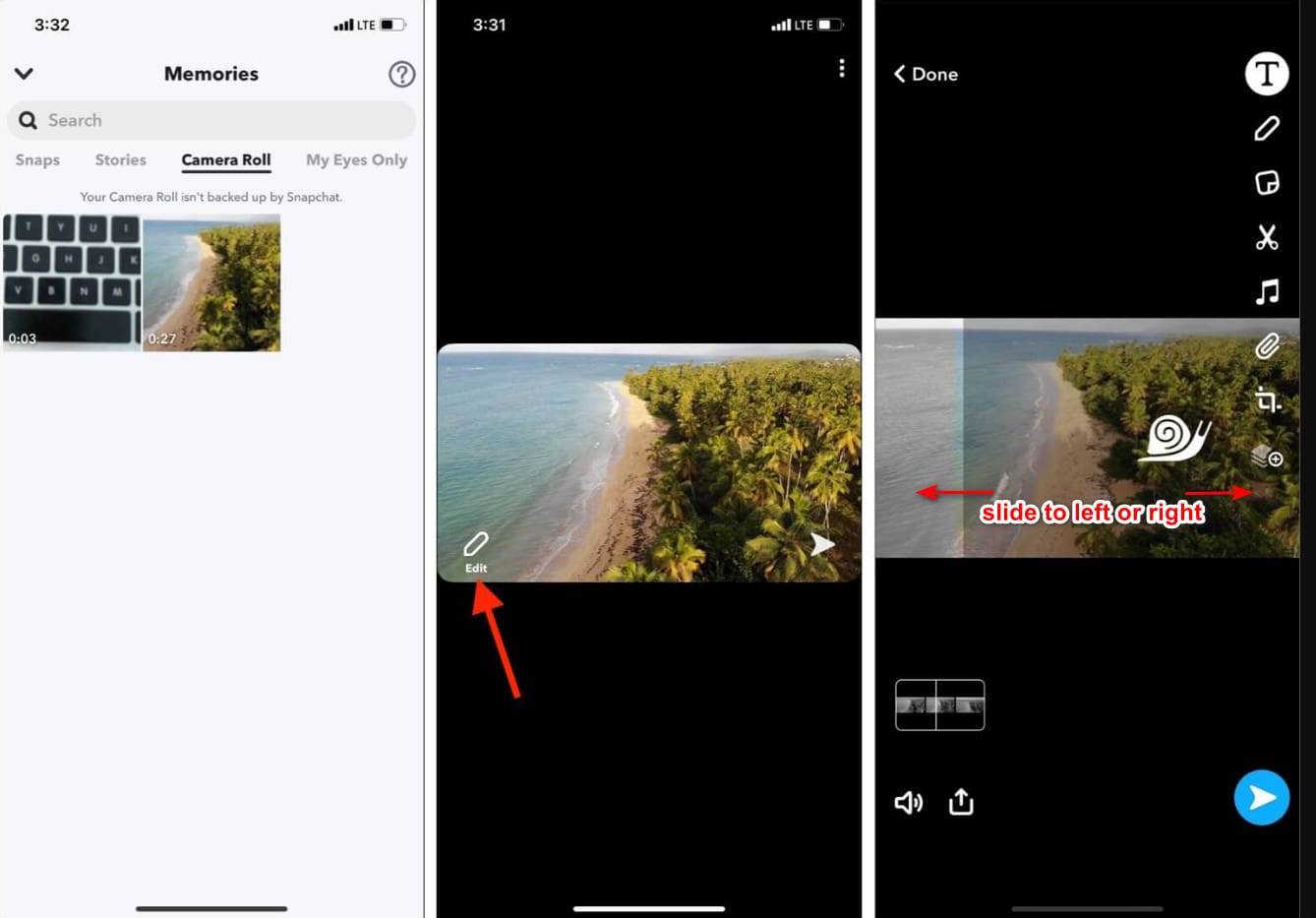
Steg 2. Tryck på fotons ikonen på skärmen och ge appen åtkomst till ditt bildbibliotek. När du har gett åtkomst väljer du den video du vill sakta ner i listan som visas och trycker på den.
Steg 3. När du har öppnat videon trycker du på Redigera för att använda hastighetsändringen som finns i Snapchat.
Steg 4. Svep åt vänster eller höger tills du hittar snigelikonen. Den här ikonen betyder att videons hastighet blir långsammare än originalet. Om ikonen däremot är en kanin spelas videon upp snabbare. Spara sedan videon i slowmotion.
Även om appen har en inbyggd hastighetsmodifierare är uppspelningshastigheten som den stöder bara en enda rörelse. Det betyder att du inte har möjlighet att ändra slow-mo enligt dina önskemål, vilket är frustrerande, speciellt om slow-mo inte är vad du vill ha. Men nästa verktyg kan hjälpa dig att ändra uppspelningshastigheten i slow motion efter dina önskemål, och det kommer inte att ge en enhastighetsrörelse som på Snapchat. För att veta detta måste du läsa följande detaljer i del 2.
Del 2. Hur man sätter en video i slow motion på Snapchat effektivt på Windows och Mac
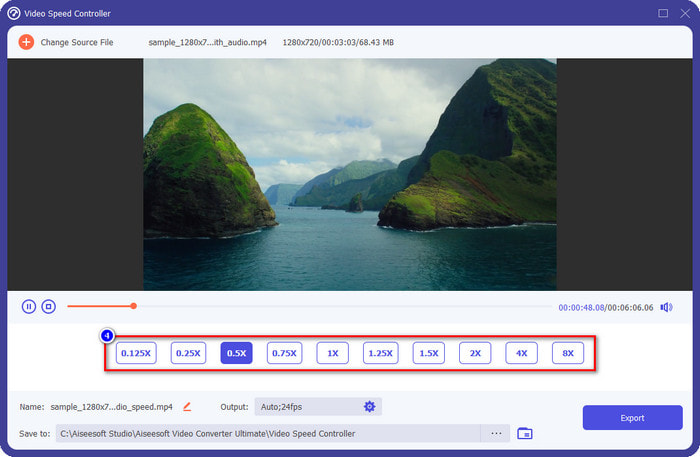
När vi nu har visat hur du lägger en video i slowmotion på Snapchat kan du se att slowmotion‑effekten inte är så långsam som de flesta vill. Så i stället för att förlita dig på den inbyggda hastighetskontrollen i Snapchat kan du prova att använda FVC Video Converter Ultimate. Den ger dig möjlighet att snabbt ändra videons hastighet efter dina önskemål. Med hjälp av hastighetskontrollen kan du importera en video med normal hastighet och göra om den till en slowmotion‑video. Du kan göra videon så långsam som 0,75x, 0,5x, 0,25x eller 0,125x; välj något av alternativen och titta i förhandsvisningen för att kontrollera om det är den slowmotion‑hastighet du vill ha.
Förutom dess funktioner för snabbare kontroller kan du också använda den här programvaran för att lägga till filter och effekter som vad du kan ha på Snapchat. Även om den stöds är den inte lika bred som filtreringsappen du kan ha på din enhet. Dessutom kan du göra avancerad redigering här som du inte kan göra på Snapchat. Såsom volymförstärkare, synkronisering av ljud, ta bort vattenstämpeln, lägga till metadata och många fler. Trots att det är ett ultimat verktyg är programvaran inte tillgänglig på mobila enheter. Ändå kan du ladda ner det på din Windows och Mac. Så nu, om du bestämmer dig för att använda det här verktyget, kan du läsa och följa handledningen för att ändra hastigheten på videon.
Steg 1. Genom att klicka på nedladdningsknappen nedan kan du få den ultimata hastighetsändraren på Windows och Mac. Installera programvaran direkt och starta den för att ändra uppspelningshastigheten på din video.
Gratis nedladdningFör Windows 7 eller senareSäker nedladdning
Gratis nedladdningFör MacOS 10.7 eller senareSäker nedladdning
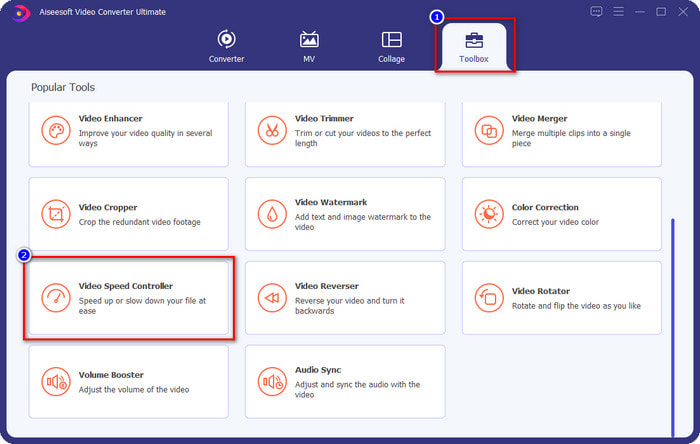
Steg 2. Du ser fyra olika sektioner i gränssnittet som du kan använda; klicka på Verktygslåda och leta efter Video Speed Controller i listan.
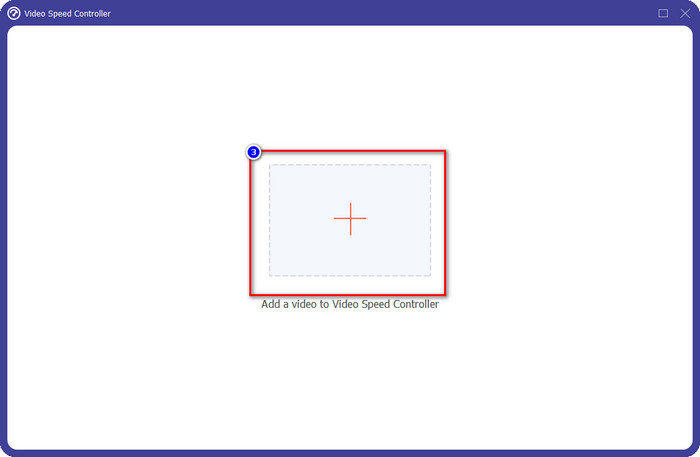
Steg 3. Tryck på +-knappen för att öppna mappen, ladda upp Snapchat‑videon eller en annan video du vill ha i slowmotion och klicka på Öppna.
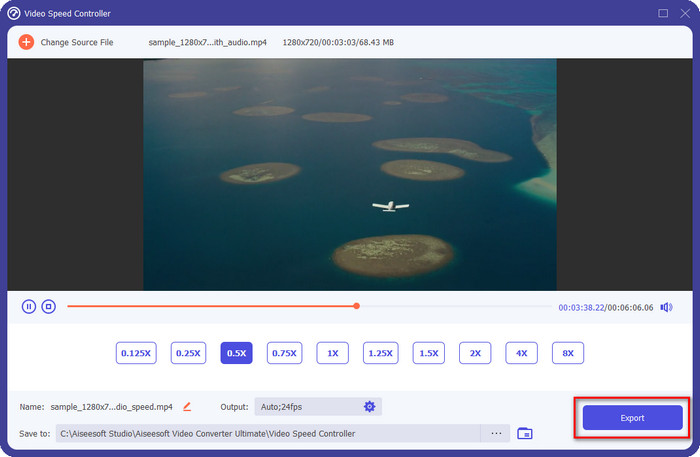
Steg 4. När du kommer till det nya gränssnittet där du kan ändra hastigheten klickar du på den slowmotion‑hastighet du vill tillämpa på din video. Du kan välja vilken slowmotion‑hastighet du vill ha, och den spelas upp i förhandsvisningsrutan.
Valfritt: Om du vill göra avancerade ändringar av utdata kan du klicka på Utdata. I den här delen kan du ändra format, upplösning, bildfrekvens, kvalitet, zoomläge osv.; klicka på OK för att tillämpa ändringarna du har gjort.
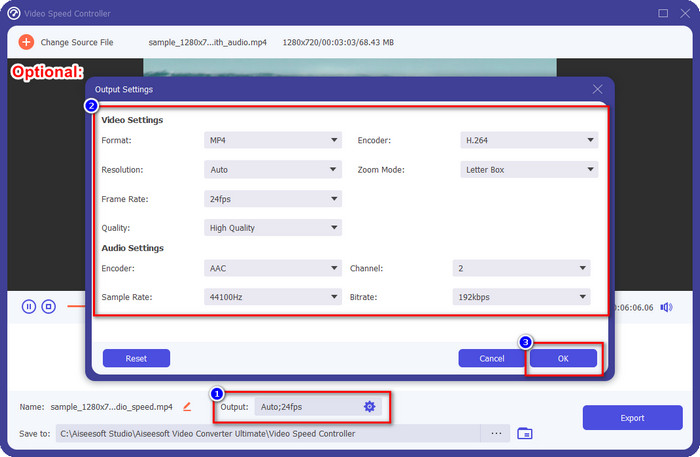
Steg 5. Klicka på knappen Exportera när du är redo att konvertera videons uppspelningshastighet. Du har nu videon i slowmotion; du kan nu dela videon eller använda slowmotion‑videon du har exporterat här.
Relaterat:
Del 3. Vanliga frågor om hur man saktar ner en video på Snapchat
Har export av slow-mo-video på Snapchat en vattenstämpel?
Du kan fritt exportera videon du har slow-mo på Snapchat utan vattenstämpeln för den slutliga utgången. Även om du vill lägga till en så får du inte lägga till en Snapchat-vattenstämpel på videon.
Kan jag ändra hastigheten på videon även om jag inte tog den på Snapchat?
Det kan du, men om du bara tillät det, för om du inte tillät appen att få tillgång till ditt galleri eller dina foton, kan du inte ändra hastigheten på videon du vill ha. För att se videon du inte tog på Snapchat kan du gå till Kamerarullen istället för Snaps och Stories.
Finns det några begränsningar för att sakta ner en video på Snapchat?
Än så länge finns det ingen begränsning om du vill sakta ner videon med Snapchat. Förutom alternativen för slow-mo-hastighet finns det inte längre. Så anta att du har en video som du vill sakta ner. I så fall kan den här appen hjälpa dig att enkelt slutföra uppgiften utan att ladda ner ytterligare tillägg för att ändra hastigheten.
Slutsats
Behöver du en hjälpande hand som visar hur man saktar ner en video på Snapchat? Du har redan fått den hjälp du behöver genom att läsa den här artikeln. Om du ändå tycker att Snapchats inbyggda hastighetskontroll inte räcker för dina behov måste du använda en videohastighetskontroll, till exempel FVC Video Converter Ultimate, för att få full kontroll över videons hastighet. Du kan skicka ett meddelande till oss om du har några frågor om det, så hjälper vi dig och löser problemet tillsammans.
-
 Hur man saktar ner en video: Perfekta tips [Skrivbord/mobiltelefon]
 Är du trött på att söka efter de bästa verktygen som hjälper till att bromsa en video online? Läs den här artikeln så att du blir upplyst med informationen nedan.
-
 Hur man ändrar slow motion video till normal hastighet [enkla steg]
 Vill du veta hur man återställer en slowmotion-video som du laddat ner från internet eller av misstag spelat in i slowmotion? Lär dig hur du konverterar slowmotion-video till normal hastighet på Mac, Windows, iOS och Android.
-
 Allt du behöver veta om hur man gör videor i slow motion
 Du vill göra slowmotion-videor som en professionell redigerare, men du vet inte vilken programvara eller vilka applikationer du vill använda? Läs den här artikeln för att lära dig alla detaljer du behöver.
