


 Video Converter Ultimate
 Skärminspelare
 Video reparation
 Säker nedladdning
Hur man tar bort vattenstämpeln från Renderforest-exporterade videor i slutändan
Renderforest är en komplett pakt med utmärkta animerade mallar för intro, outros, titlar, annonser eller liknande. Du kan börja från början eller använda de tillgängliga mallarna här. Även om du inte är en expert på videoredigering kan du ändå lyckas övervinna det genom att använda den här webbplattformen. På grund av dess användning och optimala fördelar, valde många användare denna plattform för att skapa en högkvalitativ, effektiv, kompatibel och pålitlig design om du har ett abonnemang.
Så du kan ladda ner videon du redigerar här gratis om du registrerar dig, men med en vattenstämpel. Vattenstämpeln skapar problem för många av oss som redan exporterar videon här och för dem som inte har möjlighet att betala det här verktygets prenumerationsavgift. Nedan listar vi handledningar om hur du tar bort vattenstämpeln från Renderforest med hjälp av de mest användbara verktygen vi har samlat på oss under vår undersökning. Vi kan dela dem med dig om du fortsätter läsa nästa del av den här artikeln.

Del 1. 3 effektiva sätt att ta bort vattenstämpel från Renderforest-video
FVC Video Converter Ultimate
FVC Video Converter Ultimate är en fenomenal videovattenstämpelborttagare som kan ge dig en genomgång av hur du tar bort Renderforest-vattenstämpeln. Du kan lita på det här verktyget för att ta bort vattenstämpeln i din video utan krångel. Om vi ska jämföra detta ultimata verktyg med andra, har det här verktyget kraften att ta bort vattenstämpeln i din video med stöd av AI‑teknik. Det är dessutom det bästa verktyget för att ta bort vattenstämpeln i din video oavsett vilket format du laddar upp. Vad gör det här verktyget så bra? Du behöver inte vara tekniskt lagd för att använda det; med den enkla guiden och stegen nedan kan du ta bort vattenstämpeln som Renderforest lägger på videon.
Steg 1. Ladda ner programvaran till din dator genom att klicka på rätt nedladdningsknapp. Klicka på nedladdningsfilen, installera den och välj Start Now för att starta programvaran direkt.
Gratis nedladdningFör Windows 7 eller senareSäker nedladdning
Gratis nedladdningFör MacOS 10.7 eller senareSäker nedladdning
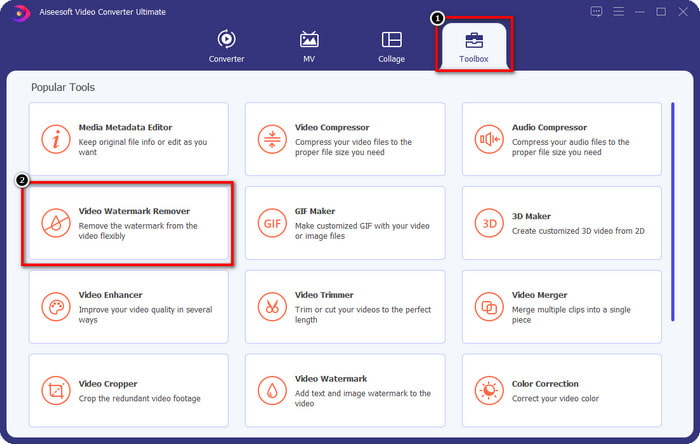
Steg 2. När du har startat programvaran öppnar du Toolbox och klickar sedan på Video Watermark Remover därunder.
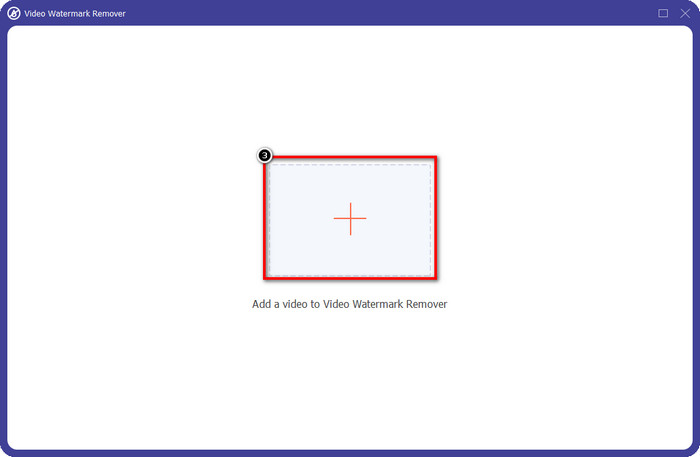
Steg 3. Klicka på +-ikonen på skärmen för att ladda upp Renderforest-videon du har exporterat med vattenstämpel.
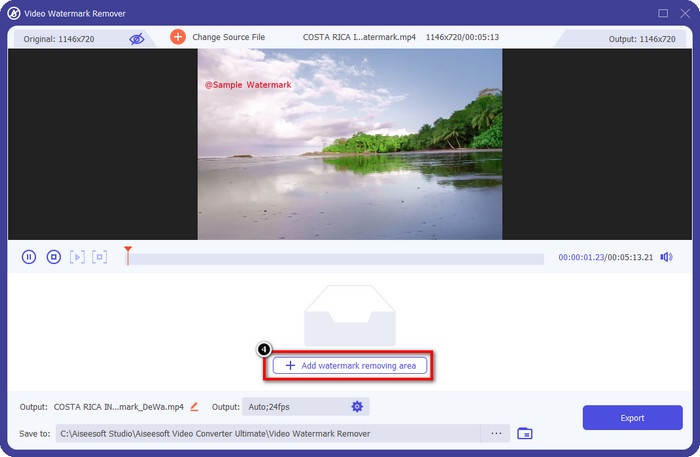
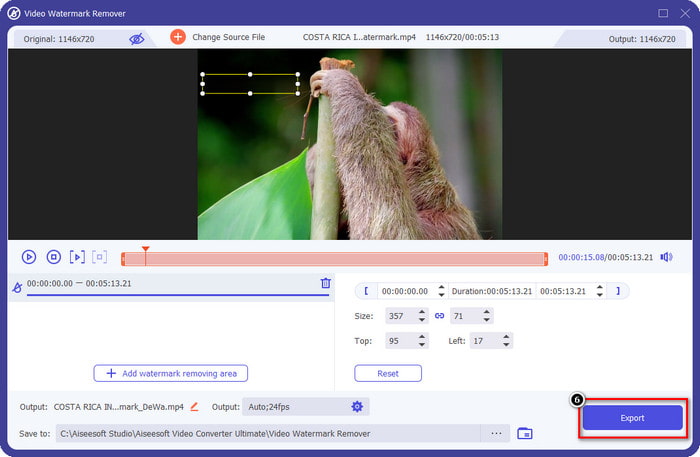
Steg 4. Tryck på Add Removing Watermark Area för att börja ta bort Renderforest-vattenstämpeln.
Steg 5. I det nya fönstret på skärmen drar du markeringsrutan och anpassar den till vattenstämpeln. Du kan justera markeringsrutan fritt om du behöver.
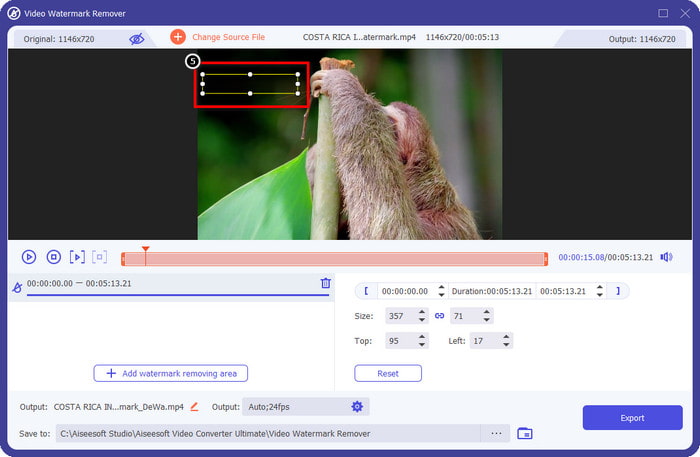
Steg 6. Nu när markeringsrutan har upptäckt vattenstämpeln i din video klickar du på Export för att börja ta bort och spara videon utan vattenstämpel. Den bearbetar videon mycket snabbt och du kan nu använda videon utan den störande vattenstämpeln.
Relaterat:
Ta bort DeviantArt‑vattenstämpel
Ta bort Video Helper‑vattenstämpel
Ta bort logotypen nu
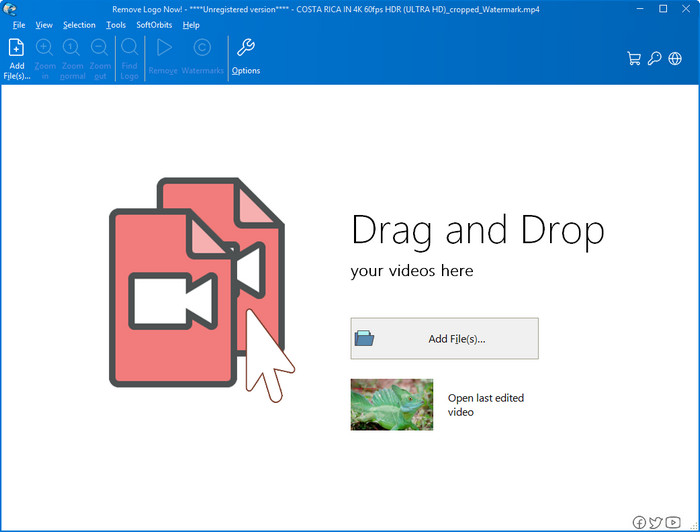
Nästa på vår lista är Remove Logo Now, som har byggt upp ett mycket gott rykte för att ta bort överlagrade vattenstämplar i Windows. Med det här verktyget behöver du ingen expertkunskap för att veta hur man tar bort Renderforest‑vattenstämpeln på en PC. När vattenstämpeln har tagits bort kan det finnas spår av rester där vattenstämpeln låg om du tittar riktigt noga. Men om du inte granskar det ingående kommer du inte att lägga märke till vattenstämpeln eller resterna på den exporterade videon. Handledningen nedan lär dig hur du tar bort vattenstämpeln i din video på dina Windows‑enheter.
Steg 1. Ladda ner och installera Remove Logo Now på din dator och följ sedan installationsprocessen.
Steg 2. Starta programvaran och klicka sedan på Add Files för att ladda upp videon här. Du kan också dra och släppa videon här för en effektivare uppladdning.
Steg 3. Välj vilket verktyg du vill använda för att markera vattenstämpeln. När du har valt ett, markera vattenstämpeln och klicka på Remove.
Steg 4. Klicka på Start för att påbörja processen för att ta bort vattenstämpeln som det här verktyget erbjuder.
Video Watermark Remover Online

Tycker du inte om att ladda ner programvara till din dator men vill ändå veta hur man tar bort Renderforest‑vattenstämpeln, så prova att använda Video Watermark Remover Online. Du kan använda denna helt automatiska vattenstämpelborttagare för att ta bort vattenstämpeln i din video gratis utan att ladda ner den till din dator. Precis som verktygen som nämns här kan du, även om du är nybörjare på videoredigering eller borttagning av vattenstämplar, lära dig att använda det här verktyget på några minuter. Du kan följa handledningen nedan för att lära dig hur du använder det.
Steg 1. Öppna den webbaserade vattenstämpelborttagaren genom att söka efter den i din favoritwebbläsare.
Steg 2. Klicka på ikonen upload cloud på huvudsidan för att lägga in videon du har exporterat på Renderforest.
Steg 3. Vänta medan uppladdningen bearbetas, eftersom vattenstämpeln automatiskt tas bort i din video, och klicka sedan på Download för att få videon utan vattenstämpel.
Del 2. Vanliga frågor om hur man tar bort Renderforst Watermark
Hur mycket är prenumerationsavgiften för Renderforest?
Renderforest stöder tre olika typer av prissättning som du kan utnyttja; $ 14,99 för Lite, $24,99 för Pro och $29,99 för Business varje månad. Denna prissättning har ett annat syfte än varandra; du kan gå till dess huvudwebbplats för att se vilka som finns tillgängliga på prenumerationen du vill använda.
Är det möjligt att ta bort vattenstämpeln från Renderforest Video utan ett verktyg?
Ja, du kan ta bort vattenstämpeln i din Renderforest utan att använda ett verktyg, och det är genom att köpa en månads- eller årsavgift på programvaran. Så att när du exporterar videofilen kommer det inte att läggas till någon vattenstämpel till den.
Vilken är den bästa planen för Renderforest; Månatlig eller Årlig?
Månadsprenumerationen är ett bra val om du vill använda verktyget några gånger, men om du bestämmer dig för att använda programvaran under en längre tid är det bättre att använda en årlig plan eftersom det kommer att kosta dig mindre än förnyelsen av varje månad. Men innan du utnyttjar kan du använda Renderforest gratis genom att logga ditt konto här och sedan försöka använda de andra mallarna som den tillhandahåller gratis.
Slutsats
Den här artikeln ger faktiskt starka bevis för att ta bort Renderforest-vattenstämpeln gratis med de tre mest användbara vattenstämpelborttagningarna du kan använda. Om du är en Windows-användare och vill ta bort vattenstämpeln på skrivbordet måste du försöka använda Ta bort logotypen nu. Men om du inte gillar att ladda ner programvara måste du prova att använda Video Watermark Remover Online eftersom du kan använda det här verktyget för att effektivt ta bort vattenstämplar.
Men om du är en Windows- eller Mac-användare som vill ha en effektiv vattenstämpelborttagare, så är utan tvekan den bästa vattenstämpelborttagaren du kan använda FVC Video Converter Ultimate. Det är den ultimata vattenstämpelborttagaren du kan använda för att ta bort vattenstämpeln som stör din Renderforest-video effektivt och professionellt.
-
 2 sätt att ta bort VSDC vattenmärke på Windows och Mac snabbt
 Letar du efter ett sätt att ta bort VSDC vattenstämpel på dina videor? Med den här artikeln tillhandahåller vi verktyg som du kan använda för att bli av med vattenstämpeln.
-
 Ta bort Animoto-vattenstämpeln på videor enkelt och effektivt
 Hur tar man bort Animoto-vattenstämpeln på videon? Fortsätt läsa den här artikeln eftersom vi gav en komplett handledning om hur man gör det.
-
 Hur man tar bort vattenstämpel från video med Final Cut Pro [Komplett guide]
 Har du problem med vattenstämpeln på videor? Sa inte mer, för vi gav en handledning om hur man tar bort vattenstämpel från video med Final Cut Pro.
