


 Video Converter Ultimate
 Skärminspelare
 Video reparation
 Säker nedladdning
Hur man tar bort vattenstämpeln i Lunapic med hjälp av 3 effektiva sätt [gratis att använda]
För en bildredigerare för nybörjare kan du prova Lunapic på webben för att redigera dina bilder. Faktum är att detta verktyg kan både lägga till och ta bort vattenstämplar på dina bilder med sina två praktiska funktioner. Här kommer vi att beskriva de tekniker du kan använda på bilderna för att ta bort vattenstämpeln. Ha tålamod och läs den här artikeln för att lära dig hur man tar bort vattenstämpeln i Lunapic med hjälp av stegen nedan.

Del 1. 2 tekniker för att ta bort vattenstämpel från bild med hjälp av Lunapic du måste veta
Lunapic tar bort vattenstämplar på en bild på två olika sätt; beskärning och borttagning av föremål. Men vilket sätt är mer effektivt och vilket är mindre effektivt? Låt oss diskutera dem först innan vi går vidare till stegen.
1:a metoden. Beskär vattenstämpeln på bilderna
Beskärningsfunktionen den ger är inget speciellt, vilket betyder att den gör vad namnet indikerar för att beskära en bild. Du kan använda den här funktionen om vattenstämpeln finns på sidorna. Beskär vattenstämpeln och spara delen av bilden utan vattenstämpel. Om du är intresserad av det kan du följa stegen vi har lagt till.
Steg 1. Öppna Lunapics officiella webbplats genom att söka efter den i din webbläsare, klicka på Upload, välj bilden i mappen som visas och tryck sedan på Open för att ladda upp den.
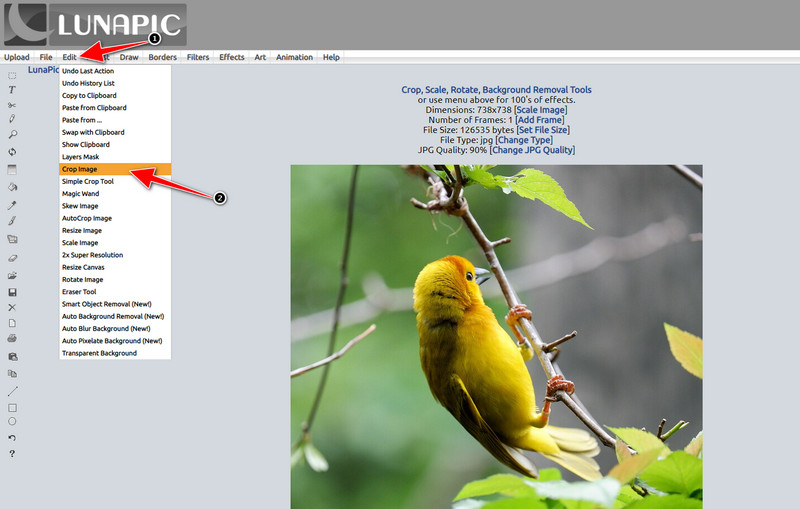
Steg 2. Klicka på Edit i toppmenyn och välj sedan Crop Image för att använda beskärningsfunktionen.
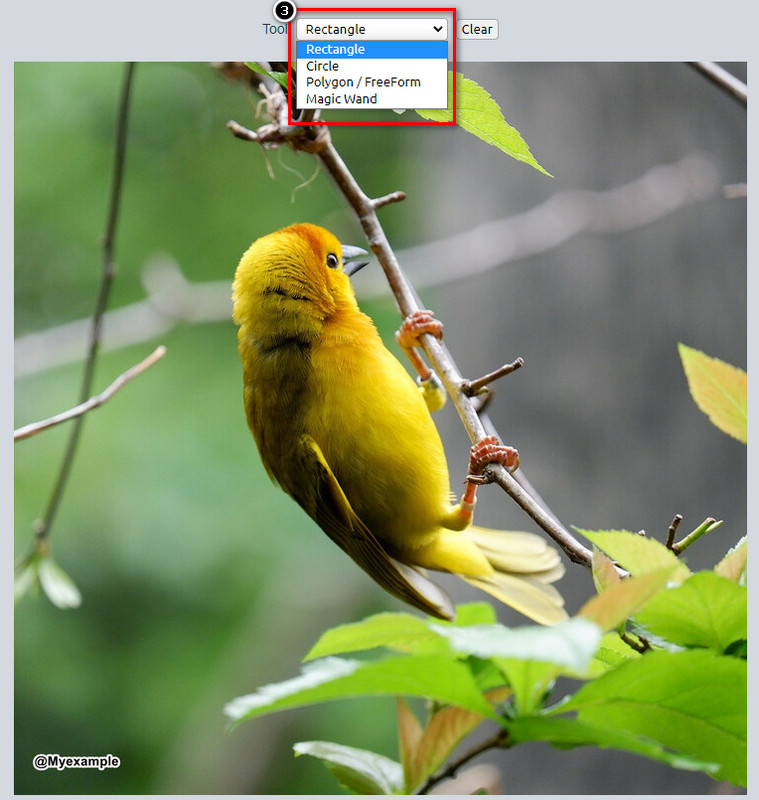
Steg 3. Tryck på drop-down-knappen vid Tool och välj det beskärningsverktyg du vill använda. Justera det och se till att vattenstämpeln inte följer med.
Steg 4. Genom att klicka på Crop-knappen ser du ett exempel på det slutliga resultatet när du exporterar bilden. Om du är nöjd med resultatet, tryck på Save för att ladda ner den beskurna versionen till din lokala enhet.
2:a metoden. Ta bort vattenstämpel på bild med objektborttagning
Till skillnad från beskärning handlar borttagning av objekt mer om att ta bort objektet på bilden utan att ändra bildens dimension. I den här funktionen måste du markera vattenstämpeln; sedan kan du ta bort den med verktyget. Är det inte fantastiskt? Om du är tillräckligt förvånad över att du vill använda den, kommer stegen nedan att ge fullständiga sätt att rensa vattenstämpeln med Lunapic.
Steg 1. Upprepa samma första steg som vid beskärningsfunktionen för att importera bilden med vattenstämpel.
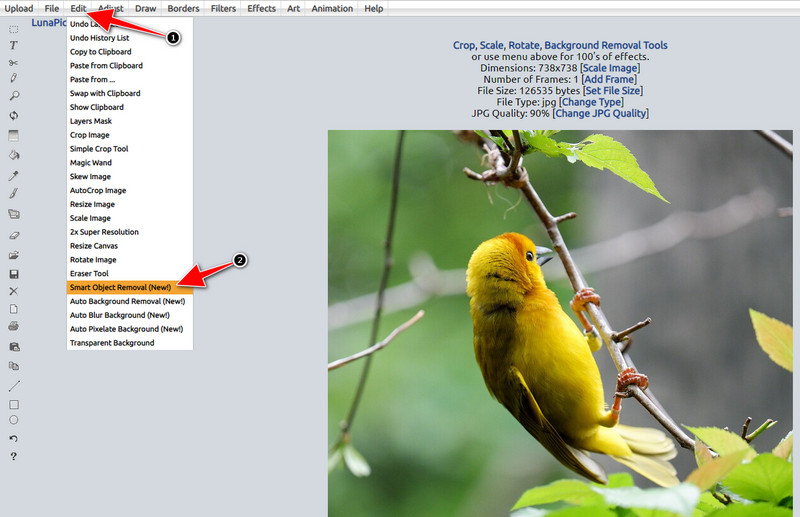
Steg 2. Öppna Edit men välj nu Smart Object Removal för att använda den andra funktionen du kan använda för att ta bort vattenstämplar.
Steg 3. Markera vattenstämpeln med hjälp av penseln som tillhandahålls; du kan också justera penselstorleken efter dina önskemål.
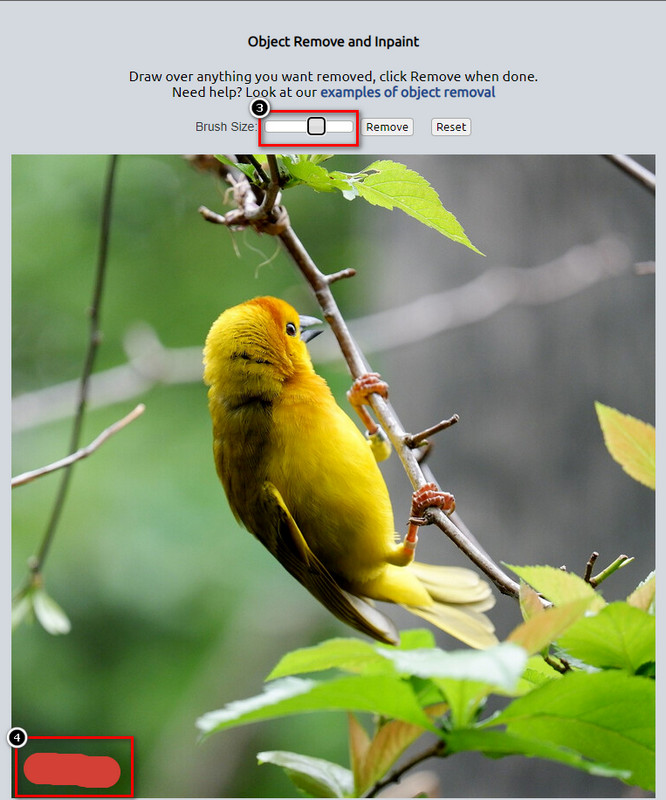
Steg 4. Klicka på Remove-knappen för att radera vattenstämpeln och se hur det kommer att se ut innan du exporterar bilden.
Steg 5. Klicka på Save för att ladda ner den färdiga bilden till din lokala enhet.
Del 2. Bästa alternativet till Lunapic för att ta bort vattenstämpeln med ett klick gratis
Om du behöver ett alternativ till Lunapic för att ta bort vattenstämplar kan du använda FVC Free Watermark Remover. Precis som Lunapic kan du använda detta verktyg på webben utan registrering, nedladdning eller annonser i webbgränssnittet. Du kan använda detta webbverktyg utan begränsningar och dess prestanda har varit effektiv ända sedan starten. Det har redan hjälpt miljontals användare på webben. Om du behöver hjälp med att ta bort objekt i din bild kan du börja följa stegen vi lagt till nedan.
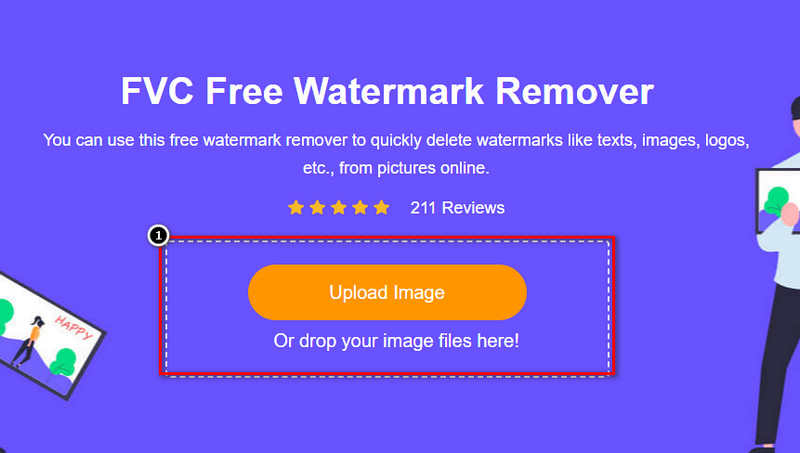
Steg 1. Öppna dess officiella webbplats genom att klicka på denna länk; den öppnas direkt i en ny flik i den webbläsare du använder och du ser gränssnittet för detta vattenstämpelborttagningsverktyg.
Steg 2. Genom att trycka på Upload Photo kan du importera bilden du har på din lokala enhet med en vattenstämpel eller ett oönskat objekt du vill ta bort.
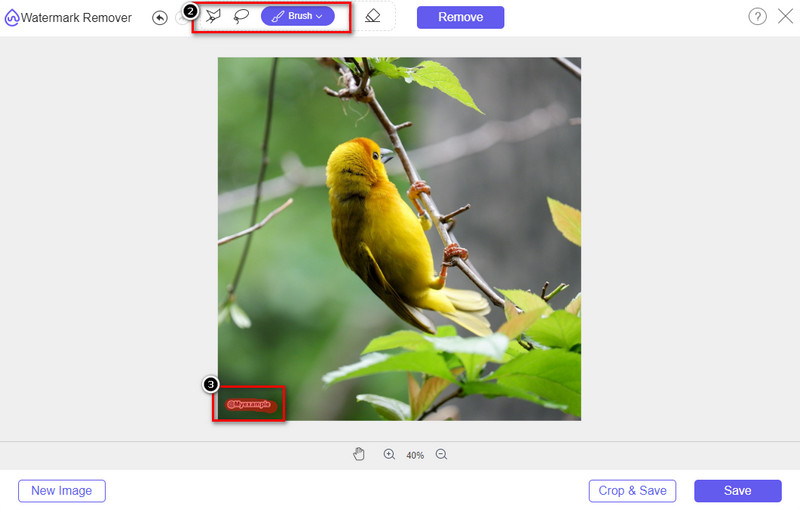
Steg 3. Det finns tre alternativ du kan använda för att markera vattenstämpeln på bilden du laddar upp. Välj ett och markera vattenstämpeln med det verktyg du väljer.
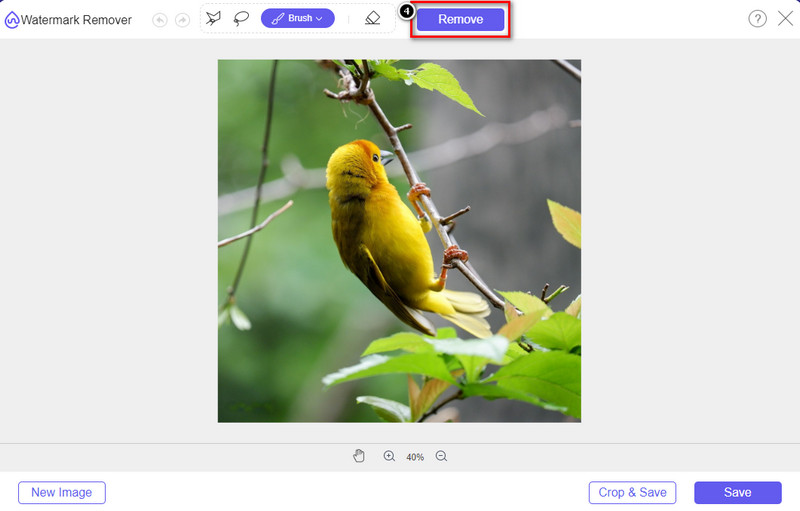
Steg 4. Tryck på Remove-knappen för att ta bort objektet du markerade tidigare i steg 3. Allt du markerar i bilden kommer att tas bort.
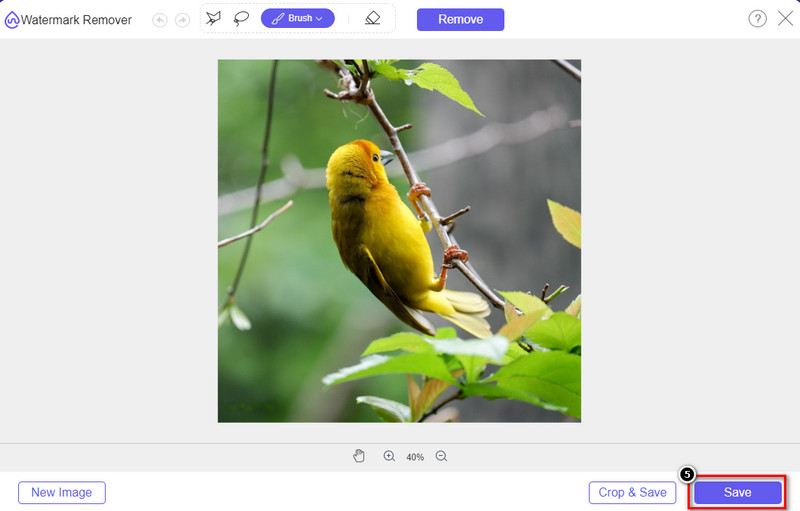
Steg 5. Tryck på Save-knappen för att ladda ner den färdiga bilden, och du kan leta upp bilden i mappen som visas på skärmen.
Vidare läsning:
Hur du tar bort B612-vattenstämpeln från dina bilder
Hur du tar bort WOW Slider-vattenstämpeln gratis
Del 3. Vanliga frågor om hur man tar bort vattenstämpeln i Lunapic
Lägger Lunapic till en vattenstämpel på redigerade bilder?
Även om denna onlineredigerare är gratis att komma åt på webben, bäddar den inte in en produktvattenstämpel på bilden du redigerar här. Du skulle inte behöva ett abonnemang för att använda premiumverktygen som den tillhandahåller. Njut av att använda verktyget utan några begränsningar! Besök dess officiella webbplats för att se och använda verktygen du kan använda för att redigera bilderna.
Kan jag lägga till min vattenstämpel på Lunapic?
Absolut, du kan lägga till din distinktion till bilden du har skapat för att göra det svårt för den andra att kopiera bilden. Genom att öppna webbplatsen, klicka på Ladda upp för att lägga till bilden du vill redigera, klicka på T-ikonen till vänster i verktygsfältet och lägg till texten vattenstämpel du vill lägga till i bilden du laddar upp.
Har Lunapic en bakgrundsborttagare?
Ja, Lunapic stöder en AI-teknik som kan upptäcka bildens bakgrund och ta bort den effektivt direkt. Namnet på funktionen är Automatisk bakgrundsborttagning. Öppna verktyget och klicka på Redigera; du kommer att se funktionen vi pratar om som kan hjälpa dig att ta bort bakgrunden på bilden. Det stöder också att lägga till en suddig bakgrund om du vill använda den.
Vilka är effekterna tillgängliga på Lunapic?
Lunapic stöder olika val när det gäller effekter, som du kan använda för att lägga till bilder, bilder, gradienter, maskering, tecknade serier, glitch och många fler som du kan använda på dina bilder.
Slutsats
Att ta bort en vattenstämpel från en bild med Lunapic är otroligt enkelt med handledningen vi lägger till i den här artikeln. Du kan följa stegen vi lägger till i den här bloggen för att beskära eller ta bort vattenstämpeln på bilden som du har sparat på din lokala enhet. Även om du inte har tillräckligt med erfarenhet av att ta bort vattenstämpeln kan du bemästra verktyget på nolltid. Men om du vill uppleva en ny höjd av att ta bort vattenstämpeln automatiskt, kan du använda alternativet som vi lägger till i den här artikeln. Besök dess officiella webbplats genom att klicka på dess namn och se vilka funktioner i detta verktyg vi går miste om. Om du tycker om att läsa den här bloggen, betygsätt oss 5-stjärnigt.
-
 Tips och knep för att enkelt ta bort Picsart-filtervattenmärket
 För att ta bort Picsart-filtrets vattenstämpel behöver du ett verktyg. Fortsätt läsa den här artikeln för att få en vattenstämpelborttagare.
-
 Hur man konverterar lågupplöst bild till högupplöst online
 Om du vill lära dig hur du konverterar lågupplösta bilder till högupplösta bilder online, då är den här artikeln för dig. Läs hela för att lära dig hur.
-
 Enkla metoder för hur man tar bort skottsäker vattenstämpel
 Ta bort Shootproof vattenstämpel genom att följa dessa enkla metoder. Använd dessa fantastiska vattenstämpelborttagare för att enkelt ta bort Shootproof-vattenstämpeln från din bild.
