


 Video Converter Ultimate
 Skärminspelare
 Video reparation
 Säker nedladdning
Otroligt fixa bildkvalitet med de mest fantastiska verktygen
Att ha en bild med låg kvalitet är ganska störande. Om du också har en bild med låg kvalitet behöver du förbättra kvaliteten på din bild. Men hur kan du göra det? Det finns många bildförstorare som du kan använda på din dator för att höja kvaliteten på din bild. Och om du undrar hur du kan fixa kvaliteten på din bild, så hjälper vi dig med det. Läs hela den här artikeln för att snabbt lära dig hur du förbättrar bildkvalitet.

Del 1. Hur man fixar bildkvalitet gratis online
Det finns massor av bilduppskalare som du kan ladda ner på din PC. Du måste dock köpa dem innan du kan förbättra kvaliteten på din bild. Och om du letar efter en gratis bilduppskalare, då har vi rätt verktyg. Läs den här delen noggrant för att lära dig hur du förbättrar bildkvaliteten gratis med de två mest fantastiska onlineverktygen.
FVC Free Image Upscaler
FVC Free Image Upscaler är ett kostnadsfritt onlineverktyg som hjälper dig att förbättra kvaliteten på en bild. Detta webbaserade verktyg är nybörjarvänligt eftersom det har ett lättanvänt gränssnitt. Dessutom kan det ge dig fyra resultat med 2x, 4x, 6x och 8x förstoring, vilket ger utmärkta resultat. Du behöver inte heller oroa dig för datasäkerheten, eftersom FVC Free Image Upscaler försäkrar att det är säkert att använda. Det fantastiska med detta verktyg är dessutom att det använder AI‑teknik som automatiskt känner igen de suddiga delarna. Vidare låter det dig återskapa förlorade pixlar, färgstrukturer och andra detaljer på ett effektivt sätt. Om du vill använda detta verktyg för att förbättra kvaliteten på din bild, följ instruktionerna nedan.
Så här fixar du fotokvalitet online med FVC Free Image Upscaler:
Steg 1. I webbläsaren du använder, sök efter FVC Free Image Upscaler i sökfältet. Klicka på den här länken för att gå direkt till deras startsida.
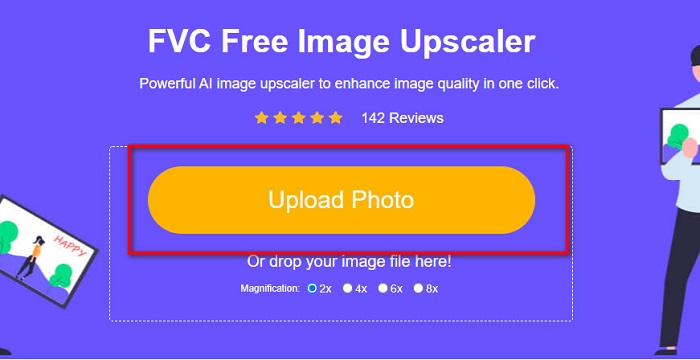
Steg 2. På huvudgränssnittet klickar du på knappen Upload Photo för att ladda upp bilden du vill förstora. Dina datorfiler öppnas, där du väljer din bild med låg kvalitet och laddar upp den.
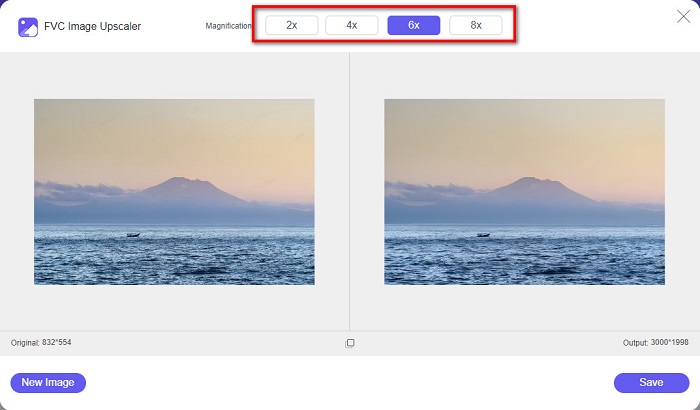
Steg 3. Välj sedan den förstoringsgrad du vill ha för din bild. Ju större förstoring, desto bättre kvalitet. Du kan välja mellan 2x, 4x, 6x och 8x.
Steg 4. Tryck sedan på knappen Save för att spara din förbättrade bild i en av dina datormappar.
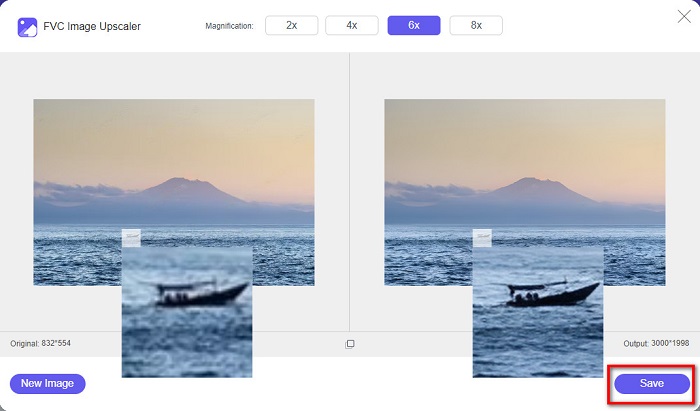
Enkelt, eller hur? Lika lätt som A-B-C kan du förbättra bildkvaliteten med FVC Free Image Upscaler.
Icons8.com
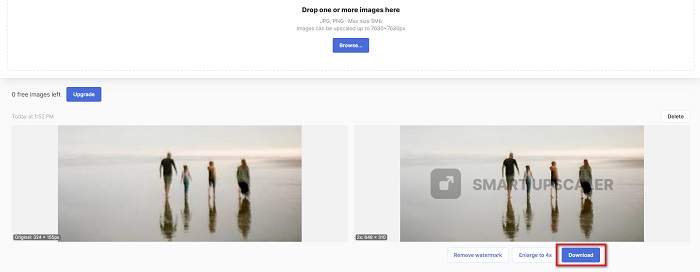
Icons8.com är en annan online-bildförstorare som är tillgänglig i nästan alla webbläsare, inklusive Google, Firefox och Safari. Denna webbaserade applikation är enkel att använda eftersom den har ett tydligt och enkelt gränssnitt. Dessutom använder detta onlineverktyg AI‑teknik som automatiskt upptäcker de suddiga delarna i bilden. Dina bilder kan dessutom förstoras upp till 7680 x 7680 px. Dock lämnar det en vattenstämpel på resultatet. Ändå är det fortfarande ett effektivt verktyg för att förstora din bild.
Så här fixar du en bild av låg kvalitet på Icons8.com:
Steg 1. Öppna din webbläsare och sök efter Icons8.com. Klicka sedan på knappen Browse på huvudgränssnittet.
Steg 2. Eftersom Icons8.com också använder AI‑teknik, upptäcker den automatiskt de suddiga delarna av din bild.
Steg 3. Klicka till sist på knappen Download för att spara din bild på datorn.
Del 2. Hur man fixar bilder av dålig kvalitet i Photoshop
Det är inte svårt att förbättra bilden av din kvalitet. Men att använda Photoshop för att uppskala din bild kan vara ganska utmanande på grund av dess gränssnitt och funktioner. Men oroa dig inte, för vi kommer att lära dig hur du använder Adobe Photoshop för att förbättra kvaliteten på din bild.
Adobe Photoshop är utmärkt för fotoredigering och bildmanipulering. Detta redigeringsprogram används av många professionella redigerare runt om i världen. Dessutom har det många avancerade redigeringsverktyg som du kan använda för att bearbeta dina bilder. Adobe Photoshop kan också laddas ner till alla större plattformar, inklusive Windows, Mac och Linux. Du kan dessutom redigera banners, logotyper, broschyrer och mycket mer med det här programmet. Och något som många användare inte vet är att det även kan förbättra din bildkvalitet. Även om du måste köpa det innan du laddar ner det, är Adobe Photoshop värt pengarna.
Så här fixar du bilder av låg kvalitet i Photoshop:
I den här handledningen kommer vi att förbättra kvaliteten på en bild genom att förstora den för att se dess upplösning.
Steg 1. Ladda ner Adobe Photoshop till din dator. Följ installationsprocessen och starta sedan programmet på din dator.
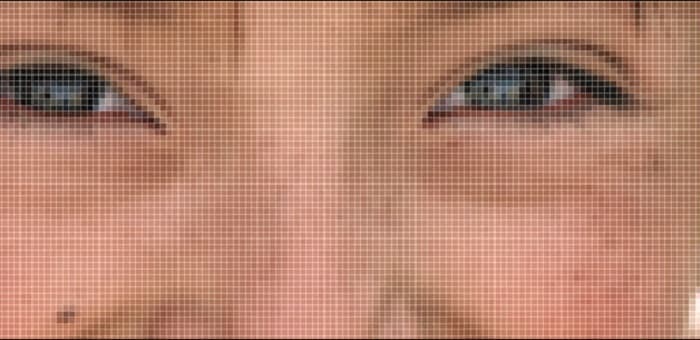
Steg 2. Öppna din lågupplösta bild i Adobe Photoshop. Här är ett exempel på en bild som har zoomats in till 100%. Som du ser har bilden låg upplösning.
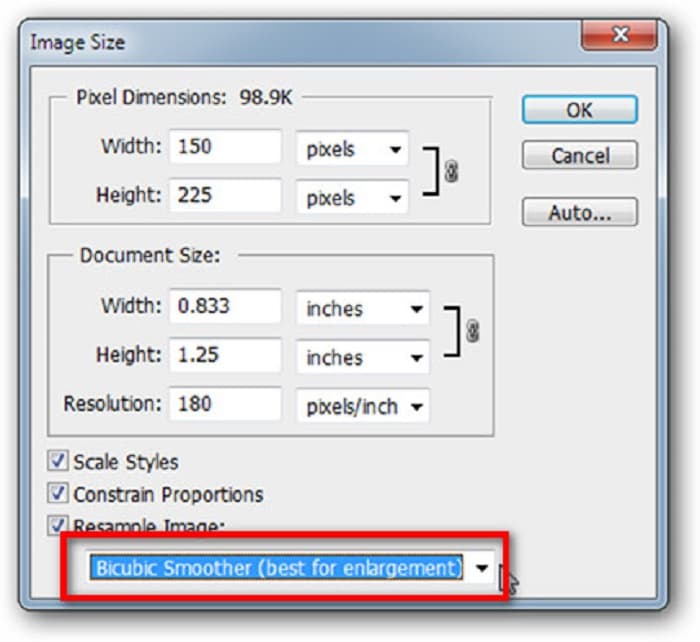
Steg 3. Gå sedan till Image > Image Size. Ändra sedan typen av kantutjämning (anti‑aliasing) i Resample Image för att förstora och jämna ut din bild. Ändra till Bicubic Smoother, som är bäst för förstoring.
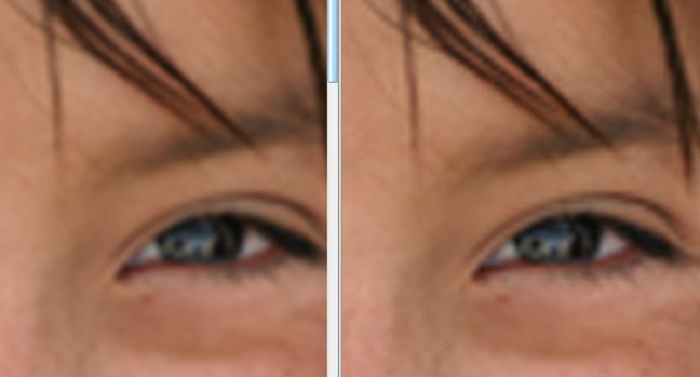
Steg 4. Du kan se skillnaden mellan de två bilderna nedan när du ändrar till versionen Bicubic Smoother. Att ändra kantutjämningen gör en enorm skillnad i hur mjuk och jämn din bild blir.
Steg 5. Nu ska vi förbättra den förstorade bilden genom att ändra dess detaljer. De flesta Photoshop‑användare går inte längre än RGB och CMYK. Idag kommer vi att använda ett annat färgläge, Lab Color. Gå till Image > Mode > Lab Color.
Steg 6. Se sedan till att du öppnar en panel genom att gå till Windows > Channels > Lightness-kanalen. Du kan också klicka på ikonen för att dölja lagret bredvid a- och b‑kanalerna.
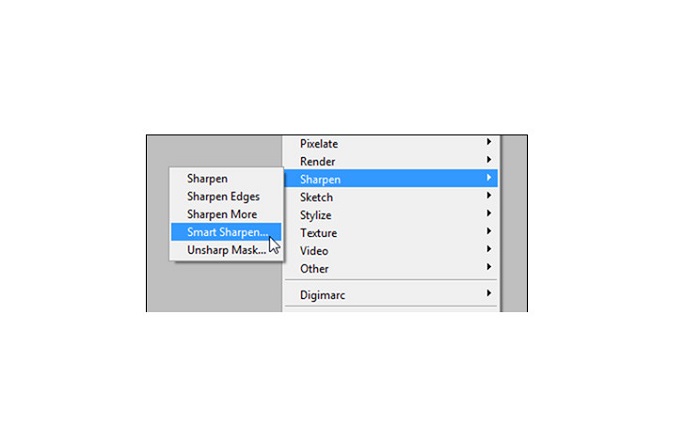
Steg 7. När du har valt Lightness‑kanalen går du till Filter > Smart Sharpen > Sharpen för att lägga till filtret Smart Sharpen.
Steg 8. Därefter kan du justera inställningarna för ditt foto och hitta det resultat du vill ha. Kom alltid ihåg att behålla Remove-inställningen på Gaussian Blur.
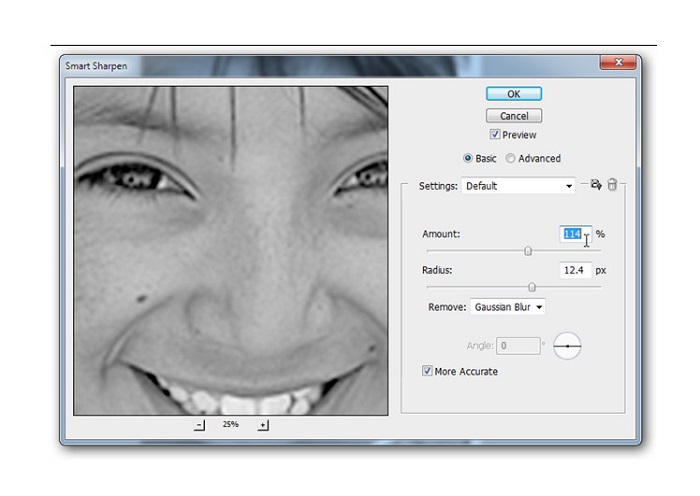
Steg 9. Du kan välja att behålla din bild i Lab Color eller gå tillbaka till RGB. Och det var allt! Här är resultatet av din bild. Du kommer att märka att bildkvaliteten har förbättrats och att den har en rikare textur.

Och voila! Genom att följa guiden ovan om hur du fixar bilder av dålig kvalitet i Photoshop kan du förbättra kvaliteten på din bild.
Del 3. Vanliga frågor om hur man fixar bildkvalitet
Kan jag förbättra bilder av dålig kvalitet på iPhone?
Ja. Du kan ladda ner många appar på din iPhone som hjälper dig att förbättra din bildkvalitet. En av de bästa apparna för uppskalning av bilder är Remini, en användarvänlig app.
Kan jag ändra upplösningen på JPEG-bilder?
Du kan ändra upplösningen för alla bildformat som du vill uppskala. Du kan använda de ovan nämnda verktygen för att förbättra kvaliteten på din JPEG-bild.
Hur fixar man bildkvalitet på Instagram?
För att förbättra kvaliteten på dina bilder på Instagram ändrar du inställningen för insticksprogrammets Image Resolution till en större bildstorlek, så att bilden visas i korrekt upplösning. Du kan göra detta genom att gå till följande: Instagram Feed > Customize > Posts > Photos > Image Resolution.
Slutsats
Vi hoppas att vi har besvarat din fråga om hur du förbättrar bildkvalitet. Du kan välja det verktyg som passar dig bäst bland dem vi presenterat ovan. Adobe Photoshop kan vara ett mer professionellt verktyg, men det är inte särskilt användarvänligt. Om du därför vill ha en lättanvänd och gratis bildförstorare, använd FVC Free Image Upscaler.
-
 Hur man konverterar lågupplöst bild till högupplöst online
 Om du vill lära dig hur du konverterar lågupplösta bilder till högupplösta bilder online, då är den här artikeln för dig. Läs hela för att lära dig hur.
-
 Ta bort DaVinci Resolve Watermark på exporterade videor med komplett handledning
 För att ta bort Davinci Resolve-vattenstämpeln måste du använda ett verktyg eller köpa den officiella versionen av det, fortsätt läsa detta för att veta mer.
-
 Hur man blir av med Power Director Watermark gratis [Komplett]
 Hur blir man av med vattenstämpeln Power Director gratis? De bästa verktygen för att eliminera vattenstämpeln finns här så lär dig dem genom att läsa detta.
