


 Video Converter Ultimate
 Skärminspelare
 Video reparation
 Säker nedladdning
Top Watermark Remover för att enkelt ta bort Adobe Stock Watermark från video
Visste du att Adobe har en egen webbplats för bild- och videobank? Här är Adobe Stock, en av de största webbplatserna som erbjuder alla typer av grafiskt material du kan behöva utan oönskade konsekvenser, eftersom det bygger på royaltyfri licensiering. Du kan ladda ned HD‑videor gratis men då med en vattenstämpel om du inte har köpt krediter eller en prenumeration. Kanske undrar du om det är möjligt att ta bort Adobe Stock‑vattenstämpeln från videon, och det är det! I nästa del använder vi det bästa verktyget för att ta bort vattenstämplar du någonsin kommer att behöva – läs vidare i artikeln för att lära känna det bättre!

Del 1. Hur man tar bort Adobe Stock Watermark från video genom att beskära
FVC Video Converter Ultimate är en komplett och lättanvänd bild- och videoredigerare som finns för både Windows och Mac. Programmet har en kraftfull beskärningsfunktion som gör att du kan spara video från Adobe Stock utan vattenstämpel. Du kan också beskära bort vad som helst i dina videor, till exempel ett objekt, en stämpel, en vattenstämpel, datum och tid.
Även om du är oerfaren av beskärning, kan du fortfarande klara av att göra det när du är klar med att följa handledningen vi lade till nedan. Ändå är det här steget inte idealiskt om vattenstämpeln är i mitten av videon eftersom du ändrar storleken på dimensionen och klipper bort onödiga faktiska bilder.
Så här beskär du bort en videovattenstämpel med FVC Video Converter Ultimate:
Steg 1. Klicka på den nedladdningsknapp nedan som passar ditt system för att få rätt version av den här videoredigeraren på din dator. Följ installations- och konfigurationsguiden och klicka sedan på Starta nu för att öppna redigeraren på ditt system.
Gratis nedladdningFör Windows 7 eller senareSäker nedladdning
Gratis nedladdningFör MacOS 10.7 eller senareSäker nedladdning
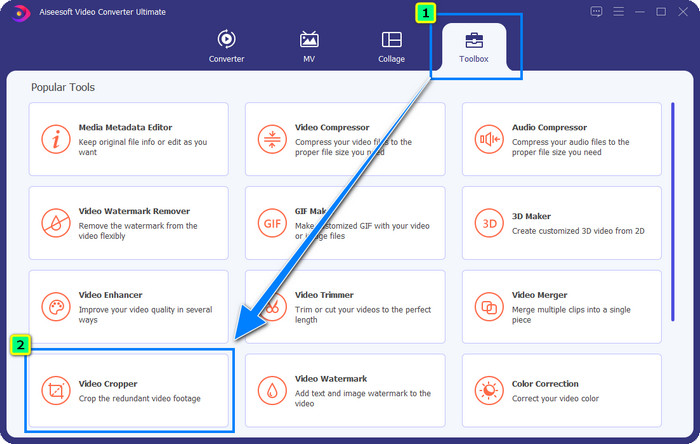
Steg 2. När verktyget är öppet går du till Toolbox och väljer Video Cropper.
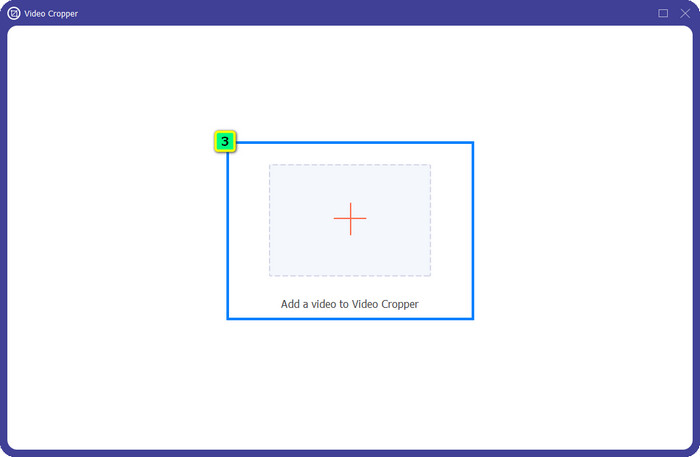
Steg 3. Ett nytt verktygsfönster visas på skärmen; tryck på +-knappen för att ladda upp videon du vill beskära.
Steg 4. Justera beskärningsområdet efter dina önskemål; se till att vattenstämpeln inte finns inom ramen så att den inte följer med när du sparar.
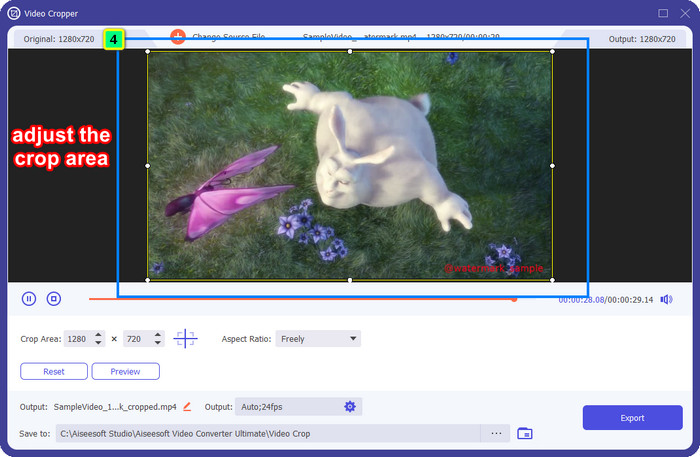
Steg 5. När du har redigerat bilden är det dags att exportera slutresultatet. Tryck på Spara till och välj den plats där filen ska sparas, klicka sedan på Exportera för att ladda ned slutresultatet till din lokala enhet.
Del 2. Hur man tar bort Adobe Stock Watermark från video utan att beskära
Gillar du inte att bli av med Adobe Stock‑vattenstämpeln genom att beskära? Då kan du använda den här ultimata konverterarens funktion för att ta bort vattenstämplar; den är kraftfull och lämnar inga spår av vattenstämpeln när den är klar. FVC Video Converter Ultimate är en pålitlig app som har en mängd olika funktioner du kan använda fritt utan att behöva ladda ned extra tillägg. I den senaste uppdateringen finns en videovattenstämpelborttagare som gör att alla som har problem med vattenstämpel i video kan lösa det enkelt och effektivt.
Till skillnad från beskärningsfunktionen tar funktionen för att ta bort vattenstämpeln bort vattenstämpeln på din video utan att lämna en smuts av det slutliga resultatet. Det ändrar ingenting på utseendet, för det skär och förskjuter inte videons dimension och kvalitet. Så om du är intresserad av hur du tar bort Adobe Stock-vattenstämpeln från en video kan du följa stegen som vi inkluderar härnäst.
Steg 1. Om du redan har laddat ned programmet kan du gå vidare till nästa steg, men om inte klickar du på den här nedladdningsknappen, installerar det och startar redigeraren.
Gratis nedladdningFör Windows 7 eller senareSäker nedladdning
Gratis nedladdningFör MacOS 10.7 eller senareSäker nedladdning
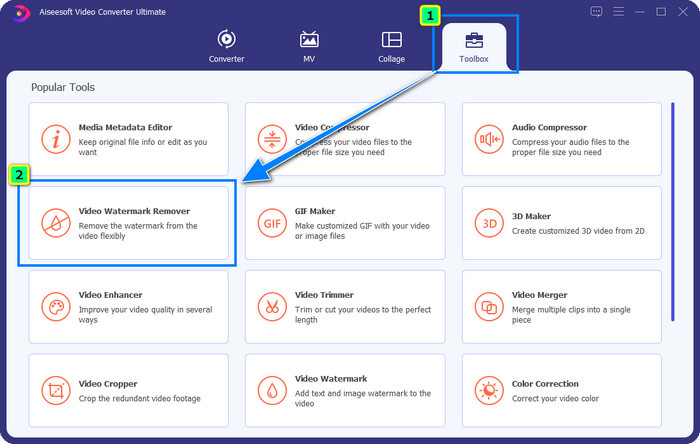
Steg 2. När verktyget nu körs på din dator klickar du på Toolbox och väljer funktionen Video Watermark Remover som programmet erbjuder.
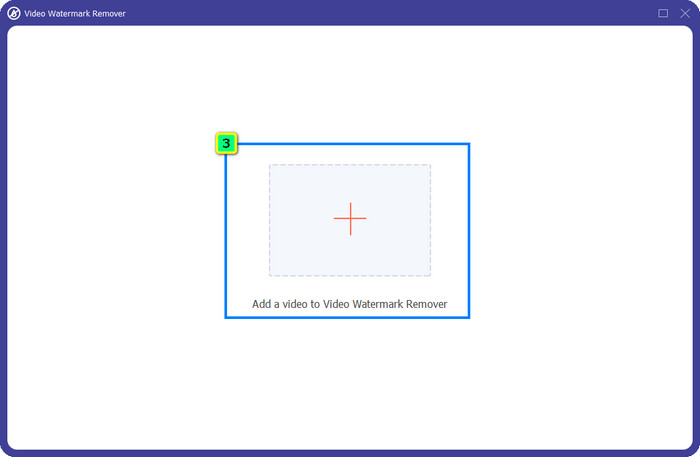
Steg 3. Klicka på plus-knappen så visas en mapp på skärmen; ladda upp den Adobe Stock‑video du har laddat ned och tryck på Öppna.
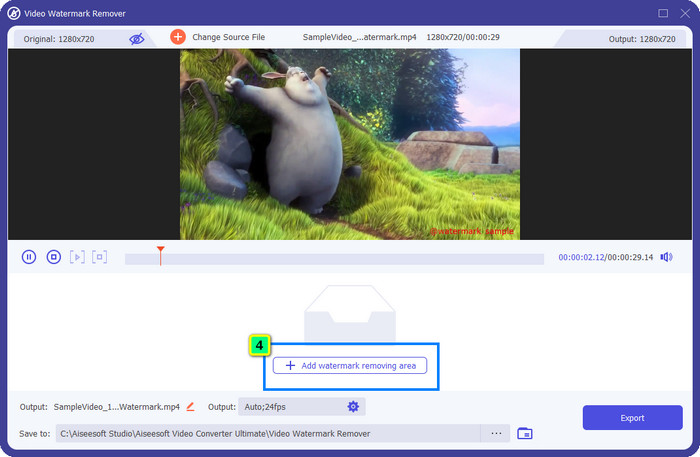
Steg 4. Tryck på Add Watermark Removing Area för att ta bort vattenstämpeln i din video.
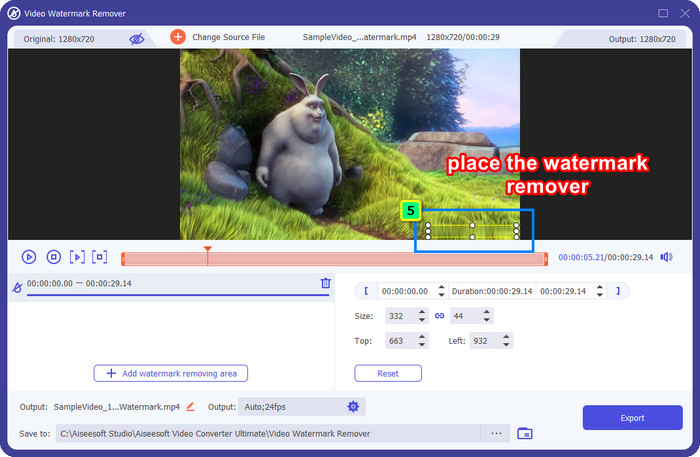
Steg 5. Placera ramen över området där vattenstämpeln sitter, och justera den fritt så att den passar exakt över vattenstämpeln i videon.
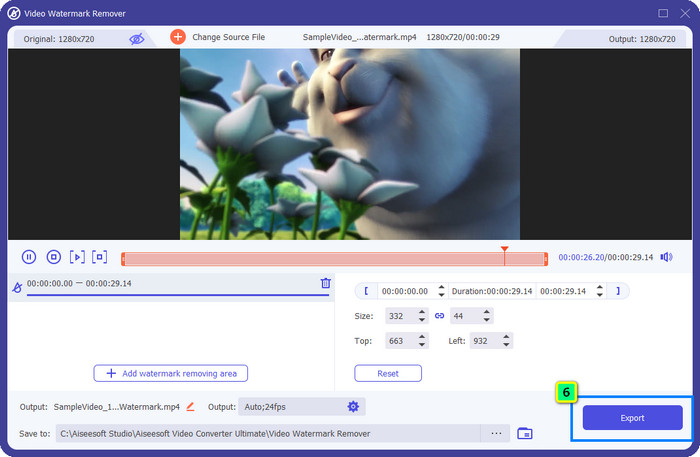
Steg 6. Klicka slutligen på Exportera, så kan du använda videon utan vattenstämpel – så enkelt är det.
Bonus: Hur man tar bort Adobe Stock Watermark på bilder online gratis
FVC Free Watermark Remover är ett effektivt verktyg för att ta bort vattenstämplar från bilder direkt på webben. Så om du har problem med vattenstämplar på en bild du laddat ned eller sparat på din enhet kan du börja använda det här programmet. Därefter kan du följa guiden nedan för att ta bort Adobe Stock‑vattenstämpeln från bilder online.
Steg 1. För att öppna den här vattenstämpelborttagaren online kan du klicka på den här länken.
Steg 2. Tryck på Upload Image för att lägga till bilden med vattenstämpeln som du vill redigera här.
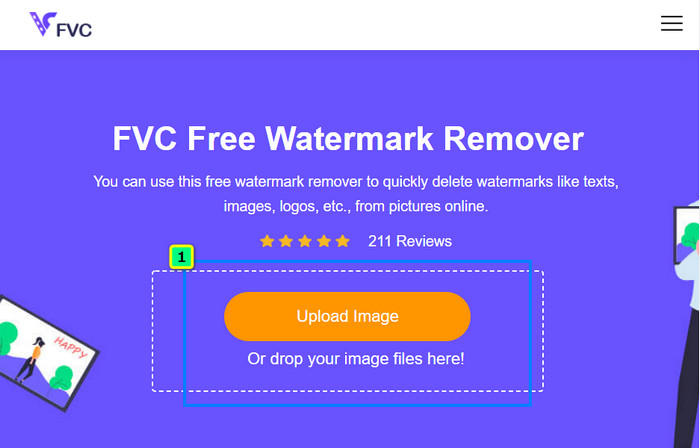
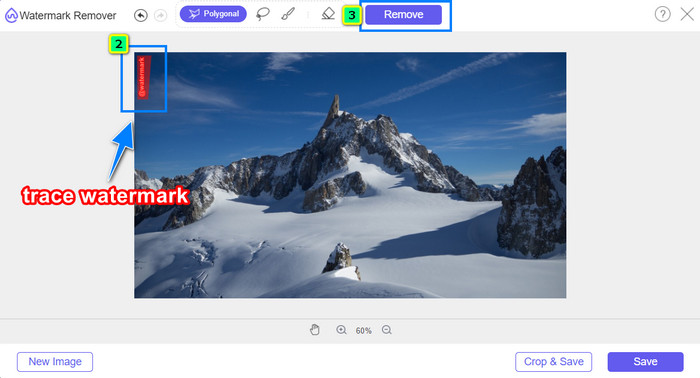
Steg 3. Använd polygonverktyget och markera vattenstämpeln punkt för punkt genom att klicka med musens vänsterknapp. Tryck sedan på Remove när du har markerat klart, så kommer AI:n att bearbeta borttagningen av vattenstämpeln åt dig.
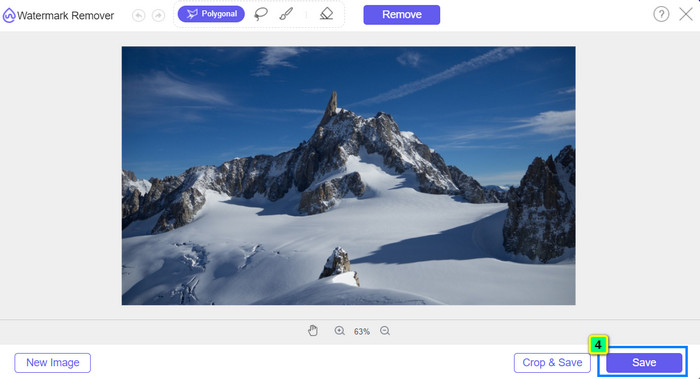
Steg 4. När du är nöjd med resultatet och redo att ladda ned bilden klickar du på knappen Save för att spara den direkt på din dator.
Vidare läsning:
Senaste sätten att ta bort objekt från foto [6 metoder]
Hur du skärper en bild i foto med 3 metoder [snabbguide]
Del 3. Vanliga frågor om hur man tar bort Adobe Stock Watermark från video
Blir kvaliteten sämre om du tar bort Adobe Stock-vattenstämpeln från videon?
Ibland, när du har tagit bort vattenstämpeln på videon, gör verktyget du använder videoutgången sämre. Men om du använder FVC Video Converter Ultimate skulle du inte uppleva det här problemet. Faktum är att du kan justera videokvalitetsinställningen till en mycket högre för att öka kvaliteten.
Var kan jag köpa Adobe Stock-krediter?
Öppna den officiella webbplatsen för Adobe Stock och gå sedan till Prissättning. Under Planer och priser ser du olika kreditpaket som du kan köpa. Ju mer kredit, desto dyrare kan det bli. Klicka på hur många du vill ha, tryck på Köp nu, lägg till betalningsinformationen och klicka sedan på Placera säker beställning.
Varför är planer på Adobe Stock superdyra?
Det kan verka superdyrt på grund av priset på varje tillgänglig produkt på Adobe Stock. Utöver priset är ökningen att utvecklaren Adobe byggt upp ett rykte. Du köper produkten med namnet på den.
Slutsats
Med den ultimata vattenstämpelborttagaren i den här artikeln kan du nu helt ta bort Adobe Stock‑vattenstämpeln från videon du har laddat ned från den officiella webbplatsen. Men vilken metod tror du fungerar bäst? Är det beskärning eller borttagning av vattenstämpel? Båda fungerar bra och ger utmärkta resultat. Men om dina bildproportioner klipps bort eller ändras i storlek är det bättre att använda funktionen Video Watermark Remover i FVC Video Converter Ultimate. Dessutom erbjuder FVC även borttagning av vattenstämplar på bilder med hjälp av ett onlineredskap som är tillgängligt i valfri webbläsare på din dator. Vi hoppas att du uppskattade informationen vi presenterat. Vill du veta mer kan du läsa de andra artiklarna nedan.
-
 Hur man tar bort vattenstämpel från video med Final Cut Pro [Komplett guide]
 Har du problem med vattenstämpeln på videor? Sa inte mer, för vi gav en handledning om hur man tar bort vattenstämpel från video med Final Cut Pro.
-
 Ta bort DaVinci Resolve Watermark på exporterade videor med komplett handledning
 För att ta bort Davinci Resolve-vattenstämpeln måste du använda ett verktyg eller köpa den officiella versionen av det, fortsätt läsa detta för att veta mer.
-
 Hur man tar bort vattenstämpeln i Lunapic med steg som ingår [3 sätt]
 Vet hur du tar bort vattenstämpeln på Lunapic med de sätt vi lägger till i den här bloggen. Fortsätt läsa informationen för att lära känna den bättre.
