


 Video Converter Ultimate
 Skärminspelare
 Video reparation
 Säker nedladdning
En enastående applikation för att ändra storlek på bild - FastStone Photo Resizer
Att söka efter ett verktyg för att ändra storlek på foton på internet är enkelt. Särskilt idag finns det många fotoredigeringsprogram som är tillgängliga online. När det gäller att ändra storlek och konvertera bilder kan du hitta många utmärkta verktyg både online och offline. Men om du har svårt att välja ett, gör vi det enkelt för dig. FastStone är en plattform för bildredigering som du kan använda för att ändra storlek på dina bilder. Och i det här inlägget ger vi dig alla detaljer om FastStone och hur du använder FastStone Photo Resizer.

Del 1. FastStone Photo Resizer Review
FastStone Photo Resizer är ett måste att använda bildredigeringsprogram. Du kan använda den på ditt Windows-skrivbord och ladda ner den enkelt. Dessutom har den ett rent och lättanvänt gränssnitt, vilket gör det till ett användarvänligt verktyg. FastStone Photo Resizer stöder olika bildformat, som JPEG, BMP, PNG, TIFF och GIF. Den innehåller också många redigeringsfunktioner som du kan använda för att konvertera, byta namn, beskära, lägga till text, ändra färg, lägga till vattenstämpel och mer.
Dessutom erbjuder den batchbearbetning, där du kan bearbeta två eller flera bilder samtidigt. Och om du vill förhandsgranska konverteringen du gör, gör FastStone det möjligt för dig att göra det. Du kan ladda ner FastStone image resizer gratis på din Windows-dator, men du måste köpa appen för att använda dess tydliga funktioner. Följ handledningen nedan om du vill veta hur du ändrar storlek på bilder med FastStone.
Fördelar
- Den erbjuder en mängd olika redigeringsfunktioner och verktyg.
- Den har ett lågt pris.
- Den har ett enkelt användargränssnitt.
- Den har en enkel fildelningsprocess.
Nackdelar
- Den har bara en begränsad support- och hjälpmöjlighet.
- Det är inte gratis att använda.
- Endast tillgänglig på Windows-programvara
Så här använder du FastStone Photo Resizer för att ändra storlek på bilder:
Steg 1. Ladda först ner och installera FastStone Photo Resizer på din Windows-dator. Efter att du har installerat appen kör du den på datorn. Klicka sedan på knappen Batch Convert i menyn i appens huvudgränssnitt för att ladda upp bilden du vill ändra storlek på.
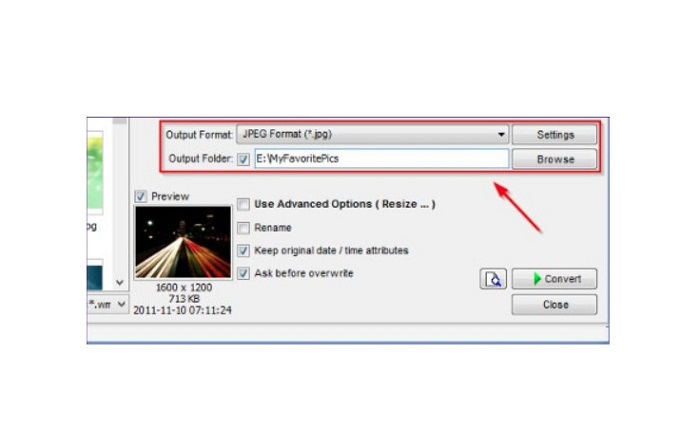
Steg 2. När du har importerat din(a) bild(er) kommer de att visas i gränssnittet. Klicka sedan på pilen för rullgardinsmenyn Output Format för att välja det filformat för utdata som du vill ha. För att välja var filen ska sparas klickar du på knappen Browse bredvid Output Folder.
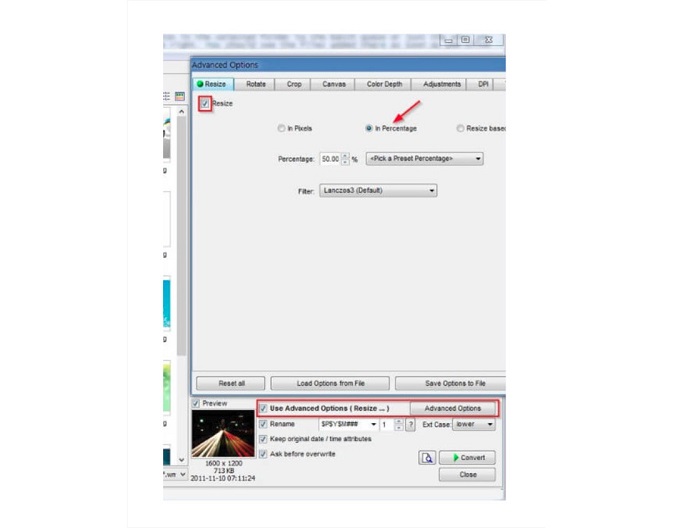
Steg 3. Klicka sedan på Advanced Options, så öppnas en ny flik. På fliken Resize markerar du alternativet In Percentage för att ändra bildstorleken i procent. Du kan välja ett filter genom att klicka på pilen i rullgardinsmenyn bredvid Filter.
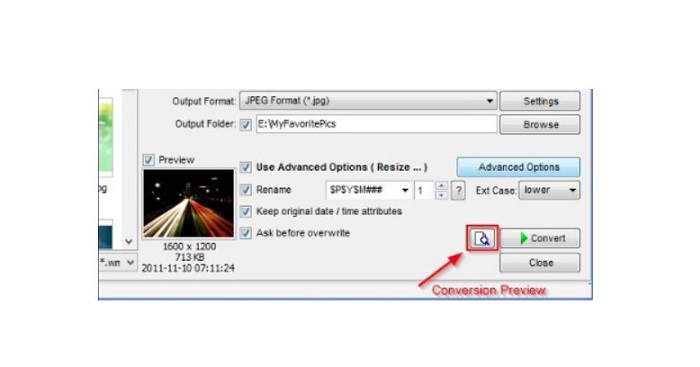
Steg 4. Därefter kan du förhandsgranska din bild och jämföra den med originalfilen genom att klicka på ikonen Preview bredvid knappen Convert.
Steg 5. Till sist markerar du knappen Convert för att starta storleksändringsprocessen. Bildfilen konverteras då också till det format du valde i föregående steg. När FastStone har ändrat storlek på din bild visas ett nytt fönster där du ser bildfilen med den nya storleken.
Och det är slutet på FastStone Photo Resizer-handledningen. Genom att följa stegen ovan kan du enkelt ändra storlek på din bild med FastStone.
Del 2. Alternativ till FastStone Photo Resizer
FastStone Photo Resizer är endast tillgänglig på Windows-datorer. Och ett annat bakslag är att du måste köpa appen innan du kommer åt dess andra redigeringsfunktioner. Så om du föredrar att använda en videotrimmerapp som är tillgänglig på Windows-, Mac- eller Linux-enheter och tillgänglig online, läs det här avsnittet noggrant.
FVC Free Image Upscaler
FVC Free Image Upscaler är en av de mest använda apparna för att ändra storlek på bilder som är tillgänglig online och i alla webbläsare, inklusive Google, Firefox och Safari. Det här onlineredskapet kan också hjälpa dig med suddiga bilder. Om du har en suddig eller lågupplöst bild kan du använda detta verktyg för att göra den skarpare och förbättra kvaliteten. Dessutom kan du förstora din bild med 2x, 4x, 6x och 8x. Det imponerande med FVC Free Image Upscaler är att det använder en AI-teknik som automatiskt upptäcker de suddiga delarna av din bild och förbättrar dem.
Dessutom stöder den alla bildformat, såsom PNG, JPG, JPEG och BMP. Du behöver inte heller registrera dig eller logga in för ett konto för att använda det här verktyget. Och om du vill kontrollera förhandsgranskningen av din utdata innan du sparar den kan du göra det medan du använder det här programmet. Dessutom är den säker att använda och bekväm att använda. Och trots att det är en internetberoende applikation har den ett snabbt bearbetningsgränssnitt där du inte kommer att ha svårt att ladda upp bilder för att ändra storlek.
Steg 1. Öppna din webbläsare och skriv FVC Free Image Upscaler i sökfältet. Klicka på länken som visas för att gå direkt till huvudsidan.
Steg 2. Starta programmet på din dator genom att klicka på knappen Upload Photo. Efter att du har startat appen klickar du på knappen Upload Photo för att ladda upp bilden som du vill ändra storlek på eller göra skarpare.
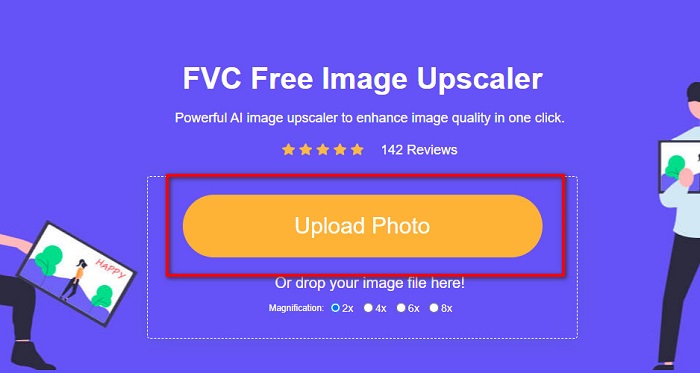
Steg 3. Därefter ser du förinställda förstoringar som du kan välja mellan. Du kan välja mellan 2x, 4x, 6x eller 8x.
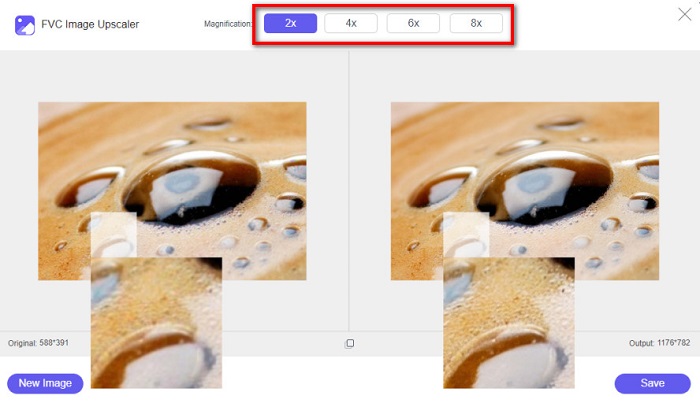
Steg 4. För muspekaren över bilden för att se en förhandsvisning. Om du är nöjd med resultatet klickar du på knappen Save längst ned till höger i gränssnittet.
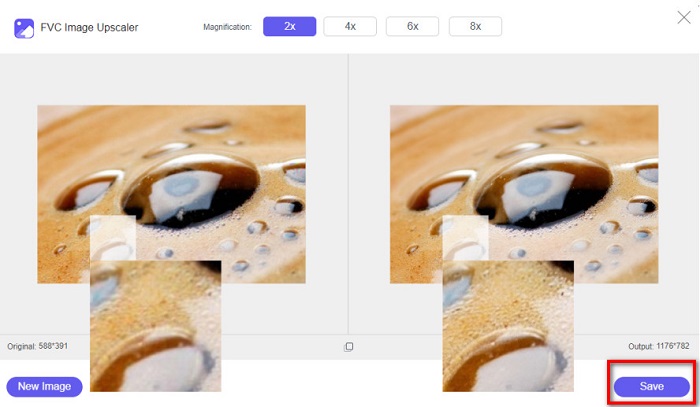
Image Resizer.com
Ett annat fantastiskt onlineverktyg för att ändra bildstorlek som du kan använda är Image Resizer.com. Image Resizer.com gör det möjligt att ändra storlek på din bild genom att justera bildens dimensioner. Dessutom har det en funktion för att beskära eller rotera bilden. Det är också ett nybörjarvänligt verktyg eftersom det har ett lättanvänt gränssnitt. Däremot innehåller det många irriterande annonser som kan distrahera dig.
Steg 1. Sök efter Image Resizer.com i din webbläsare. På huvudgränssnittet klickar du på knappen Select Image för att ladda upp bilden du vill ändra storlek på.
Steg 2. I nästa gränssnitt kan du ändra bildens storlek efter mått eller procent. Skriv sedan in den bredd och höjd du vill att bilden ska ha.
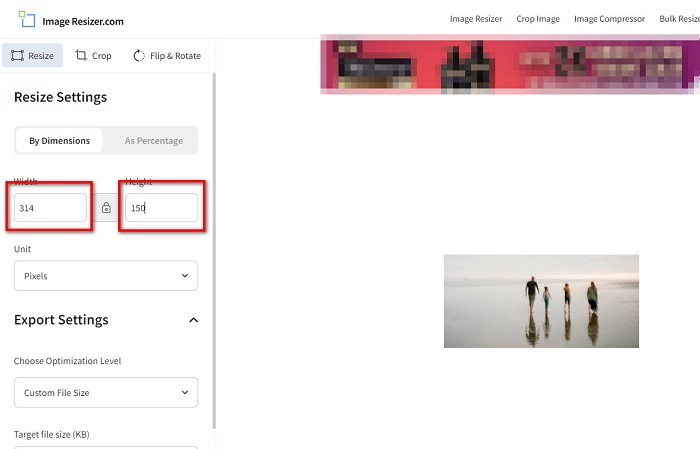
Steg 3. När du är klar med att ändra storlek på bilden klickar du på knappen Resize Image för att avsluta processen.
Del 3. Vanliga frågor om FastStone Photo Resizer
Hur mycket kostar FastStone Photo Resizer?
Du kan köpa den fullständiga versionen av FastStone Photo Resizer för $19.95 (livstidslicens)
Är FastStone-visningen gratis?
FastStone Image Viewer är en bildvisare som används för Microsoft Windows. Du kan använda FastStone Image Viewer gratis och utan kostnad.
Förstör FastStone Photo Resizer fotokvaliteten?
Nej. När du optimerar din bild med FastStone Photo Resizer kommer du inte att förlora bildkvalitet.
Slutsats
FastStone Photo Resizer är ett utmärkt program om du vill ändra storlek på dina bilder på en Windows-dator. Dessutom har det många redigeringsfunktioner och är också ett användarvänligt verktyg. Men om du undrar om det finns någon FastStone Photo Resizer för Mac är svaret nej. Om du alltså vill ha ett verktyg för att ändra bildstorlek som finns på alla plattformar, använd FVC Free Image Upscaler nu.
-
 Komplett guide för Imglarger – lösning för fotodesigners
 Imglarger är ett av de mest framstående bildlösningsverktygen. Klicka på den här sidan för att lära dig de fullständiga beskrivningarna, för- och nackdelar, pris och alternativ för Imglarger.
-
 Bästa Photo Resizer-appen online, offline, Android och iPhone
 Vilka är de bästa apparna för fotoförändring? Klicka på sidan för att lära dig de fem mest kraftfulla apparna för fotoförändring som du kan använda för att förbättra eller ändra storlek på din fil.
-
 6 sätt att ändra storlek på en bild på webben och offline [100% fungerar]
 Med handledningen vi lägger till här kan du nu enkelt ändra storlek på en bild baserat på din önskade storlek. Lär dig hur du gör det här!
