


 Video Converter Ultimate
 Skärminspelare
 Video reparation
 Säker nedladdning
De mest effektiva online- och offlinemetoderna för att konvertera MTV till MKV
Det finns tillfällen då ditt MTV-filformat inte är kompatibelt med din enhet eller ditt program. Den bästa lösningen är att ändra videofilens format. Som tur är har vi de bästa metoderna åt dig. I den här artikeln får du flera program du kan använda för att omedelbart konvertera MTV till MKV. Hoppa inte över något, läs hela artikeln för att hitta den bästa MTV till MKV‑konverteraren.

Del 1: Detaljerad information om MTV och MKV
Vad är MTV?
MTV står för Music Television. Den 1 augusti 1981 lanserades MTV som en amerikansk kabel‑TV‑kanal. Det här filformatet skapades för att möjliggöra videoguppspelning på billiga, Kinatillverkade bärbara MP4‑spelare utan att behöva höja priset på dessa spelare genom licenser. MTV‑spelaren tillverkades i Kina och kunde visa video, textfiler och bilder. Slutligen fungerar den genom att visa en serie råa, okomprimerade rgb565/555‑bildrutor samtidigt som den spelar upp MP3‑ljud.
Vad är MKV?
MKV står för Matroska Video. Det är en multimediabehållare, på samma sätt som MOV‑ och AVI‑formaten. Men den stöder fler textningsspår och ljudspår i samma fil. Denna Matroska‑multimediabehållare används för video. Den är också baserad på Extensible Binary Meta Language. Skillnaden mellan MKV‑formatet och andra videoformat är att andra format är codecs, medan MKV är en behållare (container).
Del 2: Hur man konverterar MTV till MKV förlustfritt
Att konvertera MTV till MKV utan kvalitetsförlust är enkelt med Video Converter Ultimate. Det här programmet kan konvertera många filer, såsom MOV, MTS, XVID, FLV, AVI, MP4 och fler. När det gäller processen har det en 30× snabbare konverteringshastighet än andra konverterare. Du kan också konvertera flera filer samtidigt eftersom det erbjuder batchkonvertering. Dessutom kan du använda det här verktyget om du vill förbättra din video och göra den mer attraktiv. Det har många funktioner du kan prova för att redigera och förbättra videon, till exempel en videoförbättrare där du kan skala upp videons upplösning, ta bort brus, optimera ljusstyrka och kontrast samt minska skakningar i videon. Med dessa funktioner kan du vara säker på att din video blir mer tillfredsställande. Dessutom kan du lägga till en vattenstämpel i din video med detta verktyg, eftersom det kan lägga till vattenstämpel i videon. Detta är några av funktionerna i verktyget, men om du vill upptäcka fler kraftfulla funktioner måste du prova Video Converter Ultimate.
Funktioner:
◆ Kan skapa ett collage.
◆ Erbjud videoredigeringsverktyg, såsom Enhancer, Watermark Remover, Compressor, etc.
◆ Låter dig skapa musikvideor.
◆ Konvertera många videofilformat.
Fördelar
- Har en 30x snabbare konverteringsprocess.
- Perfekt för icke-professionella användare.
- Kan konvertera flera filformat, såsom MP4, MOV, MTV, MKV, etc.
- Ingen vattenstämpel använd.
- Tillgänglig för Windows och Mac.
Nackdelar
- Du måste köpa applikationen för att uppleva fler fantastiska funktioner.
Följ dessa detaljerade guider för att konvertera MTV till MKV direkt.
Steg 1: Ladda ner Video Converter Ultimate på din Windows‑ eller Mac‑dator genom att klicka på knappen Ladda ner nedan. Installera sedan programvaran på din enhet och öppna programmet.
Gratis nedladdningFör Windows 7 eller senareSäker nedladdning
Gratis nedladdningFör MacOS 10.7 eller senareSäker nedladdning
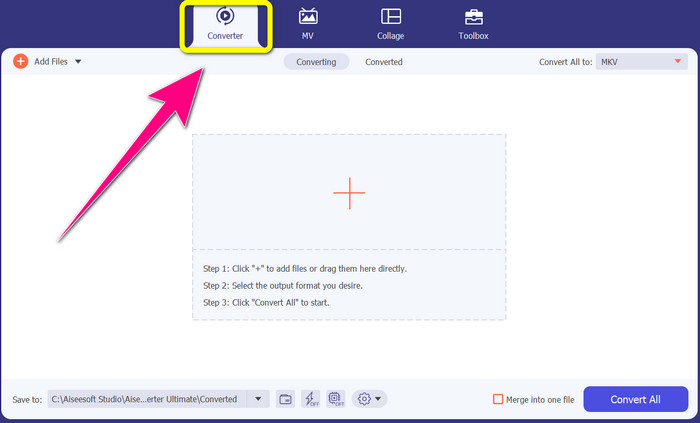
Steg 2: Du ser fyra alternativ längst upp i gränssnittet: Converter, MV, Collage och Toolbox. Välj panelen Converter.
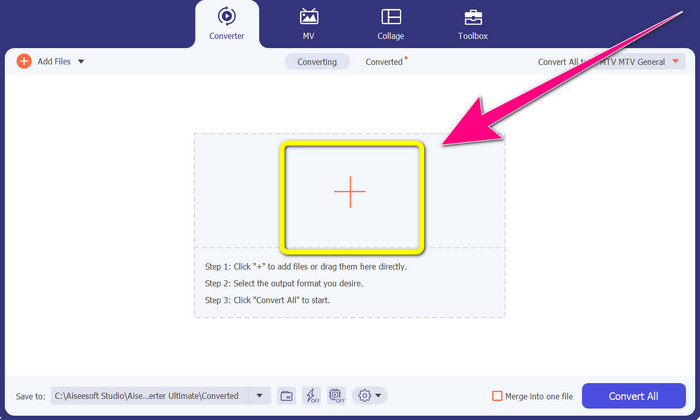
Steg 3: Klicka sedan på +‑ikonen för att lägga till MTV‑videofilen du vill konvertera.
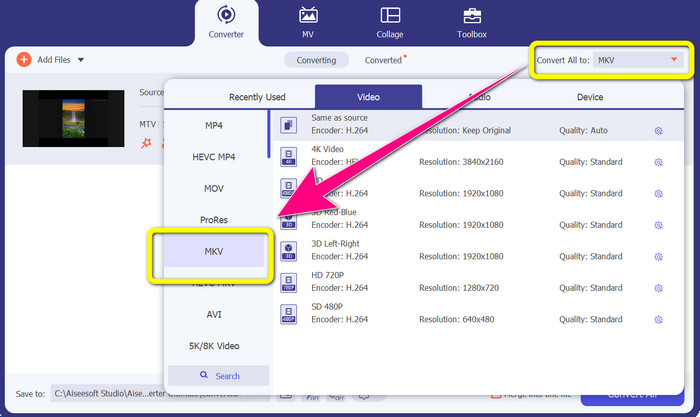
Steg 4: När du har lagt till videon klickar du på alternativet Convert all to. Leta sedan upp filformatet MKV i formatlistan och klicka på det.
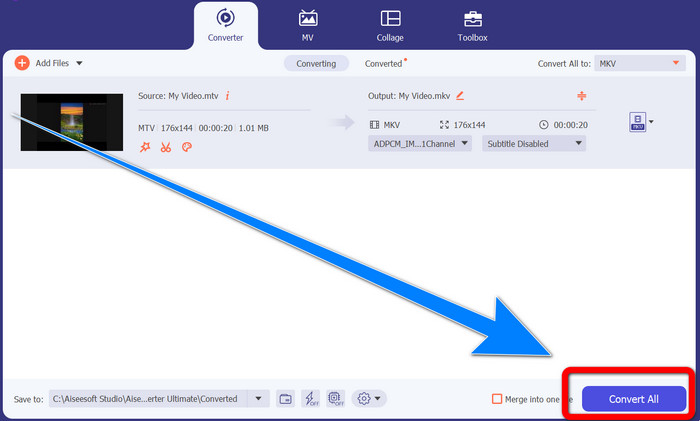
Steg 5: När du har valt MKV som filformat kan du klicka på knappen Convert All för att konvertera och spara din slutliga video.
Del 3: Onlineprogramvara för att konvertera MTV till MKV
Använder Converthelper
Du har lärt dig hur man konverterar MTV till MKV på Windows och Mac. Nu ska du få lära dig hur man konverterar filer online. En av de användbara konverterare du kan använda är Converthelper. Detta onlinverktyg är gratis och kan användas för att konvertera olika filformat, som MTV, MKV, DDAT, AVE, PS, GFP, WMF osv. Dessutom krävs bara några få steg för att konvertera, vilket passar nybörjare. Du kan också konvertera många filer utan begränsningar med Converthelper. Nackdelen är att denna kostnadsfria onlinkonverterare är långsam i konverteringsprocessen, vilket innebär att det tar tid att konvertera filer helt. Dessutom beror verktygets prestanda på din internetanslutning. För att konvertera filer med Converthelper behöver du alltså en bra internetuppkoppling. Följ stegen nedan för att konvertera MTV till MKV online.
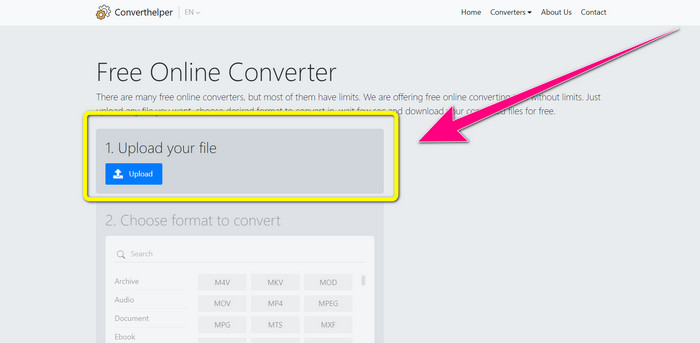
Steg 1: Besök webbplatsen Converthelper i din webbläsare. Klicka sedan på uppladdningsknappen och lägg till videon med MTV‑fil.
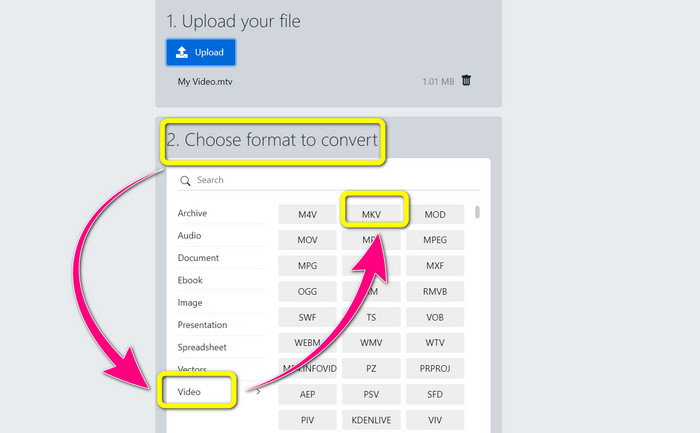
Steg 2: När du har laddat upp filen går du vidare till nummer 2. Välj formatalternativ. Klicka på knappen Video, leta upp MKV-filen och klicka på den.
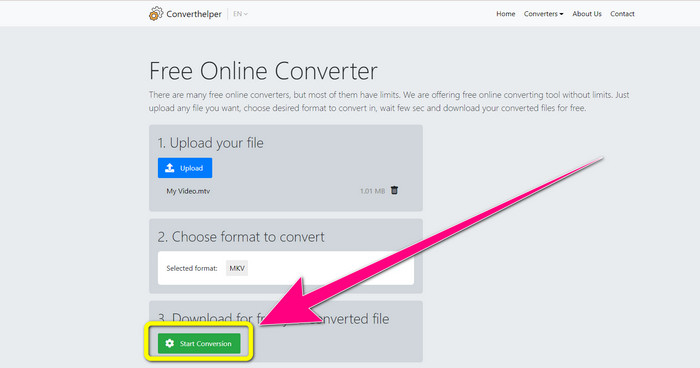
Steg 3: För sista steget klickar du på knappen Start Conversion för att konvertera din MTV‑fil till MKV‑format. Vänta på att den slutliga konverteringen ska bli klar och ladda sedan ner din slutliga video i MKV‑format.
Använda Online Convert
Ett annat onlineverktyg du kan använda för att konvertera MTV till MKV är Online Convert. Bortsett från MTV- och MKV-format stöder den fler format, såsom MP4, AVI, GIF, FLAC, FLV, VOB, DIVX, MOV, WMV och mer. Det är inte bara pålitligt när det gäller att konvertera videofiler. Du kan också konvertera bilder, dokument, ljud och andra format. Detta onlineverktyg är också bra för nya användare eftersom det är lätt att använda och bara har några få steg för att konvertera olika filer. Det här onlineverktyget har dock en filstorleksgräns, som är maximalt 3 Mb. Dessutom, precis som de andra webbaserade verktygen, kan du inte använda det om du inte har en internetanslutning. Det finns tillfällen då denna programvara inte fungerar bra. För att konvertera din MTV-fil till MKV-filformat, använd dessa steg nedan.
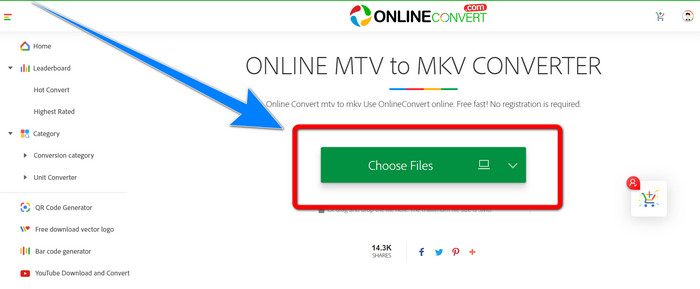
Steg 1: Gå till webbplatsen Online Convert. Klicka på knappen Choose Files för att importera din video i MTV‑filformat.
Steg 2: När du har laddat upp videon i MTV‑format går du till formatalternativen och väljer formatet MKV.
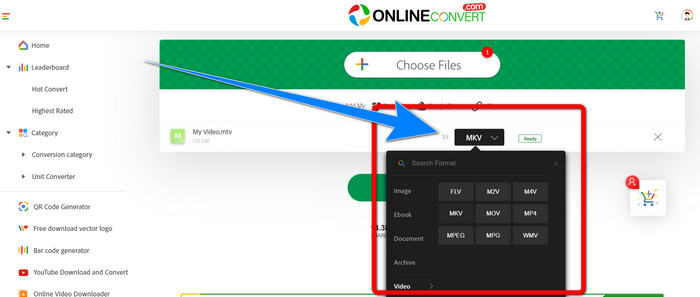
Steg 3: För sista steget klickar du på knappen Convert för att konvertera din MTV‑fil till MKV‑filformat. Vänta sedan på konverteringsprocessen och spara din konverterade video.
Vidare läsning:
De bästa metoderna för hur du konverterar AMV till MKV gratis
[Online & gratis] Hur kan jag konvertera MKV till MP4 på Windows/Mac
Del 4: Vanliga frågor om att konvertera MTV till MKV
Är MKV-formatet detsamma som MP4?
Nej, det gör de inte. MKF har fler extrafunktioner som flera undertexter och ljudspår, så MKV har en större filstorlek än MP4-format. Dessutom har MKV en högre upplösning än MP4 eftersom den har en avancerad codec med ett högre kompressionsförhållande.
Kan jag också konvertera MKV till ett annat format?
Absolut, ja! Du kan konvertera MKV till andra format med programvara som stöder MKV‑filformat, som Video Converter Ultimate. Ladda ner appen på din Windows‑ eller Mac‑dator och börja konvertera dina filer.
Är MKV-formatet bra?
Ja det är det. Den har inga licenskrav. Den stöder utmärkta funktioner, som flera spår och undertexter och mer.
Slutsats
Detta är de bästa metoderna för att konvertera MTV till MKV med utmärkta konverterare. Om du vill konvertera flera filer enkelt och utan kvalitetsförlust använder du Video Converter Ultimate.
-
 Gratis MP4 till MKV Converter - Hur man konverterar MP4 till MKV med lätthet
 När du vill konvertera MP4 till MKV gratis kan du lära dig mer om de 4 mest effektiva metoderna för att förvandla MP4-filerna till en MKV-video för olika scenarier.
-
 Hur man konverterar MKV till DivX online och offline gratis
 Letar du efter de bästa sätten att konvertera MKV till DivX-format gratis. Fortsätt läsa för att veta de bästa MKV till DivX online och offline omvandlare
-
 4 av de bästa MKV till 3GP-omvandlarna för Windows och Mac
 Om du letar efter MKV till 3GP-omvandlare som är lätta att använda, har du tur! Vi hittade de bästa och gratis MKV till 3GP-omvandlarna du måste prova
