


 Video Converter Ultimate
 Skärminspelare
 Video reparation
 Säker nedladdning
3 enkla metoder för att konvertera TRP till MKV
Are you having a hard time with your TRP file because you can’t play it on your media player or other programs? If you are one of those users that encounter this kind of problem, then it is highly recommended for you to read this article. You can convert your TRP file into MKV because most programs support MKV format. This article will show uncomplicated methods to convert TRP to MKV using your Windows, Mac, and online. What are you waiting for? Don’t waste your time and start reading this article!

Del 1: Definition av TRP och MKV
Vad är TRP?
TRP is a high-definition media file encoded into MPEG-2 part 1 transport format. It is often used in digital video broadcasting. Also, it is used for audio streams, synchronizing the output, and digital multiplexing video, and it includes excellent features to correct errors. TRP also contains AC3 audio data and H.264 video. It can be played with several video playback programs.
Vad är MKV?
MKV, or Matroska, is a multimedia container that manages numerous audio, subtitle files, and video in a single file format. MKV is also different from other multimedia standards like MP4 and AVI because it is open-source and can be customized by people with open-source software implementation. Lastly, the MKV file format is most commonly used for HD videos and online video streaming.
Del 2: Enklaste sätten att konvertera TRP till MKV offline
Använder Video Converter Ultimate
Du måste ladda ner och använda Video Converter Ultimate för att konvertera TRP till MKV förlustfritt. Med den här applikationen kan du konvertera vilket videofilformat du vill, inklusive TRP och MKV. Du kan konvertera flera videofiler i en enda process eftersom det här verktyget har en batchkonverteringsfunktion. Dessutom har den en 30 gånger snabbare konverteringsprocess, så du behöver inte konsumera mer tid för att konvertera olika filer. Denna applikation stöder flera andra format än TRP och MKV, som 5K/8K-video, ProRes, DV, ASF, M4V, MXF, MP4, MOV och mer. Det bästa är att du kan använda det här programmet med din Windows och Mac, vilket är goda nyheter för alla användare. Om du dessutom vill ändra hastigheten på dina videor kan du använda funktionen Video Speed Controller. Du kan sakta ner din video från 0,125x och snabba upp dem till 8x snabbare än den ursprungliga hastigheten. Om du vill beskära din video kan du också göra det. Detta verktyg erbjuder också en videobeskärningsfunktion,
För att veta mer om denna fantastiska programvara måste du ladda ner den och prova den själv.
Funktioner:
◆ Konvertera många filformat.
◆ Kan göra ett kreativt collage.
◆ Den erbjuder Music Video Creator.
◆ Tillhandahåller verktygslåda för att förbättra videor.
Fördelar
- 30 gånger snabbare än andra programvarukonverterare.
- Har ett vänligt användargränssnitt, som är lämpligt för icke-professionella användare.
- Har andra funktioner än att konvertera.
- Tillgänglig på både Windows och Mac.
- Konvertera olika filformat, som FLV, MP4, MOV, WBM, GIF, AMV, etc.
- Kan ändra datumdetaljerna individuellt eller i omgångar.
Nackdelar
- Köp prenumerationen för att använda mer avancerade funktioner.
Om du är sugen på att konvertera TRP till MKV, följ dessa enkla steg nedan.
Step 1: Using your Windows or Mac, download the Video Converter Ultimate by clicking the Download button below. Open the application after downloading and installing it.
Gratis nedladdningFör Windows 7 eller senareSäker nedladdning
Gratis nedladdningFör MacOS 10.7 eller senareSäker nedladdning
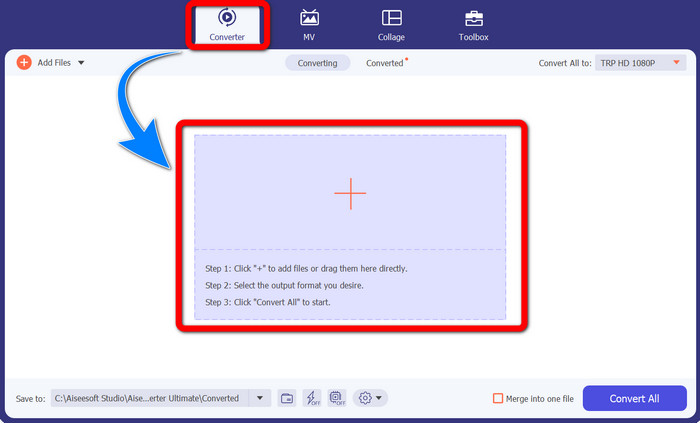
Step 2: When you already launch the Video Converter Ultimate, select the Converter panel. Then, click the + sign to import your video with the TRP format.
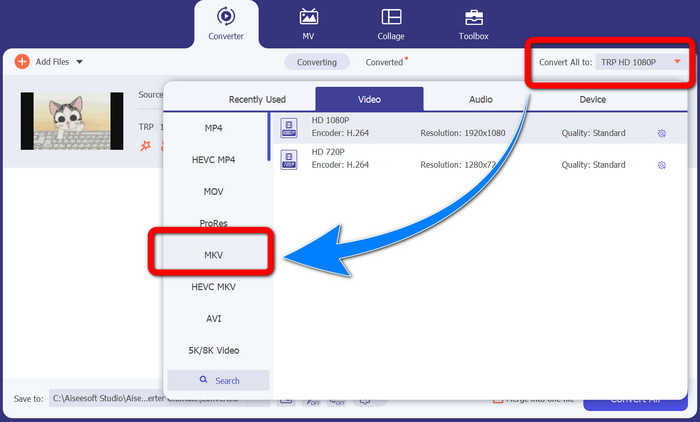
Step 3: After you import your video, click the Convert all to icon. Find the MKV format from the format options and click it.
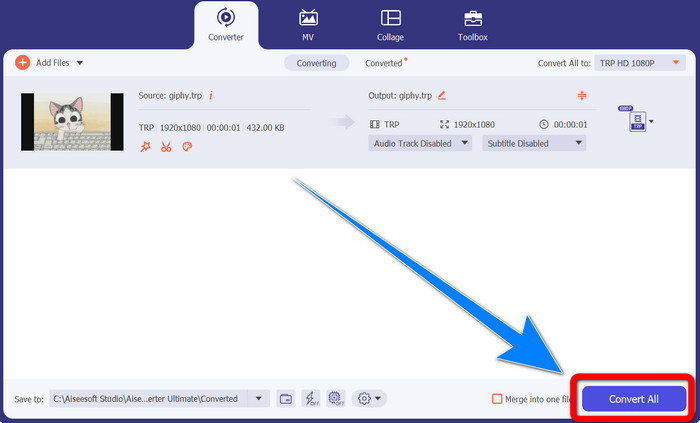
Step 4: Then, click the Convert All button to convert your TRP to MKV format.
Använder Prism Video Converter
Prism is another application you can download on your Windows and Mac. This application can help you to convert TRP to MKV easily. Also, it supports different file formats, such as AMV, MP4, DVD, VOB, MOV, DIVX, AVI, 3GP, and more. However, this application is very slow when installed on Windows or Mac. Also, the conversion process takes a while. And it has a complicated interface, which will confuse beginners, so you must look for some tutorials or seek help from advanced users. If you want to download and use this application, follow the simple steps below.
Step 1: Download the Prism Video Converter on your Mac or Windows.
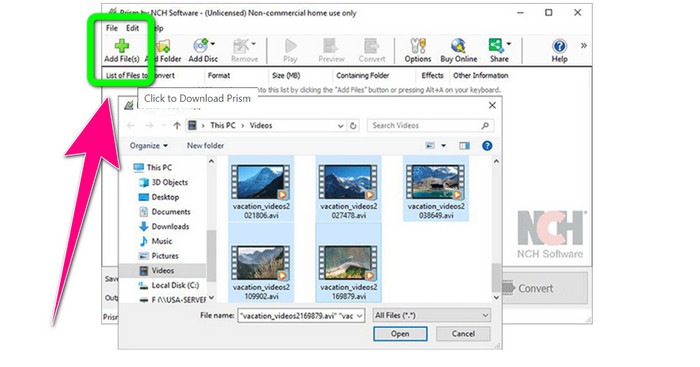
Step 2: Click the green Add Files button and insert your TRP file.
Step 3: Set the output format. Click the MKV file from the format options.
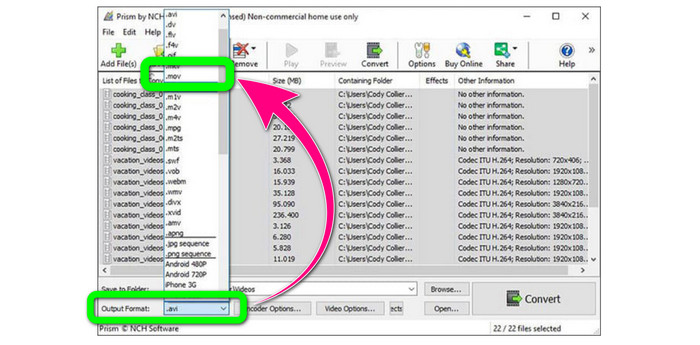
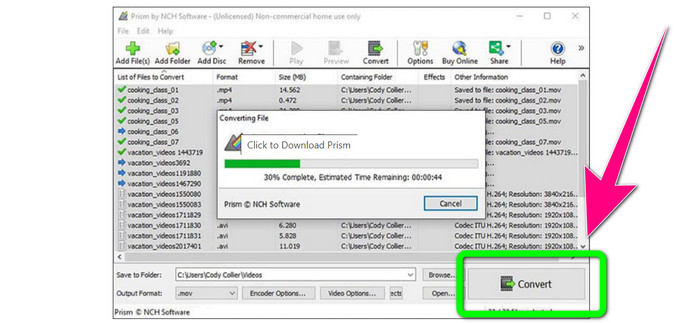
Step 4: Lastly, select the Convert button to convert your TRP file into MKV format.
Del 3: Onlineapplikationer för att konvertera TRP till MKV
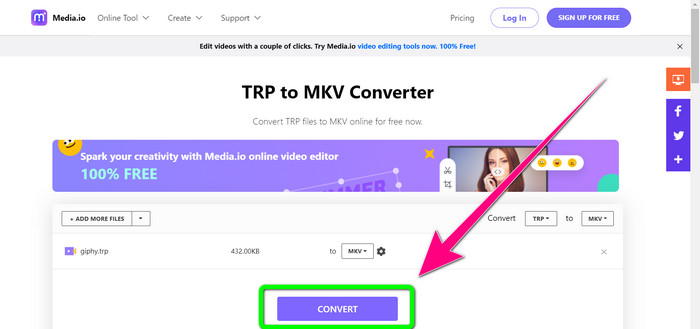
Are you interested in converting TRP to MKV online? Then, you can use Media.io. With the assistance of this application, you can convert TRP to MKV. In addition, it has more supported formats, like MP4, AVI, WMV, MOV FLV, DIVX, XVID, 3GP, etc. It is also an audio and image converter.
Dessutom är den också kapabel till videoredigering. Du kan beskära, trimma, sammanfoga, loopa videor och mer. Men när det kommer till konverteringsprocessen är den långsam. Du måste vänta lite längre för att slutföra processen. Den har också störande annonser som dyker upp på skärmen. Dessutom behöver den en snabb internetanslutning för att fungera bra. Om du vill konvertera TRP till MKV med Media.io, följ stegen nedan.
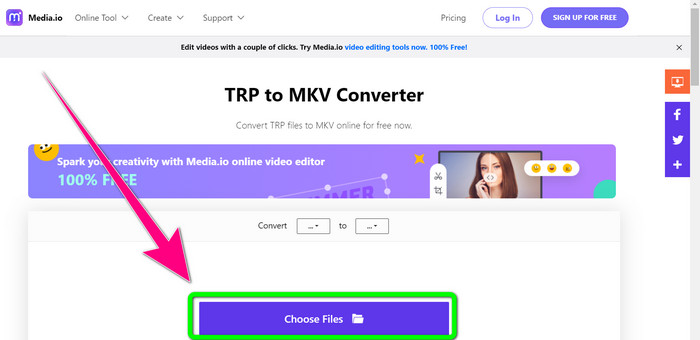
Step 1: Go to the website of Media.io. Then, click the Choose Files button to add your video with the TRP file format.
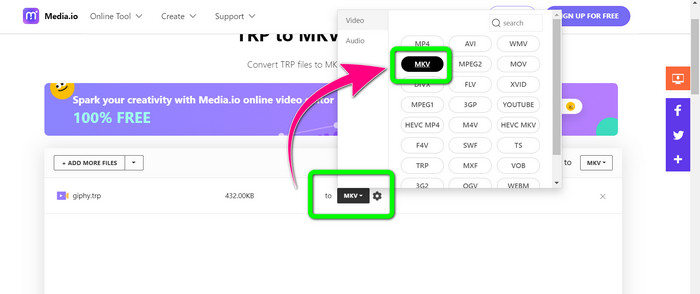
Step 2: After adding your video, go to the format options, look for the MKV file, and select it.
Step 3: For the final step, click the Convert button. Wait for the conversion process and save your video in MKV file format.
Vidare läsning
Best Procedures about How to Convert AMV to MKV for Free
Easily Convert MTV to MKV Using These Ultimate Converters
Del 4: Vanliga frågor om att konvertera TRP till MKV
Varför stöds inte MKV-filen på min TV?
En MKV-fil är bara en videobehållare som kan kodas med många codecs, som HEVC, MPEG-4, VP9, etc. TV har dålig kompatibilitet med dessa codecs, det är därför du inte kan spela MKV på din TV.
Är MKV-filen av god kvalitet?
MKV-filformat är populärt i högkvalitativa videor. Den har också en större filstorlek. Det betyder att MKV är en behållare och inte har någon inverkan på kvaliteten.
Finns det en snabb omvandlare jag kan använda på min dator?
Defenitivt Ja! Om du letar efter en snabb mjukvarukonverterare är Video Converter Ultimate den bästa applikationen. Du kan konvertera dina filer många gånger snabbare och enklare.
Slutsats
With all the applications and ways of converting TRP to MKV above, we highly suggest using Video Converter Ultimate. This can convert numerous files instantly with an ultra-fast conversion speed. So, what are you waiting for? Try it yourself to discover more.
-
 2 av de mest imponerande programvaran som finns tillgänglig för att konvertera TRP till MOV
 Kunde inte konvertera TRP-filer till MOV? Följ sedan guiden i den här artikeln. När vi väljer ut de bästa verktygen du kan använda för att konvertera dina TRP-filer.
- 2 av de mest imponerande programvaran som finns tillgänglig för att konvertera TRP till MOV
Kunde inte konvertera TRP-filer till MOV? Följ sedan guiden i den här artikeln. När vi väljer ut de bästa verktygen du kan använda för att konvertera dina TRP-filer
-
 2 professionella omvandlare för att konvertera TRP till WMV-format [Guide]
 Är du en av användarna som har en komplicerad tid med TRP-filen? Om så är fallet, låt oss fortsätta att läsa den här artikeln för att veta hur man konverterar TRP till WMV och vet mer
