


 Video Converter Ultimate
 Skärminspelare
 Video reparation
 Säker nedladdning
4 enklaste metoderna för att ta bort iFunny vattenstämplar
iFunny är en av de populäraste apparna om du vill läsa roliga meddelanden med bilder (memes). En del av dessa bilder har dock en iFunny‑vattenstämpel, vilket kan vara irriterande. Om du vill upptäcka de bästa metoderna för att ta bort dessa vattenstämplar har du hamnat rätt. Vi presenterar flera program du kan använda för att ta bort störande element från dina foton. Dessa verktyg är testade och beprövade, så du behöver inte tveka på om de är seriösa eller inte. Är du redo att lära dig de bästa metoderna för att ta bort iFunny‑vattenstämplar? Läs då den här artikeln från början till slut.

Del 1: Ta bort iFunny vattenstämplar med beskärningsverktyget
Ett av de bästa sätten att ta bort iFunny vattenstämplar är att använda beskärningsverktyget. Denna metod är tillämplig om vattenstämpeln placeras på kanten eller hörnet av din bild. Du kan klippa din bild från sida till sida och upp till ner. Om du vill beskära iFunny-vattenmärket från dina bilder, följ de enkla stegen nedan.
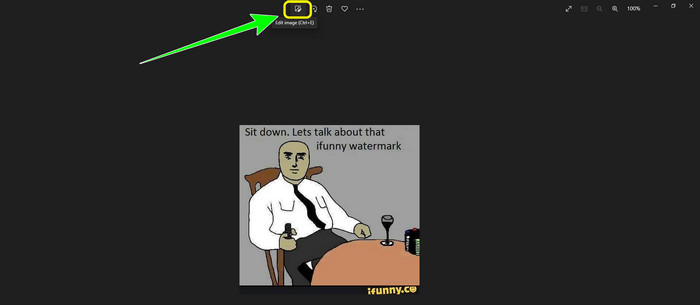
Steg 1: Öppna ditt foto med iFunny‑vattenstämpel. Välj alternativet Redigera bild för att använda beskärningsverktyget. Du kan också trycka på Ctrl+E.
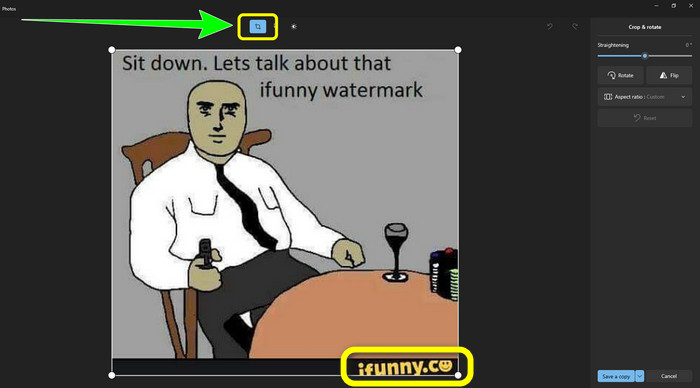
Steg 2: Klicka sedan på verktyget Beskär. Därefter kan du beskära bilden för att ta bort iFunny‑vattenstämpeln från ditt foto.
Steg 3: När du är klar med beskärningen klickar du på knappen Spara en kopia. Vänta tills sparprocessen är klar och placera ditt färdiga foto på önskad plats.
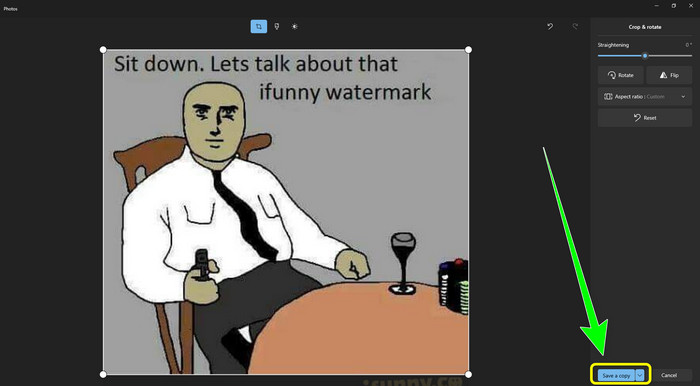
Detta är den enklaste metoden för att ta bort iFunny-vattenstämplar med beskärningsverktyget.
Del 2: Bästa sätten att ta bort iFunny vattenstämpel utan att beskära
Använder FVC Free Watermark Remover
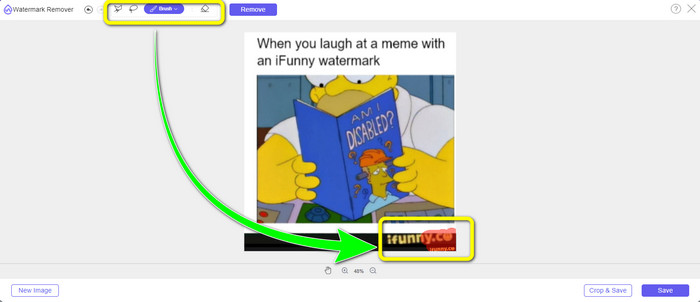
Om du letar efter ett verktyg för att ta bort iFunny‑vattenstämplar kan du använda FVC Free Watermark Remover. Med detta program kan du enkelt och omedelbart ta bort alla typer av vattenstämplar från bilder. Du kan också lita på detta verktyg om du har flera vattenstämplar på samma foto. Dessutom stöder detta onlineredskap nästan alla bildformat, inklusive JPG, PNG, BMP, TIFF och fler. För att ta bort oönskade objekt och vattenstämplar från bilder erbjuder det tre olika verktyg: Lasso, Pensel och Polygon. Med hjälp av dessa verktyg kan du enkelt ta bort allt du inte vill ha kvar på bilden. Dessutom har FVC Free Watermark Remover ett lättbegripligt gränssnitt som är tillgängligt för alla användare, både nybörjare och mer erfarna. Din fil är också säker här eftersom verktyget garanterar din integritet, vilket innebär att det bara är du som kan redigera ditt foto. Slutligen är detta en gratis programvara, så du kan använda den när du vill och ladda upp obegränsat antal filer som du vill förbättra.
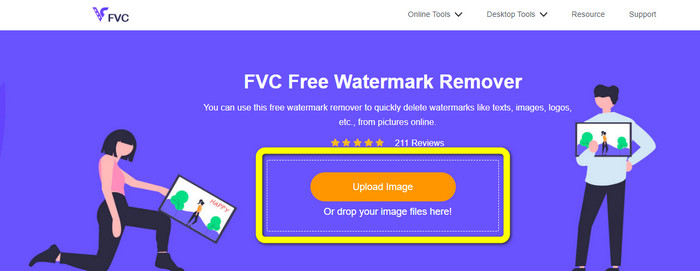
Steg 1: Öppna FVC Free Watermark Remover i din webbläsare. Klicka sedan på knappen Ladda upp bild för att lägga till ditt foto med iFunny‑vattenstämpel.
Steg 2: När du har lagt till ditt foto markerar du iFunny‑vattenstämpeln med hjälp av verktygen för att ta bort vattenstämplar.
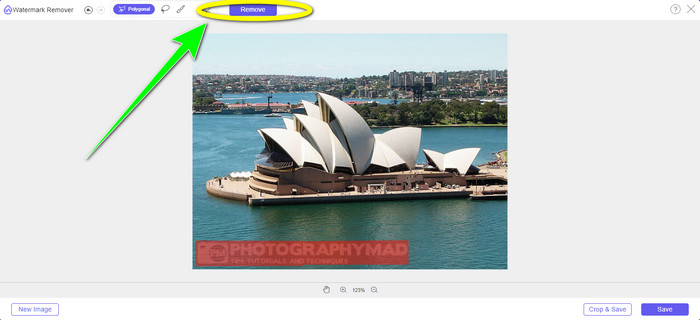
Steg 3: Klicka sedan på knappen Ta bort för att radera iFunny‑vattenstämplarna från ditt foto.
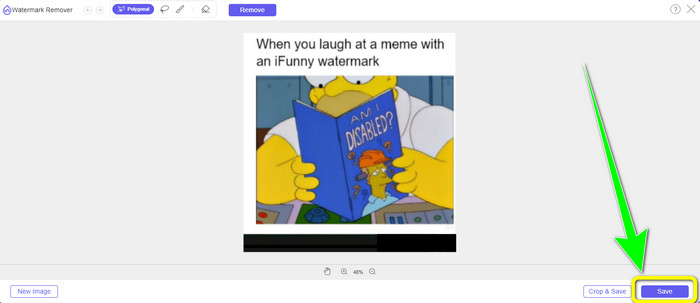
Steg 4: Efter borttagningsprocessen är ditt sista steg att klicka på knappen Spara för att ladda ned ditt foto utan iFunny‑vattenstämpel till din enhet.
Använder WatermarkRemover.io
Använd WatermarkRemover.io om du vill använda ett annat webbverktyg för att bli av med iFunny‑vattenstämplar på dina foton. Det här kostnadsfria verktyget kan ta bort alla överflödiga element från dina bilder, inklusive logotyper, texter, stämplar och mer. Du kan dessutom ta bort flera vattenstämplar från dina bilder. Det erbjuder också ett användarvänligt gränssnitt som passar perfekt för nybörjare. Olika bildformat, bland annat PNG, JPG, WEBP och JPEG, stöds av detta webbaserade verktyg. Det finns dock begränsningar i gratisversionen. Du kan bara ladda upp 50 foton åt gången och lagringsutrymmet är begränsat till 25 GB. Om du vill ladda upp fler foton och få mer lagring måste du teckna en prenumeration, vilket är relativt dyrt. Följ stegen nedan för att använda detta utmärkta verktyg för att ta bort iFunny‑vattenstämplar.
Steg 1: Öppna din webbläsare och gå till WatermarkRemover.io. Klicka på knappen Ladda upp bild för att ladda upp ditt foto med iFunny‑vattenstämpel. Du kan också dra din fil till rutan.
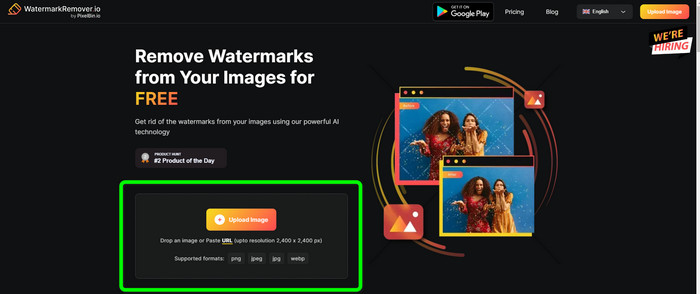
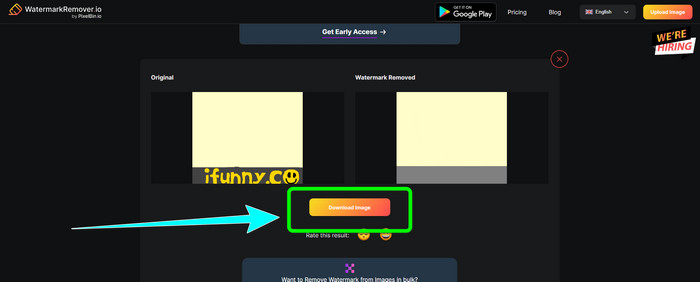
Steg 2: Efter att du laddat upp fotot tas iFunny‑vattenstämpeln automatiskt bort. När fotot visas utan vattenstämpel klickar du på knappen Ladda ned.
Använda Apowersoft Watermark Remover Online
För att omedelbart ta bort iFunny‑vattenstämplar från ditt foto är Apowersoft Watermark Remover Online också ett bra webbaserat verktyg för dig. Det kan radera oönskade element från dina foton, inklusive signaturer, texter, logotyper och mer. Det stöder också olika bildformat som JPEG, JPG, PNG, TIFF och fler. Nybörjare kan använda verktyget även utan större förkunskaper, eftersom Apowersoft Watermark Remover Online har enkla arbetssteg och ett lättbegripligt gränssnitt. Filen raderas dessutom automatiskt efter att du tagit bort vattenstämpeln och laddat ned ditt foto, vilket innebär att ingen annan kan se ditt arbete. Förutom att ta bort vattenstämplar från foton kan verktyget även ta bort vattenstämplar från videor, vilket är praktiskt för användaren. Det stöder flera videoformat, som MOV, WMV, MP4, 3GP, AVI osv. Den här onlinetjänsten har dock en långsam borttagningsprocess, vilket inte är optimalt för användare. Den fungerar inte heller utan internetanslutning. Om du vill använda detta verktyg följer du de enkla stegen nedan.
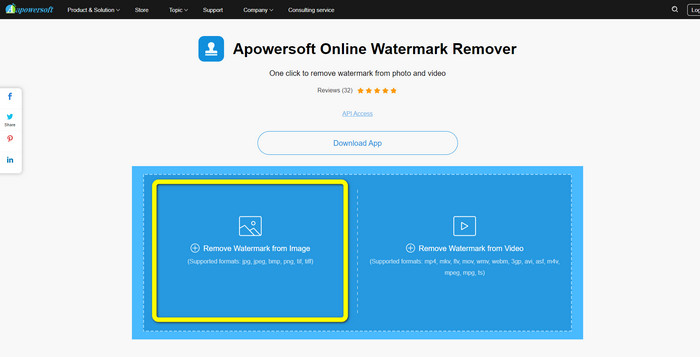
Steg 1: Sök efter Apowersoft Online Watermark Remover. Klicka sedan på knappen Remove Watermark from Image för att lägga till ditt foto med iFunny‑vattenstämpel.
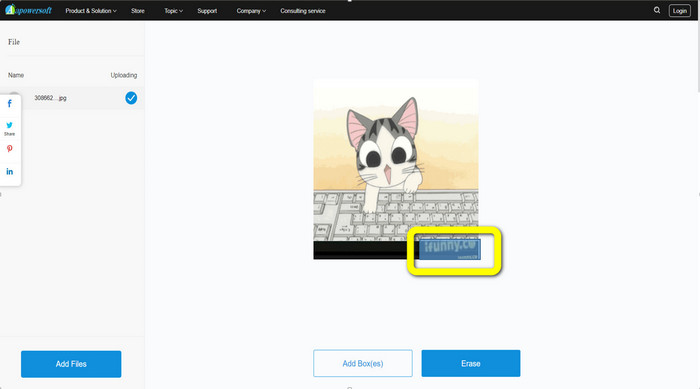
Steg 2: När du har lagt till din fil kan du använda den blå rutan för att täcka iFunny‑vattenstämpeln på ditt foto.
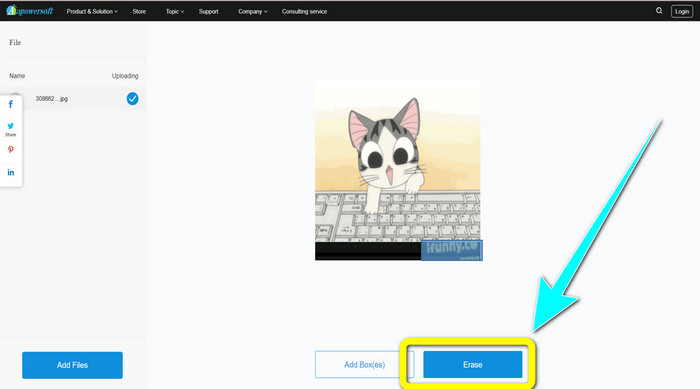
Steg 3: Klicka sedan på knappen Erase. Vänta på att borttagningsprocessen slutförs och ladda sedan ned den färdiga filen.
Relaterat till:
Ärlig recension av Inpaint Watermark Remover och alternativ
Enkla sätt att ta bort vattenstämpel från JPG online
Del 3: Vanliga frågor om att ta bort iFunny vattenstämplar
Vilket är det bästa programmet för att ta bort vattenstämpeln iFunny?
Det bästa programmet du kan använda är FVC Free Watermark Remover. Detta verktyg kan enkelt ta bort iFunny‑vattenstämpeln från din bild. Dessutom har det en snabb borttagningsprocess och erbjuder de enklaste arbetsstegen, vilket gör det till det bästa verktyget för att ta bort vattenstämplar.
Kan jag också ta bort vattenstämplar från min video?
Absolut, ja. Du kan använda många online‑ och offlineverktyg för att ta bort vattenstämplar från dina videor. Här är de bästa verktygen du kan prova.
1. Video Converter Ultimate.
2. Media.io
3. HitPaw
4. Online Video Cutter
5. Apowersoft Online Watermark Remover.
Finns det ett beskärningsverktyg jag kan använda i FVC Free Watermark Remover?
Ja. FVC Free Watermark Remover har två sätt att ta bort vattenstämplarna från ett foto. Den första är att använda olika verktyg för borttagning av vattenstämplar, som lasso, borste och polygonal. Den andra använder beskärningsverktyget.
Slutsats
Som informationen ovan visar finns det många enkla metoder för att ta bort iFunny‑vattenstämplar, till exempel med hjälp av olika verktyg och beskärningsfunktioner. Men om du vill ta bort störande element från dina bilder på ett enkelt sätt, använd FVC Free Watermark Remover nu.
-
 Utmärkta sätt att ta bort klistermärken från foto och video
 Vill du enkelt ta bort klistermärken från videor och foton? Här är de effektiva sätten, inklusive de mest pålitliga och enklaste metoderna du kan prova.
-
 Sätt på hur man enkelt tar bort Reddit-vattenstämplar från bilder
 Om du är här kanske du letar efter en utmärkt Reddit-vattenstämpelborttagare. I så fall kommer vi att visa dig den enklaste metoden för att ta bort Reddit-vattenstämplar.
-
 Hur man tar bort vattenstämpel i Lightroom Mobile [Löst]
 Vill du lära dig hur man tar bort vattenstämplar från foton i Lightroom? Här är de enklaste metoderna du kan prova med dina mobiltelefoner och datorer.
