


 Video Converter Ultimate
 Skärminspelare
 Video reparation
 Säker nedladdning
Hur man komprimerar WebM-fil online med 2 gratis videokompressorer
WebM är ett audiovisuellt mediafilformat som vanligtvis används för medieinnehåll på webbsidor. Det är kompatibelt med alla populära webbläsare som Chrome, IE, Safari, Firefox och fler. När du vill att din video ska strömmas snabbare behöver du komprimera den. Frågan är: vet du hur man komprimerar WebM utan större kvalitetsförlust?

Letar du efter ett sätt att komprimera en WebM-fil och minska dess filstorlek? I det här inlägget vill vi dela 2 kostnadsfria metoder som hjälper dig att komprimera WebM online.
Del 1. Hur man gratis kan komprimera WebM-fil online
För att komprimera WebM och minska filstorleken samtidigt som du behåller den ursprungliga bild- och ljudkvaliteten kan du använda det populära verktyget Free Video Compressor. Det är särskilt utformat för att komprimera video i alla ofta använda videoformat, inklusive WebM, AVI, MP4, FLV, MKV, MOV och fler.
Denna lättanvända WebM-filkompressor har förmågan att minska videofilens storlek utan kvalitetsförlust. Det låter dig komprimera 4K UHD och 1080p, 720p HD och vanliga SD-videor. Du kan navigera till sidan Free Video Compressor för att enkelt komprimera WebM.
Steg 1. Öppna din webbläsare på datorn och gå till den officiella webbplatsen för denna kostnadsfria online WebM-filkompressor.

Steg 2. När du kommer dit kan du klicka på knappen Add Files to Compress för att installera ett litet startprogram för WebM‑komprimeringen. Sedan kan du välja och lägga till den WebM-fil du vill komprimera i popup-fönstret.

Steg 3. Du kan fritt komprimera din WebM-fil efter behov. Dessutom får du anpassa videoupplösning, bildfrekvens och bithastighet, videonamn och utdataformat. Efter alla dessa inställningar kan du helt enkelt klicka på knappen Compress för att börja komprimera WebM online.

Till skillnad från många andra online WebM-videokomprimeringsverktyg lägger inte denna gratis videokompressor till någon vattenstämpel i din komprimerade WebM-fil.
Del 2. Hur man komprimerar WebM med WebM Compressor
För att komprimera en WebM-fil online kan du också använda VEED WebM Compressor. Oavsett om dina filer överskrider gränser för e‑postbilagor, Facebook Messenger eller andra uppladdningsgränser kan du använda denna WebM‑kompressor för att minska filstorleken på din WebM‑video.
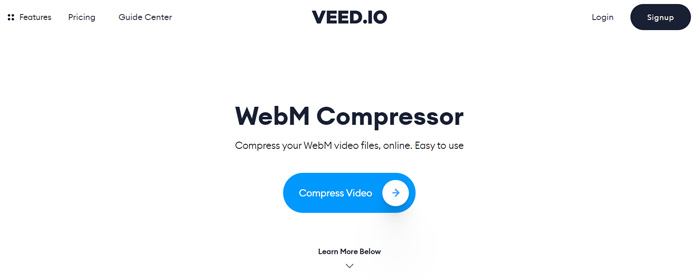
Steg 1. Öppna din webbläsare och gå till webbplatsen för VEED WebM Compressor. Klicka på knappen Compress Video för att gå vidare till nästa uppladdningssteg.
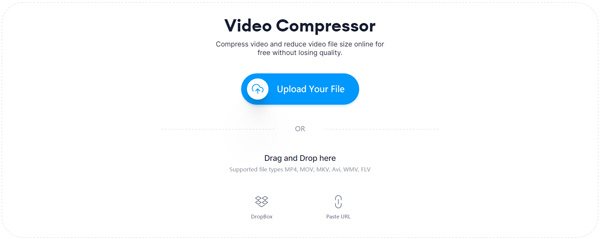
Steg 2. Du kan klicka på knappen Upload Your File för att ladda upp din WebM‑video. Här kan du dra och släppa filen för att ladda upp WebM. Denna kostnadsfria WebM‑videokompressor låter dig också ladda upp video från Dropbox och via URL.
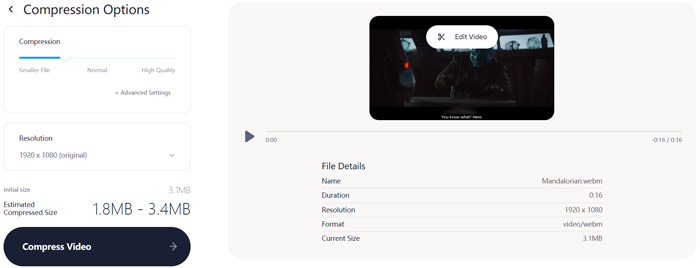
Steg 3. Du kan fritt justera videokomprimeringen efter behov. Dessutom kan du anpassa videoupplösningen. Du kan också trimma din WebM‑fil genom att klicka på Edit Video. Den är utrustad med en mediaspelare så att du kan förhandsgranska den inlästa videon.
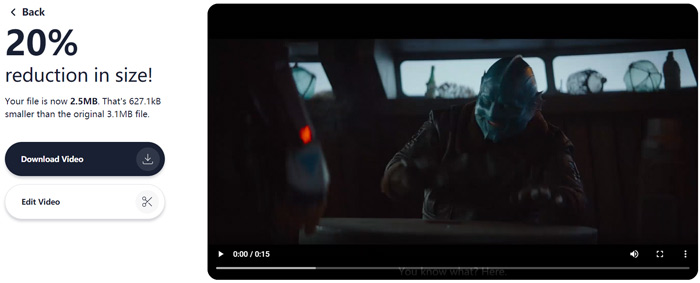
Steg 4. Klicka på knappen Compress Video nere i vänstra hörnet för att starta komprimeringen av WebM-filen. Därefter kan du klicka på knappen Download Video för att spara den komprimerade WebM-videon på din dator.
Del 3. Vanliga frågor om komprimering av WebM-fil
Fråga 1. Vad är WebM-format?
WebM är ett open source-format som innehåller video komprimerad med VP8- eller VP9-codec och ljud komprimerat med Vorbis- eller Opus-codec. WebM är ursprungligen avsedd att erbjuda ett royaltyfritt alternativ att använda i HTML5-video- och HTML5-ljudelement. WebM-fil används främst för medieinnehåll på webbsidor.
Fråga 2. Hur konverterar jag WebM till MP4 gratis online?
För att gratis konvertera en WebM-fil till MP4 kan du använda den populära videokonverteraren Free Online Video Converter. Den kan enkelt utföra WebM till MP4-konvertering och andra video‑/ljudkonverteringar.
Fråga 3. Vad är det minsta videoformatet med hög kvalitet?
MP4. Det ger vanligtvis den bästa videokvaliteten med den minsta filstorleken.
Slutsats
När du bestämmer dig för att dela en WebM‑video på Facebook, Instagram, Twitter eller något annat socialt mediekonto är det bäst att komprimera den först. I det här inlägget kan du lära dig 2 enkla metoder för att gratis komprimera WebM online. Du kan använda din föredragna videokompressor för att minska filstorleken på dina WebM‑filer.
-
 Handledning för att komprimera en video för e-post på iPhone / Android / Online
 Kan du inte skicka en video som är för stor via e-post? Om du har det här problemet kan du få användbara sätt att komprimera en video för e-post här. Den här artikeln visar hur du krymper stora videofiler gratis i detalj.
-
 MP4 till WebM Converter - 4 bästa metoder för att konvertera MP4 till WebM
 När du vill konvertera MP4 till WebM gratis kan du lära dig mer om de fyra mest använda metoderna för att få önskade videor gratis från artikeln.
-
 3 sätt att komprimera och konvertera stora videofiler för WhatsApp
 Från den här artikeln kan du få 3 enkla sätt att komprimera videor online för WhatsApp. Varför kan du inte skicka videor på WhatsApp? Vad kan du göra för att fixa WhatsApp-storleksgränsen? Läs bara och kolla.
