


 Video Converter Ultimate
 Skärminspelare
 Video reparation
 Säker nedladdning
Utmärkta knep för att enkelt konvertera WMV till M4V Du kan prova
Are you one of the users looking for excellent and easy methods to convert your WMV to M4V? There are various converters you can find on the web. However, some of them don’t support WMV and M4V file formats. If that is your problem, this article can provide you with the easiest solution using worthy applications. You will also discover their features to get an idea of the other functions of these applications. Read the article from top to bottom to find out more essential details.

Del 1: Introduktion till WMV och M4V
WMV filformat
| namn | WMV |
| Filtillägg | .wmv |
| Beskrivning | WMV (Windows Media Video) förkortning står för en grupp video-codecs som Microsoft först lanserade på sitt Windows Media-ramverk. Det skapades först för att konkurrera med RM-formatet i appar för streaming på internet. Den rymmer komprimerade videofiler och hjälper till och med Blu-ray/DVD-skivor att leverera innehåll. |
| Filkategori | Video |
| Utvecklad av | Microsoft |
| Tillhörande program | VLC Media Player MPlayer Klassisk mediaspelare Windows mediaspelare |
| MIME-typ | video/x-ms-asf video/Mpeg |
| Tekniska detaljer | Multimediainnehållet som har kodats finns i en WMV-fil som använder containerformatet Advanced Systems Format (ASF). ASF-filer bör använda .ASF-filtillägget snarare än .WMV-filtillägget, även om ASF kan innehålla multimedia i andra kodningar än WMV-filstandarden tillåter. |
M4V filformat
| namn | M4V |
| Filtillägg | .m4v |
| Beskrivning | Apple skapade filformatet M4V, ett videobehållareformat som liknar MP4-standarden. Den största skillnaden är att M4V-filformat kan ha DRM-kopieringsskydd. I sin iTunes Store kodar Apple videofiler med M4V-formatet. |
| Filkategori | Video |
| Utvecklad av | Apple Inc. |
| Tillhörande program | VLC Media Player KMPlayer Klassisk mediaspelare Zoom spelare |
| Tekniska detaljer | M4V-filer kan skyddas med Apples FairPlay-kopieringsskydd för att förhindra obehörig replikering. Endast datorer som är godkända (via iTunes) med kontot som används för att köpa videon kan spela upp en FairPlay-skyddad M4V-fil. |
Del 2: Bästa sättet att konvertera WMV till M4V för Mac och Windows
The best way to convert WMV to M4V is the FVC Video Converter Ultimate. This converter is downloadable on both Windows and Mac. It can convert 100+ video file formats, such as WMV, M4V, MP4, AVI, FLV, MKV, MOV, and more. When converting, you can convert multiple files simultaneously because this application can handle the batch conversion. Also, you will never be disappointed when it discusses the conversion process. This converter offers a high-speed conversion process, wherein you can convert files 30x faster than the average speed.
Dessutom har Video Converter Ultimate en annan huvudfunktion. Om du är intresserad av att konvertera dina bildfiler kan du göra det.
Funktioner
◆ Konvertera olika videofilformat, såsom M4V, WMV, FLV, AVI, MP4, MOV, VOB, etc.
◆ Erbjuder videoredigeringsverktyg, som en videoförstärkare, kompressor, cropper, trimmer, reverser, etc.
◆ Kan skapa ett collage.
◆ Det går att göra en musikvideo.
◆ Tillåter batchkonvertering.
◆ Ändra hastigheten på videon.
◆ Konvertera bildfilformat som PNG, JPG, BMP, WEBP och mer.
Låt oss konvertera WMV till M4V på Mac med FVC Video Converter Ultimate. Använd de enkla guiderna nedan.
Step 1: Download and install the FVC Video Converter Ultimate on your Mac by clicking the download button below with the Mac version.
Gratis nedladdningFör Windows 7 eller senareSäker nedladdning
Gratis nedladdningFör MacOS 10.7 eller senareSäker nedladdning
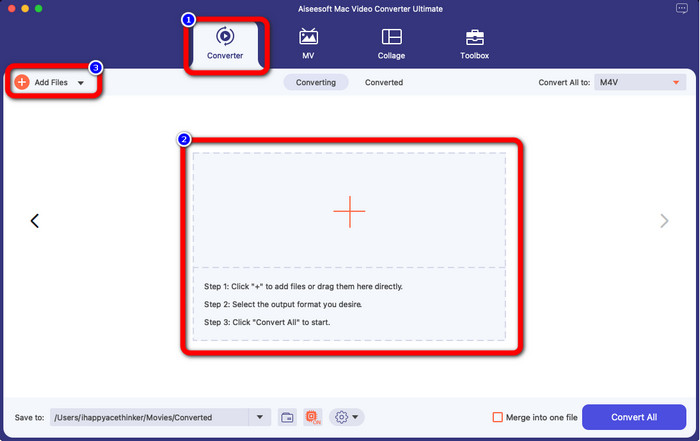
Step 2: Launch the application and select the Converter panel. Then, click the + icon or Add Files button to insert your WMV video file.
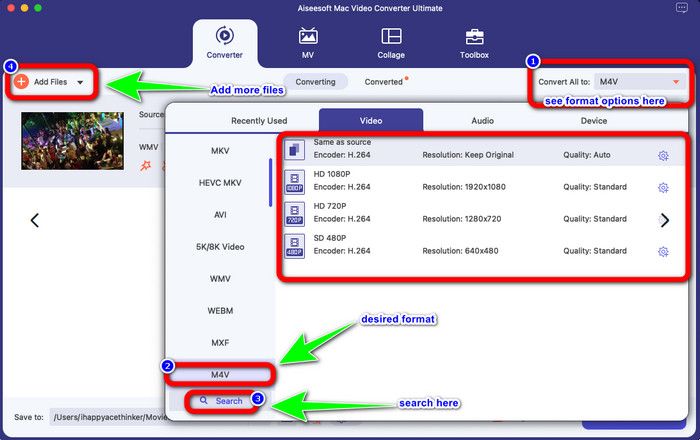
Step 3: After adding your video, click the Convert All to button to view the format options, and select the M4V file format. You can also search your desired format on the search box on the lower part of the interface. You can still click the Add Files button to add more videos to do batch conversion.
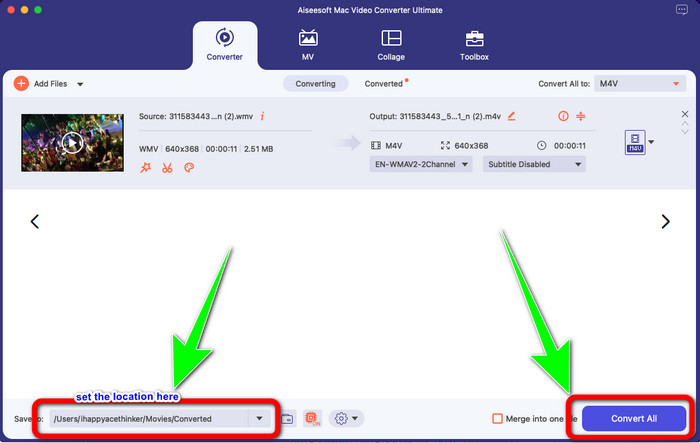
Step 4: When you select your desired file format, the M4V, you can already choose the location where you want to save your video. Then click the Convert button.
Del 3: Gratis sätt att konvertera WMV till M4V
To convert WMV to M4V for free, you can use Convertfiles.This online software is also capable of converting multiple files. It has easy instructions with a simple interface, which is suitable for all users. Aside from converting videos, you can also convert images, audio, presentation, and more. However, there are times when this converter doesn't perform well. It has a slow conversion process, and the ads are annoying.
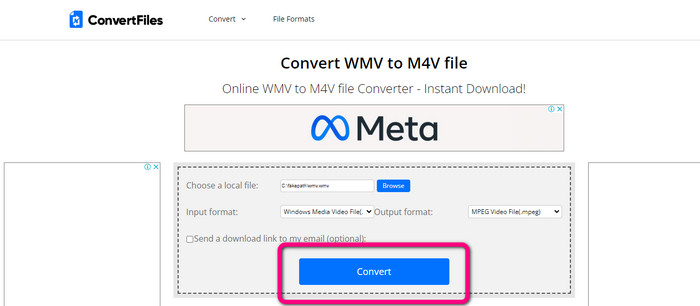
Step 1: Go to the Convertfiles website.
Step 2: Upload the WMV file format you want to convert.
Step 3: On the Output format, select the M4V file. Then click the Convert button.
Del 4: Utmärkt metod för att konvertera WMV till M4V Online
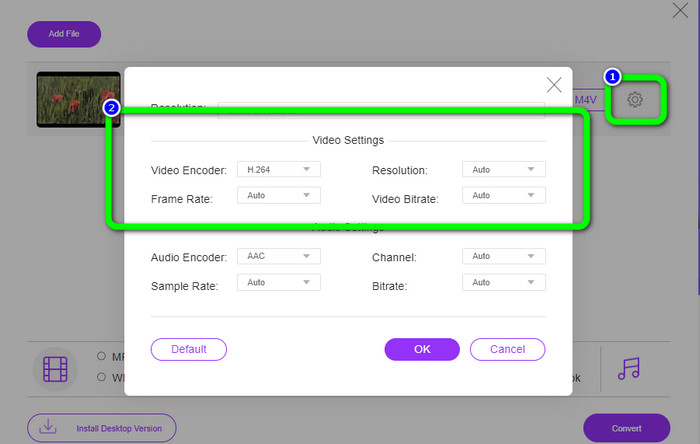
Another method to convert WMV to M4V online is to use the FVC Free Video Converter Online. With the help of this online tool, converting WMV is easy. It also converts more files like AVI, MP4, FLV, MKV, VOB, etc. Moreover, even though it is a free online converter, you don’t need to worry about the quality of your video. You can save your converted video with the original quality. Furthermore, you can also change your video's bit rate, frame rate, and resolution.
Funktioner
◆ Kan ändra videons bithastighet, bildhastighet och upplösning.
◆ Erbjuder batchkonvertering.
Följ de detaljerade stegen nedan för att konvertera WMV till M4V med FVC Free Video Converter Online.
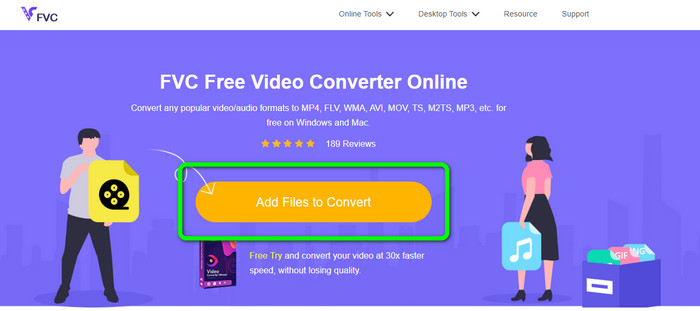
Step 1: Visit the FVC Free Video Converter Online website. Then, click the Add Files to Convert button.
Step 2: If you want to change your video’s bit rate, frame rate, and resolution, click the Settings icon. Then, press OK when you are done.
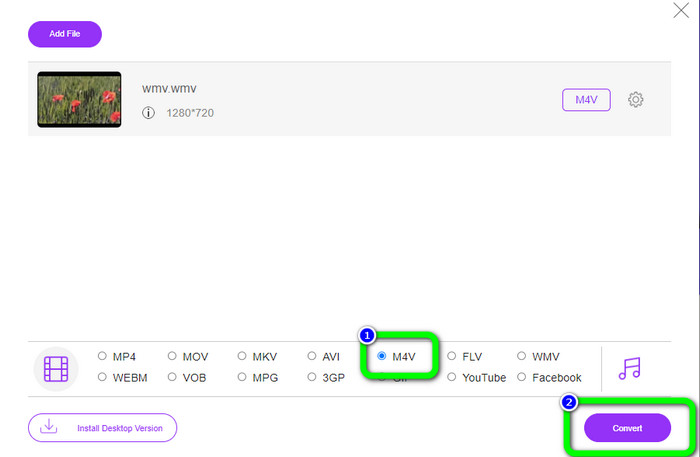
Step 3: Then, on the lower part of the interface, you will see the format options. Select the M4V file as your desired output file format, and click the Convert button to download your video.
Del 5: Vanliga frågor om att konvertera WMV till M4V
1. Kan alla enheter spela M4V?
Unfortunately, no. Built-in player of Android devices doesn’t support M4V files. You can download a third-party M4V player that supports the M4V format or convert it to a compatible format.
2. Finns det den bästa omvandlaren för att konvertera WMV till M4V?
If you want the best WMV to M4V converter, you can use the FVC Free Video Converter Online. It can convert your files efficiently and effortlessly.
3. Vilket är bättre, M4V eller MOV?
M4V is better. If you want to play your files on a portable device, such as iPhone, iPod, or iPad, M4V is highly recommended. But in some devices, MOV is supported only. In that case, you can convert M4V to MOV.
Slutsats
With all the essential information above, you can already convert WMV to M4V easily and instantly. If you prefer a fast conversion speed converter, you can use the FVC Video Converter Ultimate. Also, you can use the FVC Free Video Converter Online if you want a free online converter.
-
 Hur komprimerar du M4V-filer till en mindre storlek (gratis och online)
 Om du letar efter ett enkelt sätt att minska storleken på din M4V-fil, bör du komma och läsa den här artikeln. Här kommer vi att dela det enklaste sättet att komprimera M4V-filer med dig
-
 Konkret guide för att gå med M4V-filer på Windows och Mac gratis
 Om du letar efter en lösning för att kombinera M4V-videofiler till en, missa aldrig detta avsnitt. Här kommer vi att prata om de två bästa metoderna för att kombinera M4V-videofiler
-
 Snabba och enkla tips för att konvertera WMV till MOV [Beprövat]
 Vill du veta vilka som är de bästa och lättanvända omvandlarna som konverterar WMV till MOV? Fortsätt läsa den här artikeln eftersom den diskuterar alla möjliga val du behöver överväga att använda
