


 Video Converter Ultimate
 Skärminspelare
 Video reparation
 Säker nedladdning
Hur man konverterar WebP till GIF med hjälp av anmärkningsvärda omvandlare
Det finns en god anledning till att GIF-filer blir mer och mer populära. De är ett utmärkt sätt att ge din webbplats mer personlighet. Dessutom är de enkla att dela på sociala medier. Men hur är det med WebP-formatet? Känner du till det? Oroa dig inte om du vill ha mer information om formatet. Den här guiden ger dig tillräckligt med information om dessa två filformat. Dessutom får du lära dig de bästa sätten att konvertera WebP till GIF utan krångel. Så, utan vidare dröjsmål, läs den här artikeln och ta del av alla de bästa metoderna du kan använda.

Del 1. WebP vs. GIF
| Filformat | WebP | GIF |
| Filtillägg | .webp | .gif |
| Utvecklad av | CompuServe | |
| Fullständiga namn | Bild på hemsidan | Grafikutbytesformat |
| Beskrivning | Ett utvecklat bildformat kallas a WebP fil. Överlägsna förlustfria och förlustfria kompressioner är tillgängliga. Alfatransparens och animering ingår också. Metoderna för förlustfri och förlustfri komprimering hjälper till att minska mängden data. Det minskar filstorleken med 26% och 34% jämfört med JPG och PNG. | GIF är ett format som används för att överföra bilder. Det är ett använt grafiskt format som använder 256 färger och komprimerar data till ett format utan kvalitet. 1987 utvecklade CompuServe GIF-formatet. Det är för att överföra rastergrafik över nätverk (GIF87a). |
| Kompression | Lossy och Lossless | Förlust mindre |
| Tillhörande program/webbläsare | Google Chrome, Internet Explorer, Microsoft Edge, Mozilla Firefox | Picosmos Shows, Paint, GIMP, Twitter, Facebook, Tumblr |
Del 2. Bästa sätten att konvertera WebP till GIF online och offline
Konvertera WebP till GIF med FVC Free Image Converter
Bland de bästa bildkonverterarna online för konvertering från WebP till GIF finns FVC Free Image Converter. Det här verktyget kan konvertera alla filformat till JPG, PNG och GIF. Applikationen stöder en mängd olika indataformat, inklusive JPG, PNG, JPEG, TIFF, BMP, WEBCO, ICO och fler. Den erbjuder också tre enkla konverteringslägen som passar alla användare. Batchkonvertering är en annan funktion i FVC Image Converter. Du kan konvertera många bilder på en gång med hjälp av den. Alla webbläsare stöder FVC Free Image Converter. Den fungerar med Google, Mozilla, Microsoft Edge, Internet Explorer, Safari och andra webbläsare.
Steg 1: Besök huvudwebbplatsen för FVC Free Image Converter i din webbläsare. Välj ditt utdataformat. Välj filformatet GIF i alternativen Convert to eller format.
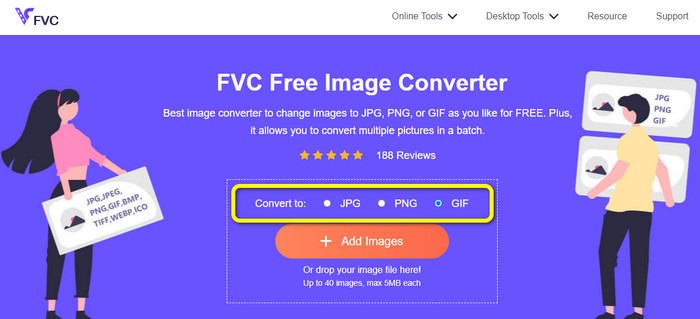
Steg 2: Klicka sedan på knappen Add Images i mitten av gränssnittet. När datorns filutforskare visas på skärmen väljer du de WebP-bilder du vill konvertera. Klicka sedan på knappen Open. Du kan också släppa bildfilen i rutan för att ladda upp den.

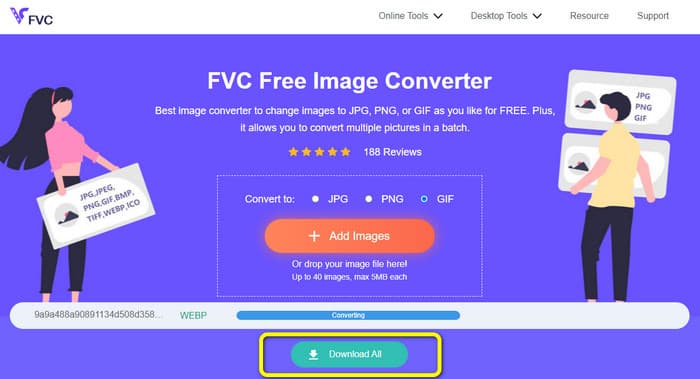
Steg 3: När bilden har laddats upp konverteras dina WebP-bilder automatiskt till GIF-format. När processen är klar klickar du på knappen Download All.
Konvertera WebP till GIF med FreeConvert
FreeConvert är en pålitlig WebP till GIF-konverterare online. Den har en enkel process och ett lättbegripligt gränssnitt. Både avancerade och oerfarna användare kan använda det här verktyget. Dessutom kan det konvertera mer än 500 olika bildformat som JPG, PNG, WebP och andra. RAW-bilfiler från kameror är också enkla att konvertera. Du kan använda den här bildkonverteraren i valfri webbläsare, till exempel Chrome, Firefox, Edge, Safari osv. Den erbjuder filsekretess och säkerhet. När du har sparat dina konverterade bilder raderar verktyget dina data. Men det finns vissa begränsningar, särskilt när du använder gratisversionen. Den maximala filstorleken du kan ladda upp är bara 1 GB. Det är bäst att köpa verktyget om du vill ladda upp större bilder med den här bildkonverteraren. Dessutom visar den här bildkonverteraren annonser på webbsidan, vilket är störande för användare. Den kräver också en internetanslutning för att fungera optimalt.
Steg 1: Gå till webbsidan för FreeConvert i din webbläsare. Klicka på knappen Choose Files på webbsidan för att lägga till WebP-bilderna. Du kan ladda upp två eller fler bilder för att göra en batchkonvertering.
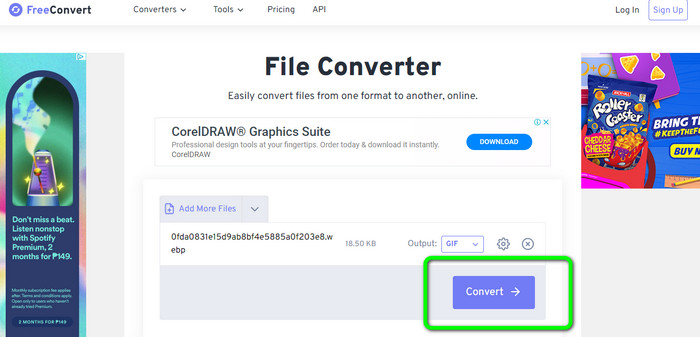
Steg 2: Efter att du laddat upp bilden går du till formatinställningarna. Välj sedan GIF som ditt utdataformat. Du kan också klicka på ikonen Settings för att ändra storlek på din utdatafil.
Steg 3: När konverteringen är klar klickar du på knappen Download. På så sätt sparar du din konverterade fil på datorn.
Konvertera WebP till GIF med Ezgif
Du kan också använda Ezgif som en WebP till GIF-konverterare. Med hjälp av den här bildkonverterarens enkla arbetsflöde kan du konvertera dina WebP-filer till GIF-filer. Dessutom har den ett lättanvänt gränssnitt som gör allt tydligt. Detta gör det möjligt för alla användare att använda konverteraren. Själva konverteringsprocessen går också snabbt. Du kan konvertera bilder på bara några sekunder. Ezgif fungerar i alla webbläsare. Du kan använda den här bildkonverteraren i Google, Firefox, Explorer med flera. Ezgif har också fler funktioner. Förutom att konvertera bilder kan du även konvertera videofiler. Du kan dessutom beskära och rotera dina bilder fritt. Verktyget har dock begränsningar. Du kan bara ladda upp upp till 50 MB. Det finns också tillfällen då verktyget inte fungerar bra, särskilt med en dålig internetanslutning.
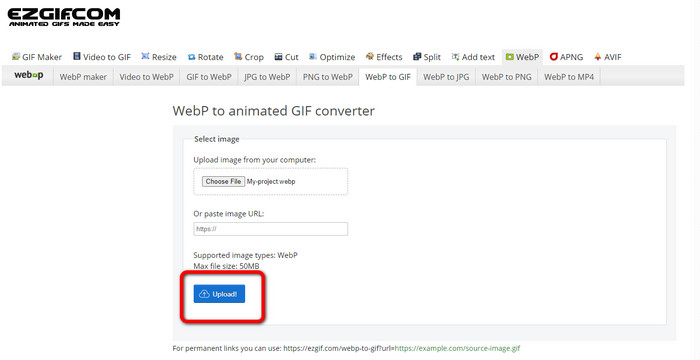
Steg 1: Gå till webbplatsen för Ezgif. Klicka på knappen Choose Files. Öppna WebP-bilderna från dina datorfiler. Du kan också ladda upp bilden via en länk.
Steg 2: När du har laddat upp WebP-bilden klickar du på knappen Upload.
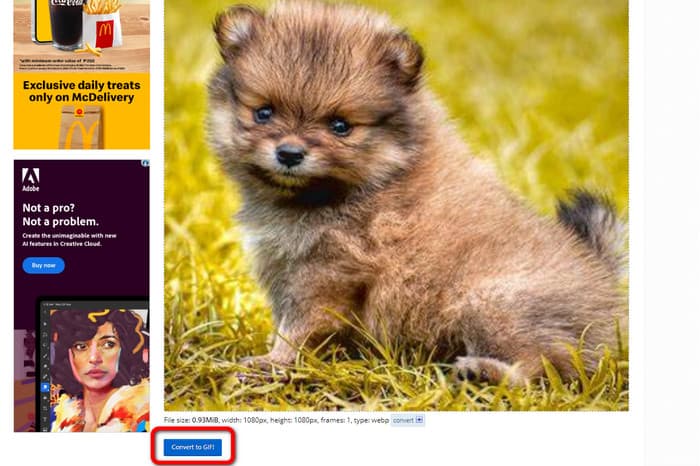
Steg 3: Din bild visas på skärmen. Klicka på knappen Convert to GIF för att starta konverteringen. Klicka sedan på Save.
Hur man konverterar WebP till GIF med Picosmos Tools
Behöver du ännu en konverterare på datorn för att konvertera WebP-filer till GIF? Testa Picosmos Tools. Det här konverteringsprogrammet körs på Windows. Det gör att du snabbt kan konvertera en WebP-fil till en GIF utan kostnad. Dessutom läggs ingen vattenstämpel till på din konverterade fil. Det är också mer än bara en WebP till GIF-konverterare. Det innehåller dessutom en kraftfull bildredigerare som gör det enkelt att redigera, designa och komponera dina fotografier. Däremot är programmets gränssnitt förvirrande. Det kan bli komplicerat, särskilt för nybörjare. Det tar dessutom tid att installera programmet på datorn.
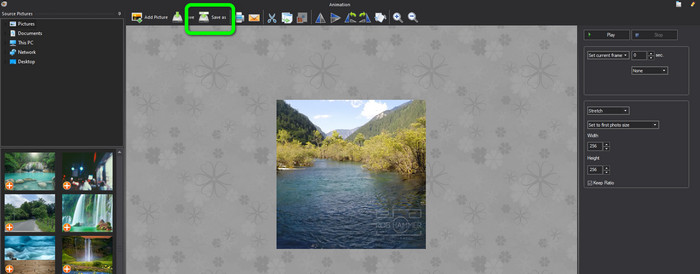
Steg 1: Efter att du har startat programmet klickar du på alternativet Add Picture och lägger till WebP-bilden.
Steg 2: När bilden visas på skärmen klickar du på knappen Save as. På så sätt kan du spara dina WebP-bilder som animerade GIF-filer. Klicka här för att lära dig hur du konverterar WebP till JPG.
Del 3. Vanliga frågor om att konvertera WebP till GIF
1. Vad är fördelen med WebP framför en animerad GIF och vice versa?
WebP är ett nytt format som erbjuder bättre komprimering än GIF. Det innebär mindre filstorlekar och snabbare laddningstider. Men WebP stöds av webbläsare, så det är inte alltid det bästa valet. GIF är ett äldre format som stöds av webbläsare och många enheter. Således är GIF också ett populärt val för enkla animationer. Ändå är de ofta större i filstorlek än WebP-bilder, vilket leder till långsammare laddningstider.
2. Varför är storleken på GIF större än WebP?
WebP används för statiska bilder, medan GIF används för animerade bilder. Det är anledningen till att GIF har en större fil än WebP. Dessutom är GIF förlustfri, vilket innebär att den behåller all information från originalfotot.
3. Accepterar discord WebP?
Tyvärr inte. Discord stöder inte WebP. Så om du vill öppna en bildfil i Discord måste du konvertera den till andra format. Använd sedan FVC Free Image Converter. Det kan hjälpa dig att konvertera dina WebP-bilder till JPG-, PNG- och GIF-format.
Slutsats
Nu vet du hur du konverterar WebP till GIF. Men vissa online- och offline-bildkonverterare kräver en prenumerationsplan och tar lång tid att använda. Om du vill ha en enkel och kostnadsfri bildkonverterare kan du använda FVC Free Image Converter.
-
 Perfekta metoder för att enkelt konvertera WebP till PNG
 Var kunnig om de anmärkningsvärda metoderna för att konvertera WebP till PNG. Den här guideposten ger dig de mest användbara bildkonverterare du kan prova.
-
 Hur man konverterar HEIC till GIF-format [bästa sätten]
 Vill du konvertera HEIC till GIF-filformat? Då hjälper dessa verktyg dig att enkelt konvertera din HEIC-fil till GIF.
-
 5 bästa sätten att ändra bild till animerad GIF [Uppdaterad 2023]
 Behöver du en konverteringsbild till GIF? Den här artikeln kommer att ge de fem bästa omvandlarna vi kan hitta på marknaden. Så låt oss ta reda på dessa verktyg genom att läsa den här artikeln.
