


 Video Converter Ultimate
 Skärminspelare
 Video reparation
 Säker nedladdning
Lär dig de perfekta metoderna för hur man skapar en URL från en bild
Nowadays, image file formats have become popular. These formats are one of the best ways to share and open images in different browsers and programs. However, there are some instances when you can’t share your images, no matter what extension you use. This situation might be troublesome for other people. But little did we know there was a solution to this type of struggle. If you want to share your photos everywhere and anywhere, the best way is to transcode the image into the URL. This way, you can share the photo to others without the help of any extensions. Fortunately, the article has an exceptional solution for you. Please read this post as we give you the best tutorials on how to turn your images into a link.

Del 1. Effektiva metoder för att förvandla en bild till en länk
Konvertera bild till länk med i-Converter
Some image to URL converters online are not working well, so we want to introduce you to i-Converter. It is an online converter you can rely upon to change your image files into a URL link. You can access the online tool on different browsers. It includes Firefox, Chrome, Edge, Explorer, and more. It also has a simple process of converting files. This way, the tool is suitable for you whether you are a skilled user or a beginner. Additionally, it supports various image file formats. You can convert your images to JPEG, BMP, TIFF, PNG, GIF, DOC, and more. Moreover, the i-Converter is free. It means that you can convert your images without purchasing a subscription plan. However, the i-Converter is only exclusive to JPG image files. If your image doesn't have a .jpg file extension, you can't upload it on this online tool. Also, there are times when the tool is not performing well. Since it is an online tool, an internet connection is highly recommended.
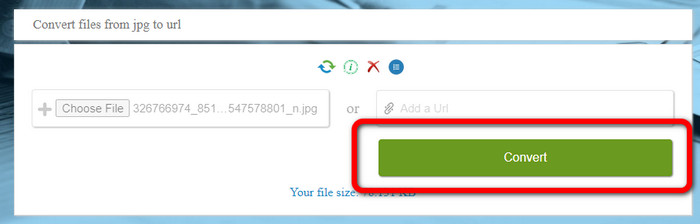
Step 1. Open any browser from your desktop and visit the i-Converter website. When you are already on the main webpage, click the Choose File button. When the computer file appears on the screen, open the image you want to turn into a URL.
Step 2. After uploading the image file you want to convert, click the Convert button. Then, wait for the conversion process. After a few seconds, the tool will give you the link. You can copy the link to the browser to open the image by clicking the Copy Code button.
Hur man gör en bild till en länk med hjälp av Image to Link
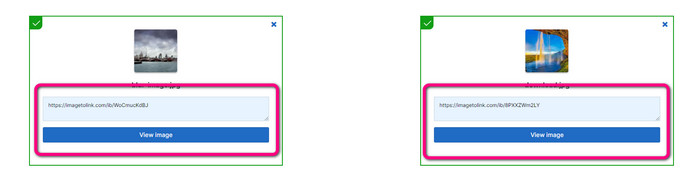
Another online tool you can utilize to convert images to HTML is Image to Link. Compared to the first tool above, the tool supports various input formats like JPG, PNG, and GIF. Also, it offers straightforward methods. After uploading the image, the tool will convert the image automatically. The conversion process is fast so you can get the link quickly. Additionally, Image to Link is available on various web browsers. You can use it on Google, Mozilla, Explorer, and more. All users are capable of operating this tool because of its understandable options. The best thing is that you can convert multiple images at once. This way, converting more files is perfect when using the tool. However, when using the converter, some ads appear on the screen, making it frustrating for users. Also, when converting multiple files, you can only upload up to five images. You also need internet access to use the online image converter.
Step 1. Navigate to the Image to Link website from your browser. On the webpage, click the Start Uploading button. Then open the image file you want to convert from your computer file. You can upload up to five images when doing a batch conversion process.
Step 2. After uploading, the tool will automatically turn the image into a link. Afterward, the tool will provide a link that you can use to open the image. To open the image, copy the given link and paste it into your browser.
Del 2. Hur man ändrar bilder till JPG, PNG och GIF
Konvertera bilder till JPG, PNG och GIF på FVC Free Image Converter
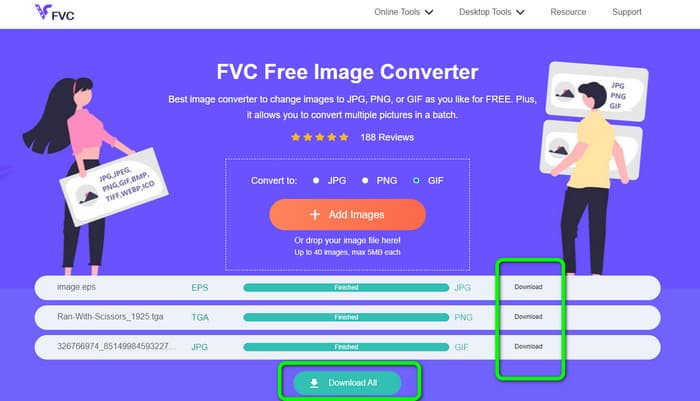
One of the leading online image converters you can use is the FVC Free Image Converter. The tool can transcode your image into various formats like JPG, PNG, and GIF. Also, it supports various input formats, including BMP, SVG, ICO, WebP, and more. You can convert images in just a simple method, which is perfect for users. Additionally, The image converter has great features you can enjoy. It is the batch conversion feature. It allows you to upload multiple images and convert them in a single click. Note that you can convert up to 40 image files. It also offers a fast conversion process wherein you can convert images in a few seconds.
Dessutom, FVC Free Image Converter i alla webbläsare, så att du kan använda den överallt så länge du har en internetanslutning. Verktyget garanterar också din integritet. Under konverteringsprocessen kommer du aldrig att stöta på några irriterande annonser på din skärm. När du har sparat dina konverterade bilder kommer verktyget att radera din data, så att ingen kan se dina uppladdade och konverterade bilder. Använd de listade metoderna nedan för att enkelt konvertera bilder till JPG-, PNG- eller GIF-format.
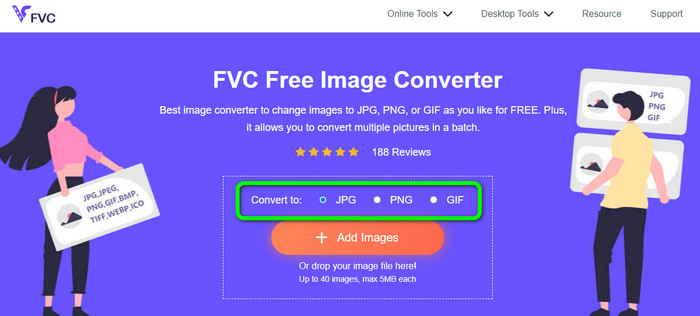
Step 1. Navigate to the official website of FVC Free Image Converter. You can access this online image converter on all browsers. After that, you can click the JPG, PNG, or GIF format from the format option.
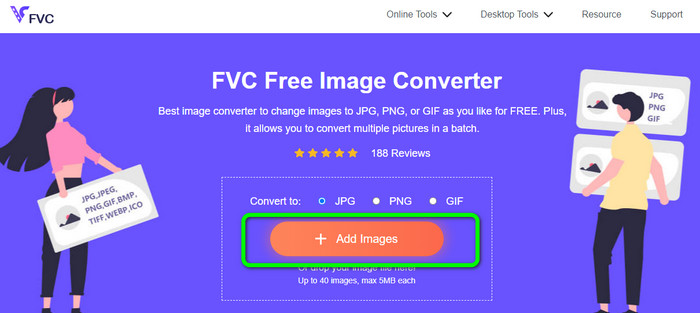
Step 2. Click the Add Images to upload the image file from your computer. You can also drop and drag the file into the box. Since the tool offers a batch conversion process, you can upload multiple files simultaneously.
Step 3. You will see that the image converter will convert the images automatically after the uploading process. When the conversion process is done, click the Download All button to save them in one click. But, if you prefer to save the image manually, click the Download button on the right.
Del 3. Vanliga frågor om att konvertera bilder till länk
1. Varför förvandla en bild till en länk?
Du kan använda en bild som en knapp om du har en webbplats eller blogg. På så sätt kan användare komma åt din hemsida eller en viss sida. Dessutom är det möjligt att länka bilder i sociala medier eller e-postsignaturer. Det är också ett fantastiskt sätt att marknadsföra din webbplats eller blogg och öka trafiken. Här är bara några av de viktigaste motiveringarna för URL-konvertering från en bild.
2. Vilka är fördelarna med att förvandla en bild till en länk?
Det kan vara enklare för användare att klicka på din länk om du konverterar en bild till en länk. Om du vill att besökarna ska klicka på en liten bild, kommer att göra bilden till en URL för att ge dem ett mer omfattande område att klicka på. Att dela ditt material med andra kan göra det mycket enklare att upptäcka nya varor eller tjänster.
3. Hur hittar jag webbadressen till en bild på en webbplats?
Högerklicka på bilden och välj Kopiera bildlänk för att få webbadressen till en bild på en webbplats. Du kan sedan öppna webbadressen på en ny flik för att spara bilden eller dela webbadressen via e-post, sociala medier och andra kanaler.
Slutsats
There you go! Now you have learned the best methods to convert images to links. In addition to that, you discovered the most straightforward ways of converting images to JPG, PNG, and GIF formats. Thus, if you want to change your images to URL links, see the effective methods above. On the other hand, if you want an outstanding image converter to convert images to other formats, use FVC Free Image Converter.
-
 Metoder för hur man konverterar bilder till JPG online och offline
 Vill du konvertera filen till JPG-format av någon anledning? Då är den här artikeln för dig. Vi kommer att lära dig den bästa metoden för att konvertera din bild till JPG
-
 Användbara metoder för att enkelt konvertera bilder till PNG-format
 Letar du efter det bästa sättet att spara din bild som PNG? Denna guidepost erbjuder utmärkta lösningar för dig att konvertera bilder till PNG online och offline
-
 Vad är JPEG/JPG: Konvertera dina bilder till JPG utan ansträngning
 Är du nyfiken på vad JPEG betyder? Vi har ett svar till dig. Du kommer också att lära dig hur du konverterar olika bildformat till JPG-filer. Läs inlägget nu.
