


 Video Converter Ultimate
 Skärminspelare
 Video reparation
 Säker nedladdning
Hur man konverterar JFIF till JPG: Få de effektiva metoderna du kan prova
Numera är filformatet JFIF ovanligt. Vissa program stöder inte den här filtypen. En del användare vet därför inte hur de ska öppna sina JFIF‑bilder i en sådan situation. Om du vill visa din JFIF‑bild måste du dock ändra dess filändelse. Vill du ha en mer välkänd och universell filändelse kan du istället göra om bilderna till JPG. Dessutom är JPG ett av de mest populära bildformaten som du kan använda. Nästan alla webbläsare och program stöder det här formatet. Om du vill konvertera JFIF till JPG är det alltså en bra idé att läsa den här guiden. Vi kan erbjuda olika sätt att göra om din JFIF‑fil till JPG. Utan vidare omsvep – läs artikeln för att ta reda på hur du gör.

Del 1. Enklaste sätten att konvertera JFIF till JPG Online
Bonus: Hur man konverterar JFIF till JPG med FVC Free Image Converter
Att använda FVC Free Image Converter är det mest effektiva sättet att konvertera JFIF till JPG. Du gör ett klokt val när du konverterar bildfiler. Programmet stöder bildformat som JPG, JPEG, PNG, SVG, BMP, TIFF och GIF. På så sätt slipper du oroa dig för att vissa verktyg eller enheter inte kan öppna dina bildfiler. Dessutom bevaras den ursprungliga bildernas höga kvalitet. Efter konverteringen kommer du inte att kunna se någon skillnad mot originalet. Bildkonverteraren stöder dessutom batchkonvertering. Det innebär att du kan konvertera upp till 40 bildfiler samtidigt. Jämfört med andra konverterare är detta betydligt mer praktiskt och effektivt. Det kostar heller ingenting att använda programmet. En gratis bildkonverterare finns här.
Dessutom behöver du inte skapa ett konto för att använda det. Du behöver bara gå till webbplatsen och börja konvertera. Reklam är irriterande, som vi alla vet. Ändå har det här verktyget inga annonser, vilket gör att du kan konvertera i fred. Webbläsare som Chrome, Mozilla, Edge, Explorer och mer ger dig tillgång till den här omvandlaren.
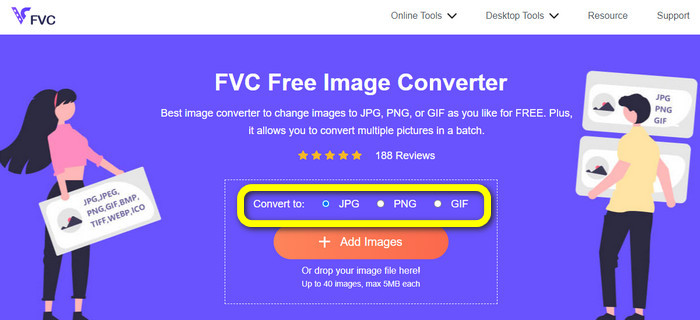
Steg 1. Öppna en webbläsare på din dator. Gå sedan till den officiella webbplatsen för FVC Free Image Converter. Välj JPG som filformat under alternativet Convert to. Du ser detta mitt på skärmen med den orangea listen och plusikonen.
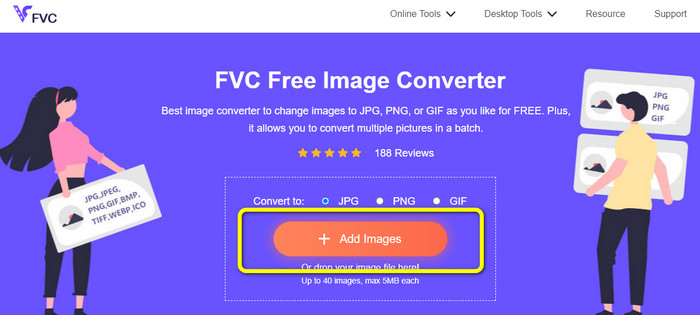
Steg 2. Klicka på knappen Add Images för att ladda upp den JFIF‑bild du vill konvertera. Du kan lägga till fler än en bildfil. När uppladdningen är klar konverteras dina bildfiler automatiskt.
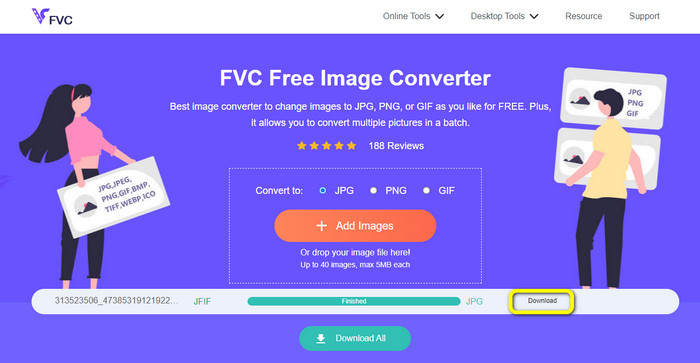
Steg 3. Det sista steget är att spara din konverterade fil genom att klicka på knappen Download.
Hur man konverterar JFIF till JPG med Convertio
Convertio är en av de effektiva webbaserade konverterarna du kan använda för att göra om JFIF‑filer till JPG. Med den här bildkonverterarens enkla arbetsflöde kan du snabbt konvertera dina JFIF‑filer till JPG. Den har också ett användarvänligt gränssnitt och tydlig layout som gör den lätt att förstå. Det gör att både erfarna användare och nybörjare kan använda den här webbkonverteraren. Programmet har dessutom en funktion för batchkonvertering. Du kan alltså konvertera flera bildformat samtidigt. Själva konverteringen går också snabbt – bilderna kan konverteras på bara några sekunder. Populära webbläsare som Google Chrome, Firefox, Internet Explorer med flera stöder Convertio. Convertio har dessutom fler funktioner. Förutom bilder kan du till exempel konvertera video, ljud, dokument och mer.
Convertio har dock vissa begränsningar, speciellt när du använder gratisversionen. Endast 100 MB bilder kan laddas upp. Efter det är bildkonvertering inte längre möjlig. Så om du vill använda alla dess möjligheter, investera i en medlemskapsplan. Dessutom låter gratisversionen dig bara ladda upp två filer medan du utför en batchkonverteringsprocess. Slutligen krävs en snabb internetanslutning för att uppleva en prestanda på hög nivå.
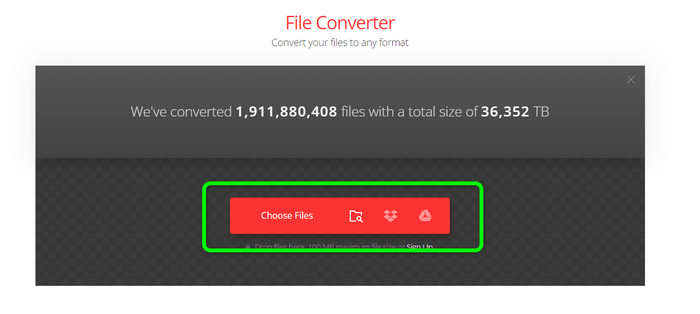
Steg 1. Använd valfri webbläsare på din dator och gå till webbplatsen Convertio. Klicka på knappen Choose Files. Den här knappen finns på den röda listen. När du klickar på den öppnas datorns mappfönster. Leta upp JFIF‑filen och ladda upp den till verktyget.
Steg 2. När JFIF‑bilden har laddats upp går du till formatmenyn. Välj sedan JPG som utdataformat.
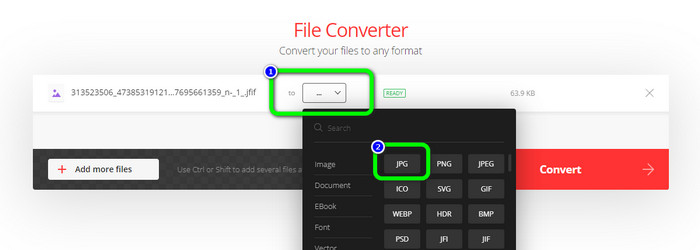
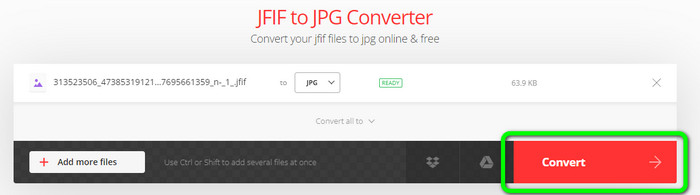
Steg 3. När du har valt JPG‑formatet klickar du på knappen Convert. Vänta några sekunder medan konverteringen genomförs.
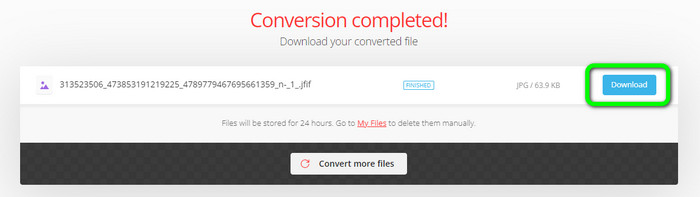
Steg 4. Klicka på knappen Download när konverteringen är klar. På så sätt kan du enkelt öppna din tidigare JFIF‑bild på enheten.
Del 2. Hur man konverterar JFIF till JPG på Windows 11/10
Om du vill spara din JFIF‑fil som JPG‑bildformat kan du använda Bitrecover JFIF Converter Wizard. Du kan ladda ner det här offlineprogrammet gratis till Windows. Dessutom stöder det olika bildformat. Dit hör BMP, PNG, TIFF, PDF med flera, vilket gör det extra praktiskt för konverteringsarbete. Programmet har också en snabb konverteringsprocess, så det tar inte mycket tid för användaren. Det finns dock vissa nackdelar när du använder den här konverteraren. I gratisversionen kan du bara konvertera upp till 5 bildfiler. Vill du konvertera fler än fem bilder måste du köpa en prenumerationsplan.
Steg 1. Ladda ner Bitrecover JFIF Converter Wizard till din dator. Starta sedan programmet efter att installationen är klar.
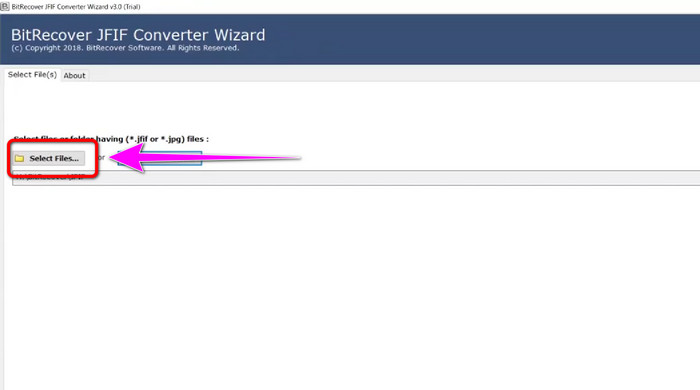
Steg 2. När gränssnittet visas på skärmen klickar du på alternativet Select file för att lägga till de JFIF‑filer du vill konvertera. Klicka sedan på Next nere i vänstra hörnet av gränssnittet.
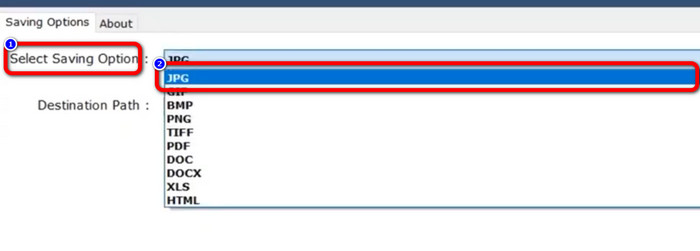
Steg 3. Gå därefter till Select Saving Option. Klicka på formatet JPG som ditt utdataformat.
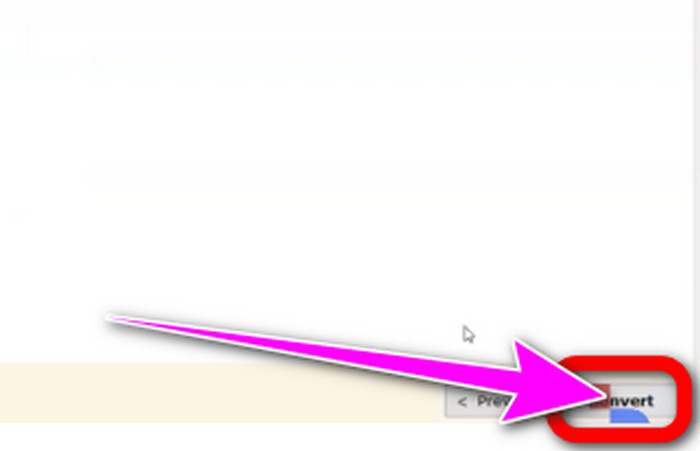
Steg 4. För sista steget klickar du på knappen Convert nere i högra hörnet av gränssnittet.
Del 3. Bästa sättet att konvertera JFIF till JPG på Mac
Du kan konvertera JFIF till JPG med hjälp av det inbyggda Mac‑programmet Förhandsvisning (Preview). Med det här offlineprogrammet kan du göra om JFIF‑filer till JPG. Är du däremot inte Mac‑användare eller obekant med enheten kan du behöva lägga lite extra tid på det. Om du är villig att lära dig kan du följa stegen nedan.
Steg 1. Högerklicka på filen, välj Open With i snabbmenyn och välj sedan Preview. Om Förhandsvisning inte visas som alternativ för just den här filtypen kan du dubbelklicka på filen.
Steg 2. Ett popup‑meddelande om att det inte finns något program för att öppna dokumentet kommer att visas. Klicka på alternativet Choose Application.
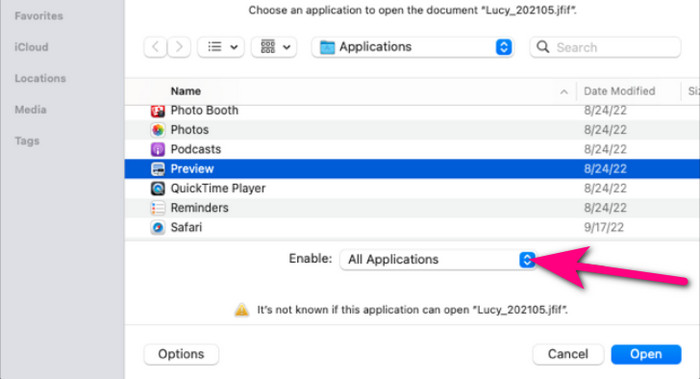
Steg 3. När programmappen öppnas väljer du All Applications i rullgardinsmenyn Enable längst ned. Välj sedan Preview i listan och klicka på Open.
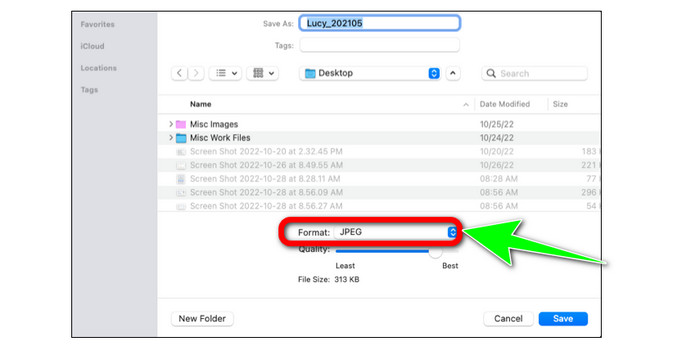
Steg 4. Din JFIF‑bild ska nu visas i Förhandsvisning. Håll ner Option‑tangenten, klicka på File i menyraden och välj sedan Save as.
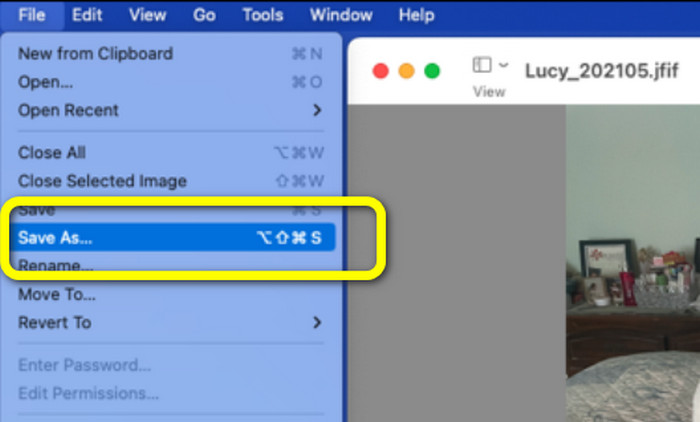
Steg 5. Välj JPEG i rullgardinsmenyn Format i dialogrutan Save As. Vid behov kan du justera kvaliteten med hjälp av skjutreglaget.
Del 4. Vanliga frågor om att konvertera JFIF till JPG
1. Vad är skillnaden mellan en .jfif-fil och en .jpeg-fil?
JFIF-filer är vanligtvis rå datorkod. Det är inte en bild- eller videofil, som ibland inte ens kan nås. Mer tekniskt sett är JFIF-filerna JPG-filens källkoder. JFIF är JPG virtuell fildata som har bitmappats för lagring.
2. Vilka är fördelarna med att använda en JFIF-fil?
JFIF-formatet definierar flera egenskaper som det ursprungliga JPEG-formatet hade utelämnat. Användare kunde spara och distribuera filer med hjälp av JPEG-komprimering efter att viktiga detaljer, såsom ett standardhuvud, specifikationer för upplösning och bildförhållande, och färgmodell, fastställts. Många digitalkameror har historiskt lagrade foton i JFIF-format.
3. Hur vet jag om en bild är JFIF?
När du har hittat bildfilen måste du gå vidare till förlängningsfältet till höger, där många alternativ finns tillgängliga. Ett JFIF-tillägg kommer att väljas som standard när du kommer till den tilläggsmenyn. Detta innebär att JFIF har valts som standardbildtillägg eller -format när du sparar en bild.
Slutsats
All informationen ovan beskriver de bästa metoderna för att konvertera JFIF till JPG. Om du föredrar webbaserade sätt att konvertera bilder är FVC Free Image Converter ett bättre val. Den har ett mer lättöverskådligt och enkelt arbetsflöde än många andra onlinekonverterare.
-
 Lär dig de enklaste metoderna för att snabbt konvertera WebP till JPG
 Låt oss alla lära oss effektiva sätt att enkelt konvertera webbbilder till JPG. Den här artikeln ger dig utmärkta bildkonverterare som du kan använda för att konvertera bildfiler.
-
 Topp 5 ledande handledningar för att snabbt konvertera PNG till JPG
 Om du behöver konvertera din PNG-fil till JPG-format kan du lära dig de bästa sätten här. Du kommer också att lära dig skillnaden mellan PNG- och JPG-filformat.
-
 Enkla metoder för hur man konverterar SVG till JPG-format
 Hittar du det bästa sättet att konvertera SVG till JPG? Det här inlägget kommer att ge några säkra handledningar som du kan prova. Du kommer också att upptäcka SVG till JPG-konverteraren åt dig.
