


 Video Converter Ultimate
 Skärminspelare
 Video reparation
 Säker nedladdning
Sätt igång ditt musikspel: Konvertera MP3 till MIDI och remixlåtar
Om du är musiker eller musikproducent vet du att rätt verktyg kan göra all skillnad i din kreativa process. Ett verktyg som kan lyfta din musik till nästa nivå är möjligheten att konvertera MP3‑filer till MIDI. Även om MP3 är utmärkta för att lyssna på musik, erbjuder MIDI‑filer oöverträffad flexibilitet och möjlighet till anpassning. Genom att konvertera dina MP3 till MIDI kan du manipulera enskilda noter, ändra tempo och tonart i en låt och till och med lägga till nya instrument eller ljud i ett befintligt spår.
Med rätt konverteringsverktyg är möjligheterna oändliga. Oavsett om du vill skapa unika remixer av dina favoritlåtar, transkribera ett musikstycke för noter eller experimentera med nya ljud och arrangemang, kan omvandling av MP3-filer till MIDI revolutionera din musik och ta din kreativitet till nya höjder.

Del 1. Jämförelse mellan MP3 och MIDI
Om du vill inspektera för en specifik jämförelse av dessa två format i olika aspekter, kan du hänvisa till tabellen nedan.
| Funktioner | MP3 | MIDI |
| Filstorlek | Relativt stor | Väldigt liten |
| Ljudkvalitet | Förlustig kompression, hög kvalitet | Låg kvalitet, men anpassningsbar |
| Redigerbarhet | Inte lätt att redigera | Mycket redigerbar |
| Instrumentation | Fast instrumentering | Anpassningsbar instrumentering |
| Användande | Lyssnar på musik | Redigera och producera musik |
| Kompression | Förlustig kompression | Ingen kompression |
Del 2. Sätt att konvertera MP3 till MIDI eller MIDI till MP3 på Windows och Mac
FVC Video Converter Ultimate är ett mångsidigt verktyg för videokonvertering som möjliggör enkel konvertering av videor till en rad olika format. Denna programvara kan hantera ett brett urval av filformat, såsom MP4, AVI, MOV, WMV och andra. Denna egenskap gör den mycket attraktiv för användare som vill omvandla sina videofiler för olika enheter eller plattformar.
Förutom dess robusta videokonverteringsfunktioner, innehåller FVC Free Video Converter Ultimate sofistikerade attribut som videoredigering, batchkonvertering och andra avancerade funktioner. FVC erbjuder en användarvänlig design och ett intuitivt gränssnitt som underlättar videoredigeringsuppgifter som att trimma, beskära, lägga till vattenstämplar och justera videoeffekter. Denna programvara gör det möjligt för användare att skapa skräddarsydda videor skräddarsydda för deras specifika behov. Dessutom kan den fungera som en MIDI till MP3-omvandlare. Lär dig hur du använder den genom steg-för-steg-proceduren.
Nyckelfunktioner:
◆ Snabb konverteringshastighet: FVC använder avancerad konverteringsteknik, vilket resulterar i snabbare konverteringstider jämfört med andra liknande verktyg.
◆ Anpassningsalternativ: FVC låter dig anpassa dina konverteringsinställningar, såsom video- och ljudkodek, bithastighet, bildhastighet och upplösning.
◆ Användarvänligt gränssnitt: FVC har ett intuitivt och lättanvänt gränssnitt.
Steg 1. Ladda ned och installera programmet
Till att börja med är det nödvändigt att ladda ned och installera programvaran FVC Video Converter Ultimate på din dator. Klicka på knappen Free Download nedan och starta därefter programmet.
Gratis nedladdningFör Windows 7 eller senareSäker nedladdning
Gratis nedladdningFör MacOS 10.7 eller senareSäker nedladdning
Steg 2. Lägg till MIDI‑ eller MP3‑filer i programmet
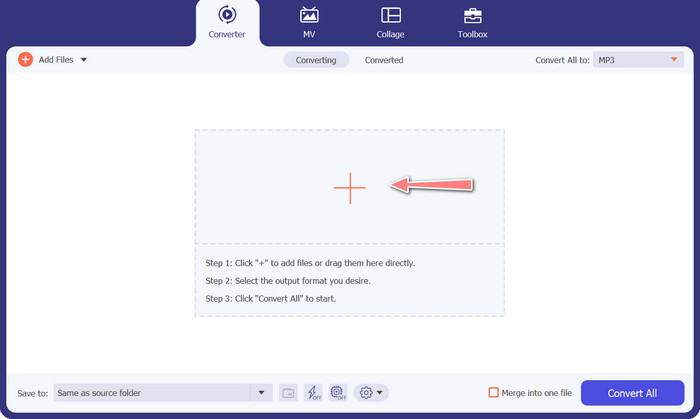
Därefter lägger du till den MIDI‑ eller MP3‑ljudfil som du vill konvertera. Klicka på knappen Add Files för att importera dina ljudfiler. När ljudfilen har lagts till i programmet bör dess miniatyrbild bli synlig.
Steg 3. Välj ett utdataformat
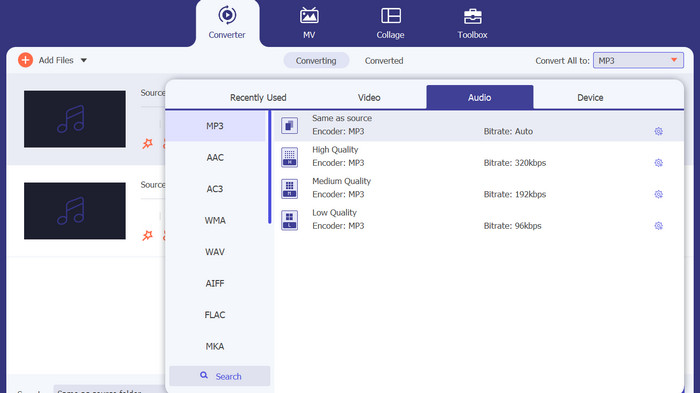
Efter ovanstående steg är det lämpligt att välja ett passande utdataformat. Välj formatet MP3 som utdata i rullgardinsmenyn bredvid avsnittet Convert All to. Om du vill anpassa inställningarna kan du justera utdata för videon genom att klicka på knappen Custom Profile.
Steg 4. Starta konverteringen
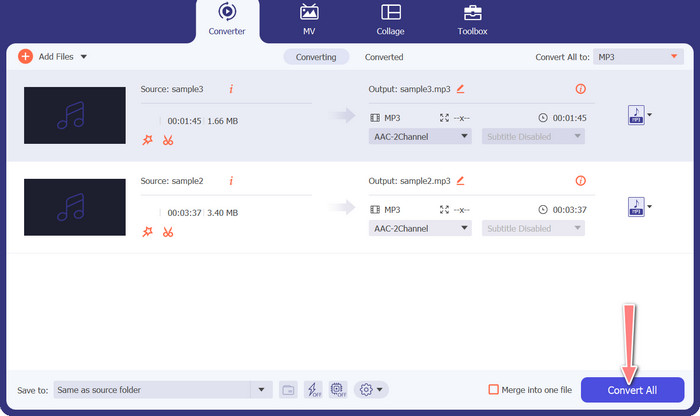
Slutligen väljer du alternativet Convert All för att starta konverteringsprocessen. När konverteringen är klar sparas MP3‑filerna i den angivna utdatakatalogen.
2. Gratis Audio Converter Online
Ett annat sätt du kan använda är Free Audio Converter Online. Som namnet antyder är detta ett onlineprogram som körs direkt i webbläsaren. Du behöver alltså inte ha något särskilt MP3‑till‑MIDI‑konverteringsprogram installerat. Allt är åtkomligt och kan göras direkt i din webbläsare. Det halkar inte efter när det gäller funktioner. Du kan också ladda upp många filer eller göra batchkonvertering och anpassa profilen för en video- eller ljudfil. Lär känna denna bästa MP3‑till‑MIDI‑konverterare online genom att följa stegen nedan.
Nyckelfunktioner
◆ Tillgänglighet online: Som ett onlineverktyg kan en gratis ljudkonverterare online nås var som helst.
◆ Batchkonvertering: Detta gratis verktyg för att konvertera MIDI till MP3 online låter användare konvertera flera ljudfiler samtidigt, vilket sparar tid och ansträngning.
◆ Snabb konverteringshastighet: Det är en molnbaserad server som kan hantera konverteringsprocessen, vilket möjliggör snabba konverteringshastigheter.
Steg 1. För att börja använda Free Audio Converter Online ska du först öppna din favoritwebbläsare och gå direkt till webbplatsen.
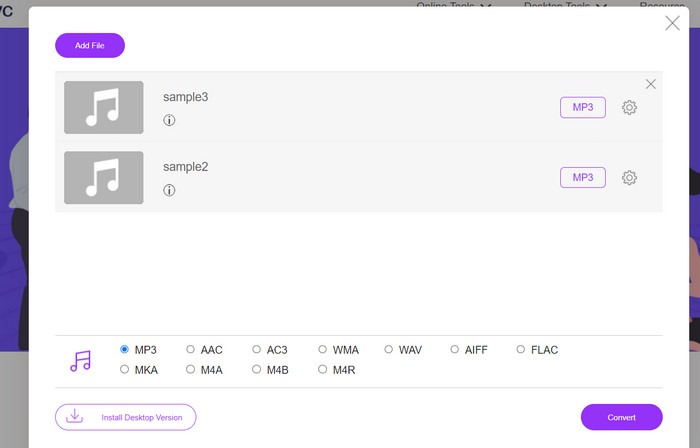
Steg 2. Klicka på alternativet Add Files to Convert, så uppmanar verktyget dig att ladda ned och installera dess lilla startprogram. När installationen är klar kan du ladda upp dina MIDI‑ eller MP3‑filer.
Steg 3. Välj MP3 som format för slutresultatet i menyn Audio format. Kvaliteten på den färdiga MP3‑filen kan justeras genom att välja en annan bithastighet (bitrate).
Steg 4. Avslutningsvis klickar du på knappen Convert för att starta konverteringsprocessen.
Del 3. Konvertera MP3 till MIDI eller MIDI till MP3 på mobilen
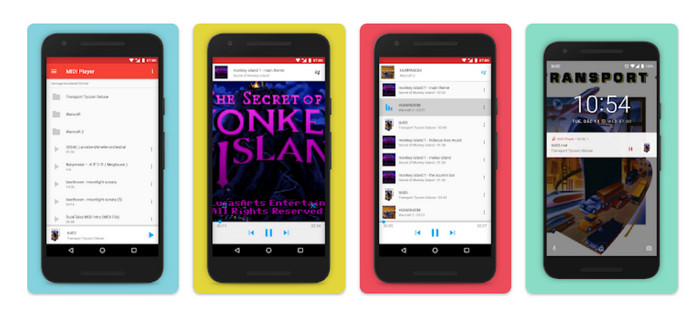
MIDI Player & Converter är en mobilapp som är designad för Android-enheter och används främst för att spela och konvertera MIDI-filer till andra ljudformat. Programmet är gratis att ladda ner och det ger ett användarvänligt gränssnitt. En av nyckelfunktionerna i MIDI Player & Converter är dess inbyggda MIDI-spelare, som låter användare lyssna på MIDI-filer med högkvalitativt ljud. Utöver sina MIDI-uppspelningsmöjligheter innehåller MIDI Player & Converter även verktyg för att konvertera MIDI-filer till andra ljudformat, inklusive MP3, WAV och AAC.
Nyckelfunktioner
◆ Ljudkonvertering: Appen tillåter användare att konvertera MIDI-filer till andra ljudformat, inklusive MP3, WAV och AAC.
◆ Anpassningsbara utmatningsinställningar: Användare kan justera utgående ljudkvalitet, samplingshastighet och bithastighet till sina preferenser.
◆ Justering av tempo och tonhöjd: Appen innehåller också verktyg för att justera ljudfilens tempo och tonhöjd under konverteringsprocessen.
◆ Batchkonvertering: MIDI Player & Converter tillåter användare att konvertera flera MIDI-filer till ljudformat samtidigt.
Steg 1. För att ändra en MIDI‑fil till MP3 kan du ladda ned och installera MIDI Player & Converter via Google Play Store.
Steg 2. Starta appen och välj funktionen Convert i huvudmenyn.
Steg 3. Gå till kategorin Source och välj alternativet MIDI. Fortsätt med att välja den MIDI‑fil du vill konvertera. I kategorin Target väljer du formatet MP3 som utdata.
Steg 4. Anpassa utdata‑parametrarna, inklusive men inte begränsat till ljudkvalitet, samplingsfrekvens och bithastighet, efter dina egna preferenser. Använd de inbyggda verktygen för att ändra ljudets tempo och tonhöjd. Starta konverteringsprocessen genom att välja alternativet Convert.
Vidare läsning:
Konvertera MP3 till OGG och njut av överlägsen ljudkvalitet
FLAC vs. MP3: Vilket ljudfilformat är egentligen bäst?
Del 4. Vanliga frågor om att konvertera MP3 till MIDI
Är det lagligt att konvertera MIDI-filer till MP3?
Lagligheten av att konvertera MIDI-filer till MP3-filer kan variera beroende på upphovsrättslagarna i ditt land. Om du äger rättigheterna till MIDI-filen eller har tillstånd från upphovsrättsinnehavaren bör det vara lagligt att konvertera den till en MP3. Å andra sidan är det alltid en bra idé att inspektera lagarna i din region för att säkerställa att du inte bryter mot några upphovsrättsregler.
Kan jag anpassa utdatainställningarna när jag konverterar en MIDI-fil till en MP3?
Ja, de flesta MIDI till MP3-konverteringsverktyg låter dig anpassa utdatainställningarna, såsom ljudkvalitet, samplingshastighet och bithastighet. Detta kan hjälpa dig att uppnå önskad ljudkvalitet och filstorlek för din MP3.
Kan jag konvertera MP3 till MIDI i Audacity?
S: Audacity kan inte direkt konvertera MP3-filer till MIDI-filer. Även om Audacity är en kraftfull programvara för ljudredigering och inspelning, har den inte förmågan att känna igen och extrahera enskilda anteckningar från en MP3-fil, vilket är nödvändigt för att skapa en MIDI-fil.
Slutsats
Processen att konvertera formatet MIDI till MP3, eller tvärtom, kan vara ett praktiskt sätt att underlätta delning och uppspelning av musikaliska verk på olika plattformar och enheter. Olika verktyg står till förfogande för detta ändamål, såsom programvara installerad på stationära datorer, webbaserade konverterare och appar för mobila enheter.
-
 M4A vs MP3: Vilket ljudfilformat passar dig?
 Är du sliten mellan M4A och MP3 ljudformat? Vår omfattande granskning och jämförelse av M4A vs. MP3 hjälper dig att välja den bästa filtypen för dina behov
-
 Hur man konverterar MP3 till M4A för förbättrad ljudkvalitet
 Förbättra kvaliteten på dina musikfiler genom att konvertera MP3 till M4A med våra experttips och tricks. Vår guide erbjuder steg-för-steg-instruktioner och rekommenderad programvara
-
 Exceptionella MP3 till AIFF-konverterare för Windows och Mac
 Den här handledningen går igenom varje steg i att konvertera MP3 till AIFF med hjälp av betrodda verktyg. Besök dem för att få veta mer
