


 Video Converter Ultimate
 Skärminspelare
 Video reparation
 Säker nedladdning
Konvertera 3GP till MP4 med effektiva och användarvänliga omvandlare
Behovet av att konvertera filformat har ökat avsevärt. En särskild omvandling som har enorm betydelse är att konvertera 3GP-filer till MP4-format. Medan 3GP-filer var populära tidigare, utgör de ofta kompatibilitetsproblem på moderna enheter och plattformar. Däremot erbjuder MP4-formatet universell kompatibilitet, högkvalitativ uppspelning och bredare stöd över olika enheter och plattformar.
To address the need for converting 3GP to MP4 seamlessly, we have carefully reviewed and curated a list of powerful conversion tools. These tools provide efficient and reliable solutions to effortlessly transform your 3GP videos into the widely compatible MP4 format. Join us as we explore these top-rated conversion tools and discover how they can enhance your video experience by ensuring optimal playback quality and compatibility across multiple platforms and devices.

Del 1. Bästa 3GP till MP4-omvandlare
1. Video Converter Ultimate
Video Converter Ultimate is an excellent program for converting videos to 3GP and MP4, and other audio formats. This software has a batch conversion function that lets you convert multiple audio files at once. In addition, the application lets users optimize the quality of their output by changing parameters like frame rate, bitrate, and resolution. Read the little tutorial we've prepared below if you want to learn how to convert 3GP to MP4.
Nyckelfunktioner
◆ Programvaran FVC Video Converter Ultimate är designad för att generera överlägsna video- och ljudfiler, med fokus på att bevara de konverterade filernas ursprungliga kvalitet i största möjliga utsträckning.
◆ Applikationens gränssnitt är designat för att vara användarvänligt och intuitivt, vilket underlättar navigering för både nybörjare och avancerade användare.
◆ FVC Video Converter Ultimate är ett mjukvaruverktyg som uppvisar hög hastighet och effektivitet, vilket underlättar snabb konvertering av olika filformat.
Step 1. Get the 3GP to MP4 Converter App
First, click the relevant Free Download option below to begin downloading the program to your device. The next thing you should do is to follow the on-screen prompts in order to activate the software. Once it's set up, you can ask for assistance with the user interface.
Gratis nedladdningFör Windows 7 eller senareSäker nedladdning
Gratis nedladdningFör MacOS 10.7 eller senareSäker nedladdning
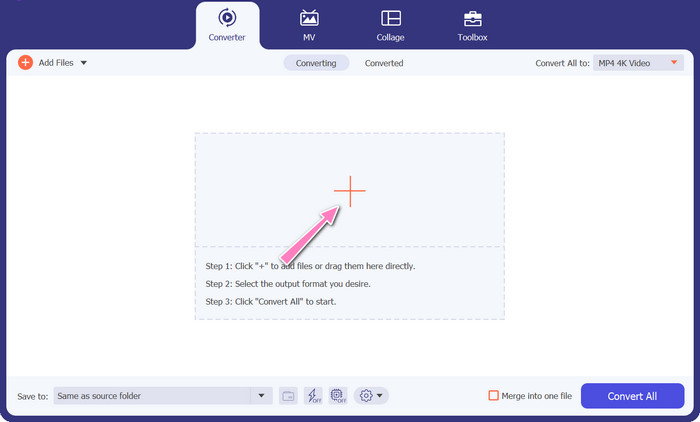
Step 2. Upload 3GP movie files
The second step is to import the movie file you wish to edit by hitting the Add icon on the main screen. After that, a preview of the imported file will load. If you wish to convert many files at once, just upload the folder. Choose the directory that has all of your audio files.
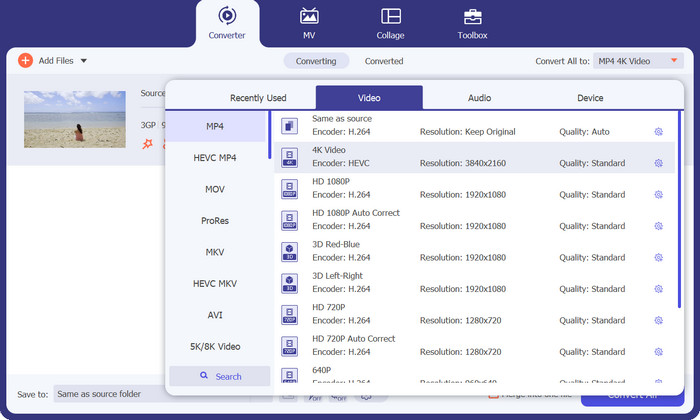
Step 3. Select output format
Third, hit the Converter All to button at the top of the program's interface to select a new format for the final product. Select MP4 from the Video Output drop-down menu. You have control over the output file quality by modifying its sample rate and bitrate.
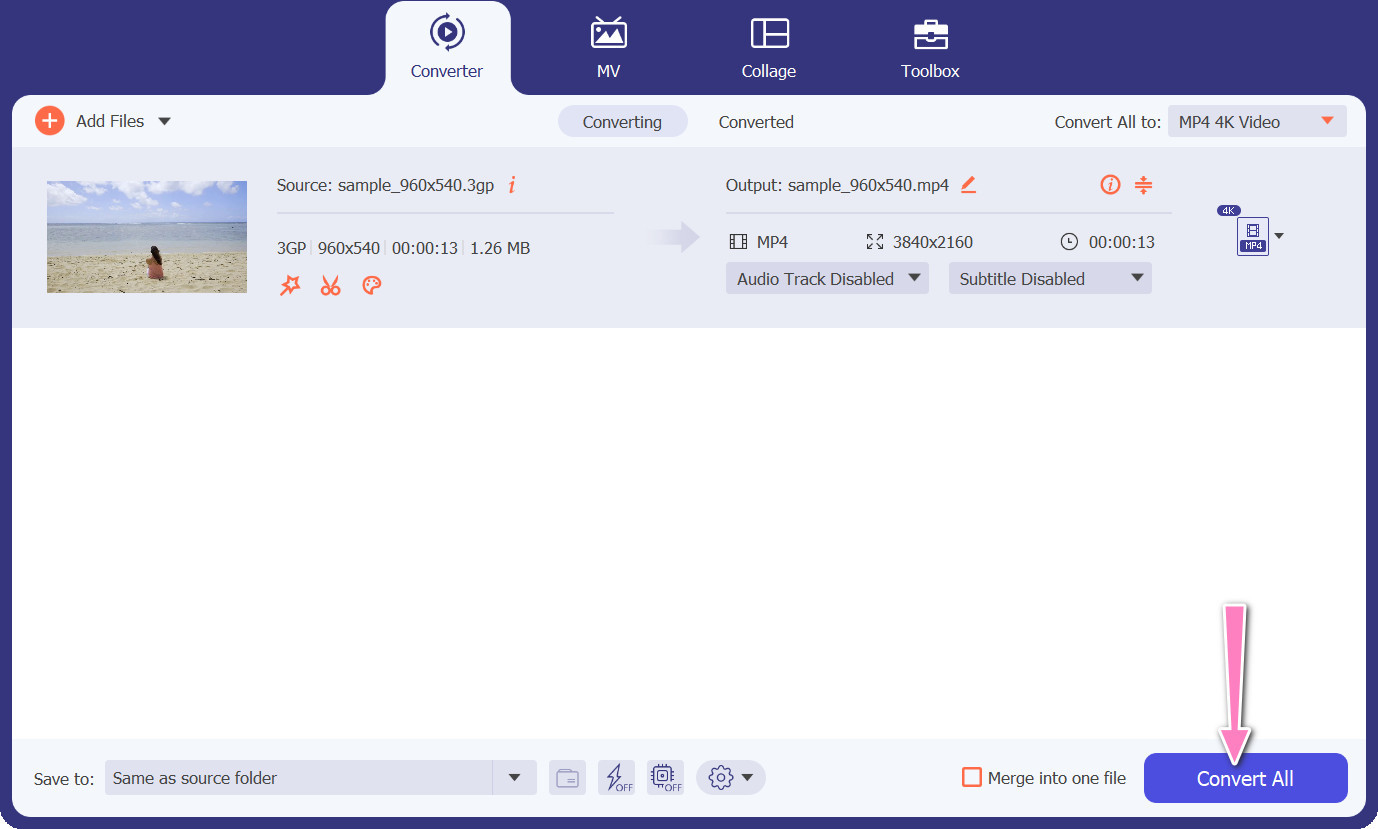
Step 4. Start the conversion process
Fourth, start the transformation by pressing the Convert All button down below. The output folder will then open so you can double-check the converted file.
2. Gratis MP4 Converter Online
The utilization of Free MP4 Converter Online presents a viable alternative to the installation of a desktop program, thereby offering a convenient solution. This 3GP to MP4 converter online operates with seamless efficiency, ensuring the protection and confidentiality of personal data during the conversion process. Additionally, the software's bulk conversion functionality can be utilized similarly to that of a desktop program.
Nyckelfunktioner
◆ Free MP4 Converter Online låter dig anpassa utdatainställningarna enligt dina preferenser. Du kan justera parametrar som videocodec, upplösning, bithastighet och bildhastighet för att uppnå önskad kvalitet och filstorlek.
◆ Free MP4 Converter Online stöder batchkonvertering, vilket gör att du kan ladda upp och konvertera flera 3GP-filer till MP4 samtidigt. Detta sparar tid och ansträngning när du hanterar flera filer.
◆ Free MP4 Converter Online värdesätter användarnas integritet och använder åtgärder för att skydda dina uppladdade filer. De erbjuder ofta alternativ för att radera filer efter konvertering eller lagra dem säkert under en begränsad period.
Step 1. The initial step is to navigate to the primary website of the Free MP4 Converter Online by clicking on the provided hyperlink. Navigate to the Add Files to Convert option located on the primary interface and proceed to upload your audio file.

Step 2. Upon execution, the display of the initial document will be presented on the interface. Select your preferred output format by turning downwards from the same panel.
Step 3. Proceed to select the Convert button in order to change 3GP to MP4. To convert additional files, it is necessary to repeat the aforementioned instructions from the beginning.

3. Vilken videokonverterare som helst
Det flitigt använda skrivbordsprogrammet Any Video Converter har en gratis webbaserad motsvarighet. Det är möjligt att konvertera 3GP till MP4, och den har massor av sofistikerade inställningar och batchbearbetning. Videoredigering och DVD-bränning är bara två av de extrafunktioner som finns i mjukvaruversionen.
Nyckelfunktioner
◆ Vilken videokonverterare som helst låter dig anpassa videoupplösning, bithastighet, bildhastighet och ljudkvalitet. Den optimerar utdatavideo till dina specifikationer.
◆ Vilken videokonverterare som helst låter dig klippa, beskära, slå samman och lägga till effekter till videor. Undertexter och vattenstämplar anpassar videor.
◆ Alla videokonverterare stöder import och inbäddning av undertexter i dina videor. Du kan lägga till externa undertextfiler eller manuellt mata in undertexter för att göra dina videor mer tillgängliga eller flerspråkiga.
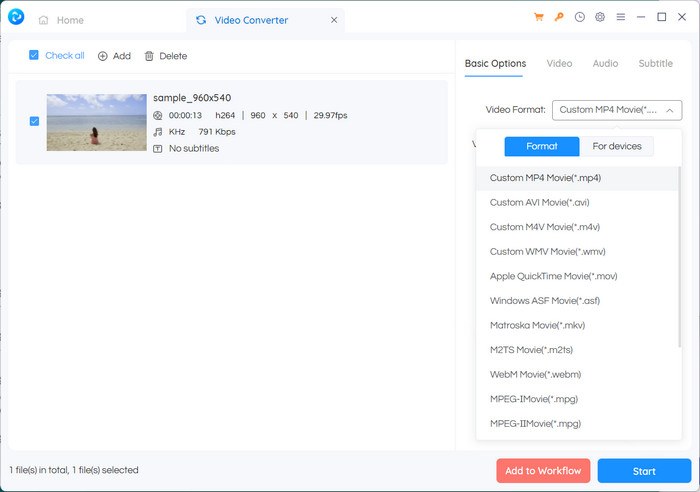
Step 1. First, install Any Video Converter. Download Any Video Converter from its website and install it on your computer using the on-screen directions. Launch Any Video Converter.
Step 2. Click on the Add Video(s) button within the software. Browse and select the 3GP files you want to convert to MP4. Next, click Open to add the selected files to the conversion queue.
Step 3. In the Profile section, select MP4 as the desired output format. You may have different MP4 options to choose from based on your preferences and requirements. Select the one that best suits your preferences.
Step 4. Tick on the Start button to begin the conversion process.
Vidare läsning:
Merge 3GP – How to Combine Different Video Clips from Your Smartphone
How to Convert 3GP to MOV Using Different Approaches [2023]
Del 2. Vanliga frågor om 3GP till MP4-omvandlare
Vad är skillnaderna mellan 3GP och MP4?
MP4 stöder fler enheter och plattformar än 3GP. Codecs: MP4 stöder fler ljud- och videocodecs för större kodningsflexibilitet och kvalitet. Funktioner: 3GP stöder inte undertexter, kapitel eller flera ljudspår, medan MP4 gör det. På grund av effektivare komprimeringsalgoritmer är MP4-filer mindre än 3GP-filer men har motsvarande eller överlägsen kvalitet.
Finns det några specifika fördelar med att använda MP4 över 3GP för streaming online?
MP4:s bättre videokvalitet, avancerade komprimeringstekniker och bredare kompatibilitet gör det till det föredragna valet för onlinestreamingplattformar, vilket ger en bättre tittarupplevelse för användarna.
Kan jag konvertera MP4-videor till 3GP-format om det behövs?
Ja, det finns videoomvandlare tillgängliga som låter dig konvertera MP4-videor till 3GP-format om det behövs, även om det kan resultera i en nedgradering av kvaliteten och begränsade multimediamöjligheter.
Slutsats
While 3GP was popular in the past, especially for mobile devices, it has more limited support for advanced features and may not be as compatible with modern platforms. MP4, on the other hand, supports a wider range of video codecs, audio codecs, subtitles, and advanced features like chapters, menus, and multiple audio tracks. Luckily, you have many options to choose the best 3GP to MP4 converter based on your needs. Overall, if you have the choice between 3GP and MP4 for video files, it is recommended to opt for MP4 due to its superior quality, compatibility, and a broader range of features and functionalities.
-
 Hur komprimerar 3GP-videor till en mindre storlek med en batchprocess
 För att säkerhetskopiera 3GP-videor på din smartphone, här är de 2 vanligaste sätten att komprimera 3GP-filer till en mycket liten storlek med en batchprocess från artikeln.
-
 Anmärkningsvärda lösningar för att konvertera 3GP till MKV förlustfritt
 Se steg-för-steg-handledningarna om hur du konverterar 3GP till MKV utan att förlora kvalitet. Om du vill konvertera filer, förbered dig på att möta dessa bedrövliga metoder.
-
 De 3 bästa gratis 3GP-spelarna för datorer och mobiler du borde veta
 När du enkelt vill spela din 3GP-film utan att installera eller konvertera videokodek kan du lära dig mer om de 3 bästa 3GP-spelarna på Windows, Mac, Android och iPhone i den här artikeln.
