


 Video Converter Ultimate
 Skärminspelare
 Video reparation
 Säker nedladdning
Bästa MKV till WAV-omvandlare: opartiska recensioner och rekommendationer
Oavsett om du är en audiofil, ett fan av multimedia eller en professionell inom ljudbranschen, och vet hur man konverterar MKV (Matroska Video)-filer till WAV (Waveform Audio File Format), kan filer ge dig tillgång till en helt ny värld av ljud. I den här guiden kommer vi att förklara konverteringsprocessen, titta på varför WAV är ett bra val som slutformat och prata om förmånerna och saker att tänka på.
I slutet kommer du att veta allt du behöver för att kunna fatta kloka beslut och förbättra din lyssningsupplevelse. Förbered dig på en resa där digital musik går bortom gränser och kvalitet står i centrum. Låt oss titta på hur man kan konvertera MKV till WAV och upptäcka vad dina ljudfiler verkligen kan åstadkomma.

Del 1. Jämförelse av MKV till WAV-omvandlare
För en glimt av de program vi ska granska, här är ett jämförelsediagram som du kan använda som referens.
| Video Converter Ultimate | Gratis Video Converter Ultimate | Freemake Audio Converter | |
| Format som stöds | Brett utbud av format | Brett utbud av format | Brett utbud av format |
| Batchkonvertering | Ja | Ja | Ja |
| Anpassningsalternativ | Omfattande ljudinställningar | Begränsade ljudinställningar | Anpassningsbara ljudinställningar |
| Utdatakvalitet | Konvertering av hög kvalitet | Kvaliteten kan variera | Konvertering av hög kvalitet |
Del 2. Bästa MKV till WAV-omvandlare
1. Video Converter Ultimate
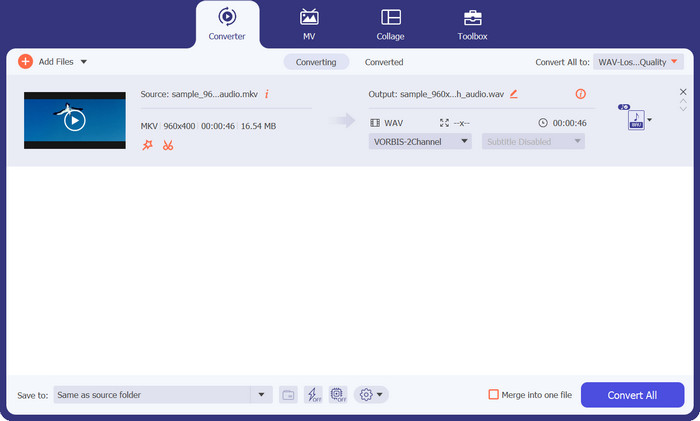
Video Converter Ultimate är det perfekta valet om du vill konvertera flera MKV-filer till MOV-filer på en och samma gång. Med hjälp av den här programvaran, som är en kompetent MKV-omvandlare, kan du enkelt konvertera MKV-videor till MOV-format. Förutom att stödja en mängd olika ljudformat kan detta verktyg också konvertera MKV till många andra videoformat. Även om MKV-filer är den vanligaste typen som konverteras med Video Converter Ultimate är programmet också kompatibelt med AVI, MP4 osv.
Följande instruktioner leder dig genom processen att använda denna MKV till WAV-omvandlare:
Fördelar
- Snabb och effektiv konvertering.
- Den är kompatibel med de vanligaste operativsystemen.
- Omfattande utbud av video- och ljudformat som stöds.
Nackdelar
- Endast grundläggande redigeringsmöjligheter för gratisversionen av appen.
Steg 1. Börja med att klicka på knappen Free Download nedan för att hämta installationsfilen för appen. Installera sedan programmet på din dator.
Gratis nedladdningFör Windows 7 eller senareSäker nedladdning
Gratis nedladdningFör MacOS 10.7 eller senareSäker nedladdning
Steg 2. Efter att du startat verktyget, lägg till dina mål-filer genom att klicka på knappen med Plus-symbolen i huvudfönstret. Du kan också klicka på knappen Add Files uppe i vänstra hörnet för att ladda upp filer på ett alternativt sätt.
Steg 3. Vik sedan ut alternativet Profile. Här ser du flikarna för konvertering. Välj nu fliken Audio och välj WAV som utdataformat. Om du vill kan du justera parametrarna efter dina behov.
Steg 4. Klicka slutligen på knappen Convert All nere i högra hörnet för att starta konverteringsprocessen. Vänta tills processen är klar.
2. Gratis Video Converter Online
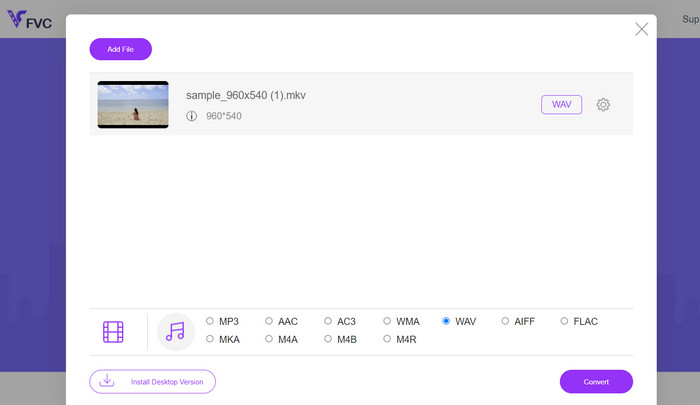
Det är ett webbaserat program som låter användare konvertera MKV-filer till WAV helt gratis. Själva videokonverteringen går blixtsnabbt med Free Video Converter Online. Ännu bättre är att det inte finns någon gräns för hur många videor du kan konvertera. Det här programmet stöder konvertering av MKV till en rad format, inklusive MP3, WMA, WAV och fler. Det fungerar i vilken webbläsare som helst utan krav på särskild hårdvara, till skillnad från programvara för MKV till WAV-konvertering.
Fördelar
- En gratis MKV till WAV online-omvandlare.
- Ingen mjukvaruinstallation behövs.
- Den är kompatibel med flera operativsystem.
Nackdelar
- Beroende på att ha konstant tillgång till internet.
Du kan se följande guide för att använda detta MKV till WAV gratis omvandlarprogram:
Steg 1. Öppna din favoritwebbläsare och besök den officiella webbplatsen för Free Video Converter Online genom att klicka på programmets länk. Då hamnar du på huvudsidan.
Steg 2. Klicka nu på knappen Add Files to Convert i huvudgränssnittet och välj den eller de MKV-filer du vill konvertera till WAV. Därefter visar programmet den eller de uppladdade filerna.
Steg 3. Välj nu ett utdataformat. I avsnittet för Audio-format markerar du alternativet WAV och redigerar parametrarna. Klicka till sist på knappen Convert för att börja konvertera MKV till WAV.
3. Freemake Audio Converter
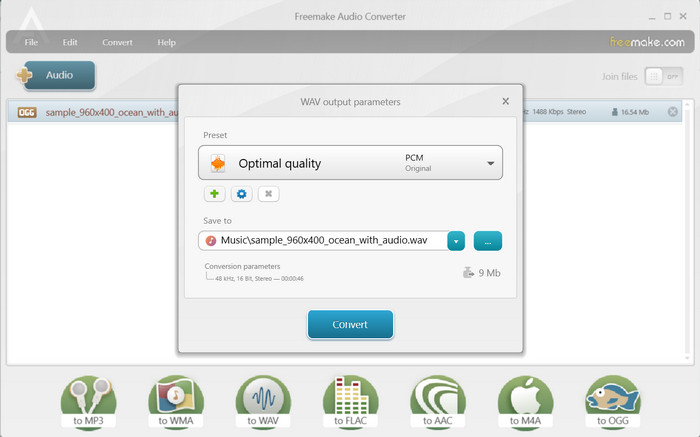
Freemake Audio Converter ger en effektiv lösning för att omvandla dina MKV-filer till högkvalitativt WAV-ljud. Du kan enkelt lägga till dina MKV-filer i programmet genom att antingen välja enskilda filer eller hela mappar. När filerna har laddats kan du välja WAV som utdataformat från de tillgängliga alternativen. Dessutom ger den flera andra utdataformatsval, vilket säkerställer kompatibilitet med ett brett utbud av enheter och mediaspelare.
Fördelar
- Extrahera ljudspår från videofiler.
- Konvertera flera filer samtidigt.
- Anpassa utdatainställningar.
Nackdelar
- Endast tillgängligt för Windows OS.
- Begränsade avancerade funktioner.
Steg 1. För att konvertera MKV till WAV installerar du programmet och startar det på din dator.
Steg 2. Klicka sedan på knappen Audio för att ladda upp en fil, och se till att du laddar en MKV-fil som innehåller en ljudfil.
Steg 3. Välj nu alternativet till WAV längst ned i gränssnittet för att ställa in det som utdataformat. Klicka slutligen på knappen Convert i den ruta som dyker upp.
Vidare läsning:
Bästa omvandlaren för att konvertera ASF till GIF med roliga memes
Enklare sätt att snabba upp MP4-videor [offline och online]
Del 3. Vanliga frågor om MKV till WAV-omvandlare
Finns det några begränsningar vid konvertering av MKV till WAV?
Några begränsningar att tänka på när du konverterar MKV till WAV inkluderar filstorleken, konverteringstiden och kapaciteten hos konverteringsprogramvaran eller -verktyget. Stora MKV-filer kan ta längre tid att konvertera, och vissa konverteringsverktyg kan ha begränsningar för filstorlek eller varaktighet.
Finns det några alternativ till WAV för MKV-ljudextraktion?
Ja, det finns alternativa ljudformat att överväga för MKV-ljudextraktion, beroende på dina specifika behov. Några vanliga alternativ inkluderar MP3, FLAC, AAC och OGG.
Kan jag konvertera MKV till WAV utan att förlora ljudkvalitet?
Ljudkvaliteten för den konverterade WAV-filen beror på olika faktorer, inklusive den ursprungliga ljudkällan och inställningarna som används under konverteringsprocessen. Konvertering från ett förlustformat ljudformat (som ljudet i en MKV-fil) till ett förlustfritt format (som WAV) bevarar i allmänhet den ursprungliga ljudkvaliteten.
Slutsats
Genom att förstå processen och använda tillförlitliga konverteringsverktyg kan du effektivt konvertera MKV till WAV och få större flexibilitet när du arbetar med ljudinnehållet i dina MKV-filer.
-
 Utmärkt val för att konvertera MKV till ett AVI -format
 Bemästra hur man konverterar MKV-videor med enkla steg som tillhandahålls exklusivt för dig. Vill du veta hur? Klicka sedan på den här länken för att lära dig mer.
-
 Bästa sätten att redigera MKV-metadata som en professionell [Lätt]
 Har du ingen aning om hur man redigerar MKV-metadata? Vissa användare tycker att det är svårt att redigera taggarna på MKV, om du är en av dem så läs den här artikeln.
-
 Hur man konverterar FLAC och WAV enkelt (gratis och betald)
 Vill du ändra FLAC till WAV men behöver hjälp med att veta var du ska börja? Den här guideposten kommer att lära dig hur du gör det snabbt och enkelt.
