


 Video Converter Ultimate
 Skärminspelare
 Video reparation
 Säker nedladdning
DVR till MP4: Gör ditt medieliv till en vind med enkel konvertering
Step into a world of convenience and freedom using the best DVR to MP4 conversion solutions. Bid farewell to complexities and say hello to the seamless transformation of your DVR recordings into the versatile MP4 format. Embrace hassle-free accessibility and open up a world of possibilities for your DVR content. Then, start converting to MP4 today and unlock the true potential of your media collection with a smile. Whether you want to share cherished moments or enjoy your favorite shows on the go, our user-friendly approach makes it a breeze.

Del 1. Bästa sättet att konvertera DVR till MP4
FVC Video Converter Ultimate is a versatile and user-friendly video conversion software that empowers you to transform your videos effortlessly. It offers fast conversion speeds, batch conversion capability, customizable output settings, and even the ability to extract audio from videos. Get to know more about this tool by taking a look at its key features.
Nyckelfunktioner
◆ Redigeringsverktyg: Programvaran erbjuder grundläggande redigeringsverktyg som gör att du kan trimma, beskära, lägga till vattenstämplar eller använda videoeffekter för att förbättra dina videor före konvertering.
◆ Högkvalitativ utdata: Bevara den orörda kvaliteten på dina videor eller välj en mängd olika kodningsalternativ för att garantera optimal utskriftskvalitet för ditt konverterade innehåll.
◆ Stöd för flera språk: Programvaran stöder olika språk, vilket gör den tillgänglig för användare över hela världen.
Step 1. Get the appropriate installer
Först och främst måste du skaffa rätt installatör. Nedan finns installationsprogram för Windows- och Mac-datorer. När du skaffat verktyget installerar du det på din dator. Starta sedan den på din dator.
Gratis nedladdningFör Windows 7 eller senareSäker nedladdning
Gratis nedladdningFör MacOS 10.7 eller senareSäker nedladdning
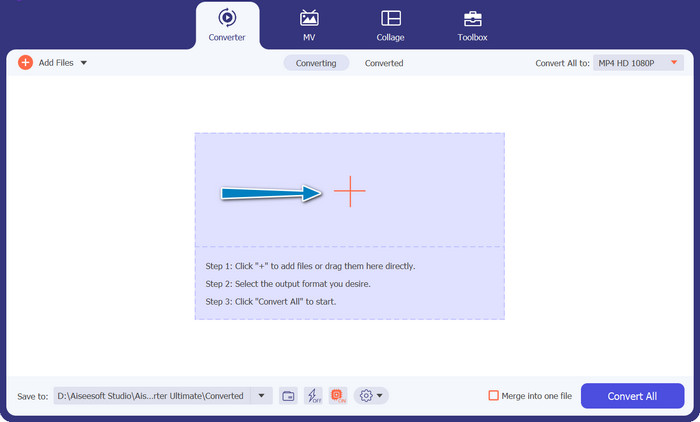
Step 2. Upload a DVR file
Now, tick the Plus sign button provided in the main interface and select your target DVR file from your computer folder. Then, you should see its thumbnail.
Step 3. Select an output format
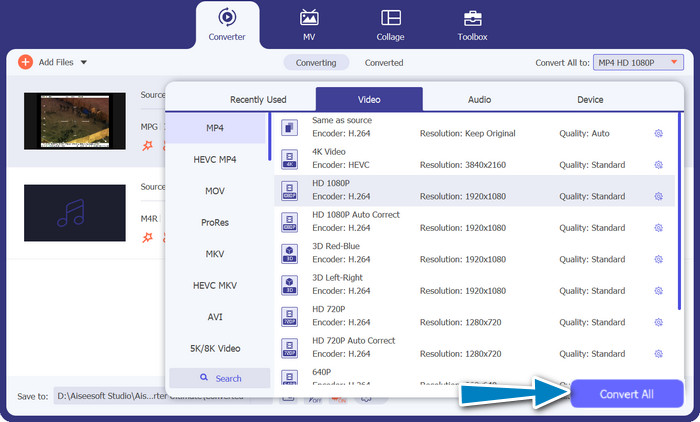
Next, unfold the drop-down list menu to see all the available formats. Go to the Video tab and look for the MP4 format. Afterward, you can select your preferred quality for your video conversion.
Step 4. Start the conversion process
After uploading a file and selecting an output format, tick the Convert All button at the bottom of the program's interface to begin the conversion process.
Del 2. Bästa sättet att konvertera DVR till MP4 online gratis
Have you heard of Free MP4 Video Converter Online? It's a great tool that can help you convert your videos into the popular MP4 format. This way, you can be sure that your videos will work on any device or platform. And the best part? It's super easy to use! Follow the steps on how to use this online DVR to MP4 converter and see more of its features.
Nyckelfunktioner
◆ Kostnadsfritt: FVC Free MP4 Converter Online är tillgänglig utan kostnad, vilket gör det till ett ekonomiskt val för att konvertera dina videor till MP4-format.
◆ Obegränsad användning: Det finns inga begränsningar för antalet videor du kan konvertera med FVC Free MP4 Converter Online, så att du kan konvertera så många videor du behöver utan några begränsningar.
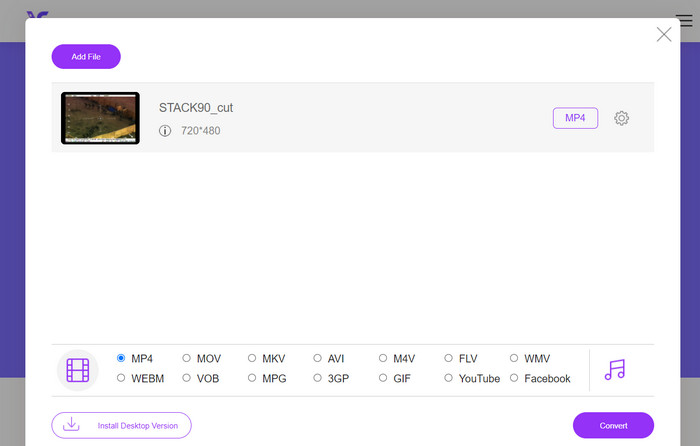
Step 1. First and foremost, you need to visit the program's website by ticking the link included in the description of the tool above. Then, tick on the Add Files to Convert button from the main page to upload DVR files.
Step 2. After that, choose the file you want to convert from your computer. After the upload process, the tool will automatically set the output format as MP4.
Step 3. At last, hit the Convert button to initialize the conversion process. Then, wait for the process to complete.
Del 3. Konvertera DVR till MP4 på ett annat sätt
FFmpeg är ett kraftfullt kommandoradsverktyg som kan konvertera DVR till MP4 och utföra andra multimediauppgifter. Det behöver viss teknisk förståelse för att kunna användas, men det kan anpassas på många sätt och används ofta för att bearbeta multimedia.
Nyckelfunktioner
◆ Kommandoradsgränssnitt: FFmpeg fungerar genom kommandoradskommandon, vilket ger avancerade användare flexibiliteten att utföra komplexa konverteringsoperationer.
◆ Avancerad bearbetning: Den erbjuder avancerade funktioner som videofiltrering, skalning, beskärning och ljudmanipulering, vilket gör det möjligt för användare att finjustera sina konverteringar.
Step 1. Download and install FFmpeg from the official website (https://ffmpeg.org/) according to your operating system.
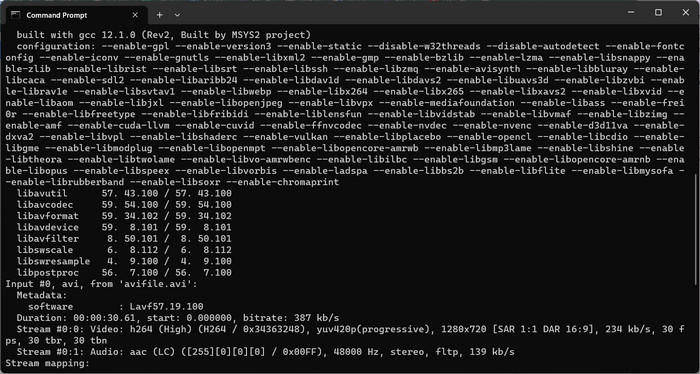
Step 2. Then, launch a command prompt or terminal window on your computer.
Step 3. After that, navigate to the directory where FFmpeg is installed or provide the full path to the FFmpeg executable in the command.
Step 4. Use the FFmpeg command-line syntax to specify the input DVR file and desired output file format (MP4). For example: ffmpeg -i input.dvr output.mp4.
Step 5. Lastly, hit Enter to execute the command. FFmpeg will start the conversion process and display the progress in the command prompt.
Vidare läsning:
An Ultimate and Free Ways To Convert DV to WMV [Online & Offline]
Hassle-Free Techniques on How to Convert MTV to MP4
Del 4. Jämförelse av de 3 sätten
För att hjälpa dig att välja mellan FVC Video Converter Ultimate, Free MP4 Video Converter Online och FFmpeg som din DVR till MP4-omvandlare, har vi sammanställt följande tabell.
| Video Converter Ultimate | Gratis MP4 Video Converter online | FFmpeg | |
| Formatstöd | Brett utbud av format | Begränsade format | Brett utbud av format |
| Anpassning | Avancerade utdatainställningar | Grundläggande utgångsinställningar | Omfattande anpassning |
| Användargränssnitt | Desktopprogramvara | Webbaserat gränssnitt | Kommandoradsverktyg |
| Prestanda | Effektivt och snabbt | Beroende på internethastighet | Beroende på systemspecifikationer |
| Integritet | Lokal filkonvertering | Online filkonvertering | Lokal filkonvertering |
Del 5. Vanliga frågor om DVR till MP4-konvertering
Hur öppnar jag en DVR-fil?
Windows Media Center kan fånga och spela upp DVR-filer sparade i DVR-MS-formatet på din persondator.
Kan VLC spela upp DVR-filer?
VLC kanske kan spela upp DVR-filer, men bara om den har lämpliga ljud- och videoavkodare inbyggda. DVR-filer kan spela upp ljud och video i MPEG-2- respektive AAC-format. VLC kräver MPEG-2-videoavkodaren och AAC-ljudavkodaren för att spela upp DVR-filer effektivt.
Kan jag konvertera DVR-filer till andra videoformat än MP4?
Ja, beroende på vilken programvara du använder kan du ofta konvertera DVR-filer till olika andra videoformat, inklusive AVI, MKV, MOV eller WMV. Denna flexibilitet gör att du kan välja det format som bäst passar dina uppspelnings- eller delningsbehov.
Finns det risk för dataförlust eller kvalitetsförsämring under konverteringsprocessen?
När du använder ansedd och pålitlig programvara är risken för dataförlust eller kvalitetsförsämring minimal. Det rekommenderas dock alltid att göra en säkerhetskopia av dina ursprungliga DVR-filer innan du utför några konverteringar, bara för säkerhets skull.
Kan FFmpeg konvertera DVR-filer till andra format än MP4?
Ja, FFmpeg är ett kraftfullt kommandoradsverktyg som stöder olika video- och ljudformat. Med lämpliga kommandon kan du konvertera DVR-filer till format som AVI, MKV eller MOV, bland annat.
Slutsats
By choosing the right tool for your needs, you can efficiently convert DVR files to MP4 while maintaining video quality. Whether you prefer desktop software or an online converter, these options provide the flexibility to convert DVR files and enhance your multimedia experience.
-
 Hur komprimerar du DV-fil utan att förlora kvalitet på Windows / Mac
 När du vill dela DV-videor som tagits med din Sony-kamera kan du lära dig mer om hur du komprimerar DV till e-post eller SNS utan att förlora kvaliteten gratis.
-
 De 2 bästa sätten att konvertera DV-filer till MOV gratis på skrivbordet och online
 Har du problem med att konvertera dina DV-filer till MOV på din Mac? Om det är ditt problem kan vi lösa det tillsammans om vi läser den här artikeln.
-
 Hur man konverterar DV till MP4-filformat [Problem löst]
 Intresserad av att konvertera DV till MP4 med offline- och onlinekonverterare? Då är du på rätt väg. Vi ger dig de bästa lösningarna du vill ha.
