


 Video Converter Ultimate
 Skärminspelare
 Video reparation
 Säker nedladdning
3 sätt att spela DVD-skivor på Windows 10/8/7 PC
Varför spelas inte min DVD upp i Windows Media Player?
Om du använder Windows 7 eller Windows 8 kan du bekvämt titta på DVD‑filmer med standardspelaren Windows Media Player. Microsoft har dock kraftigt begränsat WMP i Windows 10. Därför kan du inte längre öppna DVD‑skivor direkt i Windows Media Player.

Det här inlägget visar dig hur du spelar DVD i Windows Media Player. Oavsett om du använder en dator med Windows 10, Windows 8, Windows 7 eller en tidigare version får du här 3 DVD‑spelare för att enkelt kunna titta på DVD‑filmer.
Del 1. Hur man spelar DVD på Windows Media Player
Windows Media Player är förinstallerad och tillgänglig på Windows‑datorer. Den används främst för att spela upp video, ljud och visa bilder i Windows. Den stöder även uppspelning av ljud‑CD, data‑CD, VCD och DVD i Windows 7 och Windows 8. I den här delen beskrivs hur du spelar DVD i Windows Media Player.
Steg 1. Öppna först Windows Media Player på din PC. Du kan trycka på Windows‑tangenten för att få fram sökrutan och skriva WMP eller Windows Media Player för att hitta programmet. Windows Media Player visas som första alternativ. Här kan du trycka på Enter eller dubbelklicka på alternativet för att öppna det.
Steg 2. Sätt in DVD‑skivan i datorns skivenhet. Eftersom de flesta moderna bärbara datorer saknar DVD‑enhet kan du behöva ansluta en extern enhet.
Steg 3. DVD‑filmen startar automatiskt. Om inte kan du gå till Windows Media Player och välja DVD‑skivan under Player Library. Här kan du välja en DVD‑titel eller ett kapitelnamn. Spelaren växlar då automatiskt till läget Now Playing.
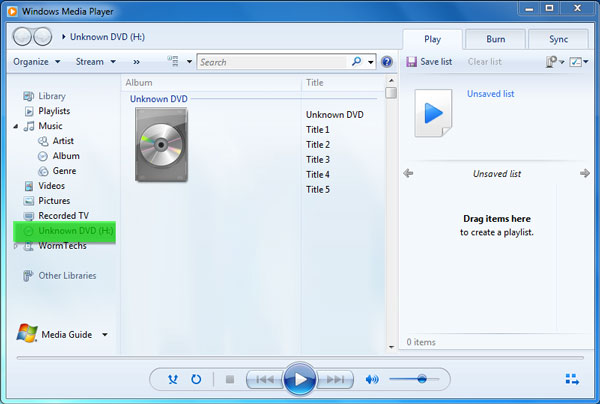
Du behöver en DVD‑enhet och en kompatibel DVD‑avkodare för att spela DVD i Windows Media Player. Om du får ett felmeddelande kan du gå till Web Help för att ta reda på hur du skaffar en avkodare. Observera att Windows Media Player bara kan spela DVD i Windows 7‑ och Windows 8‑datorer.
Del 2. Bättre sätt att spela DVD-skivor i Windows 10/8/7 PC
Som nämnts ovan kan du inte längre spela DVD i Windows 10 med Windows Media Player. I stället måste du köpa appen Windows DVD Player, som kostar 15 USD, för DVD‑uppspelning. Du vill förstås hellre ha ett kostnadsfritt sätt att spela DVD på din dator.
FVC Free DVD Player är ett helt kostnadsfritt DVD‑uppspelningsverktyg som låter dig titta på DVD‑skivor, DVD‑mappar och ISO‑avbildningar på Windows 10/8/7‑PC och Mac. Det är egentligen en webbaserad DVD‑spelare. Du kan använda den direkt i valfri webbläsare som IE, Chrome, Firefox och Safari. Med stöd för avancerad videoenkodning kan den spela DVD‑filmer jämnt och med hög kvalitet. Dessutom stöder den DTS‑HD och Dolby TrueHD för förlustfri ljudeffekt.

Steg 1. Öppna din webbläsare och gå till webbplatsen för denna kostnadsfria DVD‑spelare. Klicka på knappen ”Play Now” för att snabbt installera en liten startfil för DVD‑uppspelningen. Därefter visas huvudfönstret för DVD‑uppspelning på skärmen.
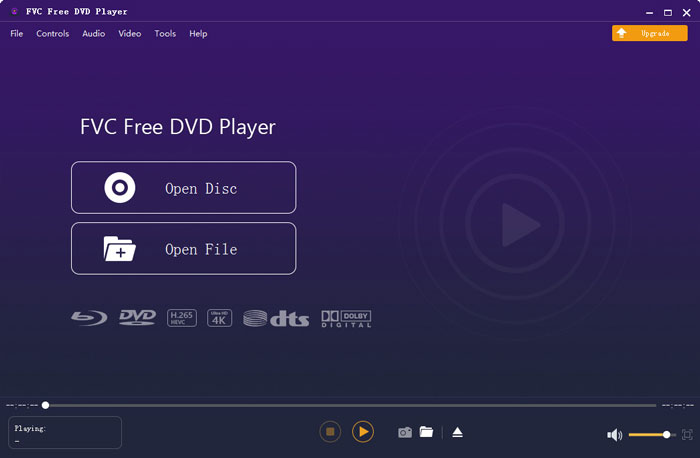
Steg 2. Sätt in din DVD‑skiva i datorns skivenhet. Klicka sedan på knappen Open Disc för att hitta och spela din DVD‑film. Du har full kontroll över uppspelningen. Du kan till exempel spela upp, pausa, spola bakåt, spola framåt, justera volym och uppspelningsfönster som du vill.
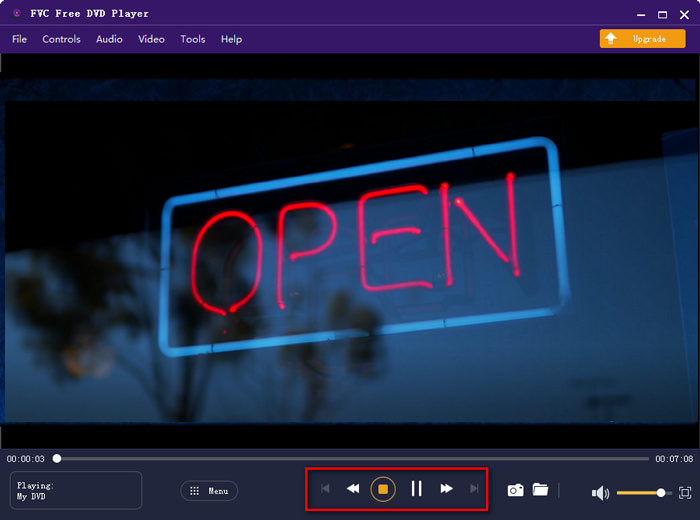
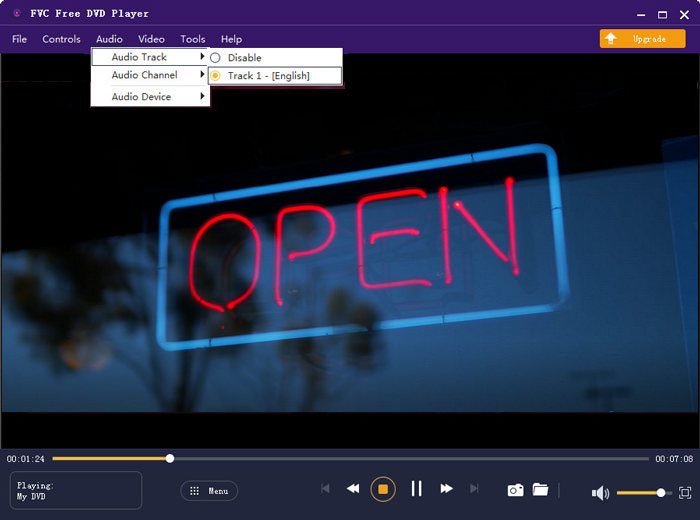
Steg 3. Förutom grundläggande uppspelning gör denna kostnadsfria DVD‑spelare det möjligt att lägga till och ändra undertexter och ljudspår. Dessutom kan du ta skärmdumpar när som helst under DVD‑uppspelningen.
Del 3. Hur man tittar på DVD-skivor på Windows 10/8/7 PC med VLC Media Player
VLC media player är en av de mest populära videospelarna och den stöder även DVD‑uppspelning. Som en plattformsoberoende mediaspelare låter VLC dig spela DVD på Windows 10/8/7, macOS och Linux‑datorer. Den kan spela DVD, VCD och ljud‑CD. När det gäller DVD‑uppspelning kan VLC enkelt komma åt DVD‑meny, kapitel och annat innehåll. Förutom DVD stöder VLC även Blu‑ray‑skivor.
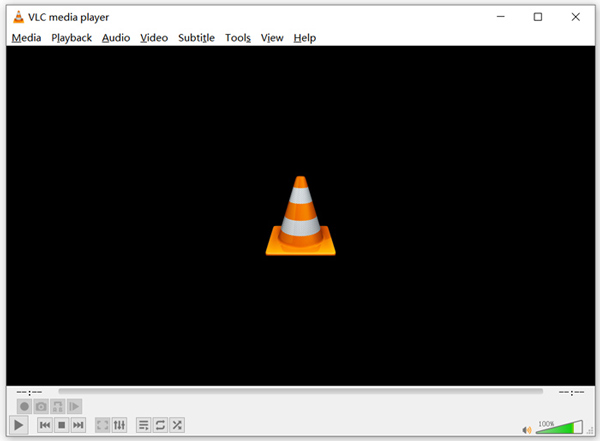
Steg 1. Ladda först ner rätt version av VLC gratis till din dator. Sätt in din DVD‑skiva i skivenheten på din bärbara dator.
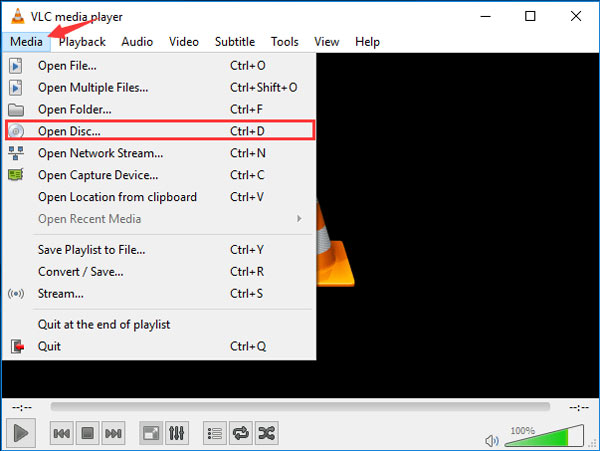
Steg 2. Öppna VLC media player och klicka sedan på Media i menyraden högst upp. Välj alternativet Open Disc i rullgardinsmenyn.
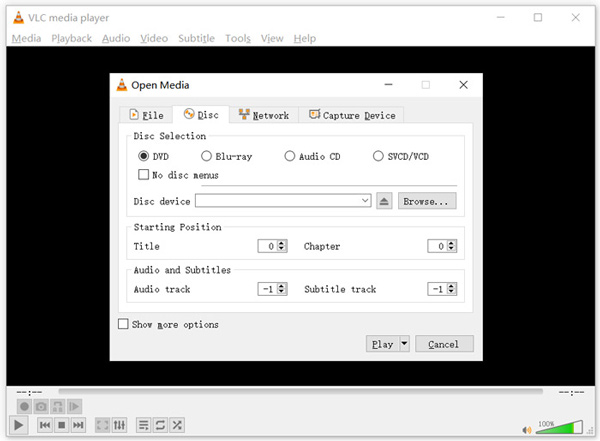
Steg 3. I det nya fönstret Open Media klickar du på fliken Disc, markerar DVD och klickar sedan på knappen Browse för att välja och ladda den DVD‑film du vill spela.
Efter dessa åtgärder kan du enkelt titta på DVD-filmen på Windows 10/8/7 PC eller Mac med VLC mediaspelare.
Del 4. Vanliga frågor om hur man spelar DVD på Windows Media Player
Fråga 1. Hur rippar du en CD i Windows Media Player?
För att rippa en CD i Windows Media Player bör du sätta in CD: n i datorns skivenhet. Öppna Windows Media Player och välj CD under mapplistan. Nu kan du välja att rippa CD: n med standardinställningarna. Här kan du också anpassa Rip-inställningarna baserat på ditt behov.
Fråga 2. Varför kan jag inte spela DVD-skivor i Windows 10?
Microsoft har tagit bort det inbyggda stödet för DVD-uppspelning i Windows 10. Så du kan inte direkt öppna DVD-filmer på en Windows 10-dator.
Fråga 3. Hur rippar jag en DVD till MP4?
För att rippa DVD till digital video som MP4, MOV eller AVI kan du ladda ner en DVD‑omvandlare för att rippa DVD utan kvalitetsförlust.
Slutsats
Varför är DVD inte spelbar i Windows Media Player? Om du använder en PC med Windows 10 kan du använda den rekommenderade Free DVD Player eller VLC för att titta på DVD‑filmer. För användare av Windows 8 eller Windows 7 kan du spela DVD direkt i Windows Media Player. Om du fortfarande har frågor om DVD‑uppspelning i Windows 10/8/7 kan du lämna ett meddelande till oss.
-
 10 bästa gratis MP3-musikspelare 2025
 Vad är den bästa MP3-musikspelaren? Hur lägger jag musik på en MP3-spelare? Hur laddar jag ned MP3-spelaren? Det här inlägget ger dig en detaljerad genomgång av de 10 bästa gratis MP3-spelarna för Windows PC och Mac.
-
 7 bästa Xvid-spelare för Windows och Mac
 Skaffa FVC Free Video Player - den bästa Xvid-spelaren för alla plattformar. Här nämnde vi också de andra 6 Xvid-spelarna för Windows och Mac.
-
 5 bästa VOB-spelare för Windows 10/8/7 PC och Mac 2025
 Hur spelar jag VOB-filer på Windows 10? Vad är den bästa VOB-spelaren? Detta inlägg gör en recension av de 5 bästa VOB-spelarna för Windows 10-dator och Mac.
