


 Video Converter Ultimate
 Skärminspelare
 Video reparation
 Säker nedladdning
Konvertera MP4 till WebP Online med de bästa gratisverktygen
En video med bara en andra längd består av flera separata bilder. Dessa bilder eller ramar visas vanligtvis när du arbetar med att redigera videon. Och om du är en bloggare som specialiserat sig på mat, är ett bra sätt att göra ditt videoinnehåll intressant genom att skapa en miniatyrbild för det. Inte bara det, men du kommer att vilja välja den perfekta ramen att använda som en miniatyrbild för din video. För att lösa detta kan du välja den bästa bilden från ditt videoinnehåll för att vara din perfekta förhandsvisningsbild via video-till-foto-konvertering. Och om du ska fråga oss så skulle WebP vara ett bra bildformat att prova.
Lyckligtvis visar den här artikeln dig tre olika sätt att konvertera MP4 till WebP online. Ta en titt på innehållet nedan och ta reda på vilken metod som fungerar bäst för dig för att få fram bilder från dina videor.

Del 1. Lär dig mer om WebP
Vad är WebP?
WebP är ett slags bildformat som är designat av Google. Den är gjord för att göra webbbilder mindre och laddas snabbare. Dessutom använder den här typen av format avancerade komprimeringsmetoder som hjälper till att minska filstorleken på bilder utan att ändra för mycket kvalitet.
Detta är fördelaktigt för webbplatser att laddas snabbare, och detta är också viktigt för användare på långsamma internetanslutningar eller mobila enheter. Eftersom WebP-filer stöder både förlustfri och förlustfri komprimering, ger det dig också flexibiliteten att välja rätt balans mellan filstorlek och kvalitet. Visste du att du kan konvertera din MP4 till WebP online? Detta är endast tillrådligt om du vill förbättra din webbupplevelse genom att göra bilder mer effektiva och kunna laddas samtidigt som du bibehåller anständig kvalitet från videofilerna du har för närvarande. Med det sagt, låt oss gå vidare till de anständiga video-till-bild-omvandlarna, vars konverteringsprocess presenteras nedan.
Del 2. 3 bästa sätten att konvertera MP4 till WebP Online
1. MP4.to
Om du vill låsa upp potentialen hos din MP4-video att bli en webbbild, då är den första omvandlaren du måste prova denna MP4.to. Det är ett onlinefilkonverteringsverktyg som är speciellt utformat för att konvertera olika typer av multimediafiler till MP4-format. Med detta anmärkningsvärda verktyg kan du konvertera MP4 till WebP online och till andra olika format som GIF, MOV, WAV, AVI, MP3, MPEG och mer. Å andra sidan kan du ladda upp olika typer av filer, såsom videor, ljudklipp och till och med bilder, och konvertera dem till MP4-format. Detta kan vara användbart för att förbereda videor för onlinestreaming och för att säkerställa kompatibilitet mellan olika enheter och plattformar som stöder MP4-formatet. Under tiden nedan är de enkla stegen som du kan följa när du använder MP4.to för att konvertera dina videor till WebP.
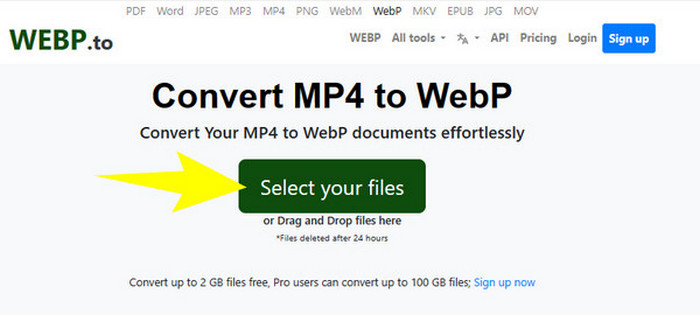
Steg 1. På verktygets webbplats klickar du på knappen Select your files för att ladda upp dina MP4-filer.
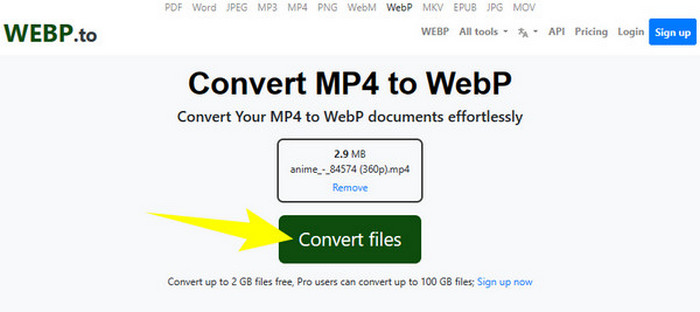
Steg 2. När MP4-filen har laddats upp kommer verktyget att visa knappen Convert Files, som du måste klicka på för att genomföra konverteringen.
Steg 3. Vänta medan processen pågår. Ladda sedan ned den konverterade filen och exportera den till din dator.
2. MConverter
Nästa kostnadsfria MP4 till WebP‑ eller WebP till MP4‑omvandlare online som du bör prova är MConvert. Denna webbaserade omvandlare ger en smidig lösning för dig som behöver omvandla filer till olika format, eftersom den även stöder en mängd olika format för video, ljud och bild. Dessutom erbjuder den här online‑omvandlaren ett användarvänligt gränssnitt och kräver ofta ingen programvaruinstallation, vilket gör den tillgänglig för alla med internetanslutning. Men, precis som många andra onlinetjänster, innehåller MConverter också annonser i sitt gränssnitt. Om det inte är något problem för dig kan du gå vidare till de enkla steg vi har gjort nedan.
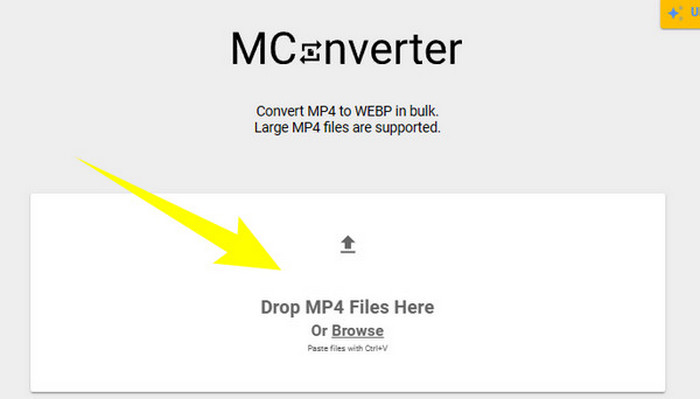
Steg 1. När du kommer till omvandlarens webbplats kan du släppa de MP4-filer du behöver konvertera där.
Steg 2. Efter att du har släppt filen klickar du på WebP bland alternativen i den gula sektionen som ditt utdataformat.
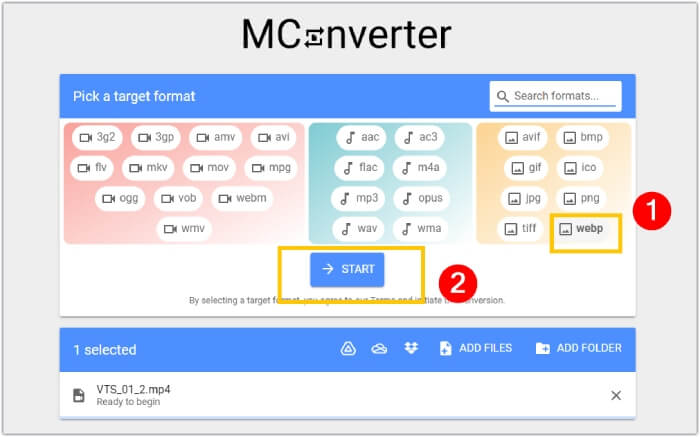
Steg 3. Klicka sedan på knappen START för att starta konverteringsprocessen.
3. Ezgif.com
Med Ezgifs verktyg Video to WebP kan du enkelt konvertera dina MP4-filer kostnadsfritt till WebP-format. Förutom detta kan du med det här onlineverktyget utföra uppgifter som att ändra storlek, optimera, beskära och lägga till effekter till dina multimediafiler. Vidare är denna MP4 till WebP‑omvandlare populär för sin enkelhet och användarvänlighet. Den är ett praktiskt alternativ för personer som vill redigera eller konvertera multimediafiler utan att behöva avancerade program eller teknisk expertis. Därför kan den också fungera som din medieomvandlare, redigerare och GIF‑skapare – allt i ett! Samtidigt, med fokus på vårt syfte, följer här stegen för att förvandla en videofil till en bild med Ezgif.
Steg 1. På verktygets huvudsida väljer du fliken Video to WebP bland de verktyg som erbjuds. Ladda upp MP4-filen med knappen Upload File.
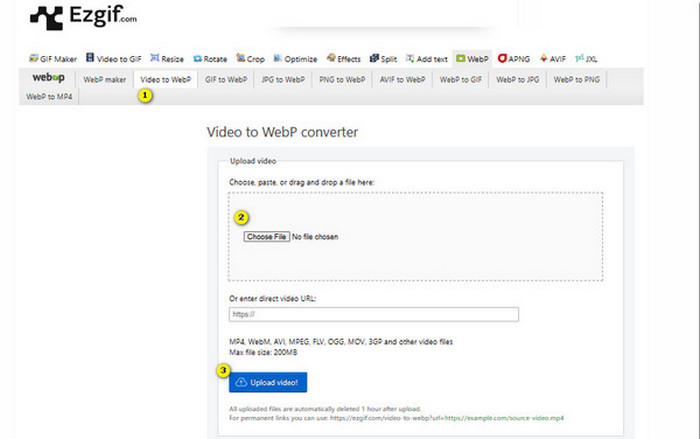
Steg 2. Klicka därefter på knappen Upload Video för att fortsätta.
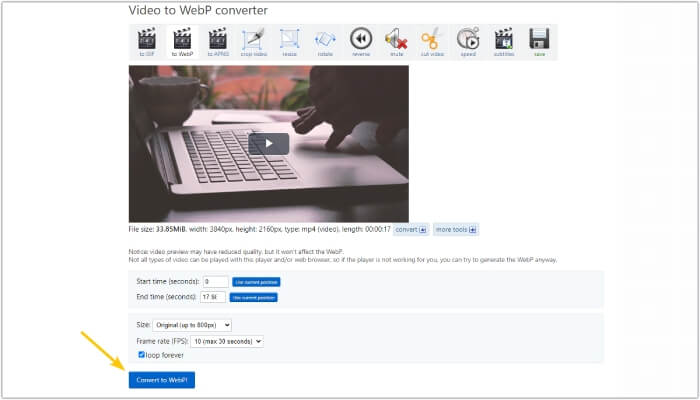
Steg 3. När filen har laddats in klickar du på knappen Convert to WebP och väntar tills processen är klar.
Del 3. Bonustips: Bästa sättet att konvertera MP4 till olika video- och ljudformat
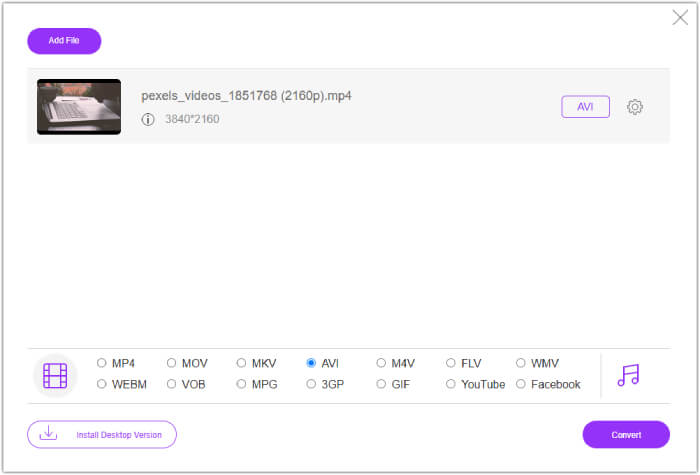
Nu när du har stiftat bekantskap med de tre MP4 till WebP‑omvandlarna ovan, vill vi gärna ge dig en bonusdel där du hittar det bästa sättet att konvertera din MP4 till video‑ eller ljudformat. FVC Free Video Converter Online är också ett webbaserat verktyg som ger ett utmärkt sätt att konvertera många filer på mycket kort tid. Ja, till skillnad från onlinesomvandlarna ovan har den här videoomvandlaren ultrasnabb konvertering, vilket ger dig en mycket snabb process. Dessutom behöver du inte ladda ned dina konverterade filer manuellt, eftersom den automatiskt exporterar filerna direkt efter konverteringen. Och det som gör den ännu mer attraktiv är att den är fri från annonser och vattenstämplar, vilket gör användningen smidig och bekväm.
Del 4. Vanliga frågor om MP4 och WebP Conversion
Kan jag verkligen konvertera MP4 till en bild som WebP?
Konverteringen av video till en bild kan inte göras direkt. Istället görs det via ramutdrag.
Vilken nytta får jag av att konvertera en video till WebP?
Jämfört med traditionella format som JPEG och PNG ger det flera fördelar att konvertera videor till WebP‑format. Bland annat blir filstorlekarna mindre, vilket kan bidra till att förbättra webbplatsers laddningstider.
Kan jag använda all WebP i alla webbläsare?
WebP-format stöds inte fullt ut i vissa gamla webbläsare. De flesta moderna webbläsare stöder dock WebP-bilder, inklusive Google Chrome, Opera, Firefox och Edge.
Slutsats
Den här artikeln är en introduktion till tre effektiva MP4 till WebP‑omvandlare som du kan använda online. Dessutom inkluderade vi också en video‑till‑video/ljud‑omvandlare online som garanterat förbättrar din mediekonverteringsprocess. Dela alltså detta med dina vänner så att ni kan få samma konvertering i professionell klass tillsammans!
-
 Lär dig de enklaste metoderna för att snabbt konvertera WebP till JPG
 Lär dig de enklaste metoderna för att snabbt konvertera WebP till JPG
-
 Perfekta metoder för att enkelt konvertera WebP till PNG
 Var kunnig om de anmärkningsvärda metoderna för att konvertera WebP till PNG. Den här guideposten ger dig de mest användbara bildkonverterare du kan prova.
-
 Recension av de bästa MP4-omvandlarna online och offline
 Maximera räckvidden och effekten av ditt videoinnehåll med den bästa MP4
